PDF.js gives you a browser PDF engine, not a drop-in component
PDF.js has shipped in Firefox since v19, and the same JavaScript engine parses and renders PDFs for other web applications. Mozilla describes it as a general-purpose, web-standards platform. The repository contains the lower-level display library and a generic viewer with familiar document controls. Teams reach for it when a native browser pane is too opaque to adapt.
The distinction between engine and component matters. PDF.js loads documents, renders pages, exposes text, and supports a full viewer, but the README sends application developers to the prebuilt pdfjs-dist package. React-PDF wraps the same engine for React. If your requirement is simply "show this PDF," cloning 2,543 files is the expensive route. Choose the source when viewer behavior is part of your product.
The generic viewer handles more than canvas painting
Release v6.2.108 changed annotation editing, font conversion, digital signature verification, encrypted files, AcroForm data, and structure trees. A PDF viewer also has to deal with text selection, links, images, fonts, document outlines, search, and worker communication. That list explains both the project's value and its maintenance burden.
PDF.js gives developers more control than a native embed. The API documentation and examples cover loading and rendering through JavaScript, while the supplied viewer is a reference implementation. The 2 generated files, pdf.js and pdf.worker.js, are both required; the main script loads the worker. The README calls them large and recommends minification, so teams should measure their delivery cost.
What happened when we ran it
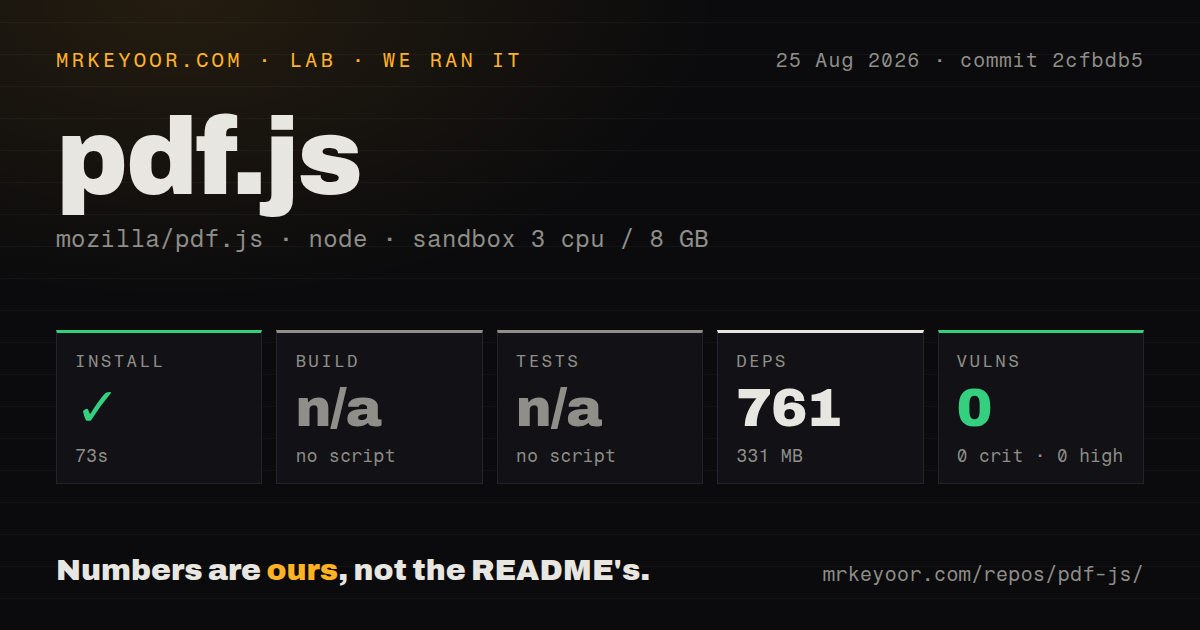
Our run at commit 2cfbdb5 installed 761 npm packages in 73 seconds. The dependency tree occupied 331 MB, while the checkout measured 157.1 MB across 2,543 files and roughly 264,715 lines of source. Installation succeeded in an unprivileged Debian container with 3 CPUs, 8 GB of RAM, Node 22, and no secrets. The npm audit found 0 known vulnerabilities at every reported severity.
The package exposed no npm build target and no npm test target, so both stages were skipped. The repository still has a tests directory, 15 CI workflow files, and documented Gulp tasks for browser, Node, integration, and reference tests. A generic npm-script harness cannot exercise them without project-specific knowledge. There was no Dockerfile, so contributors inherit the host and browser setup described by the project.
Source development uses Gulp and a current Firefox
Development requires Node 22.13 or newer and opens a Gulp server on port 8888. The instructions assume the latest Firefox, and a server is required because browsers may refuse PDF access through a file:// URL. Node 24 is also supported. Those requirements are more specific than a normal library install.
Production output comes through 2 build versions. npx gulp generic builds the current-browser viewer, while generic-legacy targets older browsers. The modern demo assumes recent JavaScript features. That split leaves compatibility policy with the integrator: decide which build to serve, wire asset paths, include the worker, and test every supported browser.
PDF edge cases make regression testing part of adoption
Version v6.2.108 maps where real PDFs become difficult. It includes fixes for AES-256 passwords with non-ASCII characters, signature fields with widget children, inherited form resources, Unicode attachment names, soft masks, JPX images, and missing font behavior. These are documents that can render, select, save, or verify incorrectly when an implementation misses one corner of the format.
A team shipping PDF.js should keep representative user documents and test interaction as well as pixels. Forms need save checks, selectable text needs copy checks, and encrypted files need non-ASCII password cases. The repository documents 4 test groups: reference, integration, browser, and Node. Our lab did not run them because no npm test target existed, so our result cannot certify rendering fidelity.
Active work and Mozilla support make the upkeep credible
The repository was pushed on 2026-08-25, the date of this review, and issues and pull requests received updates that week. GitHub reported 414 open issues and PRs together, a work queue rather than a defect count. Release v6.2.108 arrived on 2026-07-28 with changes to browser behavior, accessibility, document parsing, tests, and dependencies.
Documentation has 4 useful layers: the README handles setup and builds, the wiki covers integration and browsers, API pages describe the library surface, and examples show direct use. The repository publishes coverage through 3 separate unit, integration, and browser workflows. Newcomers still have to learn the project's task vocabulary instead of relying on familiar npm scripts.
Use the source when the viewer is part of your product
PDF.js fits a team building a document workspace, annotation interface, browser extension, or specialized reader. Apache 2.0 licensing, current maintenance, and Firefox deployment reduce adoption risk. The trade is ownership: budget for a 331 MB installed tree during development, custom Gulp tasks, browser-specific output, worker assets, and document regression fixtures.
For a React page, start with React-PDF and drop lower only when its component model blocks you. For a plain document link, native browser embedding through PDFObject may be enough. Choose pdf-lib when editing or generating files is the requirement. PDF.js earns its weight when you need to control how a PDF is parsed, rendered, searched, selected, or annotated inside the browser.