A short packaging command still needs a native toolchain
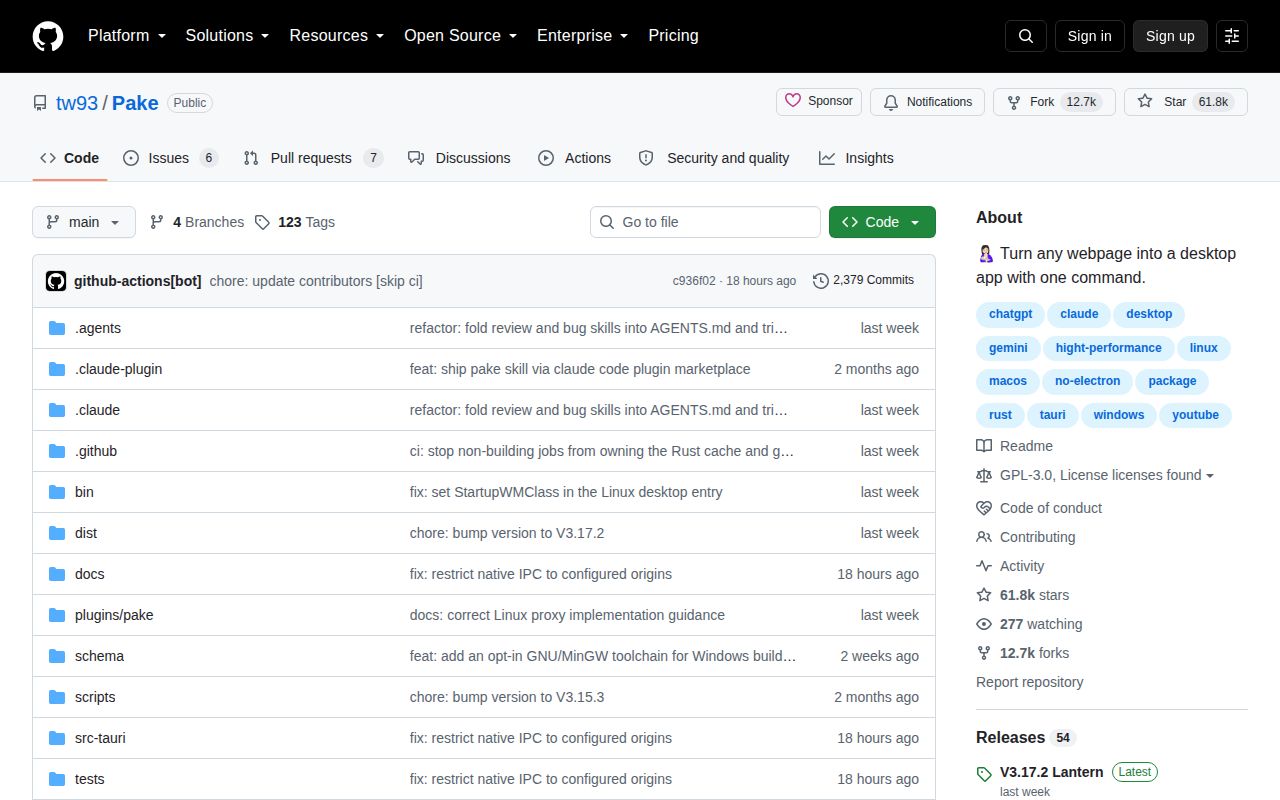
Pake suits a specific job: putting an existing website or static web build in a desktop application. It uses Tauri and system webviews across macOS, Windows, and Linux. You still need to check how the website behaves in each target platform's webview.
The README offers ready-made packages, CLI packaging, online building, and source development. It also describes shortcuts, window customization, CSS and JavaScript injection, machine-readable --json output, and an official agent skill. These are documented capabilities, not features verified by our sandbox run.
The README's claims about installers typically under 10 MB, comparisons with Electron package sizes, speed, and memory use are project claims. Our 155 MB dependency measurement describes the development setup. It measures neither a packaged application's size nor its memory use.
What our recorded run established
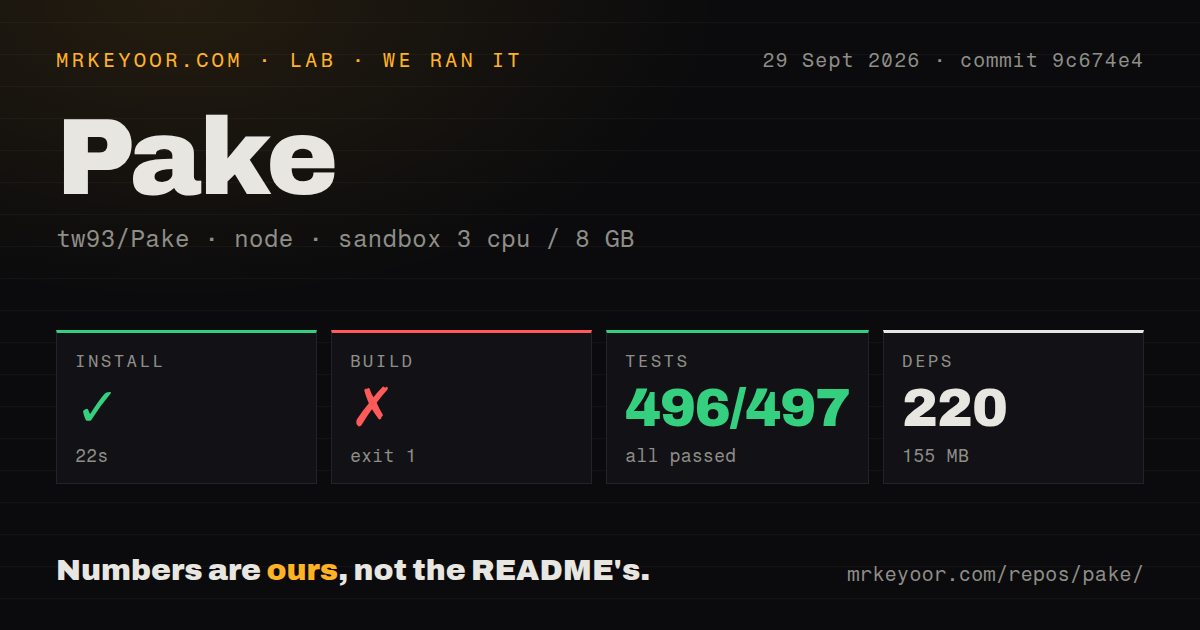
Our stored run began on September 29, 2026, at 04:12:01.444 UTC, using commit 9c674e48bc16d7f0bc872dabfa67d0f17c377c68 (short form 9c674e4). The build log identifies pake-cli 3.17.2. The recorded configuration specifies 3 CPUs, 8 GB of memory, and image lab-node:22; the image name does not verify which Node runtime executed the commands.
The dependency-install step succeeded in 22.487 seconds, rounded to 22 seconds in the stored summary. That summary records 220 dependencies and 155 MB. The raw pnpm tail reports Packages: +219 and completion in 5.4 seconds using pnpm v10.26.2. We have not reconciled the summary's dependency-count definition with pnpm's added-package count. The outer step duration and pnpm's own duration also describe different scopes.
This was dependency installation in a source checkout. It does not prove that the published CLI was globally installed, that a desktop installer was created, or that an installed application launched.
The source-build step ran tauri build and exited 1 after 11.441 seconds, rounded to 11 seconds. It could not execute cargo metadata, returning No such file or directory. Native compilation did not get past that prerequisite. This is evidence that Cargo was unavailable to the command, not evidence of a Rust compilation defect in Pake.
The test step exited 1 after 25.489 seconds, rounded to 25 seconds. Its Vitest summary reported 53 passing files and 496 passing tests, zero failed tests, and one skipped test out of 497. Separately, the outer runner reported 15/16 checks passed. Its failed check was explicitly named Native GitHub.com Build, which returned code 4 after warning that first use requires system dependencies. The current CLI guide defines code 4 as a missing environment or dependency-setup failure; the recorded tail does not identify every missing prerequisite in that check. The local artifact fixture was also skipped because it used macOS .app paths.
These are reported results from the stored run. They do not establish exhaustive unique test coverage, and the two runner totals should not be added together. No new execution or complete-log reconciliation was performed. There was no successful native build, installed-binary check, application workload, memory benchmark, or security audit result.
Choose a setup route before evaluating the result
The current CLI guide requires Node.js 20.9.0 or newer and Rust 1.85.0 or newer. Development documentation recommends Node 22 and lists platform prerequisites: Xcode command-line tools on macOS, Windows build tools and an SDK for the documented MSVC route, and native development packages on Linux. The CLI guide also documents a Windows GNU toolchain option, so Visual Studio is not the only documented Windows route.
The CLI can accept a URL, a local HTML file, or a directory containing index.html at its root. The README also offers online building for readers who want to move compilation out of their local environment. Neither route was validated by our source-checkout run.
For automation, the CLI guide says --json moves logs to stderr and writes one JSON result to stdout. Interactive prompts are disabled. Missing Rust can therefore produce ENV_MISSING rather than an installation prompt. On Linux builds requesting several package formats, inspect the returned outputs and warnings: the guide says a partially successful build can report success with fewer outputs than requested.
Routing and origin permissions determine fit
Local packaging supports hash routing; history-mode SPA routing is not yet supported. A directory needs index.html at its root. Single-file packaging requires CLI 3.0.0 or newer, and directory packaging requires 3.15.0 or newer. A local app using #/settings fits the documented routing model. An app expecting /settings to be rewritten to index.html needs a routing change for this packaging route.
Pake grants native IPC to bundled local pages and the exact configured website origin, including scheme, host, and port. Other origins do not receive those native permissions. Keeping an authentication redirect inside the app through navigation options does not establish that the redirected page gains native IPC access.
On another origin, Pake's native notifications, zoom, fullscreen controls, hidden-title-bar dragging, and system-browser link commands are unavailable; downloads fall back to browser behavior. Package the final website hostname, including its www or workspace subdomain, and check the actual sign-in and download flow.
For macOS camera and microphone access, the advanced guide requires the relevant build flags. The CLI guide also warns that popup options cannot guarantee embedded-webview sign-in when a provider blocks it.
Printing and Wayland reports need version boundaries
Issue 1396 reported window.print() failing on macOS with Pake 3.17.2 because the print permission was missing. It is now closed. In an October 4, 2026 comment, the maintainer says pake-cli 3.17.3 grants that permission for local pages and the exact packaged site, while other origins remain blocked. The issue was closed as completed on October 5. This is a maintainer-reported fix, not a result from our 3.17.2 run. If printing matters, rebuild with the documented fix and verify the print dialog in your app.
Issue 1192 is also closed, marked not planned on October 5, 2026. The maintainer says Pake 3.17.2 changed Wayland rendering for WebKitGTK 2.52 or later to retain hardware acceleration. For older WebKitGTK versions, the September 25 comment says the old flags still apply and documents PAKE_LINUX_WEBKIT_SAFE_MODE=0 as a workaround. Closure followed a lack of further feedback; it does not prove that every affected compositor and system was verified.
The V3.17.2 release notes describe fixes for Linux rendering, popup permissions, launcher matching, and Windows GNU linker flags. These notes and the issue exchanges show concrete maintenance activity. They do not establish response-time guarantees, adoption, or compatibility with every website.
How to choose
Start with Pake when the website already supplies the interface and the documented wrapper controls meet your needs. Try the appropriate packaging route, then verify login, navigation, downloads, printing, and any requested media access on each target platform.
Tauri is the underlying framework, so choosing it directly means taking responsibility for the application and Rust backend API. Its primary documentation supports web frontends and system webviews. Electron is a separate application-framework choice based on Node.js and Chromium. Neither comparison is a measured size or performance result from this review.
Rating rubric
Scores are editorial judgments about the evidence available for each category, not benchmark results. On this five-point scale, 1 means substantial documented obstacles, 2 means limited supporting evidence, 3 means a usable documented path with material limits, 4 means detailed support with only bounded gaps, and 5 requires broad independent validation. Unknown adoption or untested compatibility earns no extra credit.
Setup receives 3/5 because dependency installation succeeded but local compilation still requires native prerequisites. Documentation receives 4/5 for explicit requirements, routing limits, permission boundaries, output semantics, and troubleshooting. Community receives 3/5 for visible reporter, contributor, and maintainer exchanges, without verified adoption or support-service measurements. Maturity receives 3/5 because versioned fixes are documented, but our run produced no verified desktop artifact and platform compatibility remains a workflow-specific check.