
It belongs inside a web product you control
Page Agent is a JavaScript operator embedded in the application it controls. It reduces the DOM to text, sends that structure and a user's instruction to a configured language model, then acts on the existing controls. A team can add a copilot to a CRM or admin panel without standing up a Python service or a separate headless browser. That is the useful distinction: Page Agent changes the product experience, while most browser agents sit outside the product.
The boundary matters as much as the convenience. The README calls this client-side web enhancement, not server automation. Scheduled scraping, remote test fleets, and jobs across sites you do not own are better handled by Playwright, browser-use, or a similar external controller. The repository is still substantial for an embedded feature: our checkout held 252 files and about 23,738 source lines in a workspace monorepo.
DOM-only control cannot see Canvas or cross-origin frames
Page Agent does not send screenshots to a multimodal model. It works from simplified page structure, so labels, buttons, inputs, and accessible names carry the task. That is a good match for a semantic internal application where the development team can repair vague labels. It is a poor match for a drawing tool, a map built on Canvas, or an interface whose instructions exist only as icons and color.
The project's limitations page is refreshingly direct. Images, SVG, Canvas, and WebGL are not understood as visual content. Nested and cross-origin iframes are outside the supported boundary, as are drag-and-drop, right-click menus, and editors such as Monaco that need access through their JavaScript instance. The 4 CI workflow files do not change those product limits. Better markup helps the agent, but it cannot turn a pixel surface into a readable DOM.
What happened when we ran it
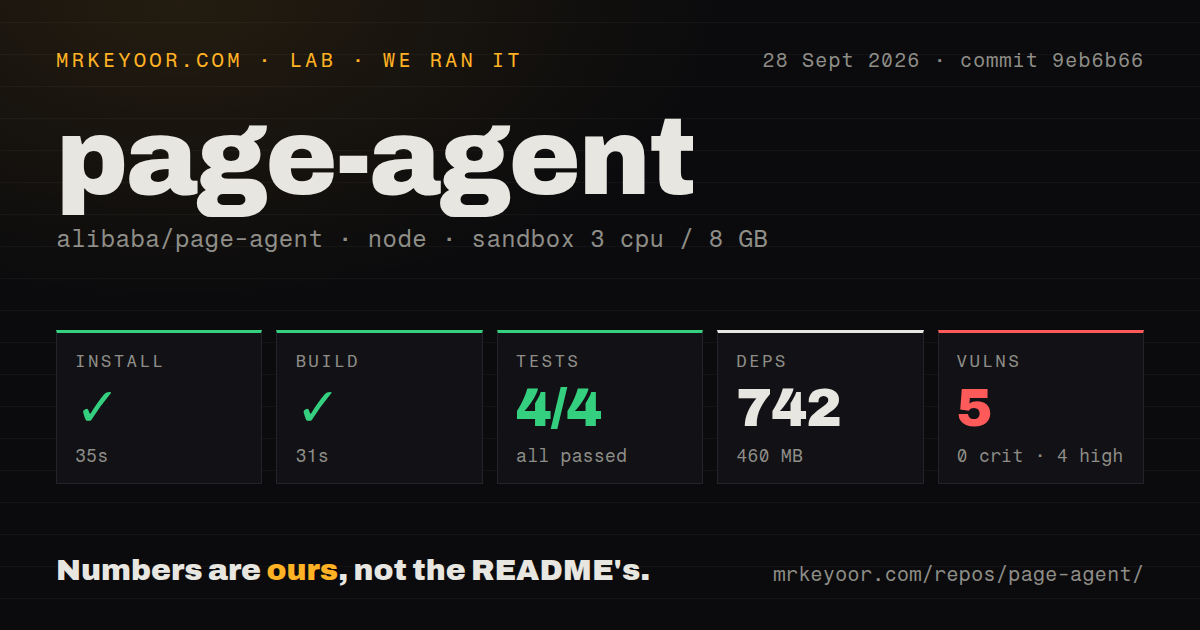
Our sandbox installed commit 9eb6b66 in 35 seconds, bringing in 742 npm packages and occupying 460 MB on disk. The unprivileged container had 3 CPUs, 8 GB of RAM, Node 22, and no secrets. The build completed successfully in 31 seconds. Vitest then finished in 12 seconds with 4 tests passed and 0 failed.
The run covered repository mechanics, not task accuracy. We did not supply a model key or ask the agent to operate a live application, so the successful 4-test suite does not tell you how often it chooses the correct button on your interface. The checkout itself was 1.4 MB, and our scan found no Dockerfile or tests directory. That is consistent with an npm package and browser extension, but buyers should notice how thin the automated test count is.
Npm audit reported 5 known vulnerabilities: 4 high and 1 moderate, with no critical or low findings. The supplied result does not name the packages, say whether they ship in the browser bundle, or prove that an affected path is reachable. Investigate the advisories before rollout. A passing 31-second build and 4 green tests do not answer the dependency question.
Cleaned HTML can still carry form values to the model
Bring-your-own-key mode has no Page Agent backend. The browser talks to the model endpoint you configure, and the extension stores its settings locally. Yet the privacy document warns that cleaned HTML can retain visible text, form values, or other sensitive material. For an authenticated finance or support page, that makes the model provider and the page scope part of the security design.
The free testing API is only for evaluation. Its terms prohibit sensitive data, offer no availability guarantee, and say requests are processed through Alibaba Cloud infrastructure in Mainland China. A production team should use its own compliant endpoint, restrict which elements the agent may touch, and require confirmation before destructive actions. The quick trial took our box 35 seconds to install. Deciding which DOM content may leave the browser will take longer.
The beta MCP route adds 3 tools and a Chrome hub
The @page-agent/mcp package lets a local agent client send browser tasks through the optional Chrome extension. It exposes 3 tools: execute a task, check connection or busy status, and stop the current task. The server speaks stdio to the MCP client, starts a local HTTP and WebSocket bridge, and asks the extension to open a hub tab. Model credentials remain part of that setup.
This route widens the trust boundary. A connected agent can act inside signed-in tabs, and the extension documentation says its broad page, navigation, and multi-tab permissions could harm privacy if abused. The extension therefore uses a token that the user must share with trusted applications. The 460 MB development install is measurable. Permission design is application-specific, so test it with a low-privilege account before connecting a daily browser profile.
A September 28 push shows activity, with one maintainer setting limits
GitHub showed 29,263 stars and 97 open issues and pull requests on September 29, 2026. The API split that combined figure into 44 issues and 53 pull requests. The repository was pushed on September 28, and release v1.12.4 shipped on September 6. Those dates show an active project rather than one coasting on an old release.
Issue 349 supplies the qualification: the author says he maintains Page Agent primarily on his own and asks contributors to discuss features before coding them. Our run found a clean build, 4 passing tests, and a manageable 35-second install. The reason to choose Page Agent is narrower than its star count suggests: you own the page, its DOM is readable, and an embedded copilot is preferable to an outside browser robot.