Osaurus puts the agent layer on one Apple Silicon Mac
Osaurus combines a native chat application, local model runtime, agent memory, tools, scheduling, and compatible APIs. The model can be local through MLX or remote through providers such as OpenAI, Anthropic, Gemini, xAI, OpenRouter, and others listed in the README. Switching providers does not require abandoning the saved agent, its memory, or its tools. That is the product's clearest idea: keep the working context under one application while treating models as replaceable.
The price is a strict platform boundary. Osaurus requires Apple Silicon and macOS 15.5 or later. Building the main application needs Xcode 16 or later. This is a native Swift project rather than an Electron shell, and the local runtime is tuned for Apple's hardware. Anyone standardizing across Windows, Linux, and Intel Macs should stop there. Jan or an Ollama plus web-interface stack covers more machines.
Three compatible APIs make it useful outside its own chat window
A local server exposes OpenAI chat completions, Anthropic messages, and Ollama chat shapes on port 1337. Existing clients can point at those endpoints, while autonomous server-side agent runs use a separate agent route. Osaurus can present its tools to remote harnesses through MCP, and a command-based stdio bridge lets another local MCP client call into the running service.
It also consumes MCP tools, with one-tap connections for roughly 25 named providers in the README and OAuth 2.1 support where available. There is an important limit: the remote provider screen accepts HTTP or SSE services and does not launch arbitrary third-party stdio commands. Users with a folder full of local command and args MCP configurations will need to keep another host or expose those servers over a supported transport.
What happened when we ran it
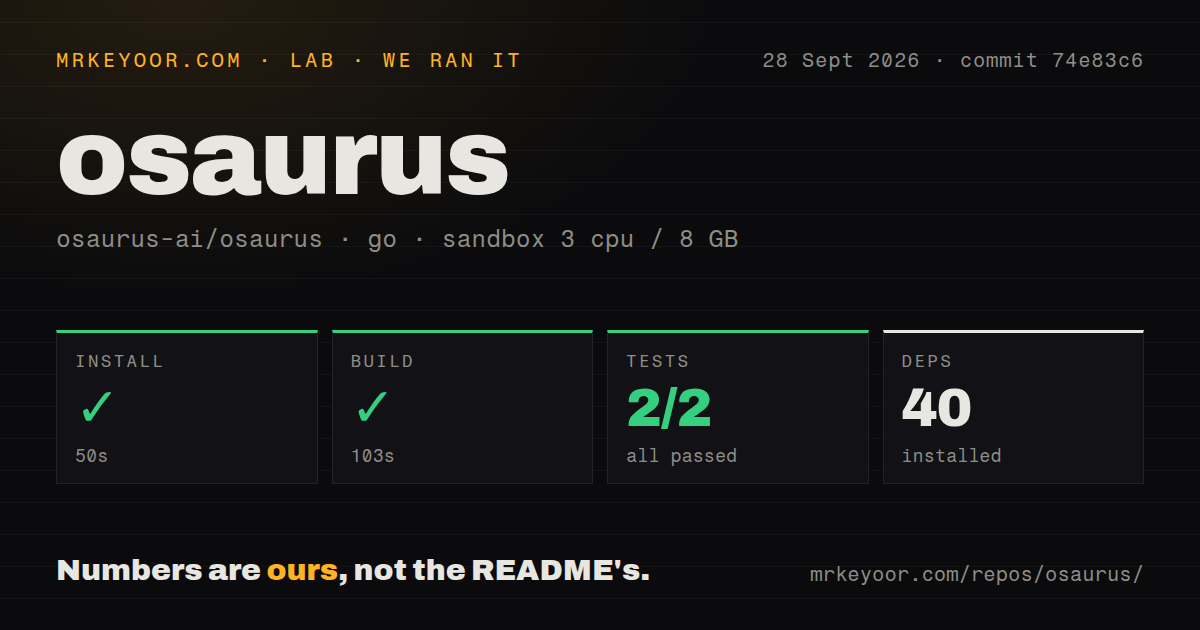
Our sandbox did not build the Swift macOS application. The measurable Go project lived in helpers/osaurus-wa/ inside commit a2e781b. That helper installed 40 packages in 39 seconds, built in 57 seconds, and finished its Go test step in 31 seconds with 1 passed and 0 failed.
The entire checkout contained 3,107 files, about 848,110 source lines, and occupied 72.9 MB before dependencies. Our scan found 6 CI workflow files, no Dockerfile, and no top-level tests directory. Those repository figures explain why one passing Go helper test is narrow evidence. It says the measured helper compiled in a fresh 3-CPU, 8 GB Debian container; it says nothing about the SwiftUI application, MLX inference, model downloads, or macOS entitlements.
A buyer should test the distributed DMG or Homebrew cask on the actual Mac, download the intended model, and exercise one local and one remote task. The useful acceptance test includes memory recall, tool approval, a server restart, and a sandboxed file operation. Local model quality and speed depend on the selected weights and Mac, so our supplied run supports no inference or token-rate claim.
The stronger Linux VM sandbox requires macOS 26
On macOS 26, agent code can run in a Linux VM built on Apple's Containerization framework. Each agent receives a separate Linux user and home directory, while a vsock bridge reaches inference, memory, and secrets. The VM supports shell tools, Python, Node.js, compilers, and package managers, and can apply per-domain network rules.
Earlier supported macOS versions fall back to native Seatbelt confinement. Commands then run on the Mac, writes are limited to the workspace, package installs cover pip and npm rather than Alpine's package manager, and network access is all or nothing. That fallback is materially different for risky coding tasks. MacOS 15.5 satisfies the application minimum, but macOS 26 is the more convincing floor for users choosing Osaurus because of isolated agent execution.
Local data needs a deliberate encryption and telemetry choice
Agents can keep private databases, identity, pinned facts, and session episodes. The README says local storage is plaintext by default and relies on FileVault, with SQLCipher offered as an opt-in. FileVault protects a powered-off disk; it is not the same boundary as an encrypted agent database while the user session is open. People storing client material or secrets should enable SQLCipher and test backup and recovery.
Cloud use is elective, but it changes the data path. Osaurus includes an on-device privacy filter that can detect and replace several classes of identifiers before a cloud request, with a post-scrub check designed to block leaks. That extra check is useful, yet provider policies and credentials still apply. The exact bytes view in Insights is the right place to confirm what left the machine.
Usage analytics use Aptabase and exclude chats, prompts, files, outputs, and keys according to the README. Crash and hang reporting through Sentry is a separate opt-out switch enabled in distributed builds. Source builds without configured keys keep both systems inactive. Privacy-sensitive deployments should record these settings rather than assuming that local inference makes every supporting service local.
Release 0.23.1 shows fast work and a moving surface
GitHub showed 7,690 stars, 164 combined issues and pull requests, and a last push on August 26, 2026. Version 0.23.1 was released on August 23. Its notes include corrections to cache behavior, model settings, image handling, external provider reconnection, and UI reachability. The same release notes explicitly retract a previously reported 42-fold restart improvement that did not reproduce, which is unusually candid.
Osaurus packs more into one desktop application than most local model runners. For a committed Apple Silicon user, that integration can be more convenient than maintaining separate model, chat, MCP, and automation services. Our helper-only test is too narrow to endorse the complete runtime, and the macOS 26 sandbox split matters. Trial it on the exact machine, keep write approvals on, enable storage encryption where needed, and judge the whole agent loop rather than the model list.