One browser fronts dozens of unrelated storage providers
OpenList mounts local folders, object stores, consumer cloud drives, and network protocols into one web file tree. The README lists providers ranging from OneDrive, Google Drive, S3, and Dropbox to several Chinese storage services. Users can preview documents and media, copy direct links, upload files, move data between mounts, or expose the collection through WebDAV, S3, FTP, and SFTP. The server can proxy bytes or send a client to the provider with an HTTP redirect.
That model is convenient because OpenList does not require a second complete copy of every drive. It is also why its reliability is tied to outside login flows and APIs. A provider can change a captcha, token response, download URL, or throttling rule without changing OpenList itself. The project warns that it has no official association with those services and that users bear risks such as account bans or speed limits.
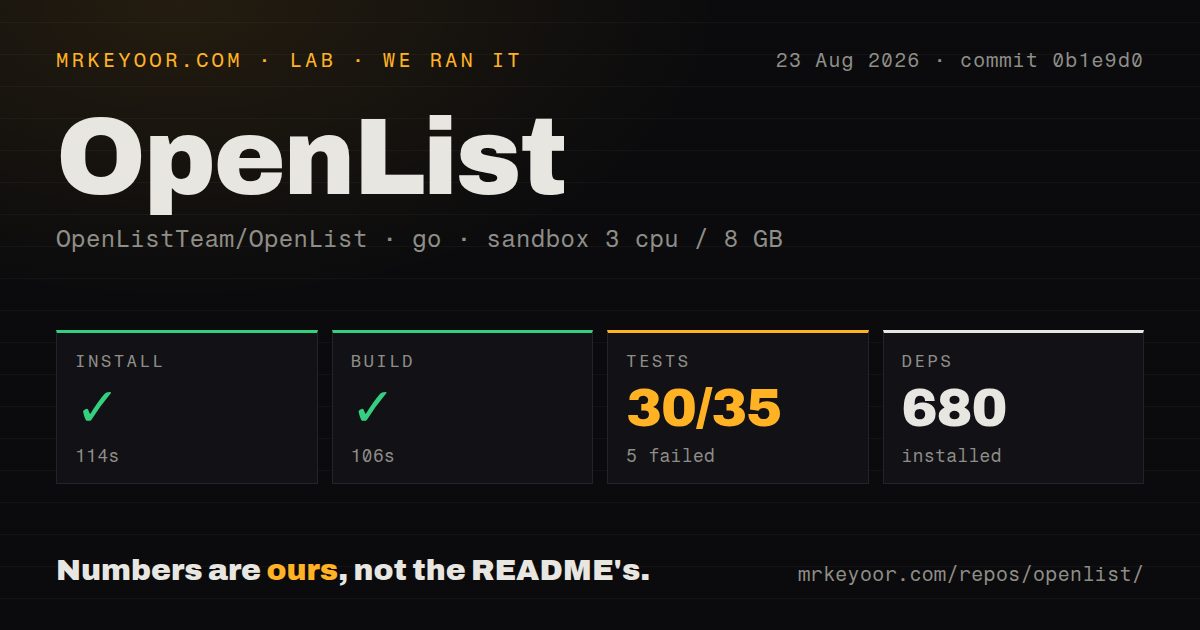
The 106-second build passed, while 5 test packages failed
We cloned commit 0b1e9d0 into a fresh unprivileged Debian container with 3 CPUs and 8 GB of RAM. Installing 680 Go packages took 114 seconds. The build completed successfully in 106 seconds. The checkout itself was 4.1 MB with 861 files and about 137,940 source lines, a compact download hiding a broad collection of storage drivers and server protocols.
The repository has 10 CI workflows, a Dockerfile, and a Compose file. It has no top-level tests directory, which is normal for Go projects that keep test files beside packages. Our harness ran the available Go suite across 35 package results. Thirty passed and 5 failed. That result is good enough to justify investigation, but not good enough to call the checked commit clean.
What happened when we ran it
Our sandbox installed OpenList in 114 seconds and built it in 106 seconds. Tests ran for 47 seconds before exiting with code 1. The summary counted 30 passing and 5 failing package results out of 35. The supplied log tail shows several server packages passing or reporting no test files, then a final FAIL. It does not name the five failing packages or show their assertions.
We therefore cannot say whether those failures concern a storage driver, environment requirement, network access, or core server behavior. We can say that commit 0b1e9d0 did not pass the available Go test command in our stated environment. A production evaluation should rerun the suite with full logs and add live checks for the exact providers and protocols the deployment will use.
Provider credentials are the ongoing maintenance cost
The binary is only the beginning. Every mount can require a different mix of OAuth tokens, cookies, usernames, passwords, client identifiers, folder identifiers, and proxy settings. Those values unlock real storage accounts, so they belong in a protected configuration database with restricted backups. An internet-facing instance also needs HTTPS, a strong admin password, and access rules for any WebDAV, S3, FTP, or SFTP service it enables.
Open issue #2965 gives a concrete example of driver drift in v4.2.5. A PikPak user reports an expired captcha token during account refresh and says the refresh-method setting described by documentation was missing from the interface. The report does not establish whether every PikPak mount fails. It does show why operators should keep a disposable test account and verify reauthentication before an old token expires.
Redirect behavior can conflict with backup clients
OpenList advertises direct links and HTTP 302 redirects as useful ways to let clients fetch data from the source. That is attractive for large media because the OpenList host does not relay every byte. A direct URL can also expose the provider endpoint to clients, and some tools expect storage APIs to return data rather than redirect them. The proxy decision should be made per workload, not treated as a universal speed switch.
Issue #2947 reports that OpenList's S3 service returned 302 responses for key and data reads backed by a 139 storage mount. Restic treated those responses as API errors and repeatedly retried unlock and initialization. The reporter says reverting to behavior before pull request #2598 restored 200 responses and asks for a way to disable redirects. Until that path is fixed and verified, OpenList's S3 layer is a poor target for a Restic repository on that driver.
A busy fork still needs driver-by-driver acceptance tests
OpenList exists as a community-governed fork of AList and uses AGPL-3.0. Release v4.2.5 arrived on August 7, 2026 with a new GuangYaPan driver, multipart upload work, dependency updates, and fixes to several drivers. GitHub recorded a push on August 26, 24,334 stars, and 268 combined issues and pull requests. The same-day queue contains both user reports and automated dependency work, evidence of active maintenance rather than a quiet repository.
Activity does not make every connector dependable. OpenList spans dozens of independent services, so a green core build cannot certify their current authentication and transfer rules. Before adoption, mount only the providers you need, test listing, upload, rename, range reads, token renewal, and failure recovery, then repeat those checks after upgrades. For backup and synchronization jobs, rclone has a narrower command-oriented model. For local files, File Browser removes the cloud-driver layer entirely.