
The current repository is a rewrite, not the live editor
OpenCut's strongest documentation choice is the warning at the top. The project is being rebuilt, the previous version has moved to OpenCut-app/opencut-classic, and opencut.app still runs that classic code. The rewrite uses new.opencut.app until it is ready. A reader who misses that distinction could mistake 86,776 GitHub stars and polished release notes for evidence that this checkout is ready for editing.
The new direction centers a Rust engine shared by web, desktop, and mobile interfaces. The README lists an Editor API, plugins, MCP access, headless rendering, and scripting among desired outcomes. The tracking issue says there is no timeline and leaves every progress checkbox empty, including architecture documentation, engine core, storage, web UI, desktop UI, Android, iOS, and public beta. Those are goals, not available features.
The desktop application currently opens one window
The desktop guide is unusually direct: the GPUI application is very early and currently only opens a window. Developers can run Moon tasks for check, development, and release build. Rust is pinned through .prototools, and the root lockfile is committed. That is enough to establish a development shell, though it is nowhere near an editing workflow with timeline, preview, import, export, and project recovery.
On Linux, the GPUI path renders through Vulkan and enables Wayland plus X11. Its documented package list includes Vulkan runtime and drivers, Wayland headers, X11 XCB headers, libxkbcommon-x11-dev, fontconfig development files, a C toolchain, and CMake. macOS needs Xcode command-line tools; Windows lists no extra platform package. WSL2 has a stated protocol-version mismatch with GPUI 0.2.2.
What happened when we ran it
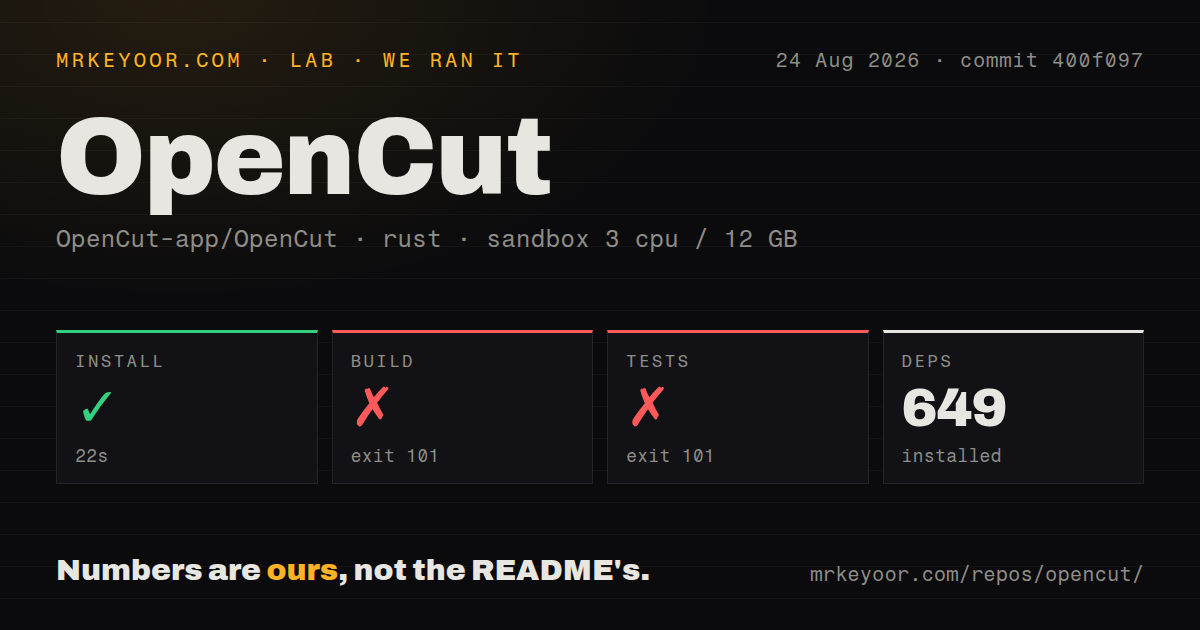
Our unprivileged Debian sandbox installed 649 Rust packages in 22 seconds. The build continued for 204 seconds, then exited with code 101. rust-lld reported that it was unable to find -lxkbcommon-x11, and the desktop binary stopped after 22 warnings. The log identifies the missing linker library but does not show any later compile or runtime behavior.
Tests failed with exit 101 after 11 seconds at the same link step. The test binary could not find -lxkbcommon-x11 and stopped after 21 warnings. Our checkout at commit 400f097 had 127 files, roughly 8,363 source lines, and 0.7 MB before dependencies. It included 1 CI workflow, no Dockerfile, and no tests directory.
The missing library is documented, but setup is still heavy
The failure does not expose a hidden requirement: libxkbcommon-x11-dev appears in the desktop README's Debian and Ubuntu list. It does show that a general Rust image is insufficient for this GUI build. Developers must prepare the display and graphics toolchain before Cargo can finish, and our 649 resolved packages did not bypass that system layer. A successful build would still yield the early window described upstream.
The root workflow adds another tool manager. Contributors first install proto, use it to obtain pinned tools, then invoke Moon tasks for web, API, or desktop work. There is no repository Dockerfile to capture those dependencies. That may change as the architecture settles, but the current setup is aimed at project developers who can manage native graphics requirements, not curious users looking for a quick local editor.
Release v0.3.0 belongs to the earlier product line
The latest GitHub release is v0.3.0, published April 15, 2026. Its notes describe masks, keyframe curves, speed and volume controls, caption import, custom canvas sizes, a Rust and wgpu compositor, and 16 storage migrations. Those features explain the project's reputation, but the current README now directs working users to Classic. Release notes and the rewrite status therefore describe different moments in the repository's history.
This distinction should govern comparisons. OpenCut Classic is the nearest alternative because it preserves the usable product. Kdenlive is the safer choice for a mature nonlinear editor, while LosslessCut suits people who mostly trim or remux media. The rewrite should be judged on code and milestones it has completed, not on the v0.3.0 feature list or promises carried over from the project name.
Outside contributions are paused during architecture work
The README says the maintainers are not set up to accept outside contributions while the architecture is being designed. The tracker likewise says architecture documents are unfinished. That boundary is reasonable during a rewrite, yet it means a willing developer cannot assume an issue or patch will fit the eventual interfaces. Questions and discussion are directed to Discord or GitHub issues instead.
Repository health looks mixed only because the signals measure different things. The last code push was August 10, 2026, while issues were still active later in August. GitHub reported 371 combined issues and pull requests. Current reports include storage migration retry behavior, development tooling, and rewrite status questions. Activity is real, but maturity is not. For editing today, the project's own answer remains OpenCut Classic.