A 2007 Intel Mac can run a newer macOS, with conditions
OpenCore Legacy Patcher builds an OpenCore boot setup for genuine Macs that Apple has dropped. Its README says supported machines reach back to 2007 and can run macOS Big Sur through Tahoe, depending on the model. Post-install patches restore hardware paths that newer macOS releases removed, including older graphics, wireless chipsets, and USB controllers. The result can feel close to a native upgrade, but every model has its own boundary.
Our commit d622cd5 checkout was 135.8 MB, with 679 files and about 33,177 lines of source. This is a real hardware-support project rather than a small configuration generator. The model table is the first decision point: PowerPC and Apple Silicon are excluded, T2 models have special limits, and Sonoma or newer needs at least 3 GB of RAM for installation according to the guide.
The 11-second install is the least risky part
The recommended path is the signed installer package from the releases page, not a source checkout. Running from source needs an official python.org installation of Python 3.6 or newer; the docs say Xcode and system Python builds are unsupported. A working deployment also needs administrator privileges, an installer source, and usually a USB drive that can bring the machine back if its internal boot setup stops working.
Version 2.5.1, released September 19, 2026, is a small fix for a Root Volume Dirty message after unpatching. Its asset notes recommend OpenCore-Patcher.pkg for all users. The separate uninstaller removes the app and utilities but does not revert installed patches. That distinction matters because this tool changes the boot path and, for some Macs, files on the sealed system volume.
What happened when we ran it
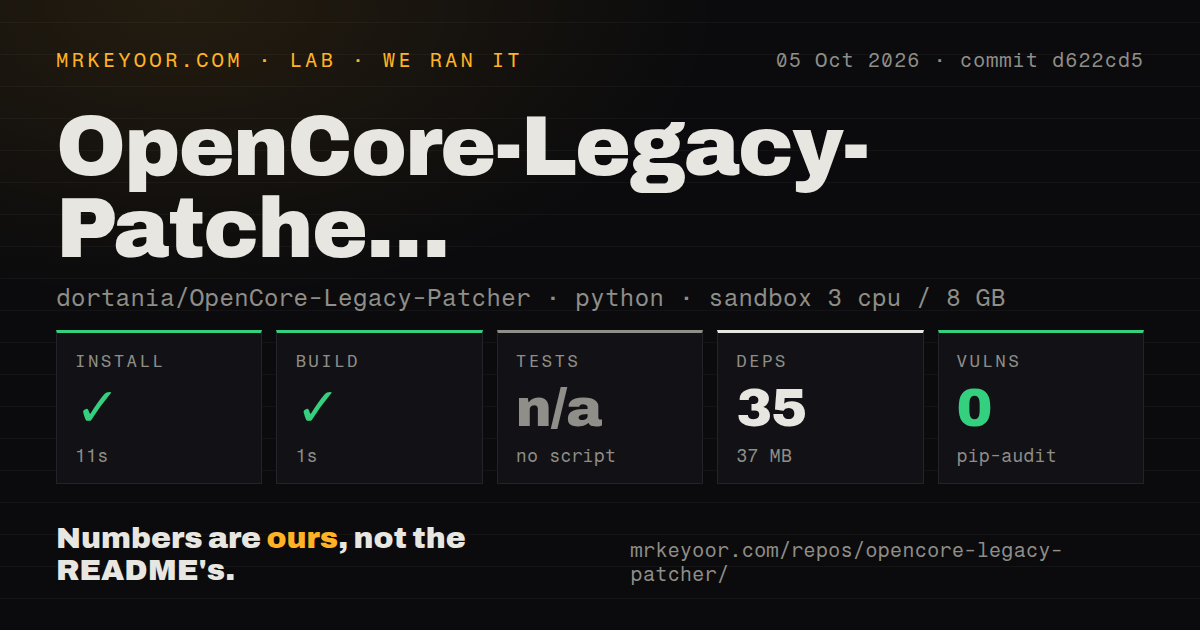
Our sandbox installed 35 packages in 11 seconds and used 37 MB on disk. The build completed in 1 second. Pip-audit reported 0 known vulnerabilities. The run used a fresh unprivileged Debian container with 3 CPUs, 8 GB of RAM, Python 3.12, and no secrets, so it measured whether the Python project could install and build away from a developer's Mac.
There was no test script or target, and we skipped tests rather than inventing a substitute. The repository has 4 CI workflow files, no Dockerfile, and no tests directory. Our test method therefore says nothing about whether a patched Mac boots, resumes from sleep, renders Metal correctly, or survives an operating-system update. Those outcomes require the exact Mac model and macOS release.
Root patches turn every update into a maintenance event
The FAQ recommends disabling automatic updates, including automatic downloads. Apple can stage an update while downloading it, which may modify the system volume before the owner is ready. Major upgrades such as macOS 13 to 14 are better handled through USB media. Root patches are removed by macOS updates and must be installed again after the operating system finishes updating.
Some Sequoia systems also need MetallibSupportPkg after an update. If the patcher cannot reach the internet, it may offer only the Wi-Fi patch first; after rebooting and connecting, the rest can be applied. That sequence is manageable on a hobby machine. It is awkward for remote support, unattended updates, or a Mac that must be ready for work every morning.
Hardware tables matter more than the 1-second build
The documentation names defects by model and graphics family. Issue 1145 covers heavy interface corruption or freezing in Chrome 125 and later, plus some Electron apps, on AMD GCN 1.0 hardware running Ventura or newer. Issue 1008 lists other legacy-Metal limits involving DRM playback, Photos editing, external GPUs, hardware decoding, and newer Metal features. These are specific compatibility gaps, not a claim that every patched Mac has them.
Tahoe support also needs close reading. Open issue 1167 says the 3.0.0 release candidate brings preliminary support while T2 machines, Fusion Drives, and some hardware paths still present challenges. The main README says Tahoe is officially in range, but your model identifier and the issue's current limitation list decide whether that statement is useful for your computer. Do not use the newest OS name as a substitute for the model table.
An October 4 push and release 2.5.1 show active work
GitHub showed 18,426 stars and 23 open issues on October 5, 2026, with no open pull requests in the API search. The repository was pushed on October 4, and stable release 2.5.1 arrived on September 19. That combination points to active maintenance. The project still offers support on an as-is basis and directs troubleshooting toward its documentation and a community Discord server.
OpenCore Legacy Patcher is the sensible first choice for a supported Intel Mac whose useful hardware has outlived Apple's OS window. The 35-package install and clean audit make its developer setup look tidy, while the missing test target keeps our confidence limited to packaging. Keep a backup, a bootable USB drive, and the exact model's known-issues page within reach before changing the machine you rely on.