What Olares brings together
Olares puts files, applications, networking and local AI in one Kubernetes-based personal cloud. That breadth is its reason to consider it: a reader who needs only file storage has a different requirement from someone who wants to host models and agents alongside everyday apps.
The Olares README describes Files, Vault, Market, Dashboard and Control Hub as system apps. It also describes configurable backups, external SMB/NFS shares, private networking, HTTPS app entrances and GPU sharing modes. These are upstream feature descriptions. Our source-command run did not validate them in a deployment.
Choose the installation path before choosing workloads
The current installation guide offers an ISO for a fresh Intel or AMD x86-64 installation, a script for an existing Ubuntu 22.04 through 25.04 or Debian 12/13 system, and Docker Compose for a containerized installation on those Linux versions. Olares One and NVIDIA DGX Spark have device-specific instructions. The guide warns against using the generic Linux ISO or script for Olares One.
The documented Linux minimum is 4 CPU cores, 8 GB of memory and 150 GB of SSD storage. The README specifies available memory and storage for the script. Both sources say HDD installation will fail. A GPU is optional for installation, but the current guide says most AI apps need one. It lists NVIDIA Turing or newer, with at least 8 GB of VRAM recommended. The hardware compatibility of a particular app remains something to check before installation.
The README's script example is:
curl -fsSL https://olares.sh | bash -
This downloads the installer and runs it with Bash. We did not execute it. Inspect the installer and follow the guide for your chosen method before changing a host. At the measured commit, the README instructed users to create an Olares ID in LarePass and activate through a web wizard or CLI. Those were documented steps, not completed steps in our run.
What our recorded source run establishes
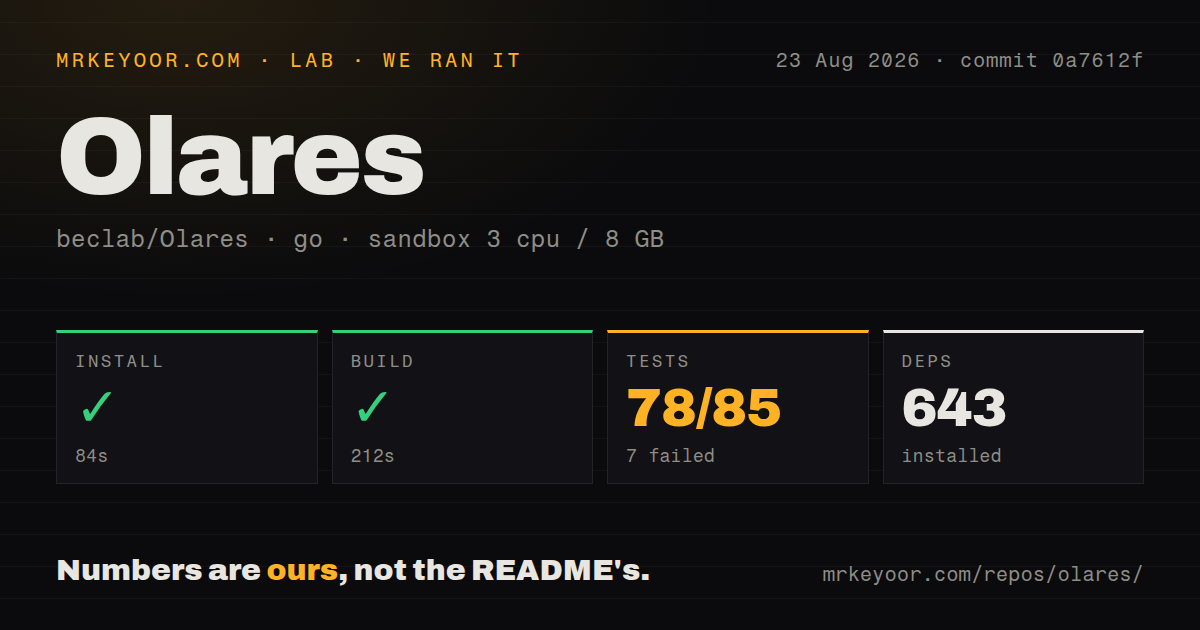
Our run was recorded on August 23, 2026 at 05:04:14.435 UTC against commit 0a7612fae4626d3e8b55c5ea27410030ca7b996f, whose recorded commit date is August 22, 2026 at 21:08:16 +08:00. Commands ran in ./cli. The sandbox configuration recorded 3 CPUs, 8 GB of memory and image golang:1.24-bookworm. The install tail shows a go1.25.0 toolchain download, so the image label alone does not establish the toolchain used throughout the run. The sandbox's CPU allocation was below the documented deployment minimum; this was not a deployment trial.
The dependency step took 84 seconds, exited 0 and recorded 643 dependencies. Dependency preparation is separate from installing and checking a usable CLI binary. The record contains no installed-binary check.
The build-labelled step took 212 seconds and recorded exit 0. Its tail also reports append with no values at pkg/upgrade/1_12_7_20260629.go:51:11 and pkg/upgrade/1_12_7_20260701.go:21:11, followed by vet-exit:1. We therefore cannot describe it as a clean build-and-vet result. The supplied record does not resolve the mismatch between the step status and those diagnostics.
The test command took 227 seconds and exited 1. The parser recorded 78 successful package results and 7 failing package results, with a reported total of 85 in those categories, plus 109 packages with no test files. These figures are not counts of individual test cases. Complete-log reconciliation and exhaustive unique coverage were not verified; the tail also includes a successful package result marked [no tests to run].
Unlike a stack trace alone, the supplied test tail identifies specific failures: DID resolution returned methodNotSupported in JWS, JWT and VC checks; presentation-exchange and VC JWT checks could not open named JSON test-vector files; and a VC example panicked after a signature-verification error. The tail also contains a base64 decoding error. These observations identify source-check problems in this checkout, but do not establish their full causes or show that the deployed cloud is broken.
The repository scan recorded 11,345 files, approximately 961,017 source lines, 535.6 MB and 51 CI workflow files. It detected no Dockerfile, Compose file or tests directory. Those detector results describe that scan, not the absence of all container support or tests: the run itself found Go tests, and the current installation guide documents Docker Compose. The checkout size is not an installed-system footprint. The recorded source steps totalled 566 seconds; this is not a cloud-installation time. No security audit result or measured AI workload was supplied.
What still needs a deployment trial
The recorded run did not validate Kubernetes initialization, storage provisioning, activation, remote access, app installation, backups, restore, GPU scheduling or model performance. A useful next step is to install through the appropriate documented method and check the workflows that would justify adopting the platform: access from your devices, an app upgrade, a backup restoration and any required member accounts or AI workloads.
The supplied issue-list extract includes reports of installation hanging at 94 percent, storage-related control-plane freezes, an empty member desktop and a Debian 13 installer problem. These are user reports visible in the list, not independently reproduced findings or evidence that every installation is affected. The supplied evidence does not establish that the installer can wipe the wrong disk.
The 1.12.6 release notes describe CLI and Agent Skills changes, Model Console, shared apps and storage work. They also instruct affected users to back up needed app data and reinstall compatible AI apps if apps installed before 1.12.6 fail after upgrading, and to update LarePass to 1.10.62 first. These are version-specific upstream instructions. The current README also highlights 1.12.7; neither release was installed or compared in our run.
When a narrower alternative fits
CasaOS describes a home-oriented interface for Docker applications, an app store, and drive and file management. Evaluate it if those are your main requirements. We have not measured whether it is easier to operate than Olares.
umbrelOS is a standalone home-server OS. Its README supports installation on specified Intel/AMD devices, Raspberry Pi 5 and virtual machines, and explicitly rules out installation on top of an existing Linux distribution. Evaluate it if installing a separate OS suits your host plan. This review contains no comparative performance or reliability test.
How to read the ratings
These are editorial evidence ratings, not benchmark results. The scale is 1 for little supporting evidence or substantial barriers, 2 for partial support with major limits, 3 for documented capability with operational questions unresolved here, 4 for substantial direct evidence with limited gaps, and 5 for comprehensive evidence within the stated scope. Setup considers prerequisites and verified completion; docs considers the supplied instructions; community considers visible support channels and participation; maturity considers release and operational evidence. Unknown adoption, compatibility and deployment reliability do not earn a high score.
Olares has a documented route to an integrated personal cloud, but our recorded source checks stop well short of establishing that cloud's reliability. Evaluate it for the integration you need, and make restore and upgrade checks part of the trial.