Begin with a Linux host you can afford to rebuild
CasaOS recommends Debian 12 and asks you to install a supported base system before running its installer. That makes a spare computer a sensible place to evaluate it. You are choosing a browser interface for a Linux home server, with an app store and file management. You still need to be comfortable looking after the host when something outside that interface needs attention.
The README lists apps such as Nextcloud, HomeAssistant and Jellyfin, alongside Docker app support. That combination is appealing if your goal is to put familiar services on one machine without starting each deployment from a blank configuration. Our recorded run did not install those apps or inspect their storage behavior. The catalog is a reason to investigate, without evidence here that your chosen service will work on your hardware.
What happened when we ran it
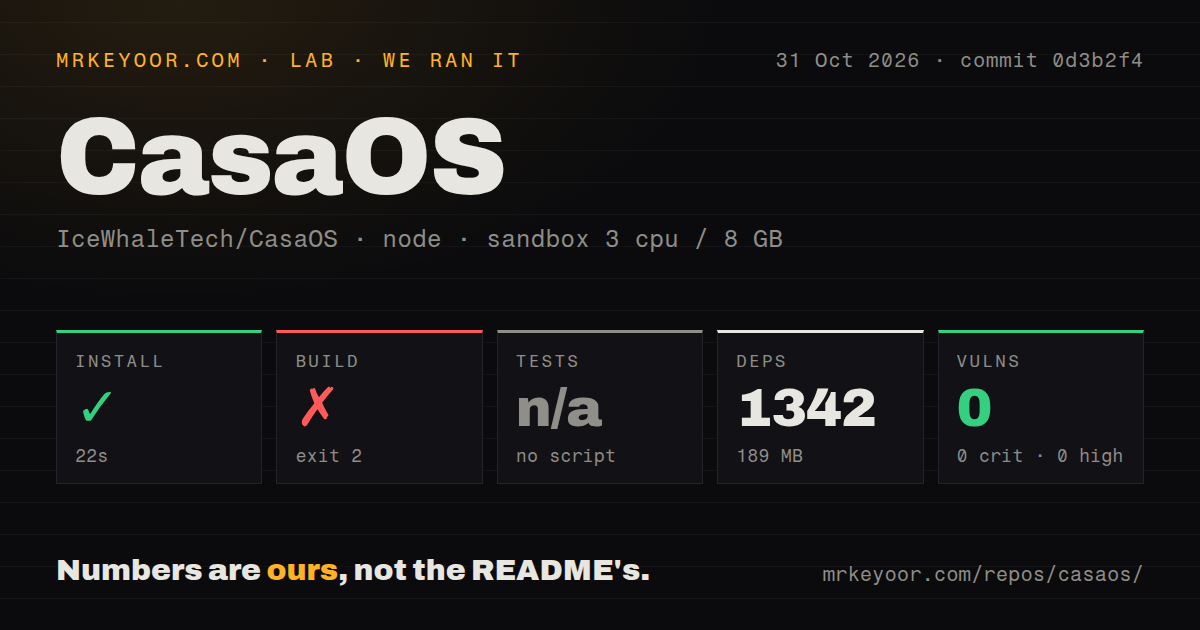
Our CasaOS run installed npm dependencies in 22 seconds, recording 1,342 dependencies and 189 MB on disk. We cloned commit 0d3b2f4 on October 31, 2026. The build failed with exit 2 after 1 second. The log identifies the target as @icewhale/casaos-openapi and shows TypeScript stopping with TS18003 because no inputs were found in tsconfig.json.
The configuration included all paths through **/* and excluded node_modules. That is what the error reports. It does not explain why this target had no eligible inputs, and we cannot infer missing generated files or a package-manager mistake from that tail. The build command included tsc followed by yarn clean, but the visible failure happened at TypeScript. It provides no evidence that the later cleanup step ran.
Tests were skipped because the run found no test script or target. That is an absence of an executed test result, rather than a passing suite. The npm audit reported zero known vulnerabilities. Its scope is the recorded npm dependency audit. It does not establish the security of the Go server, the host installer or any Docker application you subsequently select.
Our measurement setup specified 3 CPUs, 8 GB RAM and image label lab-node:22. Actual runtime and operating-system versions are not established by that label. The scan recorded 201 files, approximately 14,184 source lines and 5.7 MB checked out, with 10 CI workflow files and no detected Dockerfile or tests directory. These are checkout observations, without a supported-host installation or an assessment of the whole CasaOS system.
Platform support has explicit limits
The README names amd64/x86-64, arm64 and armv7 hardware, but its operating-system table is more selective than its broad introductory compatibility language. Debian 12 is recommended under official support, alongside Ubuntu Server 20.04 and Raspberry Pi OS. Alpine, OpenWrt and ArchLinux appear under community support and are marked not fully tested. Read that table before assigning the machine to this project.
For a first trial, use a host from the recommended path and an application whose data you can discard. Confirm where its persistent files live and what remains after you remove or replace the application. That is a proposed evaluation, without a claim that we performed it. A working dashboard would be an encouraging start, but it would leave those storage questions unanswered.
The host installer has a separate reported failure
Issue 2589, opened October 23, 2026, reports HTTP 500 while the host installer fetches an uninstaller component. Other users describe the same error in the thread. This concerns the README's host-installation route, rather than the TypeScript target in our run. Keep the two failures separate when deciding what to investigate or reporting a problem upstream.
The issue remains open in the retrieved record. That does not establish that the endpoint fails for everyone today, and we did not probe it ourselves. Replies offer unofficial workarounds, including an archived download and another installer. Those suggestions have not been validated here. Before setting aside time to migrate a host, check the current issue and confirm that the official route completes on the intended base system.
Keep an update route outside the dashboard
The README allows updates through Settings, but explicitly says a terminal-based update cannot run from the terminal inside the CasaOS UI. It calls for SSH or a directly attached terminal and keyboard. That is a practical reason to arrange host access before relying on the dashboard. Otherwise, the convenient interface could also be your only way into the machine when you need another route.
The latest release endpoint returned v0.4.15, published December 19, 2024. The repository's last push was September 28, 2026, and the October installer discussion shows continuing user activity. An older release tag alone would not establish abandonment. These records also do not establish a dependable release cadence or a maintainer response to the installer report, so support quality remains unassessed.
Runtipi and Portainer CE answer different home-server needs
Runtipi describes a Docker-based home-server orchestrator with a web interface and app stores. It is a relevant alternative for the same app-catalog workflow, with an explicit volunteer-support warning. Portainer CE is a container-management interface whose README targets non-production use. Consider it when container administration is your main goal. We have no comparative reliability or setup measurements for either.
Documentation receives 3/5 on this editorial scale: 1 means no usable path, 2 means sparse instructions, 3 means a main path and limits are documented, 4 requires detailed deployment and recovery guidance, and 5 requires independently verified coverage. Other ratings remain unassessed beyond our recorded repository evidence. Before moving personal files, demonstrate that you can reach the host independently and recover the chosen application's persistent data.