The short answer: the server builds, but loading can still stop you
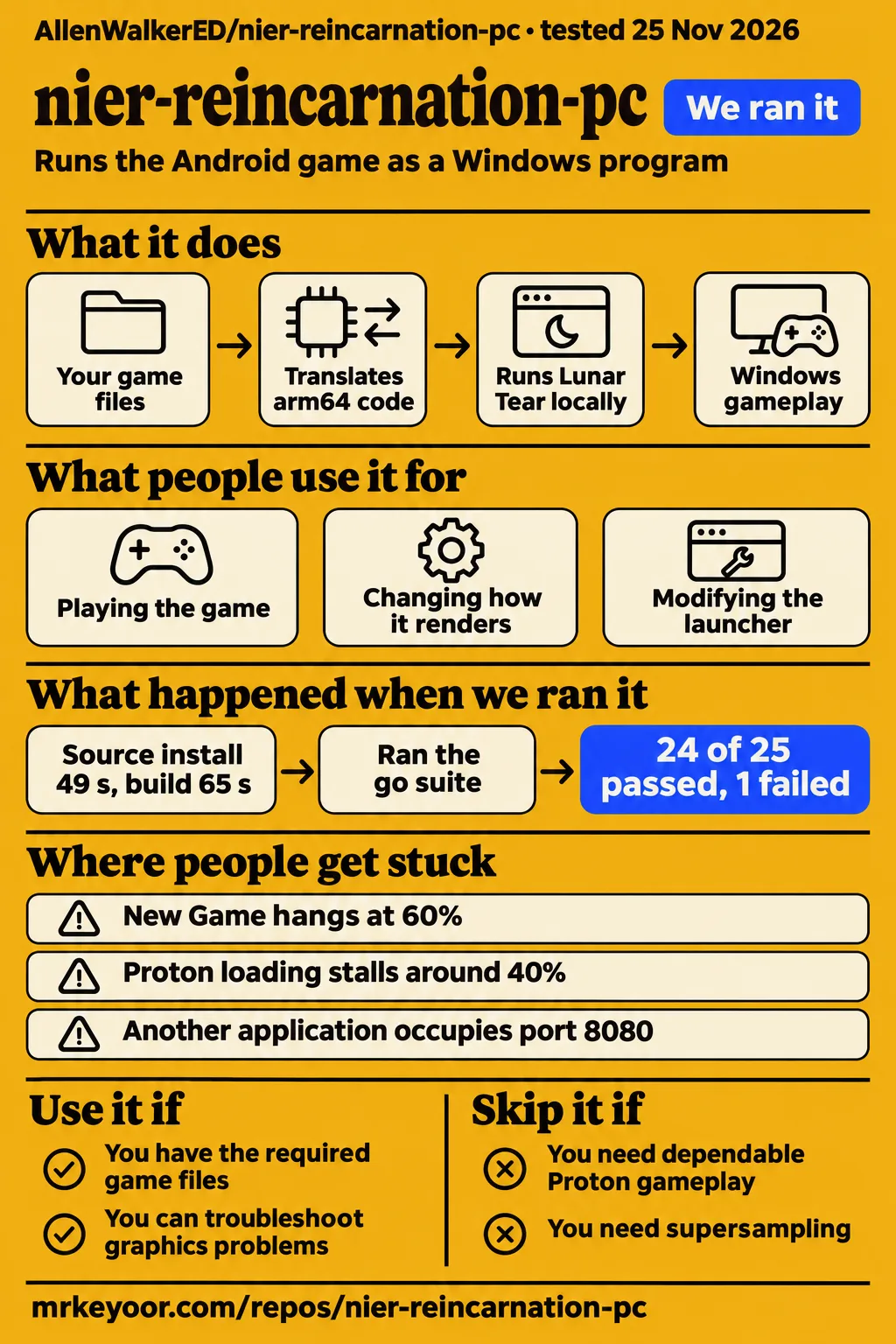
Our server build succeeded in 65 seconds, while tests failed after 29 seconds with 24 passes and 1 failure recorded. Use nier-reincarnation-pc if you are a Windows preservation enthusiast with the required game files and patience for the issue tracker. Avoid it if dependable Proton gameplay is a requirement: nierjero reported that version 1.3.1 removed a crash at 20%, then loading stalled around 40% in Proton issue #9.
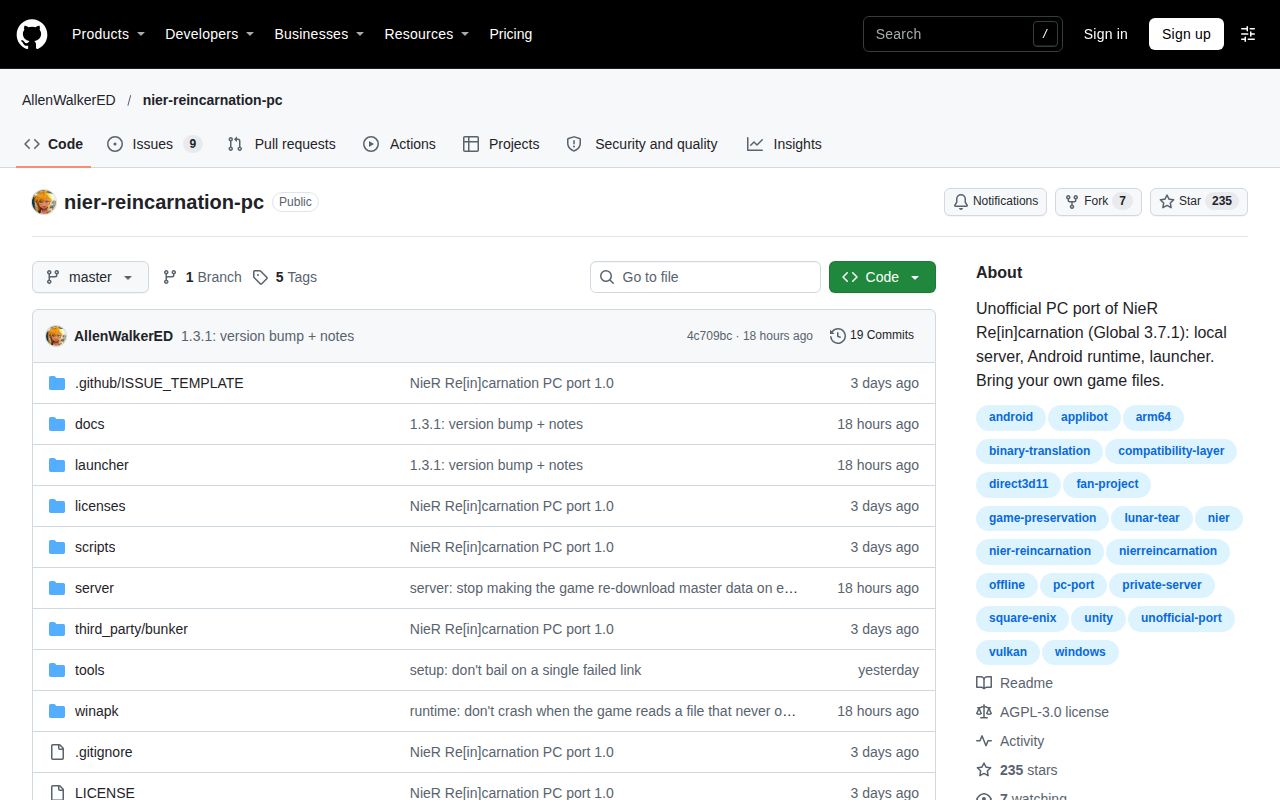
The nier-reincarnation-pc README describes an unofficial Windows port that translates the Android game's arm64 code to x86-64 and runs Lunar Tear locally. Its launcher includes graphics settings, event controls and save management. The practical distinction is between starting the launcher, starting the server and reaching gameplay. The issue tracker records different outcomes at each stage, including a gameplay report on a Ryzen 5 5600X with an RX 6750 XT and loading failures on other systems.
What people use nier-reincarnation-pc for
Polvo07 reports that the issue #2 reporter reached gameplay on a Ryzen 5 5600X with an RX 6750 XT in issue #4. Other users investigated display sizing, Proton startup and launcher changes. These reports describe distinct tasks: playing the game, changing how it renders, opening it through Wine and modifying the launcher. Keeping those outcomes separate makes the reports useful without turning a launcher success into a gameplay recommendation.
| Person and task | Reported outcome | Source |
|---|---|---|
| The issue #2 reporter launched on a Ryzen 5 5600X and RX 6750 XT | Reached gameplay, according to Polvo07's comparison | Gameplay account in issue #4 |
| Polvo07 investigated high-DPI rendering | Reapplying a three-site patch kept version 1.3 full screen at 2880x1800 after the built-in change failed | Resolution investigation in issue #2 |
| nierjero ran the launcher and local server through Proton | Opened the launcher; 1.3.1 removed a 20% crash, followed by a stall around 40% | Proton sequence in issue #9 |
| AnnoyedDev rebuilt the launcher for personal use | Shared a private Linux branch with French launcher menus and custom environment variables | Launcher discussion in issue #7 |
The gameplay account and display complaints concern different outcomes. A game can pass its loading screen while drawing an undersized image, and a launcher can open while the game later stalls. AnnoyedDev's private branch is another separate result: the comment describes launcher changes and an invitation to the maintainer. For a player choosing a route, the most useful report identifies the hardware, release and point reached after pressing START.
What happened when we ran it
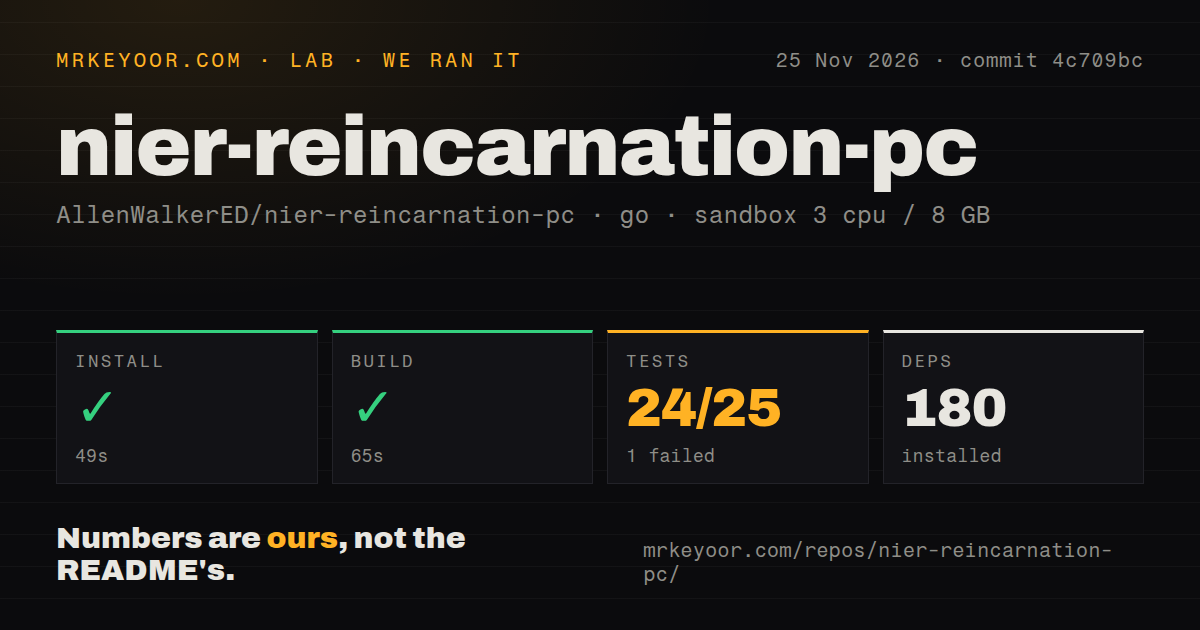
Our November 25, 2026 run installed dependencies in 49 seconds and built the Go server in 65 seconds; tests exited 1 after 29 seconds in our recorded server checks. The checkout was commit 4c709bc, and the Go project lived in ./server/. The test summary records 24 passed and 1 failed of 25. Those measurements describe the server source checks and the recorded sandbox configuration.
| Step or observation | Our recorded result |
|---|---|
| Install | Succeeded in 49 seconds; 180 dependencies recorded |
| Build | Succeeded in 65 seconds |
| Tests | Failed, exit 1, in 29 seconds; 24 passed and 1 failed of 25 |
| Sandbox configuration | 3 CPUs, 8 GB RAM, image label golang:1.24-bookworm |
| Checkout | 831 files, approximately 138,860 source lines, 18.9 MB |
| Repository scan | Dockerfile present; 0 CI workflow files; no tests directory detected |
The visible failing-test tail includes successful results for internal/service, internal/store/sqlite, internal/translation, mobile and several mobile subpackages before ending with FAIL. The summary records one failure, but the tail does not identify its assertion or cause. A repository scan finding no tests directory can coexist with Go test results because Go tests can sit beside source files. The successful package lines remain part of a failed overall test command.
The separate deployment attempt stopped at a failed safety step: none of compose.yaml, compose.yml, docker-compose.yaml or docker-compose.yml existed. The runner called the repository unsafe under its rule requiring a Compose file. Its run header nevertheless described a Docker Compose deployment on November 25 with every port bound to 127.0.0.1, and its teardown entry reported cleanup as OK. The header and failed prerequisite contradict each other; the concrete failed step governs the outcome.
Where people get stuck: match the error before changing settings
Dagagg confirmed success after port 8080 troubleshooting in issue #1, while JustLeonS identified Adguard routing in issue #3. Both affected startup, but their remedies addressed different connections. The issue tracker also separates translation-file failures, rendering problems and loading hangs. A loading percentage alone is a poor diagnosis when one report concerns an occupied server port and another concerns the translated game runtime.
| Symptom | Reported finding | Remedy and status |
|---|---|---|
| Server will not start | Another application occupies required port 8080 | Version 1.3 identifies the application; close it or stop its service. Dagagg confirmed success in #1; #5 records the same advice |
| 20% loop, blank dialog or Process failed | The game connection to port 8003 was missing | JustLeonS reported that disabling routing for the server in Adguard fixed #3 |
| New Game hangs at 60% | Polvo07 reported no further client calls after GetUserData; changing renderers and engines left the hang | Maintainer kept the loading problem open in #4; another user reported 60%, and once 40%, on 1.3.1 |
| Minimizing crashes the game | Maintainer identified a Vulkan driver crash on NVIDIA | Maintainer reports this crash fixed in 1.3 in #4 |
| Long directory breaks translation | Temporary-file writes failed, leaving JIT translation | Reporter used a shorter directory; maintainer reports short temporary directories in 1.3 in #8 |
| Moving the folder breaks libmain.so | Cached absolute paths retained the former location | Reporter rewrote paths; maintainer reports automatic relocation handling in 1.3 in #8 |
| 40% followed by Failed to download data. Returning to title screen. | Reporter reached the title screen, pressed Start and received the error | #10 is open with 0 comments |
The path failures in #8 involve two stages. Ahead-of-time translation, or AOT, prepares native code before execution; just-in-time translation, or JIT, does that work during execution. The reporter described failed AOT temporary-file writes, then a separate library-loading failure after relocating the installation. The maintainer's reply announces two corresponding changes in 1.3: a short temporary folder and finding files at their new location. Those are distinct fixes rather than one general translation setting.
Native resolution and supersampling are separate promises
CitizenRoby confirmed corner rendering on version 1.3.1 after Polvo07 reported the image shrinking again on 1.3 in resolution issue #2. Polvo07 described a 1152x720 image drawn into a 2880x1800 window and reported that reapplying a three-site patch kept the image full screen at 2880x1800. The thread also distinguishes a softer full-window upscale from rendering at the window's own resolution.
The maintainer describes 1.3's 100% setting as rendering at full window resolution in supersampling request #6, while explicitly keeping rendering above screen resolution open. Supersampling draws more pixels than the display needs and reduces the result; matching a window's dimensions is a different operation. TheLubricator separately reported that switching to Vulkan and enabling Vulkan compatibility fixed the spreading artifact in issue #2. That remedy concerns the artifact rather than the loading hang.
You need three game files before launcher setup
The README requires arm64 APK 3.7.1-152, resource_dump_android.7z and master data 20240404193219.bin.e for the Windows launcher setup. It lists 64-bit Windows 10 or 11, a Direct3D 11 or Vulkan GPU, approximately 25 GB free space, 8 GB RAM recommended and WebView2. The documented route is to unzip the release, run NieR.exe, select the three inputs and press START. The README says first setup unpacks approximately 21 GB.
The README also distinguishes this port's support tracker from Lunar Tear's Discord. Questions about the Windows port belong in this repository's issues. For a report, the launcher offers Settings > System > Export logs; the README says the export omits Windows user and PC names and asks users to keep game files out of issues. It describes the executables as unsigned. These are upstream setup and reporting instructions, separate from the measurements of our server build.
nier-reincarnation-pc vs Bunker, Lunar Tear and emulator guides
Bunker's README documents experimental Windows and Linux routes as well as Android and iOS packages in its platform instructions. Windows uses Google's Android Emulator; Linux can use Waydroid or that emulator. It also describes a native x86-64 Linux route conditional on publication of the matching runtime. For a desktop reader, the decision therefore includes the runtime and virtualization requirements, rather than a simple Windows-versus-phone split.
| Route | Documented execution path | Requirements and choice |
|---|---|---|
| nier-reincarnation-pc | Translated Android game running as a Windows program with a local Lunar Tear server | Windows 10 or 11, Direct3D 11 or Vulkan, WebView2 and the three game inputs; choose for this project's Windows runtime and launcher |
| Bunker on Android or iOS | Game and embedded Lunar Tear server on the same device | Own game files; choose for phone or tablet play using Bunker's instructions |
| Bunker on Windows | Experimental Bunker.exe runs the Android build through Google's Android Emulator | Windows 10 or 11 on Intel or AMD, Windows Hypervisor Platform enabled; first launch downloads an emulator and Android 16 image, about 2.3 GB, after Google's licence acceptance |
| Bunker on Linux through Android | Experimental launcher installs the APK into Waydroid when available, otherwise Google's Android Emulator | Waydroid installation selects that route; otherwise the README describes the emulator route used on Windows |
| Bunker native Linux | Conditional native x86-64 player using the reincomp runtime | Choose Linux in the web builder once its matching runtime is published; Global ARM64 APK, master data and resource dump are required, with the dump beside Play.sh |
| Lunar Tear directly | Standalone private server with a setup wizard and prebuilt binaries | Choose for operating the server with an existing client arrangement, following Lunar Tear's documentation |
| Unnamed launcher in issue #6 | Reporter preferred this project's interface but missed another launcher's increased internal resolution | Issue #6 leaves the competing launcher unnamed |
| Historical BlueStacks and LDPlayer guides | Instructions for the original mobile game through Android emulation | Read as historical emulator instructions rather than instructions for AllenWalkerED's runtime |
Bunker's Windows instructions say later starts need no Internet after the first emulator setup. Its Linux instructions say the native route's first launch fetches the reincomp runtime; selecting that route depends on the matching runtime being published. These desktop paths belong in the comparison because they change what a Windows or Linux user must install. They also differ from Lunar Tear's standalone wizard, which configures server services rather than providing this port's translated Windows game runtime.
Lunar Tear publishes server binaries for Linux, macOS and Windows and documents a wizard that detects an address for an emulator or phone in its README. The similarly named nier-rein-apps toolkit instead describes API libraries, datamining and exporting game data to PostgreSQL. Its database-export application answers a data-inspection task; it is a separate project from this Windows launcher and from the Bunker execution routes.
Outdated claims, corrected
Version 1.3's announced corner-rendering fix was followed by reports of the image shrinking again on 1.3 and 1.3.1 in issue #2. The maintainer's earlier advice to update and select 100% therefore needs the later user reports beside it. Polvo07 reported success after reapplying the patch; CitizenRoby confirmed that the built-in behavior lasted less than a second on 1.3.1. An announced fix and a user's successful result are different evidence.
LDPlayer's NieR Re[in]carnation installation page instructs readers to find the Android game in the Play Store, install it and start playing. Tangptr's guide records official service ending on April 29, 2024. BlueStacks' How to Play the New NieR Mobile Game on Your Computer is dated July 30, 2021 and addresses the original release. These pages describe the mobile-game emulator route; this project requires its own launcher, local server and game-file inputs.
Questions people ask
The 60% New Game hang was still reported on 1.3.1 in issue #4, where the maintainer kept the loading problem open. The questions below come from those issue discussions and keep the reported loading percentages, rendering failures and port conflicts separate. A 20% crash fixed under Proton and a 20% loop fixed by changing Adguard routing have different explanations, even though the progress indicator reached the same number.
Why does nier-reincarnation-pc get stuck at 60% after New Game?
Polvo07 reported that the client stopped sending calls after GetUserData while its spinner continued in issue #4. Both renderers and both engines produced the hang on that machine. The maintainer kept the loading issue open, and OtaconRevengeance subsequently reported a stall at 60%, and once at 40%, on 1.3.1. The thread records the stopping point and attempted changes rather than a completed diagnosis.
Does the loading hang depend on Zen 4 or Zen 5 CPUs, or on Windows 11 24H2?
The maintainer compared Windows builds 26100 and 26300 in failing logs with older builds on machines that loaded successfully in issue #4. The discussion includes Ryzen AI 9 465 and Ryzen 7 7800X3D failures alongside Polvo07's account of gameplay on a Ryzen 5 5600X. The maintainer asked for successful cases on 24H2 and cases with newer AMD CPUs on older Windows builds.
Can AVX-512 paths be disabled to investigate the loading hang?
The maintainer said there was no switch to disable AVX-512 paths in issue #4. They expressed interest in adding one and reported that their Intel 11th-generation machine, which also has AVX-512, loaded successfully. AVX-512 is a family of processor instructions. The reply discusses a possible diagnostic control rather than an existing graphics option or a demonstrated fix for the hang.
How do I stop the game crashing when I minimize it?
AllenWalkerED reports the Vulkan/NVIDIA minimizing crash fixed in version 1.3 in issue #4. Their reply separates that driver crash from the New Game loading hang and leaves the latter open. The versioned advice therefore concerns the minimizing symptom specifically. The same thread later contains a user's loading failure on 1.3.1, despite the maintainer's announced correction for minimizing.
Why does the game render at only a quarter of the window size?
Polvo07 described a fixed-size game image drawn into a larger window in issue #2. Their example used a 1152x720 frame inside a 2880x1800 window. The discussion distinguishes a softer full-window upscale from a manual patch that retained 2880x1800 rendering on 1.3. CitizenRoby then confirmed the corner-rendering behavior on 1.3.1 after the image briefly filled the window.
Can I render at 1440p or 4K internally for better anti-aliasing?
The maintainer says rendering above screen resolution is absent and keeps supersampling open in issue #6. Their 1.3 reply describes the 100% setting as matching the full window resolution instead of the game's presets. That is the distinction between matching the display and exceeding it. The later corner-rendering reports in issue #2 also need to accompany the announced native-window change.
How do I fix the black launcher window under Proton?
The issue discussions describe installing WebView2 into the game's Proton prefix and setting the Wine application-version entry for msedgewebview2.exe to win8 in issue #7. nierjero reported opening the launcher in the related Proton sequence. The registry entry concerns the launcher's embedded web interface; their subsequent report in issue #9 concerns loading inside the game after that interface opened.
Why does Proton still stall at 40% after version 1.3.1 fixes the 20% crash?
nierjero reported that 1.3.1 fixed the 20% crash but then stalled around 40% with the Unity loop, loading animation and music continuing in issue #9. Their logs showed an unresolved renderer and black drawing frames. The maintainer had attributed the earlier crash to file-open error handling during a root check; the later report describes a different stopping point after that correction.
What should I do when another application is using port 8080?
Version 1.3 names the conflicting application when START is pressed, according to the maintainer in issue #1. Their remedy is to close the named application or stop its service and start again; Dagagg confirmed that it worked. The maintainer gives the same advice in issue #5, identifying Razer Synapse as a common example of another application occupying the required port.
Can Adguard cause the 20% loading loop and Process failed error?
JustLeonS identified Adguard and reported that disabling routing for the server fixed the issue in issue #3. The maintainer's investigation distinguished asset requests from the missing game connection to port 8003. The remedy targets routing to the local server. It differs from closing an application occupying port 8080, and from the file-open crash corrected in the Proton report.
Can a long installation path break AOT translation?
The issue #8 report describes failed translation temporary-file writes and the game running with JIT only; the reporter used a shorter directory in the path investigation. AllenWalkerED subsequently said 1.3 placed translation temporary files in a short folder. That reply addresses temporary-file location, while the second change in the same reply addresses locating game files after the installation directory moves.
Can I move the game folder after setup without breaking libmain.so?
AllenWalkerED says 1.3 finds files at their new location after moving the folder in issue #8. The original report traced a startup failure to cached absolute paths and described success after rewriting the old root to the new one. The reporter's path rewrite and the maintainer's automatic relocation change are separate entries in the same troubleshooting history.
What we have not tested yet
Our run covered dependency installation, the Go server build and a failing test command at commit 4c709bc; it did not cover Windows gameplay. Complete playthroughs, controllers, save import and recovery, native-resolution patches, sustained frame rates and emulator comparisons remain outside those measurements. The deployment attempt failed its Compose prerequisite and contributes no gameplay, memory-use or loading-time benchmark. The image label records configuration rather than the actual runtime or operating-system version, which requires raw toolchain logs.
Bunker's Android, iOS, experimental Windows, Waydroid, Android Emulator and conditional native Linux routes were not tested here. Its desktop instructions do not demonstrate a remedy for nier-reincarnation-pc's loading stalls, and the native Linux instructions alone do not establish that the matching runtime is published. The issue reports also do not form a controlled hardware compatibility matrix or identify a proven CPU or Windows-build cause for issue #4.
We have not reproduced the issue remedies, audited executable security, captured network traffic or completed a game-file acquisition walkthrough. The README's local-only description is an upstream claim. The video entries contain no usable transcripts, the Reddit platform-choice result is blocked by a humanity challenge, and the Bilibili results mix unrelated uses of Reincarnation with a differently titled community video. A useful next measurement would identify the Windows release, APK and hardware through start-to-gameplay, followed separately by a Proton attempt past 40%.