A successful build makes this a candidate for MaDong teams
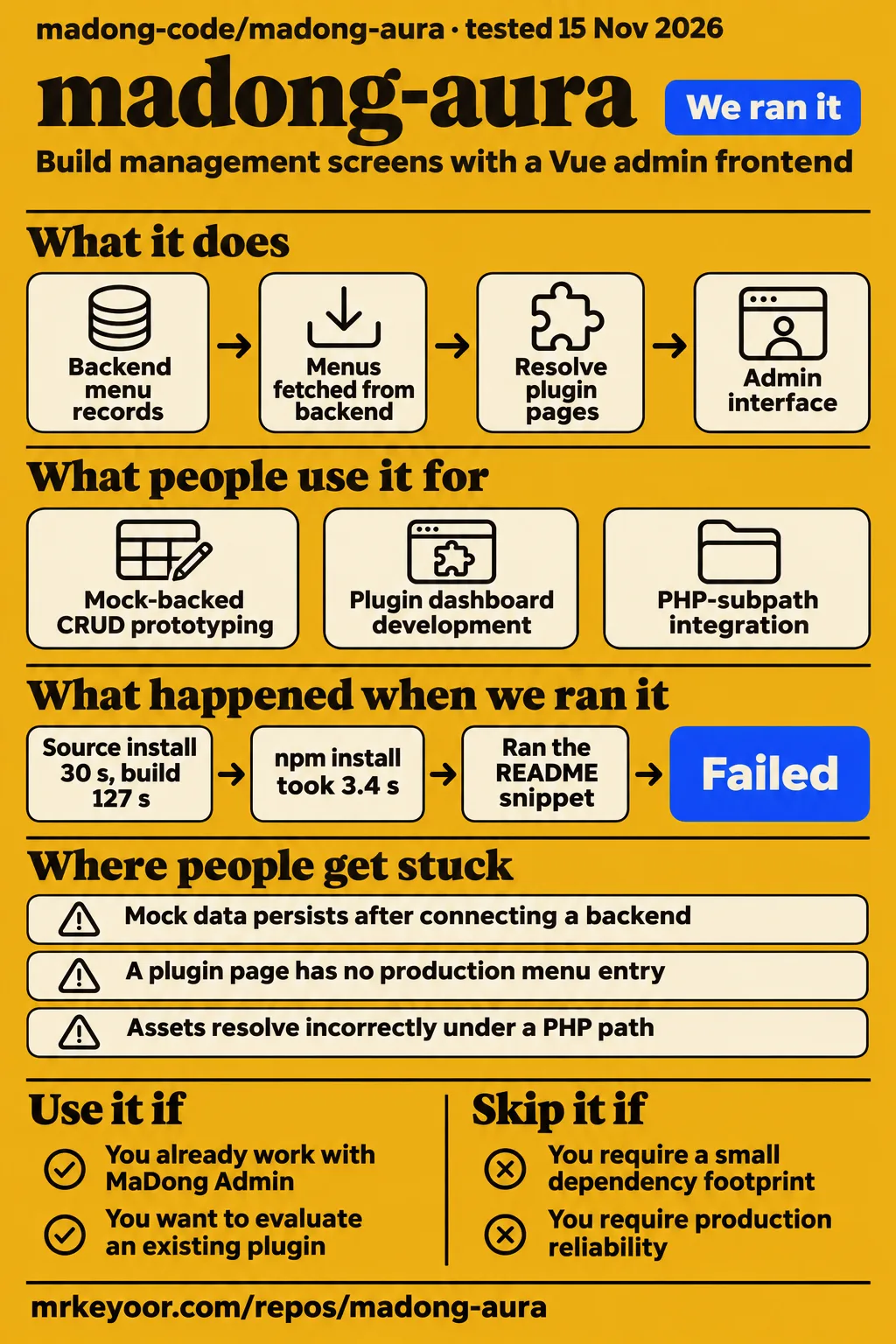
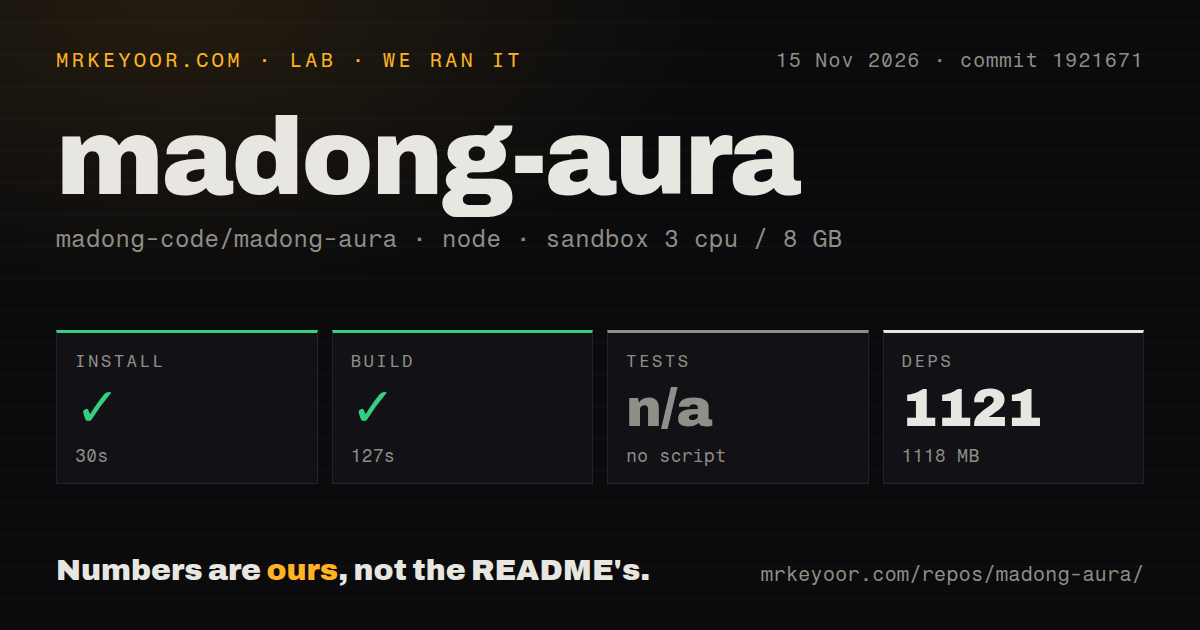
Our sandbox installed madong-aura in 30 seconds and built it in 127 seconds; tests were skipped because there was no test script or target. Use it if you already work with MaDong Admin and want to evaluate a different admin interface within the ecosystem's documented business conventions. Skip it if your selection requires an already demonstrated plugin migration or production deployment. The immediate next step is an existing plugin task against the backend you intend to use.
MaDong-Aura is the Vue admin frontend in the repository madong-code/madong-aura. Its default README is Chinese, with a separate English README covering requirements, deployment and plugin routing. Upstream describes a specific combination: business-layer conventions shared with madong-single and a container layout borrowed from art-design-pro. That relationship gives this review its focus. The useful adoption question is whether the documented integration paths fit a MaDong team's existing modules and backend menus.
What you can do with madong-aura
The English README describes MaDong-Aura as a companion frontend for MaDong Admin and a standalone admin template. It claims that the business-layer structure, API contracts and plugin mechanism align with madong-single. For an existing MaDong team, the attraction is a different container layout around familiar business conventions. Start the evaluation with a module you already understand, so its requests, navigation and component requirements give you concrete things to compare with the documented structure.
The documented components cover list pages, forms, dialogs and drawers. Upstream also lists vxe-table support for virtual scrolling, cell editing and tree tables, alongside VForm3 and LogicFlow designers. These features suggest practical evaluation tasks: editing a record, displaying hierarchical data or constructing a form. Choose a task that resembles an operator's daily work. A long component list becomes useful when you can connect each required screen to a documented component or designer. Component descriptions in the English README.
Plugins live under src/plugin/, with static route declarations available during development and backend menus driving production registration. The README places framework code under src/core/, business APIs under src/api/ and reusable business components under src/components/. This organization gives plugin authors a map for reviewing an existing module. Follow its page entry, API request and shared component separately; each belongs to a documented part of the frontend rather than an undifferentiated collection of dashboard files.
What people use madong-aura for
Gitnova lists three possible uses: mock-backed CRUD prototyping, dashboards with backend-loaded menus and deployment independently or under a PHP subpath. Its description is labelled an AI-generated README summary. Treat these as advertised applications when choosing an evaluation task. The primary README supplies the corresponding development and deployment details, including the mock service, plugin route declarations and two production build modes. Gitnova's advertised uses.
For mock-backed CRUD prototyping, the README describes a Nitro service with a response envelope of { code: 0, msg: 'ok', data: ... } and list results containing { items, total }. It also names exact-match, fuzzy-match and keyword query conventions. Those details help a frontend developer inspect how a management screen expects to receive data. Begin with one list and its edit form, then trace their requests through the documented mock structure.
For plugin dashboard development, development routes can live beside the plugin pages in routes/index.ts. Production registration uses backend menu records. For PHP-subpath integration, the integrated build targets /admin/. These paths answer different practical needs: building a module locally, exposing it through real navigation and placing the frontend at the intended URL. Select the path that matches your task before changing several configuration areas at once.
What happened when we ran it
In our November 15, 2026 sandbox run at commit 1921671, installation succeeded in 30 seconds and the build succeeded in 127 seconds. The recorded sandbox configuration was 3 CPUs, 8 GB RAM and image label lab-node:22. Our run measured repository setup and build results. The table keeps the dependency footprint, checkout size and scan findings separate so a developer can see exactly what each observation contributes to the setup decision.
| Check | Recorded result | What it tells a developer |
|---|---|---|
| Dependency installation | Succeeded in 30 seconds | The recorded setup step completed |
| Dependencies | 1,121 recorded; 1,118 MB on disk | Budget local disk for the development environment |
| Build | Succeeded in 127 seconds | The recorded build step completed |
| Tests | No script or target; skipped | There is no passing test-suite result |
| Repository | 1,092 files; about 95,310 source lines; 25.4 MB checked out | The checkout contains a substantial frontend codebase |
| Repository signals | Zero CI workflow files, no Dockerfile or tests directory detected; monorepo workspaces | These are scan results for the named files and locations |
The storage difference is the clearest practical setup finding: a 25.4 MB checkout accompanied an installation occupying 1,118 MB for dependencies. That figure describes development storage. The 127-second build duration belongs to the recorded sandbox configuration. Together, these numbers give a team concrete inputs for allocating a development environment and scheduling its first build, while the skipped-test result tells the team exactly what the harness reported after installation and compilation.
The separate quickstart-lib record used commit identifier 192167128017 on November 15, 2026 and an unprivileged lab-node:22 container with 2 CPUs, 4 GB RAM, no published ports and no secrets. It installed the npm package named aura. That package identity differs from the repository's documented pnpm workflow, so the following results remain attached to that recipe.
| Recipe step | Recorded result | Interpretation |
|---|---|---|
| Clone | quickstart-lib step took 2 seconds | Timing belongs to this recipe |
| Install | npm install aura@latest installed aura 0.13.0 in 3.4 seconds | This is the recorded npm package and version |
| Installed size | 2.1 MB in node_modules | Footprint belongs to the npm installation |
| Dependency count | Zero packages besides aura installed | Count belongs to that package installation |
| Snippet | Failed: the README has no JavaScript/TypeScript code block to run | The recorded finding is no-snippet |
| Teardown | ok | The recipe recorded successful teardown |
The failed snippet step is named no-snippet: the log says the README has no JavaScript/TypeScript code block to run. The recipe therefore supplies a failed snippet extraction, alongside its package installation and cleanup results.
Where people get stuck
The README separates static development routes from backend-driven production menus, making routing configuration a concrete integration checkpoint. A plugin page declared locally and a page registered through a backend menu follow different documented entry paths. Use the checklist below when reviewing the relevant configuration and payloads. Each row points to a README rule, including the root-layout exception that makes copying identical metadata onto every menu node a poor match for the documented format.
| Situation to investigate | Documented detail to check | Why it matters |
|---|---|---|
| Mock data persists after connecting a backend | VITE_NITRO_MOCK and the proxy target | The README separates local mock mode from the real backend |
| A plugin page has no production menu entry | Backend sys_menu records and the user-menus response | Production navigation comes from backend menus |
| A component path points at the wrong module | Component notation and meta.module | The scanner uses module information to resolve pages |
| A root layout fails to resolve correctly | BasicLayout must not carry meta.module | The README makes this an explicit exception |
| Assets resolve incorrectly under a PHP path | Integrated build and /admin/ base | The documented build modes use different deployment bases |
The README maps demo:crud/basic to src/plugin/demo/views/crud/basic/index.vue. It also accepts crud/basic when meta.module supplies demo, while BasicLayout is reserved for root nodes and must not have meta.module. For production registration, upstream describes sys_menu records carrying module metadata and menus fetched from GET /system/auth/user-menus. Read the component field and metadata together when inspecting a menu entry. Plugin path-resolution rules.
Deployment means choosing a base path and an API route
The documented standalone build uses / as its base, while the integrated build uses /admin/ for a PHP subpath. The deployment table associates pnpm build with a standalone domain and /adminapi gateway forwarding. It associates pnpm build:integrated with same-domain deployment and a relative /adminapi API path. Decide where the frontend will live before reviewing asset URLs and application links; the README gives a distinct command for each production arrangement.
Development requires Node.js 22 or newer and pnpm 10 or newer according to the English README. Its pnpm dev command starts the frontend on port 5500 and Nitro Mock on port 5320. To connect a real backend, the instructions set VITE_NITRO_MOCK to false in .env.development and point the proxy at the backend, with http://127.0.0.1:8500 shown as the default target. Requirements and deployment instructions.
Security configuration includes permission modes and button directives
The README lists frontend and backend permission modes, role permission codes and button-level authorization directives named v-access and v-roles. It also documents the demonstration login admin / 123456, with user_name as the username parameter. These details identify the access-control surfaces a MaDong team should include in its integration task: the account, its menu entries, the visible actions and the API requests those actions send. Access-control and login documentation.
A useful acceptance task pairs an allowed operation with a forbidden operation for the same screen and account context. Record the account's role, the menu entry and the API response for each action so the result is interpretable. This is a proposed next step for the team evaluating the frontend. It follows from the documented permission modes and backend integration, and gives the adoption decision a more concrete basis than a screenshot of a hidden button.
Chinese-first documentation includes an English entry point
The default README is Chinese, and README.en.md supplies English requirements, deployment instructions and plugin examples. The English README also advertises zh-CN and en-US interface support with plugin translations loaded by directory convention. An English-speaking developer can therefore start with the documented setup and routing rules in that file. Its specific paths and commands are also useful review material for a teammate checking how an existing module fits the proposed frontend structure.
The numerical cards assess two narrow tasks on a five-point scale: 1 means the documented path is obstructed, 3 means it is usable with material limits, and 5 requires demonstrated coverage across the assessed task. Setup receives 3 for successful installation and build, the 1,118 MB dependency footprint and skipped tests. Documentation receives 4 for concrete English requirements, commands, deployment bases and plugin-resolution examples. Community and maturity render as N/A; their evidence gaps are recorded in the final section.
madong-aura vs madong-single and art-design-pro
MaDong-Aura names madong-single as its business-contract reference and art-design-pro as the source of its container layout. Those relationships make the alternatives useful for different starting points. A MaDong team can compare the reference frontend with Aura's documented organization, while a team mainly interested in the layout can inspect Art Design Pro directly. The table uses the projects' primary documentation to explain those choices. Aura's description of its relationship to both projects.
| Project | What its primary documentation says | Pick it when |
|---|---|---|
| MaDong-Aura | MaDong frontend with business contracts aligned to madong-single and a layout borrowed from art-design-pro | You want that layout within MaDong's documented business conventions |
| madong-single | MaDong frontend rebuilt around Vue Vben Admin for the MaDong backend | You want to evaluate the reference frontend named by Aura |
| Art Design Pro | Vue3, TypeScript, Vite, Element-Plus and Tailwind CSS admin template | You want to start from the layout project's own template |
madong-single's README identifies Vue Vben Admin v5.7.0 as its basis and targets the MaDong 5.1+ backend. Art Design Pro's README lists its Vue3, TypeScript, Vite, Element-Plus and Tailwind CSS stack. If an existing MaDong module drives the decision, compare its route declaration, request format and reusable components first. If the layout drives the decision, inspect the layout project's own template before taking on MaDong-specific business conventions.
What the other reviews get wrong
Gitnova lists October 12, 2026 as its last-push date, while the supplied GitHub topic listing shows a November 12, 2026 update for madong-aura. These are different dated snapshots. The correction concerns repository activity: the later listing shows an update after the date presented by Gitnova. Keep that narrower fact attached to its source rather than treating an older activity card as a current account of the repository. Gitnova activity snapshot, GitHub topic listing.
Gitnova's captured summary reports 121 stars and labels its README summary as potentially inaccurate. The November 15 repository metadata in the supplied evidence records 119 stars, zero open issues and pull requests, and a November 12 push timestamp. The fetched all-state issue endpoint contains an empty list. These records describe their respective captures; use the dated metadata for the repository snapshot and the primary README for setup instructions. Repository metadata, captured issue response.
FAQ
Yes, MaDong-Aura can run without MaDong Admin through its documented built-in Nitro Mock service. The README says the development command starts the frontend and mock server together, and it supplies a demonstration account. The following first-time-user questions cover that standalone path, its developer requirements and the documented PHP deployment option. Each answer follows the English README so a reader can move from the answer to the relevant setup or deployment instructions.
Can I run madong-aura without MaDong Admin?
Yes, the README documents a built-in Nitro Mock server on port 5320 for standalone operation. Its pnpm dev command also starts the frontend on port 5500. Use this documented path to inspect the screen structure and plugin organization before connecting a MaDong backend. The same README explains where plugin-level mock data and development route declarations belong. Standalone mode and development commands.
What Node.js and package manager does it require?
The README requires Node.js 22 or newer and pnpm 10 or newer. The documented quick start installs dependencies with pnpm install and starts development with pnpm dev. Those commands are the repository's stated entry point for a developer evaluating its frontend and mock service. Follow that workflow when planning a repository setup rather than substituting the separate npm package recipe recorded in the research pack. Runtime requirements and quick start.
Can I deploy it under a PHP project's subpath?
Yes, the README documents pnpm build:integrated for a same-domain PHP subpath with base /admin/ and a relative /adminapi API path. Its separate pnpm build command targets / for standalone-domain deployment. Choose the build corresponding to the intended hosting URL, then review the matching API routing with whoever operates the backend. The deployment table presents both arrangements together. Build commands and deployment bases.
What we have not tested yet
Our repository run ends at installation and build, with tests skipped because there was no script or target. It includes no browser session, login exercise, madong-single plugin migration, production deployment, English interface coverage measurement, security audit, accessibility assessment, browser performance result or concurrent-user workload. Actual runtime and operating-system versions require raw toolchain logs; the sandbox image label supplies neither. Dependency storage and build duration also leave deployed asset size, server memory use and operating reliability unanswered.
The supplied records contain no named user deployment outcome, relevant issue-resolution story or useful MaDong-Aura setup video. Community support experience and maturity therefore remain unassessed. The routing checklist comes from documentation rather than reproduced bugs, and the alternatives table contains no comparative benchmark. Gitnova's activity rating supplies no safety assessment, while the topic listing identifies an update date rather than a commit. The null latest-release lookup supplies no release-status conclusion. The npm aura 0.13.0 recipe supplies no repository application assessment.
For a MaDong team, the next decisive task is an existing plugin opening from a real backend menu, completing an allowed action and receiving a rejection for a forbidden one. Record those outcomes against the chosen frontend and backend revisions. That task addresses the shared-contract claim directly and gives the team a result tied to its own business workflow, beyond the installation and build measurements reported here.