Twelve skills cover the work around a LinkedIn post
The current README lists 12 skills. They cover post writing, comments, replies, profile edits, content planning, repurposing, engagement monitoring, interviewing, and a humanizer. Most are detailed instruction files that tell Claude Code or Codex how to approach a bounded job. Python handles the less subjective pieces: URL parsing, calls to reading and publishing services, configuration checks, and approval-time actions.
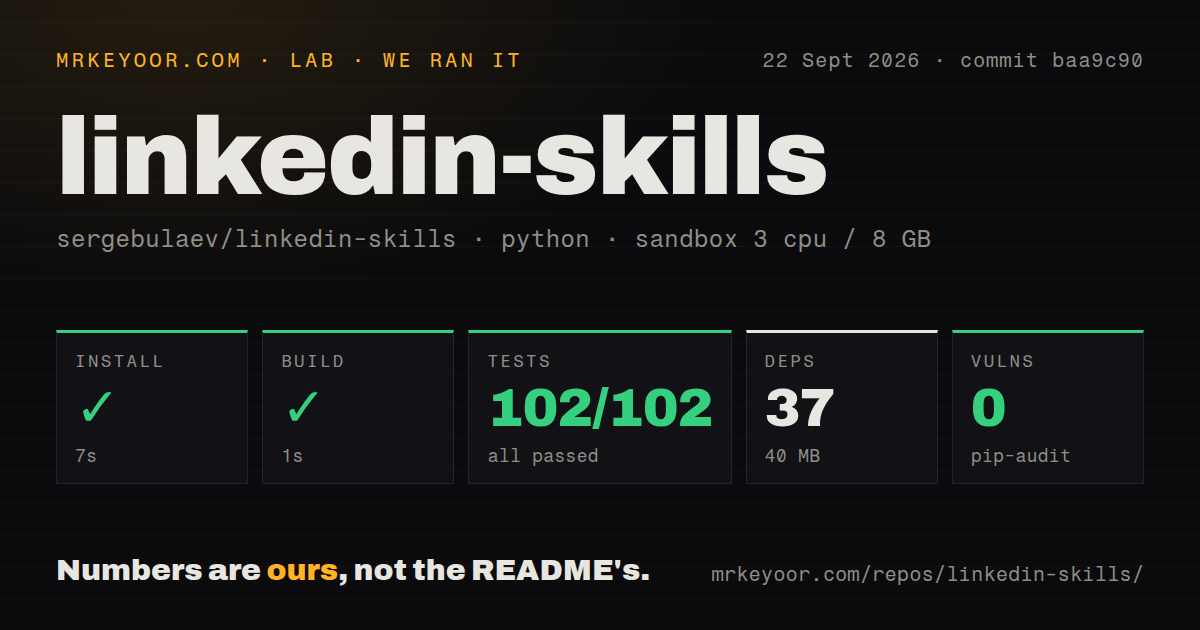
The checkout is still small enough to audit. Our commit baa9c90 clone contained 207 files, about 9,987 source lines, and 3 MB before installation. That matters for a skill bundle because the product is readable text plus thin clients, not an opaque application. You can inspect a hook formula, remove advice you dislike, or disable the publishing layer without rebuilding a social platform.
Approval separates writing help from account actions
Every action flow is supposed to stop after drafting and wait for the user to approve. In manual mode, approval returns a block to paste into LinkedIn. Connected mode can send the approved item through Publora. The same pattern applies to comments and replies, so the project is most useful as a repeatable operating procedure rather than a promise that an agent should run a public identity alone.
Our local setup makes that procedure cheap to examine: 37 packages installed in 7 seconds and occupied 40 MB. The direct runtime requirements are requests and python-dotenv. Most of the repository is skills and references, while the Python layer deals with external services. A marketer can use draft mode without installing a self-hosted web app or maintaining a database.
What happened when we ran it
Our sandbox installed LinkedIn Skills in 7 seconds, built it in 1 second, and finished pytest in 2 seconds. All 102 tests passed. The run used a fresh unprivileged Debian container with 3 CPUs and 8 GB of RAM, no secrets, and commit baa9c90. Pip-audit reported 0 known vulnerabilities in the installed Python environment.
The repository had 2 CI workflow files and a tests directory. Our scan found no Dockerfile, which fits a plugin and local-library project rather than a network service. The passing 102-test result establishes that the checked-in Python behavior and test suite worked in our environment. It does not grade the quality of a generated post, prove a reach claim, or test LinkedIn account behavior because the sandbox had no credentials.
Three optional services decide what leaves your machine
Draft mode can stay local to the agent conversation. Automatic post and comment reading uses Apify actors. Publora holds the connected publishing path, while Pixfaro provides generated images and server-rendered quote cards. Each layer is optional, and missing read access falls back to asking you to paste source text. That is a sensible degradation path for a writing tool.
The 40 MB local install should not be confused with a private end-to-end system. Connected use sends relevant data to whichever service performs the job, and it adds tokens or API keys to your environment or connector settings. Teams should decide separately whether Apify may read public feed material, Publora may act on the account, and Pixfaro may receive an image prompt. One blanket approval hides three different trust decisions.
v1.1.13 documents scraped text as an injection risk
The security guide names 5 skills that put posts, comments, profile text, or engager names into the model context. It instructs the agent to treat fetched content as data, keep it from changing the draft, and refuse any approval found inside that content. The guide also warns that the optional custom-poster environment variable names a command that will run after an approved publish.
Our 2-second test run passed all 102 cases, but it did not conduct an adversarial prompt-injection exercise with a live publishing credential. The safeguard described here is partly behavioral: the model must continue to respect the skill's trust boundary when a LinkedIn post tells it otherwise. Keep the approval step visible, limit the connected account, and avoid the custom poster unless its command and environment are controlled like credentials.
v1.1.13 cannot take back a live post
Release v1.1.13 draws a useful line around unpublish. It can cancel a draft or scheduled post. It refuses to delete a group once a post is live because deleting the service record would leave the LinkedIn post in place while removing its media and statistics. A published post still has to come down through LinkedIn itself. That is an honest limit, and operators need it in their incident checklist.
The release says 3 tests pin this behavior, while our full run passed 102 tests at commit baa9c90. The client checks live status before deletion, requires a concrete post-group ID, and does not pretend a missing value is success. That is better than a green response for an action that did not happen. It also means this bundle cannot serve as the sole control surface for publishing mistakes.
September activity is current, while the skill count disagrees
GitHub showed 3,136 stars and 6 combined issues and pull requests on September 22, 2026. The repository was pushed that day, and v1.1.13 was published on September 18. The only open issue returned by GitHub asked for a post-auditor feature that the README now describes under the humanizer, while the remaining open count included pull requests.
The 207-file repository is maintained, but its public inventory needs one cleanup pass. The README says 12 skills and lists 12. The root SKILL.md calls the bundle 11 focused skills while also listing the interviewer as another route, and the GitHub description says 11. That mismatch does not break the code. It does make the README the safer inventory to follow until the other entry points catch up.