Three moving parts connect an agent to one EasyEDA window
easyeda-agent splits the working path across 3 components. A Go CLI and daemon own commands, state, artifacts, and validation. An .eext connector runs inside EasyEDA Pro and calls the official eda.* API. A Skill tells Codex or Claude Code how to plan and check the work. The optional stdio MCP server calls the same typed command layer.
Typed actions reduce risk, but EasyEDA provides no undo API
Version v1.5.2 wraps edits in named actions with preconditions, readback, audit records, and explicit failure states. The MCP adapter deliberately withholds the arbitrary JavaScript debugging command. Those choices make a request easier to inspect than giving a model a general code channel inside the editor, especially when a schematic change touches component identity and net connectivity.
The safety layer cannot create an undo feature that EasyEDA does not expose. The README says rollback uses data checkpoints and inverse operations. Open issue 208 describes a harder case: a pin-connection write can finish after its 7-second internal timeout, leaving an orphan flag after rollback. Treat a reported failure as a reason to reread the document, not proof that nothing changed.
What happened when we ran it
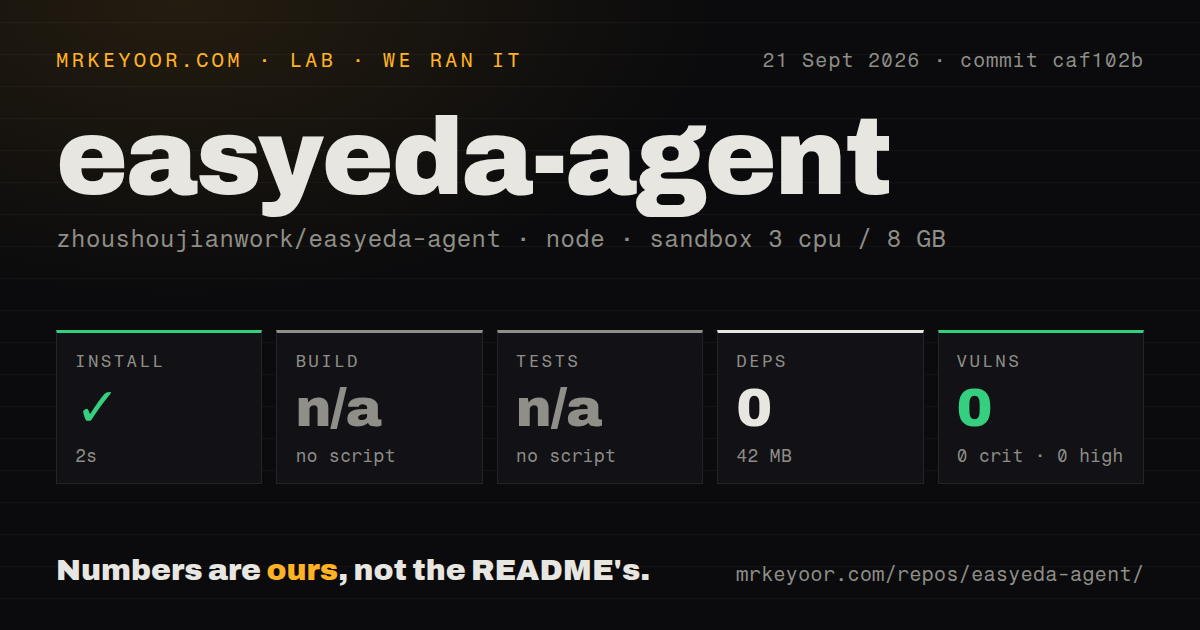
Our npm sandbox installed the checkout in 2 seconds, added 0 packages, and used 42 MB on disk. The repository held 959 files and about 208,578 source lines. It had 2 CI workflow files, no Dockerfile, and no tests directory. Installation succeeded, but the small result reflects the root package rather than the complete editor toolchain.
There was no root build script or target, so the build step was skipped. There was also no root test script or target, so the test step was skipped. npm audit reported 0 known vulnerabilities across every severity level. That clean audit covers the npm tree the harness found. It does not cover the Go CLI, the connector's separate build, or behavior inside EasyEDA Pro.
A 2-second npm install does not install the working system
The root package.json is private bundle metadata and declares no dependencies or scripts. Actual users install a released CLI, add the Skill, import or obtain the connector, enable external interaction, start the daemon, and open a project. The README advises keeping all 3 components on the same release and checking them before an agent writes to a design.
The MCP path adds another explicit command: install the adapter under mcp/, register its stdio server, point it at the easyeda binary, and restart the client. None of that ran in our 2-second root npm step. A useful acceptance test must include the desktop editor, one throwaway project, a write, a readback, DRC, save, close, reopen, and another readback.
Issue 221 makes EasyEDA 3.2.149 a risky restart target
Open issue 221 reproduces a connector that works during its import session on EasyEDA Pro 3.2.149 for Windows 11, then makes no connection attempt after the application restarts. The reported workaround is to re-import the same .eext after each launch and enable it again if needed. That is a host-version problem with direct consequences for this tool.
Release v1.5.2 documents the same cold-start defect as unresolved. Its notes also say no EDA window was connected on the release host, leaving live import, save and reload verification plus the fixed ESP32 regression incomplete. The repository was pushed on September 21, 2026, and the release arrived one day earlier, so development is active while editor-level acceptance remains unfinished.
Dense routing and controlled impedance remain outside the claim
The built-in router handles short, clear connections. The README sends dense or maze-tier work to Freerouting through a DSN export and import path, while a turnkey integration remains deferred. EasyEDA's API also withholds dielectric height, Er, and copper weight, so the agent cannot compute or certify controlled-impedance widths from the live design. These are explicit platform limits, not hidden omissions.
That boundary makes easyeda-agent better suited to supervised automation than autonomous board sign-off. It can place parts, organize a schematic, read rules, run checks, and produce artifacts. An engineer still owns stackup evidence, signal-integrity decisions, dense routing review, physical fit, and manufacturing acceptance. The 42 MB sandbox footprint says nothing about any of those outcomes.
The English README is 2 releases behind the latest tag
The primary README is Chinese and reflects current workflows. An English README exists, which is better than machine-translating every command, but its banner still says v1.4.5 while GitHub lists v1.5.2 as latest. English-only teams should read the release notes and feature inventory beside it, particularly before relying on connector installation or newly added PCB configuration commands.
GitHub showed 499 stars and 15 combined issues and pull requests on September 21, 2026. Twelve were open issues, including fresh reports about connector restarts, extension replacement, schematic identity, and partial writes. That activity is useful evidence of maintenance and real use. It also reinforces the adoption rule: pin versions and reproduce your desktop workflow before trusting a new release.
Zero installed packages earns a careful trial, not production approval
The 2-second install and 0-package result make the repository cheap to inspect, but they leave its main promise untested. Start with a disposable EasyEDA project and one reversible task. Confirm the target window, capture the before state, apply the typed action, inspect the readback and DRC, save, restart the editor, and verify the design again.
A team already committed to EasyEDA Pro may find the typed command catalog and audit trail genuinely useful. A team choosing an editor has broader options, and a team expecting unattended PCB generation should wait. The deciding evidence is a complete write and reopen cycle on your EasyEDA version, because neither 0 audit findings nor an empty root test target can stand in for that result.