Should you trial Dagger?
Trial Dagger when maintaining shared container workflows in code would solve recurring duplication between developer machines and CI. Its documented API covers containers, filesystems, secrets, Git repositories and network tunnels. That gives a team a concrete reason to evaluate it when workflow logic has outgrown a few commands. If a command runner already solves the problem, the evidence here does not establish a reason to introduce another execution engine.
Dagger runs locally, in CI, or in the cloud. The commit-pinned README documents a Linux container runtime as the requirement, with Docker Desktop or similar products supplying it on macOS and Windows. These are documented capabilities. Our sandbox did not demonstrate that an application pipeline produces equivalent results across those environments.
What did our sandbox actually establish?
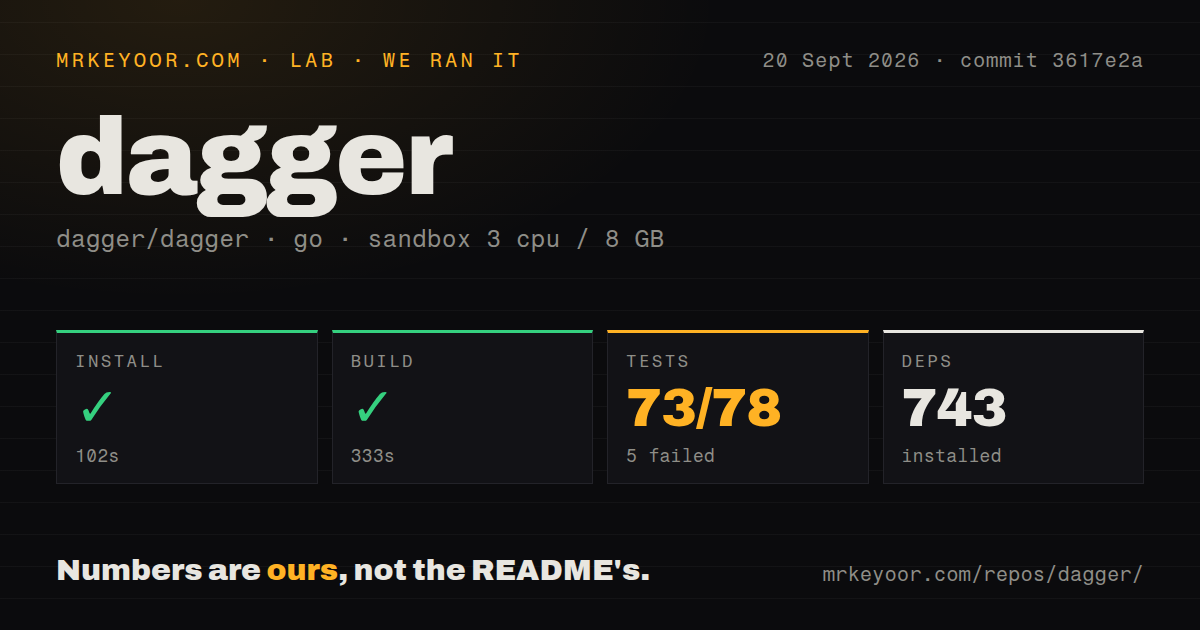
Our run on September 20, 2026, at commit 3617e2a evaluated the source checkout. Installation returned zero after 102 seconds. The recorded build step returned zero after 333 seconds. The test command returned exit code 1 after 152 seconds. Those outcomes support a qualified source-validation finding, not a deployment recommendation.
Our harness records each step's status, elapsed time, exit code, timeout status and output tail alongside parsed summaries. The build tail includes warnings about discarded context-cancellation functions and ends with vet-exit:1. Read that output alongside the zero step exit: the record does not establish that vet passed.
Our sandbox had 3 CPUs, 8 GB of memory and the golang:1.24-bookworm image. The install tail records a download of go1.26.6, so the image name alone does not establish the toolchain used throughout execution. The MrKeyoor testing methodology explains how the publisher records command outcomes and their limits. Its current text does not establish which methodology version governed this September run.
What does the test summary mean?
The attached stored parser summary records 5 failed package entries. It separately records 73 successful package entries and a total field of 78. The raw measurement names the relevant categories packagesFail and packagesOk. These figures must not be presented as counts of individual test cases, and they do not establish exhaustive unique test coverage.
The raw tail identifies failures within github.com/dagger/dagger/internal/cmd/dagger. Named examples include TestCloudChecksOnUnauthenticated, TestCloudLoginStoredCredentials, TestInitConsoleShowsCommands, TestModuleRecommendationsInspectContents and TestDaggerCMD. These names show affected areas separately from the stored package summary; they are not a replacement aggregate. The supplied tail lacks enough assertion detail to establish the causes, including whether the sandbox environment contributed.
Skipped-test counts are unknown. No audit result is attached, and security scan coverage is unknown. Neither a successful command nor an absent audit result establishes production reliability or security.
What would you maintain?
The commit-pinned README describes generated SDKs for Go, Python, TypeScript, PHP, Java, .NET, Elixir and Rust. It documents operations keyed by their inputs, content-addressed caching across local runs and CI, and OpenTelemetry tracing. Those features provide a basis for evaluating reusable workflow code and debugging complex execution graphs. We did not measure their effect on pipeline duration or operating cost.
Adoption still means maintaining workflow functions, module choices and the execution environment. The source checkout's 173 MB footprint is relevant to contributors, but it does not establish the installed size or maintenance cost of a released CLI deployment. Evaluate those separately with the distribution and pipeline you intend to use.
Do Cloud Checks replace your CI service?
Cloud Checks can run workspace Checks on Cloud Engines after Git events without a CI workflow file, according to the supplied current guide. Setup requires a GitHub repository, an origin remote pointing to it, a Dagger Cloud account and organization, a GitHub connection and repository authorization. Our September source run did not exercise that setup.
Dagger can also run inside an existing CI server. Reusing Dagger workflow logic therefore does not automatically require replacing the service that triggers it. The current quickstart describes running Checks locally and warns that a module can find nothing to check. In your trial, verify that a relevant Check actually executes before treating a successful command as validation.
Which alternatives fit a different requirement?
Task is a cross-platform build tool inspired by Make. Consider it for repeatable command execution when you have not established a need for Dagger's container orchestration API. The supplied Task extract does not establish equivalent isolation, caching or tracing, so this is a choice about the job you need done rather than a claim of feature parity.
Tekton Pipelines runs CI/CD-style pipelines on Kubernetes. Consider it when Kubernetes resources are the pipeline execution model you want. Its supplied documentation establishes that cluster-oriented role; it does not demonstrate the same developer-machine workflow described by Dagger. An existing CI service can remain a complement to Dagger, while Task and Tekton address overlapping requirements through different execution models.
How are the scores assessed?
The editorial rubric is: 1 means a major obstacle, 2 substantial friction, 3 a usable path with material qualifications, 4 strong evidence with minor gaps, and 5 comprehensive evidence for the dimension. Scores assess the supplied evidence, not runtime performance. A dimension remains unassessed when that evidence cannot support a rating.
Setup receives 3: the documented runtime requirement and quickstart establish an entry path, while our source validation has material qualifications and released CLI setup was not tested. Documentation receives 3: the supplied guides explain initial configuration and Cloud Checks prerequisites, but do not establish complete operational coverage. Community responsiveness and production maturity remain unassessed.