State graphs pay off when work must resume after a failure
LangGraph is aimed at agents that outlive one model response. A graph holds state while nodes perform work and edges decide what happens next. Persistence lets a run continue after a process stops. Interrupts can pause execution for a person to inspect or change state before the graph proceeds. If your agent has branches, retries, approvals, or work that may sit overnight, those mechanics solve a real problem.
The cost is that you own the graph. The README calls LangGraph low level and points developers who want a quicker, packaged agent to Deep Agents. That distinction is honest. A basic question-answer bot does not become better because someone drew it as nodes and edges. LangGraph earns the extra structure when you need to know exactly which step ran, what state it wrote, and where a resumed run should continue.
What happened when we ran it
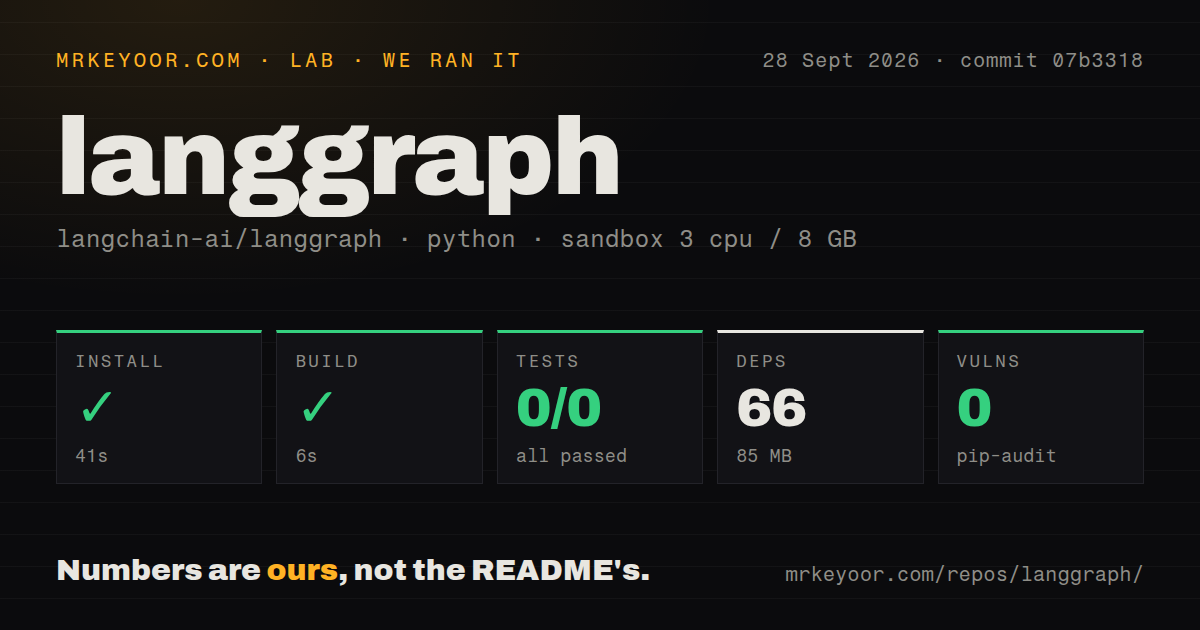
Our run installed commit 07b3318 in 41 seconds, pulling 66 packages and using 85 MB on disk. The build succeeded in 6 seconds. We ran the CLI project in a fresh unprivileged Debian container with 3 CPUs, 8 GB of RAM, Python 3.12, and no secrets. Pip-audit reported 0 known vulnerabilities. These measurements cover package setup and the CLI build, not agent latency or model quality.
Pytest failed with exit 4 after 15 seconds. It collected 510 items, then ran 0 tests and printed Unknown config option: asyncio_mode. The log showed pytest 9.1.1 and listed its loaded plugins, but it did not name a root cause beyond the rejected option. The CLI's pyproject.toml includes pytest-asyncio in its test dependency group. We cannot tell from the supplied log why that configuration was unavailable during this run.
The checkout contained 675 files, about 192,119 source lines, and 13.9 MB before installation. Our scan found 17 CI workflow files and a tests directory, so this is not a project with no test material. It had no Dockerfile at the repository path we scanned. The CLI itself has a dockerfile command that generates one for an application, which explains how a user can build containers without a checked-in root Dockerfile.
The CLI serves on port 2024 or launches Docker on port 8123
langgraph dev runs an API server with hot reload on port 2024 by default. The documented local path needs Python 3.10 or newer, the inmem optional dependency, and a langgraph.json file pointing to your graph. That configuration also names local or package dependencies and can load an environment file. Your model API keys come from the graph and provider you choose, rather than LangGraph imposing one model vendor.
langgraph up moves the API server into Docker and exposes port 8123 by default. The same CLI can build an image for one or more target platforms or generate a Dockerfile for a custom deployment. Its README warns against putting credentials in copied dependency URLs or configuration files, and recommends a secret-backed Git credential helper for private code. That warning matters because image layers are hard to clean after a secret is copied into them.
Parallel interrupts currently have a duplicate-write report
Open issue 9106, filed September 29, 2026, demonstrates two parallel nodes inside a subgraph pausing before external side effects. When the interrupts are resumed one at a time, the report says the first completed node runs again while the second resumes, causing a duplicate external record. The final graph state still looks correct in the reproduction. That combination is dangerous because a state assertion can pass while the outside system receives the action twice.
The report is about a specific nested, parallel interrupt topology, not every resumed graph. Still, it lands directly on LangGraph's main promise: controlled durable execution. Treat email sends, payments, ticket creation, and database writes as retryable operations. Give them idempotency keys or deduplication at the receiving boundary. Human approval does not make a repeated side effect safe by itself, especially when the approval is the event that triggers a resume.
LangGraph works alone, while hosted operations point to LangSmith
The core README says LangGraph can be used without LangChain. That gives you room to bring another model client, tool layer, or storage design. Its public interface draws on NetworkX, while its execution ideas cite Pregel and Apache Beam. The practical attraction is control: application code defines the state and transitions instead of hiding orchestration behind a role prompt.
Debugging and hosted deployment in the README point toward LangSmith. LangSmith adds traces, evaluation, visual inspection, and a deployment service; Studio supports visual work on graphs. You can decline that service and keep the core local, but then your team owns comparable observability and operations. Decide early whether you are choosing LangGraph by itself or the wider LangChain stack, since those have different credential, hosting, and cost reviews.
A September 29 push sits beside 836 open issues and pull requests
GitHub showed 42,490 stars and a September 29, 2026 push. Its combined open counter was 836; separate searches found 590 issues and 246 pull requests. The latest release returned by GitHub was the CLI development tag cli==0.4.32.dev0, published September 23. Those dates show active work, while the queue gives adopters plenty of component-specific history to search before selecting a checkpointer or deployment path.
LangGraph is the right kind of complicated for an agent that must stop, wait, and resume without losing its place. The abstractions map to that job instead of pretending every agent is a chat loop. Our CLI build passed, but the 510 collected tests never ran, so we would not wave it through a release review yet. Fix that test environment first, then exercise your exact checkpoint and interrupt topology before an external write can reach a user.