Short answer: this is an artifact-inspection candidate
Our source install took 16 seconds and the build took 1 second at commit 40b584c, while the application attempt stopped at a missing Compose file. Developers investigating the exact Windows download have a concrete starting point here: a small source checkout, conflicting version labels and two attributed setup reports. People choosing software for a funded wallet should skip this candidate on the strength of those results. The useful question is which artifact the instructions describe and how it relates to the source we exercised.
The target README presents Krypolybot Polymarket Mcp Whale Trader as a Windows application with copy trading, a paper-trade sandbox and a local key vault. Our recommendation concerns the evidence behind this particular download. The review follows three separate records: our source checks, GitHub commenters' Windows setup reports and documentation belonging to the similarly named Krypt PolyBot project. Keeping those identities straight is essential to understanding the results below.
What people use krypolybot-polymarket-mcp-whale-trader for
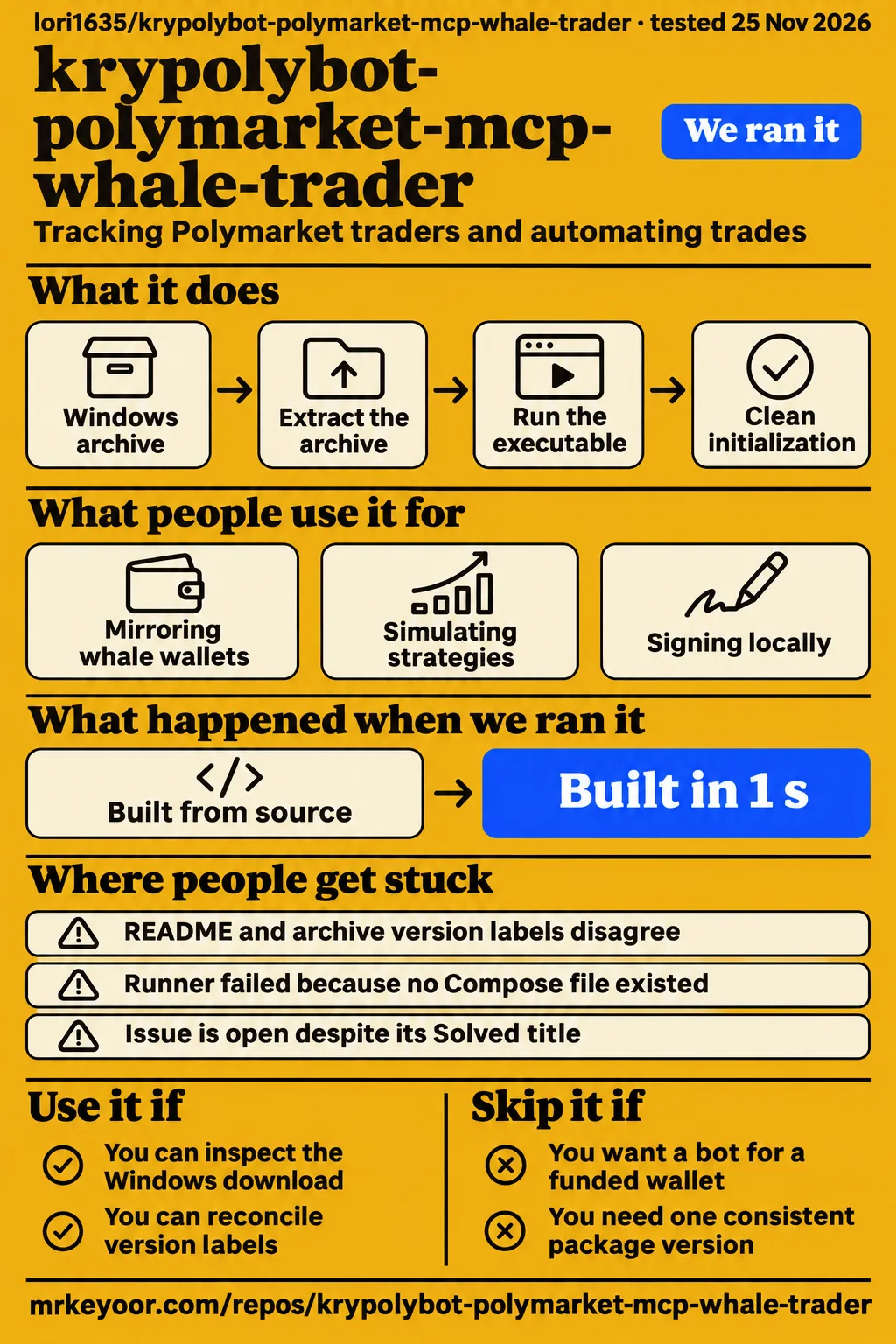
Two commenters in issue #1 report Windows setup outcomes: initialization on Windows 11 24H2 and portable-build hot reload on Windows 10 22H2. These are the concrete activities described by named users of the advertised package. Both comments refer to v1.2.2, which is different from the v1.2.0 archive linked by the README. Their operating systems, package names and reported outcomes belong together when comparing the accounts.
| Person and package | What they reported | What the report covers |
|---|---|---|
| alejandronowak95, v1.2.2 archive | Extracted the archive on Windows 11 24H2 x64 and reported clean initialization with the default configuration | Extraction and initialization |
| OnurMerkel25809, v1.2.2 portable build | Reported no dependencies needed and working hot reload on Windows 10 22H2 x64 | Portable-build setup and configuration reload |
Alejandronowak95 names the archive, password 2026, executable Krypolybot_Polymarket_Mcp_Whale_Trader_Setup_x64.exe and default config/settings.json. The reported sequence ends with clean initialization. OnurMerkel25809 describes a portable build and says hot reload worked out of the box. That distinction matters when matching instructions: an installer account and a portable-build account describe different package forms, even though both comments use the v1.2.2 label. Neither is the procedure used by our Python source harness.
The README's advertised uses include mirroring whale wallets, simulating strategies against live order books and signing locally. Those descriptions explain what the publisher is offering readers, while the table records what the two commenters say they did. For a developer investigating the download, the practical task is to connect a specific archive and executable to the corresponding instructions. The three version labels make that identification a necessary part of setup.
What happened when we ran it
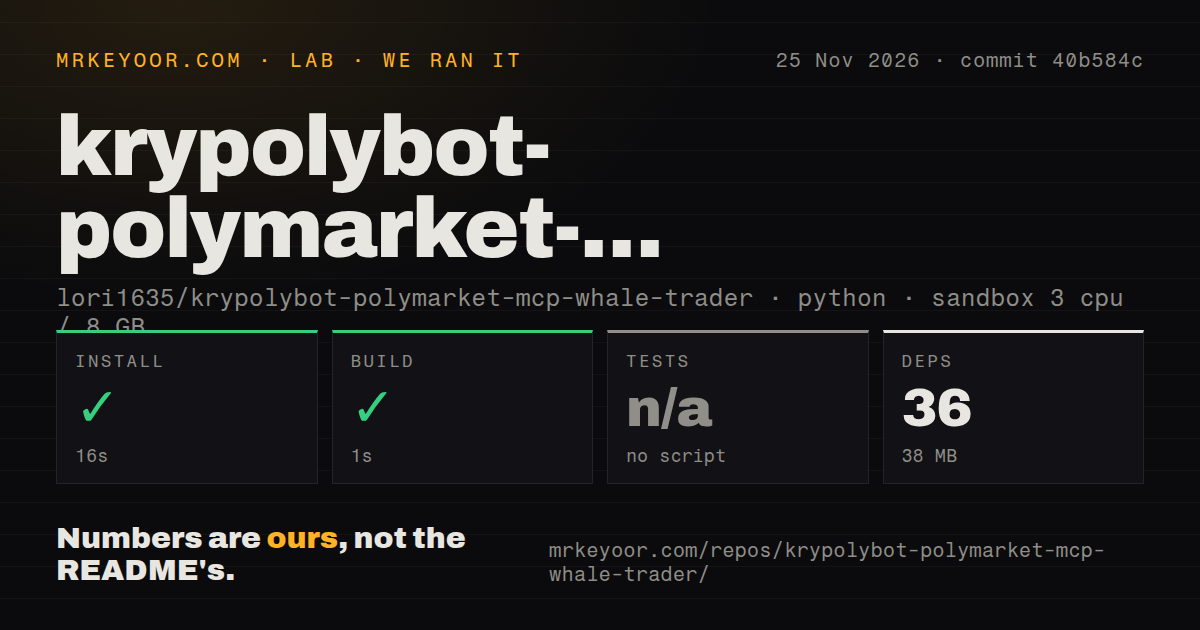
Our November 25, 2026 run at commit 40b584c installed successfully in 16 seconds and built in 1 second. We measured 36 dependencies and 38 MB on disk. The source harness skipped tests because there was no tests script or target. These results describe the repository checkout and its configured checks; the separate application attempt has its own failure record below. The checkout contained 27 files, approximately 40 source lines and 0.2 MB of files.
| Source check | Our recorded result |
|---|---|
| Install | Succeeded in 16 seconds |
| Dependencies and installed footprint | 36 dependencies, 38 MB on disk |
| Build | Succeeded in 1 second |
| Tests | No tests script or target; skipped |
| Checkout | 27 files, approximately 40 source lines, 0.2 MB |
| Repository signals | One CI workflow file, no Dockerfile, no tests directory |
The recorded sandbox configuration was 3 CPUs and 8 GB RAM, using image label ghcr.io/astral-sh/uv:python3.12-bookworm. Those details identify the configured environment for the source measurements. The harness recorded Python as the ecosystem and completed its install and build steps. A build duration of 1 second belongs to this checkout and harness operation; the Windows release instructions describe a separate archive, executable and launch procedure.
The application runner failed its safety step because no accepted Compose file existed. It checked for compose.yaml, compose.yml, docker-compose.yaml and docker-compose.yml. The runner requires a Compose file. Its error labels the repository "unsafe repo" because that prerequisite failed; that wording is the runner's classification of the missing file. The log identifies a failed deployment route rather than an application task result.
| Application record | Recorded outcome | Interpretation |
|---|---|---|
| Run summary | Says deployment used the repository's Docker Compose on November 25, 2026, with every port bound to 127.0.0.1 | Conflicts with the detailed prerequisite failure |
| Safety step | Failed because all four accepted Compose filenames were absent | The application attempt stopped at this requirement |
| Teardown | Reported successful cleanup | Cleanup completed after the failed attempt |
The detailed failure determines the application outcome. The generic summary's deployment statement and 127.0.0.1 binding description cannot be read as a successful service launch alongside a failed Compose prerequisite. Preserving both records makes the contradiction visible instead of silently choosing the more favorable description. The final application result is a stopped attempt followed by successful teardown, separate from the successful source installation and build.
Where people get stuck: three version labels
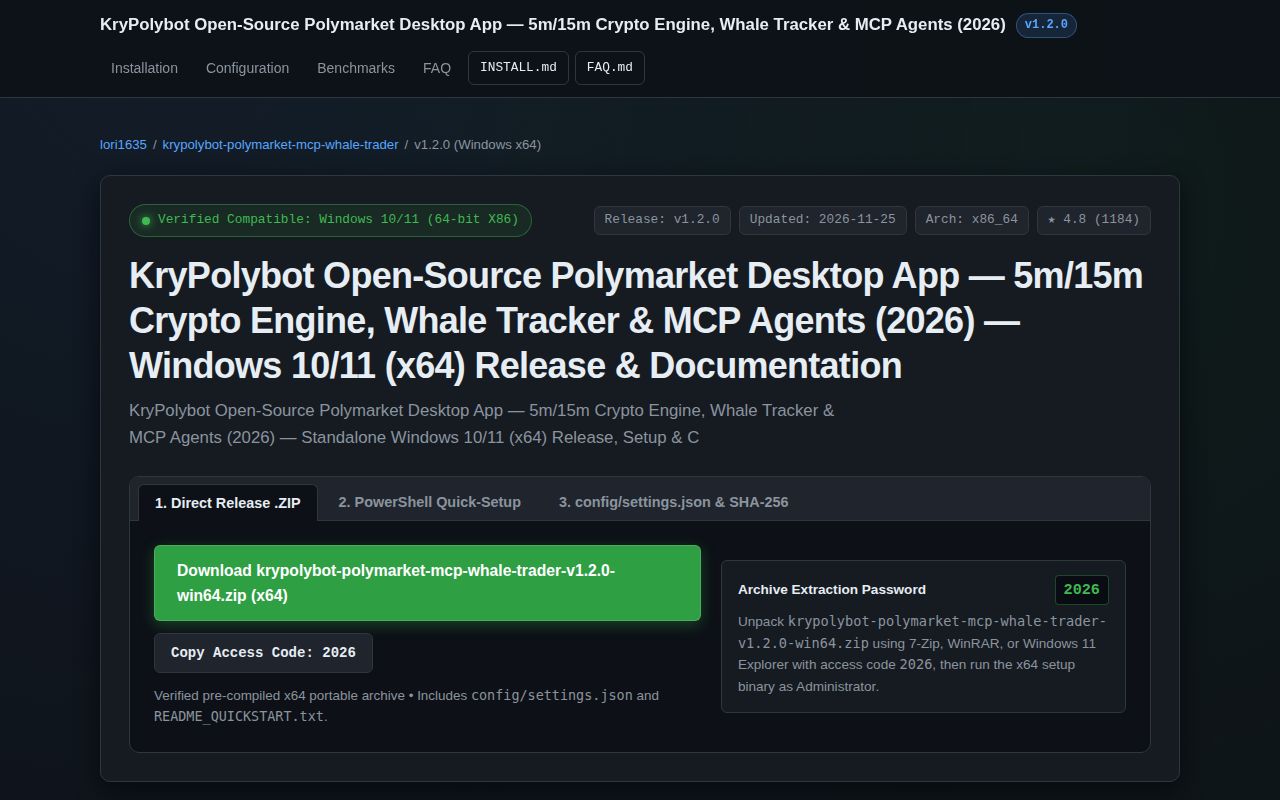
The README pairs application v2.8.7 with a v1.2.0 archive, while issue #1 promotes v1.2.2. The latest-release metadata identifies tag v1.2.0 and the matching Windows archive. A reader following the issue's latest-release link therefore encounters a destination whose recorded release tag differs from the issue's download wording. Record the actual filename and tag before matching a comment to a package.
| What you encounter | What the checked page says | Useful response |
|---|---|---|
| README download | v1.2.0 archive paired with application label v2.8.7 | Record the archive name and release tag before matching instructions |
| Issue #1 download | v1.2.2 wording linked to the latest-release page | Identify the destination's release tag separately from the link label |
| Installer instructions | Run the named executable as Administrator | Establish the artifact's origin before granting that access |
| A title ending in "[Solved]" | The captured issue is open and contains release instructions and setup comments | Read the body for the actual reported outcome |
Issue #1 is open and has two comments despite its "[Solved]" title. Its body is a release FAQ, and the comments describe initialization and hot reload. The title should therefore be read as part of the author's presentation of the release instructions. The useful details are the named packages and the commenters' specific outcomes, rather than an assumption that a trading defect was diagnosed, repaired and retested.
Administrator access and antivirus instructions
The README instructs readers to run the Windows executable as Administrator. It also directs readers to extract the password-protected archive completely before launch. These are consequential setup instructions because they concern what the executable can access on the computer. The installer filename in the GitHub comment differs from the versioned executable named in the README, adding another identifier to preserve when documenting which procedure a reader follows.
The same README's Defender and SmartScreen answer recommends whitelisting the application directory and running the executable as Administrator. It explains possible warnings as heuristic checks on an independent crypto-trading binary. That explanation and the proposed exception come from the download publisher. The appropriate reading is attribution: the publisher recommends changing antivirus handling. A warning's cause is a separate factual question from what the publisher tells readers to do about it.
The release metadata lists both the Windows archive and SHA256SUMS.txt, and its release body describes integrity checking through that file. The archive identifier, release tag and checksum file are useful pieces of an artifact record. They answer different questions from authorship: identifying a downloaded file and identifying who produced or authorized it are separate tasks. The repository owner's release wording is one source of claims about that relationship.
Krypt PolyBot is a separately documented project
The Krypt PolyBot README credits the Krypt team, whereas this review concerns a repository hosted under lori1635. Its README describes a Polymarket desktop application with a manual terminal, named AI traders, whale tracking and trading engines. Those descriptions belong to kryptccgit/KryPolybot. Similar project names are a reason to check repository identity carefully, especially when arriving through a search for a Windows download.
Krypt PolyBot's README says Paper mode covers manual orders and AI agents, while engines send nothing. Switching to Live changes the significance of an enabled engine: the README says it then trades for real. This is a useful distinction within that project's own instructions. An engine sitting idle in Paper and a simulated manual order are different behaviors, even though both appear under the same account mode.
The same README says the bundled strategies measured net-negative on its recorded data. Its guide also states that custom Python scripts run in the process holding the decrypted wallet key. Together, those passages give readers more precise information than a broad feature list or a statement about local key storage. They are disclosures by the separate project's authors and should remain attached to that project and its documented behavior.
Repository activity and discovery numbers
The Hype listing records 129 stars for lori1635/krypolybot-polymarket-mcp-whale-trader. The GitHub repository metadata also records 129 stars, creation on November 25, 2026 and the last push on that date. These are dated repository and discovery facts. They describe attention and activity around the repository rather than an account of what someone accomplished with its trading features.
The distinction helps keep the recommendation proportionate. The source run supplies install and build timings; the issue supplies two setup reports; the repository metadata supplies stars and timestamps. Each source answers a different question. The most recent push gives a date for repository activity, while the two comments give named Windows environments and reported launch behavior. A developer comparing candidates can use those facts without treating the counts as trading results.
krypolybot-polymarket-mcp-whale-trader vs alternatives
Krypt PolyBot documents a desktop trading application; Miles0sage's Polymarket MCP README documents market-data tools and an MCP server configuration. That gives readers two distinct starting points: a desktop interface or market queries from an AI client. The table compares those documented purposes with the Windows artifact reviewed here. It is a choice of project and interface, with the repository owner included so that similar names do not blur the comparison.
| Project | What its documentation describes | When to look there |
|---|---|---|
| lori1635/krypolybot-polymarket-mcp-whale-trader | Windows download instructions and advertised trading modules | You are investigating this exact artifact and its provenance |
| kryptccgit/KryPolybot | A desktop terminal, AI agents and automated trading engines | You intended to evaluate the Krypt team's desktop application |
| Miles0sage/polymarket-mcp | Market search, individual market details, trending markets, crypto markets and sports markets through MCP | Your first task is a market-data query from an AI client |
Miles0sage's README says no API keys are required for market data. Its example MCP configuration launches server.py with python3 and sets the working directory to the repository location. The tool reference names search_markets, get_market, trending_markets, crypto_prediction_markets and sports_prediction_markets. Those concrete configuration and query details support recommending it as a place to investigate market-data access through MCP.
For the desktop alternative, Krypt PolyBot's Paper-mode behavior and strategy disclosure belong in the decision alongside its terminal and agent features. For the MCP alternative, the documented server launch and named market-data tools give a narrower starting task. Choose according to the operation you need to inspect first. Our 16-second install and 1-second build remain measurements of lori1635's checkout, so the comparison gives neither alternative a performance ranking.
FAQ
Issue #1 gives 2026 as the archive password, and its two commenters describe Windows 11 24H2 initialization and Windows 10 22H2 portable-build behavior. The questions below come from that release FAQ and setup discussion. Each answer keeps the package version beside the instruction or report, because the README's v1.2.0 filename, its v2.8.7 application label and the issue's v1.2.2 wording describe different identifiers.
What is the password to extract the v1.2.2 Windows archive?
Issue #1 identifies 2026 as the archive access code, and alejandronowak95 says they used that password to extract the v1.2.2 archive. The README also gives 2026, paired with its v1.2.0 archive. The answer is therefore consistent across the two instructions even though the package labels disagree. Keep the complete archive filename in any setup record so the password answer stays associated with the package being discussed.
Does Krypolybot Polymarket Mcp Whale Trader support Windows 11 24H2?
Alejandronowak95 reports clean initialization on Windows 11 24H2 x64. Their comment names the v1.2.2 archive, extraction password, setup executable and default config/settings.json. That is the specific Windows 11 outcome described in the discussion. A second commenter reports hot reload on Windows 10 22H2 x64 using the portable v1.2.2 build, giving readers another attributed setup account with a different operating-system version and package form.
How do I download and set up the Windows 10/11 x64 release?
Issue #1 links to the latest-release page, while the README directs readers to extract its v1.2.0 archive with 2026 and run the versioned executable as Administrator. Start by matching the release tag, archive filename and executable name rather than treating the issue's v1.2.2 label as the destination's version. The recorded latest-release metadata names v1.2.0. These are the publisher's Windows instructions; our recorded procedure was the separate source harness run.
What we have not tested yet
Our run did not exercise the Windows installer or portable executable, reproduce either commenter's setup, or inspect the archive's contents. Binary signatures, checksum authenticity, outbound traffic, wallet storage and the effect of Administrator access are outside that run. Password protection and elevation instructions alone do not prove maliciousness. The publisher's explanation of antivirus warnings is not an independent analysis of an alert, and the archive's relationship to the Krypt team's project is not established by the records reviewed here.
The source harness executed no tests, and the application attempt stopped before a workload. MCP discovery, whale detection, paper orders, live orders, copy trading, custom scripts and recovery after interruption remain untested for this target. There are no measured throughput, memory-under-load, trading-accuracy or profitability results for this build. Krypt PolyBot's Paper behavior, script access and negative strategy results cannot be transferred to lori1635's executable without evidence connecting their implementations.
The sandbox image label does not establish actual runtime or operating-system versions; those require raw toolchain logs. Our timings belong to commit 40b584c on November 25, 2026, rather than a differently numbered Windows binary. The Compose failure describes our runner's route and does not establish a Windows installer failure. A useful next evidence sequence is a traceable artifact, a documented client configuration and a successful read-only MCP request before considering a funded-wallet workflow.