Version 2.4.4 covers books, documents, comics, and six platforms
Koodo Reader combines a personal ebook library with reader apps for Windows, macOS, Linux, Android, iOS, and the web. Its format list includes EPUB, PDF, DRM-free Kindle and Mobipocket files, FictionBook, comic archives, Markdown, DOCX, and several HTML variants. Reading tools cover layouts, typography, notes, highlights, OCR, dictionaries, text-to-speech, and exports. The result feels closer to a personal reading workspace than a bare EPUB viewer.
That breadth lives in a sizable source tree. Our commit d3a7b84 checkout contained 891 files, roughly 114,621 lines of source, and 27.9 MB before installation. The desktop package mixes React with Electron and native dependencies, while the wider product also has mobile clients and a web deployment. Contributors should choose one target first. A desktop release, browser build, and mobile behavior do not share every runtime constraint or plugin capability.
Twelve sync targets trade simplicity for user choice
The README lists OneDrive, Google Drive, Dropbox, iCloud, MEGA, pCloud, Yandex Disk, Box, FTP, SFTP, WebDAV, SMB, and object storage for sync or backup. Koodo can also exchange progress with KOReader and send notes to tools such as Readwise, Notion, Obsidian, and Joplin. This is unusually flexible for readers who already keep books in several places, though each chosen service brings its own authentication and failure modes.
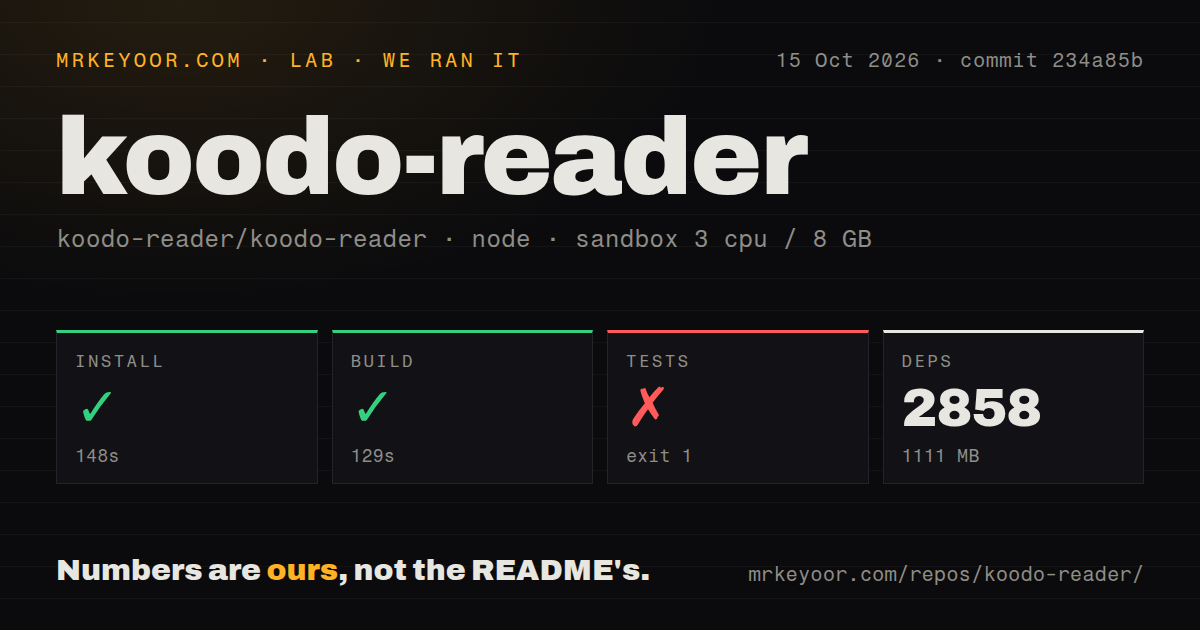
Our source install pulled 2,844 packages in 191 seconds and occupied 1,342 MB. That is a meaningful maintenance surface for an app whose packaged download hides the dependency tree from most readers. Native pieces such as better-sqlite3, Electron packaging, OCR binaries, and platform installers make source development more demanding than the two-command README section suggests. Node 20 or newer is required, and the project uses Yarn for the measured checkout.
What happened when we ran it
Our 3-CPU, 8 GB Debian sandbox completed the production build in 107 seconds after the 191-second install. The repository had a Dockerfile, a compose file, and 4 CI workflow files. Those are useful signs for people evaluating browser deployment or contribution workflows. The successful build establishes that commit d3a7b84 could compile in the clean Node 22 environment we used; it says nothing about opening a particular ebook or syncing an existing library.
Tests ended after 18 seconds with exit code 1. react-scripts test checked 459 files and reported 0 matches for its configured test patterns. The log explicitly says no tests were found, and our checkout had no tests directory. This is not a failed assertion in a working suite. It means the standard test command offered no automated behavioral coverage in our run, so upgrades need manual checks against representative books, platforms, and storage providers.
Sandboxing in v2.4.4 removes custom TTS plugins
Release v2.4.4 enables Electron sandboxing and context isolation by default, and disables renderer access to the local machine. That is a welcome security boundary for software that renders downloaded books and web-derived content. The tradeoff is explicit in the release notes: custom text-to-speech plugins are no longer supported. Users who wrote or installed one should test the built-in options before moving a main library to this release.
The same release adds folder auto-import, movable AI panels, HTTP and SOCKS5 proxy settings, scanned-PDF annotations, and fixes for import, export, footnotes, tables, and mobile PDFs. Our 891-file source scan cannot tell whether those paths work with your documents. Keep a copy of the library and use a small fixture set containing EPUB, PDF, comic, and note exports before trusting an upgrade with irreplaceable annotations.
Third-party AI behavior varies by provider
Koodo lets users bring a model for translation, dictionary lookup, summaries, and encyclopedia-style answers. Issue 1643 reports that some third-party models return HTTP 400 on Android, while desktop translation may surface thinking content instead of the final text. The reporter also names models that work, so this is not evidence that every AI integration is broken. It is evidence that nominal API compatibility does not guarantee equal request and streaming-response behavior.
Our test command found 0 tests that might catch a provider-format regression. Anyone relying on AI translation should try the exact model, endpoint, platform, and reading action before paying for a large quota. The same principle applies to remote storage. A credentials form and a successful login do not prove that conflict handling, deletion, notes, and progress sync behave as expected during an interrupted transfer. Keep an export outside the configured sync target.
The supplied container needs deliberate credentials and storage
The Dockerfile serves the built web application and can enable an HTTP file service, KOReader sync, and OPDS. Its image exposes ports 80, 8080, and 7200, while the compose example maps the first two and mounts an uploads directory. The source also contains example server credentials. Operators should replace those values, decide which services are enabled, restrict network access, and back up the mounted data rather than treating the compose file as a finished public deployment.
GitHub showed 28,091 stars and 271 combined issues and pull requests, with a push on September 7, 2026. Release v2.4.4 landed on September 3, so development is current even though the release note calls it a stable-release candidate and points cautious users to v1.7.4. Koodo is easy to recommend as an end-user trial for DRM-free reading. The 2,844-package source tree and absent tests make it a more qualified recommendation for self-hosters and contributors.