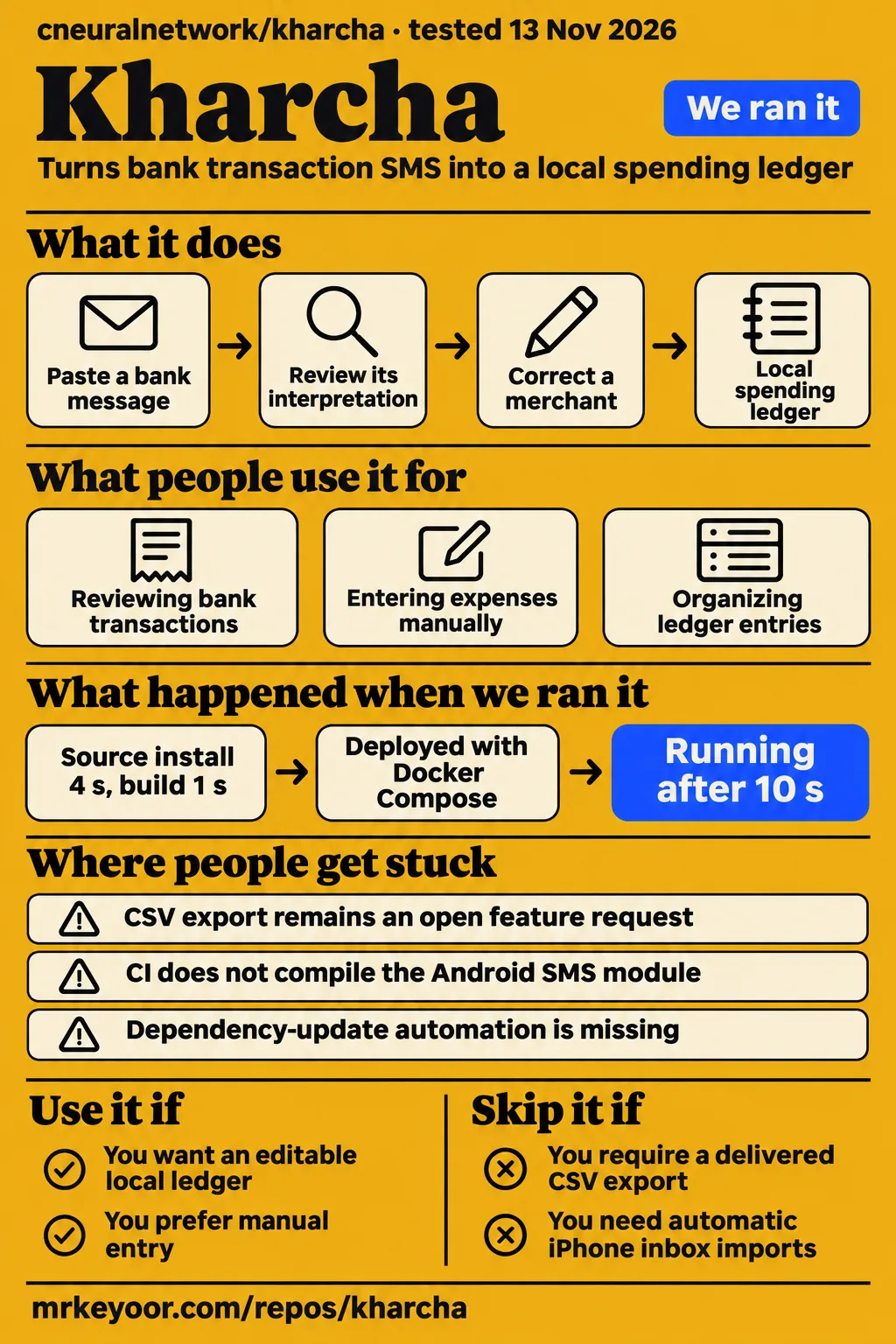
cneuralnetwork/kharcha passed our API install, build and test steps at commit 8c5c388. Its supplied CSV issue remains an open feature request. That combination makes it a useful project for developers interested in a local Android ledger, while spreadsheet-dependent users have a concrete reason to choose another workflow. This review concerns the Expo app from cneuralnetwork; other products named Kharcha have different inputs and capabilities.
What you can do with Kharcha
Kharcha turns bank transaction SMS into a local spending ledger and supports manual entry without an account or backend. The Kharcha README describes an Expo application that retains the original message beside the parsed amount. You can inspect that source, correct a merchant or category, and decide which entries belong. The separate API serves optional encrypted backup rather than the basic expense-entry workflow.
The README lists entry editing, categories, budgets, insights and pasted-message parsing across Android, iOS and web. Device-inbox reading belongs to the Android build and uses enabled bank sender IDs. Common OTP and promotion patterns are filtered. The parser requires a debit or credit signal and an amount, sends uncertain reads to a review inbox, and can automatically add high-confidence reads when that setting is enabled. These are the project's documented behaviors.
What people use Kharcha for
Kharcha is intended for reviewing bank-message transactions locally and entering expenses manually. The README's feature descriptions give someone starting a ledger two routes: type an expense or paste a bank message and review its interpretation. Android adds an allowlisted inbox reader. Keeping the message attached makes the connection between a transaction and its source visible while the user edits the ledger.
Categories, budgets and insights are another documented use: organizing the entries already in that ledger. Optional encrypted backup provides a separate recovery workflow for installed mobile apps. These uses serve different needs, so someone interested only in manual expense entry can start without operating an API. Someone interested in recovery must also consider the recovery code and the service that stores the encrypted snapshot.
The contributor request in CSV export issue #2 adds a useful picture of the desired downstream workflow. Its author wants Excel or Google Sheets analysis, an external financial-record copy, weekly or monthly reporting, and import into another finance application. Those requests explain why portability matters to a prospective user. The author's open-source launch announcement supplies release context rather than an account of those workflows in daily use.
What happened when we ran it
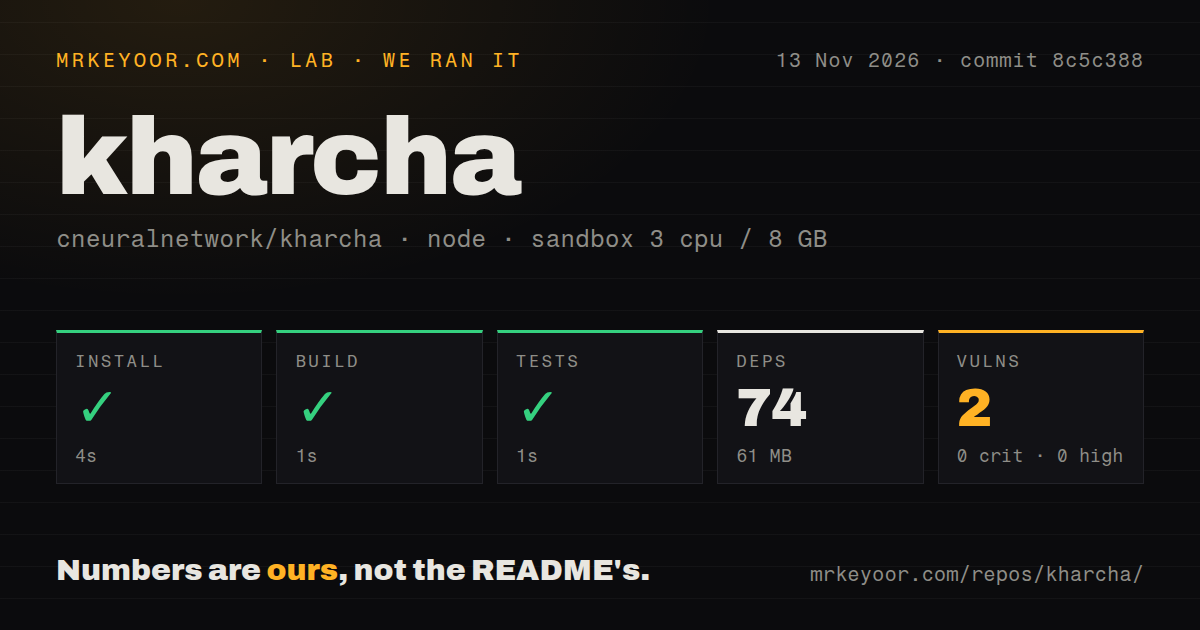
Our run installed API dependencies in 4 seconds, built in 1 second and completed the test step in 1 second. Those checks ran on November 13, 2026, at commit 8c5c388 in ./api/. We measured the source-check workflow separately from the generic hands-on recipe described below. The sandbox configuration was 3 CPUs, 8 GB RAM and image label lab-node:22.
| Recorded API check | Our result |
|---|---|
| Install | Succeeded in 4 seconds |
| Build | Succeeded in 1 second |
| Tests | Succeeded in 1 second |
| Dependencies | 74 recorded, 61 MB on disk |
| npm audit | 2 known vulnerabilities: 1 moderate, 1 low, 0 high, 0 critical |
| Repository scan | 76 files, about 2,201 source lines, 1 MB checked out |
| Project signals | 1 CI workflow, a tests directory, no Dockerfile detected |
The separate hands-on run record names November 13, 2026, commit 8c5c388d6c36, a Compose deployment and ports bound to 127.0.0.1. Its recipe ended with a missing-adapter error. The table retains each recorded step, including the model-service operations, because those operations belong to the supplied run history. They are distinct from the API install, build and test measurements above.
| Separate harness observation | Recorded outcome | What it tells a reader |
|---|---|---|
| Deploy step | OK in 10 seconds | The harness recorded deployment completion |
| Ollama connection step | OK | A model-service connection step completed |
| Model-pull output | Repeated digest and manifest output: 100%, 4.7 GB/4.7 GB, 109 MB/s, 0s; digest prefix 2bada8a74506 | The record contains download output |
| Health step | OK in 0.2 seconds | The harness health step passed |
| Generic recipe | FAILED: no runnable adapter yet for recipe generic | The recipe stopped at the adapter requirement |
| Idle memory | Database container hx2e0d14-db-1: 28 MiB, total 28 MiB | The named database container supplied the reading |
| Memory after the questions | Database container hx2e0d14-db-1: 28 MiB, total 28 MiB | The record retained this label after the recipe failure |
| Teardown step | OK | The harness recorded cleanup |
Where people get stuck
Issue #2 reports no apparent ledger export and requests CSV output for spreadsheet analysis. Its proposed controls cover all transactions, this week, this month and a custom date range. The requested columns include date, merchant, amount, type, category and description, with raw SMS excluded unless explicitly requested. The supplied reply volunteers implementation; the issue remains open in the record. Keep that proposal beside the portability decision rather than treating its acceptance criteria as delivered controls.
| Source and reported problem | Recorded response or status | Practical response |
|---|---|---|
| Issue #2: ledger export | Open CSV request; himansh-you volunteers implementation | Make a usable export a condition of spreadsheet-dependent adoption |
| Issue #5: Android native compilation | Open infrastructure request | Include a native Android build when changing the SMS module |
| Issue #5: dependency and security automation | Inventory reports missing Dependabot and CodeQL configurations | Review the proposed infrastructure work before taking responsibility for a service |
| Issue #1: contributor onboarding | Closed; issue #5 lists contribution and policy files | Start with the current contribution guide |
Issue #5 also describes checks already present: mobile lint, type checking and parser tests, plus API type checking, tests and build. Its native-module complaint is specific to Kotlin compilation and Android prebuild coverage. For a contributor, that distinction identifies where additional work belongs without dismissing the existing checks. The closed onboarding issue and later file inventory likewise direct contributors toward the files that now exist.
Android inbox access needs a native app
Expo Go cannot load Kharcha's custom KharchaSms native module, according to the README. The documented source route needs Node.js 22.13+, npm and Git, then an Android SDK with a connected device or emulator for the native Android command. The alternative EAS route begins with Expo sign-in and may require linking or creating an Expo project and configuring Android signing.
The README links Kharcha 1.0.0 as a 114 MB APK for Android 7.0+. It says manual entry works immediately and requests SMS access when the user enables the bank reader. The initial inbox scan covers the last 90 days, capped at 1,500 messages per scan; later scans inspect recent messages when the app becomes active. Sender IDs are editable, and standard two-letter routing prefixes are ignored during matching.
The platform choice determines which input route is available. iOS supports manual entry and pasted bank messages; the README says it lacks general inbox-reading access for other apps. On Google Play, READ_SMS is restricted: the project's distribution guidance describes a permission declaration and Google approval. A manual-entry and pasted-message edition has a different build requirement because the permission and native SMS reader must be removed before building that edition.
Encrypted backup makes the recovery code sensitive
The recovery code contains both an access token and an encryption key, according to the README. Anyone holding that code can restore the snapshot. Losing the code prevents the server from decrypting the backup. That gives the code a clear role in recovery: it belongs with secrets the user can retrieve after losing a device, rather than in material shared with someone helping inspect an expense.
The documented flow encrypts the snapshot on the device and stores ciphertext through an API backed by Postgres. The README says the API also stores a token hash, backup ID, version and timestamp, and describes remote deletion in the app. Installed Android and iOS apps use SQLite for the ledger. The web preview uses browser-local storage, where clearing site data removes entries; backup is listed as disabled for that preview.
The Render instructions propose a free API web service and a paid persistent Postgres database in Singapore. They ask the operator to review the database cost before deployment. The client receives the public backup API address through EXPO_PUBLIC_BACKUP_API_URL; the README explicitly warns against putting a database password or secret in public client configuration. Automatic deployment is disabled in the Blueprint, leaving service updates to the operator's choice.
Kharcha vs the alternatives people search
cneuralnetwork/kharcha uses bank SMS and manual entries, while the two supplied alternatives start with statements or Swiggy orders. Choosing by input is more useful here than choosing by the shared name. The statement analyzer's description and the Chrome extension listing each identify a different job, which the table keeps attached to its own project.
| Project | Its documented input or job | Choose it for |
|---|---|---|
| cneuralnetwork/kharcha | Local ledger built from bank SMS and manual entries | An editable mobile ledger with Android inbox integration |
| adi-g15/kharcha | Analyze bank statements, categorize expenses and generate reports | A statement-file workflow |
| Kharcha Chrome extension by Diwakar Dubey | Track Swiggy food-delivery spending | Reviewing Swiggy order history in a browser |
adi-g15's repository describes bank-statement backends, including HDFC and SBI formats, and a browser script for extracting Amazon Pay data. The extension listing describes reading Swiggy order history and storing data in the browser. Those descriptions help readers select an input route before investigating installation. Someone already collecting bank statements has a different starting point from someone whose records are individual SMS messages or delivery orders.
Which Kharcha this review covers
The repository identity is cneuralnetwork/kharcha, an Expo app with a TypeScript backup API and a small Android Kotlin SMS module. The shared product name also appears on the statement analyzer and Swiggy extension above. Keeping the owner and repository visible prevents their file-format support, store ratings or browser behavior from becoming accidental claims about this Android ledger.
The name also has an ordinary language meaning: the supplied Collins Hindi-English entry for खर्चा translates it as expense. That brief definition explains the naming overlap without turning a software review into a phrase-translation page. The practical distinction for a reader remains the software owner, input format and intended workflow, all of which are more specific than the word Kharcha alone.
FAQ
CSV export for Excel or Google Sheets is requested in issue #2, whose author reports no apparent export route. The three questions below come from that issue and concern the same portability decision. Its requested date controls and privacy behavior are described together in the issue discussion above; the answers here point readers to the relevant part of that request and the documented ledger behavior.
Can I export Kharcha transactions as CSV for Excel or Google Sheets?
Issue #2 asks for CSV output specifically to support Excel, Google Sheets and other analysis tools. For someone who needs a spreadsheet as the final record, a useful acceptance check is an actual exported file with the fields their reporting uses. The CSV export request describes that desired destination and explains why keeping a structured ledger inside the app is only part of this workflow.
Can I export all transactions or choose a custom date range?
Issue #2 lists all transactions, this week, this month and a custom date range as proposed export choices. Those choices map to different reporting needs: a full external copy, a regular weekly or monthly review, or a selected reporting period. Read the requested date-range controls alongside the proposed CSV fields when deciding what a usable export would need to contain.
Can a CSV export exclude sensitive raw SMS content?
Issue #2 asks for sensitive raw SMS content to be excluded unless explicitly requested. The README separately says a message's raw body remains attached to its ledger entry, which makes the requested export boundary useful. Before sharing a file, inspect its columns and sample rows for the material it actually contains. The raw-SMS exclusion request identifies the author's desired behavior.
What we have not tested yet
The successful measurements cover API source checks at commit 8c5c388; physical-device installation and everyday ledger operation remain outside that run. The README also says its linked 1.0.0 APK has not been smoke-tested on a physical device. Our evidence contains no known-answer transaction results, screenshots, customer outcome reports or comparative performance results. Parsing across banks and countries, permission behavior, duplicate handling, correction workflows and large-ledger behavior therefore remain unassessed.
The generic recipe produced no completed product question and answer. Its Ollama and model-pull operations have no counterpart in the README's described heuristic parser. The run's Compose description also needs reconciliation with the deployment components before its health or memory readings can describe more than the named database container. The truncated download output supplies neither a complete model identity nor a product-task timing. These are harness observations, separate from an Android expense-entry trial.
The image label records configuration rather than an observed runtime version; raw toolchain logs would be needed for that identification. The source checks supply no test-case count, and the audit totals supply no advisory identifiers or dependency paths. Encryption implementation, device-loss recovery, deletion, backup-service load and abuse resistance remain unassessed. The README calls the current recovery-code flow suitable for a small self-hosted beta and requests account-level abuse protection and operational monitoring before broad public launch.
The earlier research collection encountered rate-limited GitHub API requests, but the later supplied host lookup succeeded. Repository metadata observed on November 14, 2026 reports a last push of October 5, 2026 at 21:49:44 UTC; the supplied latest-release record identifies v1.0.0 dated October 4, 2026 at 11:54:26 UTC. These observations supply a last-push date and release record, rather than a health trend or a demonstrated mapping between the tested commit and release artifact. Native reconciliation against representative bank records and a usable transaction export are the next concrete results needed for a portability-dependent adoption decision.