mrkeyoor.com_
Fri 16 Oct 18:52 UTC
AI Toolsevaluationupdated 08 Oct 2026

jev-chat-jarvis review

Jev Chat is an Android reply assistant written mainly in Kotlin, with English documentation plus Chinese and Vietnamese translations. It reads the open chat through Android accessibility APIs, asks models to judge intent and risk before drafting replies, then fills your chosen text into the message box without sending it.

+231stars / 7d
Verdict

We could not run commit fdf8d28 because our sandbox had no Kotlin ecosystem and the repository had no Dockerfile, so there is no independent install, build, or test result from us. Jev has a sharper product idea than a generic reply generator, and its privacy docs plainly describe what leaves the phone. Use the v0.1.0 global build only as a preview on a noncritical WhatsApp account; the v1.7 Chinese edition is further along, but it still asks for powerful Android permissions and sends conversation text to your chosen provider.

We ran it

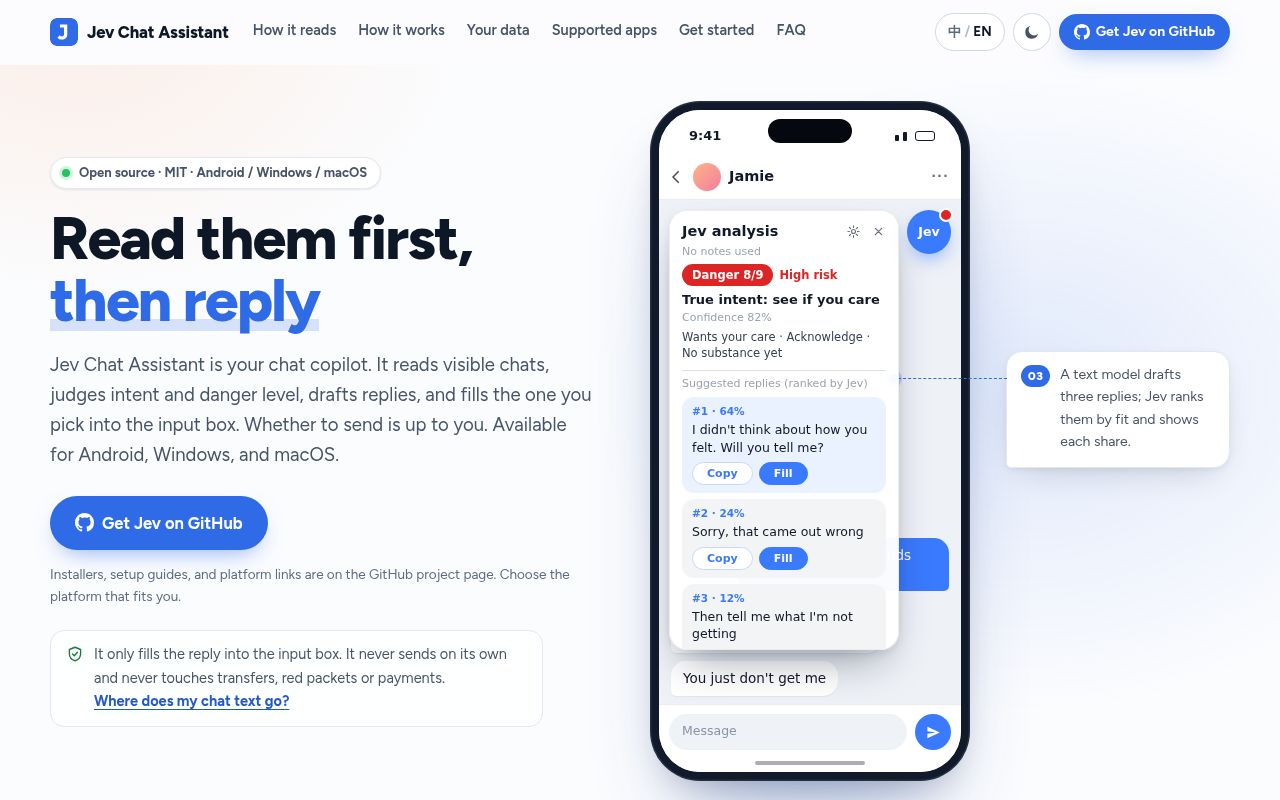
Screenshot of jev-chat-jarvis (chatjevs.com)

Answers from our run

Did you run jev-chat-jarvis yourself?

No. Its code is Kotlin, and it carries no manifest our lab installs from, and no Dockerfile, so there was nothing standard to install, build or test. This review is written from the repository's own documentation.

Who should not use jev-chat-jarvis?

Anyone unwilling to send recent chat text and optional relationship context to a model provider: local OCR does not make the analysis local.

What are the alternatives to jev-chat-jarvis?

Jev for Windows, Jev for macOS, LanguageTool. Jev has a sharper product idea than a generic reply generator, and its privacy docs plainly describe what leaves the phone.

Setup2/5APK setup still needs a key, accessibility, overlays, and app tuning
Docs4/5Specific multilingual setup, privacy, architecture, and limits
Community4/57,445 stars with active October issues and recent contributions
Maturity3/5Chinese v1.7 is active; global v0.1.0 remains a narrow preview

Who it’s for

Android 11 or newer users who want help interpreting a difficult one-to-one chat before replying.
WhatsApp users writing in English who are comfortable testing the separate global preview.
Chinese-speaking users of QQ, Feishu, X, or WhatsApp on an ARM64 phone.
Developers who can audit accessibility capture and bring their own model-provider key.
People willing to read the chosen provider's privacy policy before sending chat text to it.

Who it’s NOT for

Anyone unwilling to send recent chat text and optional relationship context to a model provider: local OCR does not make the analysis local.
Group-chat users: the Chinese edition says its interpretation assumes a one-to-one conversation, and the global WhatsApp edition refuses groups.
People who cannot grant an accessibility service and overlay permission to an app that reads chat UI and writes into input fields.
Accounts where third-party automation could trigger enforcement: the README warns that WhatsApp, QQ, Feishu, or X may restrict or ban an account.
Users expecting broad platform support from this repository alone: it contains two Android apps; Windows and macOS live in separate repositories, and iOS is source-only elsewhere.
Teams that require a lab-verified build and test result: our Kotlin runner could not execute this project and there is no Dockerfile fallback.

Setup reality

We did not run commit fdf8d28. Our sandbox had no supported Kotlin ecosystem, and the repository had no Dockerfile, so install, build, and tests were not attempted.

Source builds need JDK 17 and Android SDK platform and build-tools 35. Release builds also need signing properties kept outside the repository. Using either app requires Android 11 or newer, an accessibility service, overlay access, and a model-provider key; some OCR paths also need screenshot permission.

The global v0.1.0 preview handles English one-to-one WhatsApp chats. The Chinese v1.7 app targets ARM64 and covers QQ, Feishu, X, and WhatsApp with app-specific capture limits. Protected windows cannot be read through screenshots, and Android vendors may stop the background process.

Jev judges the chat before it drafts the reply

Most reply tools start with a prompt box. Jev starts by reading the conversation already visible in a supported app. Its judgment step identifies what the other person seems to want, the risk in the exchange, and possible ways to respond. A generation model then drafts candidates, checks them against that judgment, and ranks them. Choosing one fills the chat input; Jev does not press send.

This repository contains 2 distinct Android builds. The global v0.1.0 preview is an English WhatsApp assistant with its own package and Gradle project. The Chinese v1.7 app supports QQ, Feishu, X, and WhatsApp, with separate adapters for their UI structures. The wider product table links Windows, macOS, and iOS projects, but those codebases are not part of this review.

Local reading still sends text to a model provider

The privacy boundary is explained better than it is in many chat assistants. Screenshots used for OCR stay on the device, and the project says it operates no server for the Android apps. The actual conversation analysis is remote. Chat text, relationship context, the selected response goal, and drafted replies can go to OpenRouter or another endpoint you configure, depending on the edition and settings.

The global edition reads about 24 recent WhatsApp messages by default and can collect about twice that when you ask it to read further back. Its privacy guide says the current round remains in memory for no more than 15 minutes and is not written to storage. The Chinese edition can add matched notes and optional history, with recent history configurable from 0 to 100 messages. Your provider's retention and training rules still apply to everything sent.

What happened when we ran it

We did not run commit fdf8d28. The sandbox runner had no supported ecosystem for this Kotlin and Android project, and the repository supplied no Dockerfile as another execution route. Install, build, and test stages never began, so this review has no measured dependency count, disk footprint, timing, or test outcome.

The unused sandbox had 3 CPUs and 8 GB of RAM in an unprivileged container with no secrets on October 7, 2026. None of those specifications prove that Gradle resolves, either APK builds, or the repository tests pass. The source tree contains Android test code and one GitHub Actions workflow, but presence is not execution. A developer should run each Gradle project on a clean Android build machine before trusting a release change.

Accessibility access is both the feature and the risk

Jev needs unusual privileges because it works inside other chat apps. Android's accessibility tree supplies text where the target exposes it; Feishu falls back to on-device OCR over visible message bubbles. The selected reply goes into the input field with an accessibility action and can fall back to clipboard paste. This avoids modified chat clients and root access, yet it gives Jev a view into sensitive conversations while the service is enabled.

The support matrix has hard edges. Both editions require Android 11 or newer. The Chinese v1.7 APK is ARM64-only, protected windows cannot be captured, and OCR cannot recover hidden parts of truncated messages. Xiaomi and HyperOS may kill the background process even after battery exemptions. X was tested against its Chinese UI, while the English parsing fallback was still unverified in the project documentation.

Preview labels match the current breakage risk

The global release calls itself a preview for good reason. Version 0.1.0 supports only standard WhatsApp on Android, one-to-one chats in English, and was tested against one named WhatsApp version on one phone. Its notes warn that a WhatsApp update can break reading. The Chinese release is broader, but current issues include provider rate limiting and users reporting missing overlays or blocked screenshots in specific chat apps.

GitHub showed 7,445 stars, 25 open issues, and 2 open pull requests on October 8, 2026. The repository was pushed on October 6, the same day the global v0.1.0 preview shipped; Chinese v1.7 arrived one day earlier. That combination points to active development rather than settled behavior. Recent reports are receiving discussion, but app UI changes and provider limits remain outside the maintainer's full control.

The useful question is whether the conversation can leave your phone

Jev's judgment-first flow can be genuinely helpful when tone and boundaries matter more than grammar. It also places private messages from another person into a model request. The fact that you bring the key and the author runs no relay reduces one layer of trust, but it does not remove the provider. Read that provider's policy, disable automatic analysis, and use a conversation whitelist where the Chinese edition permits it.

Version fdf8d28 is best treated as software to inspect and trial, not a silent layer over every chat. Start with low-stakes one-to-one conversations, review the accessibility and overlay indicators, and check every filled reply before sending. If your need is simply cleaner wording, LanguageTool asks for far less access. Jev makes sense only when its conversation judgment is worth the extra permission and privacy cost.

Alternatives

ProjectWhat it isPick it when
Jev for Windows gh↗A Windows companion that reads chat windows with screenshots and local OCR.pick this instead when the conversation lives on Windows and a desktop-side panel fits your workflow.
Jev for macOS gh↗A macOS overlay that reads the screen and judges chats with a local model.pick this instead when you use Apple Silicon and want the project's desktop implementation.
LanguageToolAn open-source spelling, grammar, and style checker for more than 25 languages.pick this instead when you need help polishing text, not an app reading and interpreting the conversation around it.

What people are saying

  1. [velocity-scout] jev-chat/jev-chat-jarvis-mac
  2. [velocity-scout] jev-chat/jev-chat-jarvis
  3. [velocity-scout] Finderchangchang/jev-chat-JARVIS

Sources

  1. Jev Chat repository
  2. Jev for WhatsApp documentation
  3. Jev for WhatsApp privacy guide
  4. Jev Chinese edition privacy guide
  5. Jev Chat releases
  6. Jev Chat issues

More ai tools reviews

universal-modder · DeepEP-Ascend · DeepGEMM-Ascend · hypoarena · jeeves · faster-whisper · the whole board →