Indexed controls make agent actions easier to inspect
Jev Browser asks a decision model to choose an operation and a control from an index built inside the page. A button's role and name become an available choice, and the runtime checks that the requested action belongs to that set before acting. The boundary is useful: the model cannot answer with arbitrary JavaScript, shell commands, or a selector and have the runtime execute it.
Our checkout was 1.1 MB, with 78 files and roughly 9,420 source lines. That small codebase packages an interesting workflow: observe a page, replay cases, explore a site, or generate a case from a goal. Generated YAML can be replayed without a decision model. For a developer checking an agent-written interface, keeping the successful trace as a repeatable case is more valuable than another chat message saying the page looks correct.
What happened when we ran it
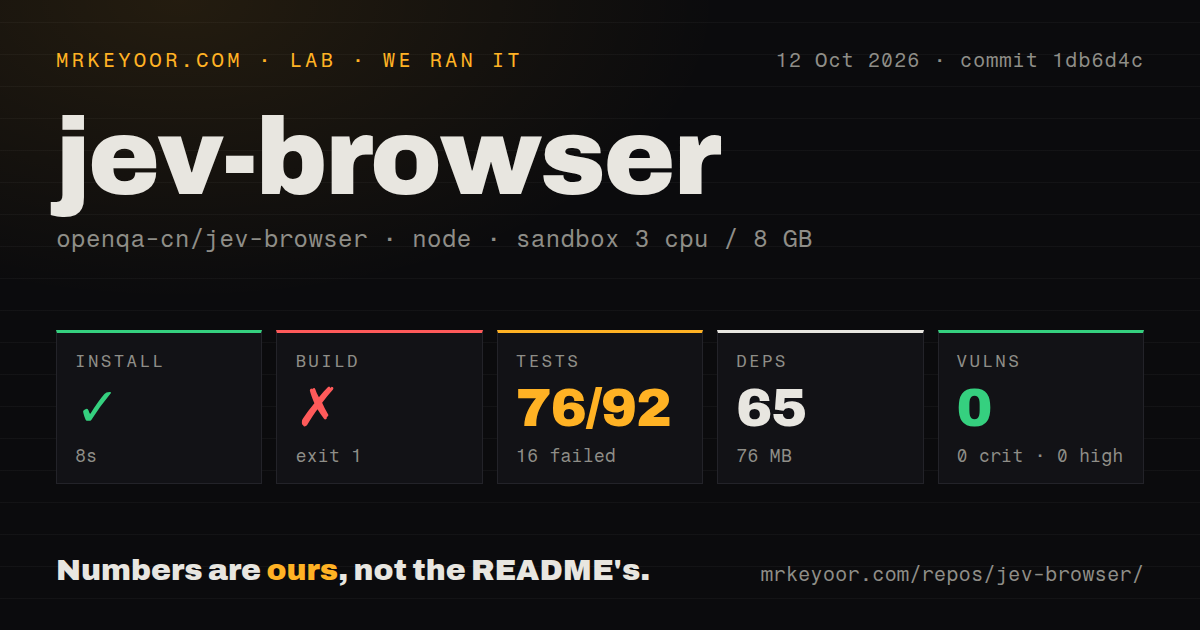
Our run installed Jev Browser commit 1db6d4c in 8 seconds on October 12, 2026, adding 65 packages and using 76 MB on disk. The fresh Debian sandbox had 3 CPUs and 8 GB of RAM, used lab-node:22, and ran without secrets or elevated privileges. Installation succeeded. The build and tests then failed, so the small dependency footprint did not translate into a clean source checkout ready for use.
The build failed after 8 seconds with exit code 1. Its command runs TypeScript compilation, then copies a DOM snapshot script and an HTML report template. The reported failure was cp: cannot create regular file 'dist/report/template.html': No such file or directory. That identifies a missing destination directory at the copy step. It does not show a compiler failure or a broken template. Report packaging stopped the build before completion.
The test command failed after 14 seconds. Vitest reported 76 passed and 16 failed out of 92 tests, with all failures in tests/live.test.ts. The supplied stack tail points to BrowserSession.start in src/browser.ts, but omits the underlying exception. Missing browser binaries, system packages, and display configuration are things to investigate, not established causes. These results do not show that the failing cases reached a live site or made model calls.
Npm audit reported 0 known vulnerabilities. The lab found a tests directory, no Dockerfile, and 0 CI workflow files. The audit result describes the dependency scan from that run, not the safety of navigating a website or exposing its content to a model provider. Likewise, passing cases demonstrate only what they exercise. Neither result removes the build failure or verifies a goal-driven browser session.
Replay can avoid model credentials
The README distinguishes model-free observation and replay from live goal-driven decisions. observe, run, explore, and scripted --decisions do not call a decision provider. Live auto and goal-based generation use a TypeSafe key for Jev or an OpenAI-compatible provider, with chat completions also handling the task plan. Your host coding agent's subscription does not supply those API calls. This CLI has its own credentials and configuration.
The 65-package install also does not establish that Chromium can launch. Documentation requires Node.js 20 or newer and Playwright Chromium, with a visible window by default and a headless configuration option. On a server, that browser environment needs attention independently of model keys. I would first run a model-free case against the included local example, inspect its report, and only then connect a paid decision provider or a site account.
Visible evidence decides completion
Jev's documented completion rule requires an assertion or visible page evidence, so a model's DONE reply alone cannot pass a case. Reports keep marked screenshots, step details, and session video, with machine-readable and Markdown copies beside the HTML report. A reviewer can inspect the evidence after a search or submission. It also explains why the failed report-template copy is a meaningful packaging defect rather than cosmetic housekeeping.
The 16 failing cases in our run prevent treating those report promises as independently verified here. They remain documented behavior. The known limitations call the runtime experimental and say offline fixture success does not establish live-site or live-model success. Teams expecting a ready release gate should resolve the source build and browser-start failures before putting Jev between a code change and deployment approval.
Site knowledge still needs a maintainer
Jev's README says the decision only chooses indexed controls and types phrases already present in the goal. Site-specific notes explain which control to prefer, how fields should be filled, and when a login dialog should stop the run. That is substantial work for someone automating unfamiliar sites. An observed city input does not inherently tell the model whether it means departure or destination. Correct indexing supplies choices, while your notes supply the business meaning.
The 76 passing tests do not measure whether those notes describe your application correctly. Password values are omitted from model requests, but that is a narrow privacy measure, not a promise that all page data stays local. The project also warns about destructive controls during exploration or automatic runs. Start with a disposable account and a harmless task whose expected evidence you can name before the browser opens.
September activity supports a trial, not a production default
The last push was September 28, 2026. GitHub listed 90 stars and 0 open issues and PRs, and the latest-release endpoint returned no published release. The recent push shows activity despite the absence of a release tag. An empty public queue offers little evidence of external adoption or response to defects. MIT licensing and English documentation, with a Chinese translation, make inspection straightforward without establishing operational maturity.
The 8-second failed build is the adoption hurdle I would address first. Choose Playwright directly for authored browser regression checks across its supported engines, or Playwright MCP when your agent needs an MCP browser interface. Jev earns consideration when indexed decisions, goal-to-case generation, and evidence reports match your workflow. Keep it in a trial branch until the report assets package correctly and the browser starts in your target environment.