mrkeyoor.comAsk

aizhimou/javranking-extensiontested 30 Sept 2026commit 206ec97

javranking-extension review

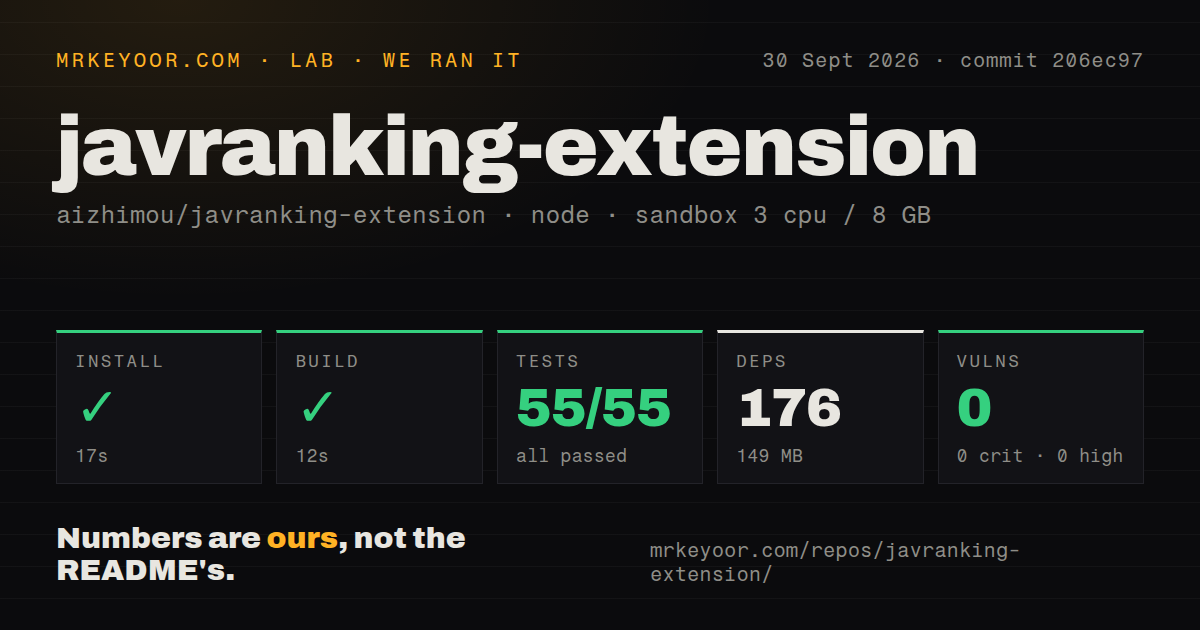
The measured checkout passed all 55 tests with 0 failures.

  • Install 17 s
  • Build 12 s
55/55tests passed
  • 176 packages
Webevaluationupdated 06 Nov 2026
+10stars / 7d

JavRanking Extension identifies adult-video codes on the active page after a toolbar click and displays matching JavRanking ranking information. Its primary README is Chinese, with English documentation available.

Verdict

The measured checkout passed all 55 tests with 0 failures. Consider a browser trial if you already use JavRanking and accept manual Chromium updates. Persistent Firefox installation is not currently documented as available, and the English privacy section omits mark synchronization described in Chinese. Check recognition and synchronization separately before relying on the extension.

We ran it

Lab card: what happened when we ran javranking-extension
Lab card from our sandbox run
Screenshot of javranking-extension (javranking.cc/zh-hans/extension)
javranking.cc/zh-hans/extension
Install✓ · 17s176 packages · 149 MB
Build✓ · 12s
Tests✓ · 8s55 passed · 0 failed of 55 (vitest)
Known vulns00 critical · 0 high · 0 moderate · 0 low (npm audit)
Repo49 files~5,360 lines of source · 1.1 MB · 1 CI workflows · tests dir

Answers from our run

Does javranking-extension build from source?

Dependencies installed in 17 seconds (176 packages), and the build succeeded in 12 seconds. We cloned commit 206ec97 into a clean Debian container with 3 CPUs and no project-specific setup.

Do javranking-extension's tests pass?

Yes. The project's own test command finished in 8 seconds and reported 55 passed, 0 failed (vitest).

Does javranking-extension have known vulnerabilities in its dependencies?

npm audit found none in the dependency tree at the time of our run.

Who should not use javranking-extension?

Firefox users who need persistent installation: the English README says a Mozilla-signed XPI is not currently published.

What are the alternatives to javranking-extension?

Violentmonkey, Greasemonkey. The measured checkout passed all 55 tests with 0 failures.

Setup4/5Our source checkout installed in 17 s and built in 12 s with 176 dependencies, but we did not run a README task.Editor’s note: Source installation and build passed, but browser loading, release-artifact installation and manual updates were not exercised in the supplied run.
Docs4/5The README has an install section (“安装 Chrome 或 Edge 版本”) and usage examples in code; we did not run its quickstart ourselves, and the README is mostly in Chinese, not English.Editor’s note: The English privacy section omits optional mark synchronization described in Chinese. The supplied evidence does not provide a complete documentation assessment.
Community4/5Last push on 2026-10-27 and 1,046 stars.Editor’s note: Recent source activity and zero recorded open issues and PRs do not establish support responsiveness. No assessed support interaction was supplied.
Maturity3/5Latest release v1.0.1 on 2026-09-13, repository created 2026-09-07 and its test suite passed in our sandbox (55 of 55 passed).Editor’s note: The measured source checks passed, but sustained browser use, recognition accuracy, synchronization and release-artifact reliability were not assessed.

How we score

Who it’s for

Existing JavRanking users who want to look up codes on the current page.
Chrome or Edge users comfortable maintaining an unpacked extension and updating it manually.
Developers evaluating a TypeScript extension whose recorded source installation, build and tests passed.

Who it’s NOT for

Firefox users who need persistent installation: the English README says a Mozilla-signed XPI is not currently published.
People expecting automatic Chromium updates: the documented route requires downloading and extracting a new release and reloading the extension.
Users who need verified browser privacy or synchronization behavior: the supplied sandbox run assessed neither.

Setup reality

The September 30, 2026 sandbox run at commit 206ec97 installed dependencies in 17 seconds, built in 12 seconds and completed Vitest in 8 seconds: 55 passed, 0 failed of 55. It recorded 176 dependencies, 149 MB installed and zero known npm audit vulnerabilities. These are source-check results; the supplied record contains no browser installation or recognition trial.

Chrome and Edge installation uses a release ZIP extracted into a permanent local folder, Developer mode and Load unpacked. Updates require downloading and extracting a new release and reloading the extension. The English README describes static-index retrieval and GitHub release checking; the Chinese README also documents synchronization of marked codes, states and timestamps after binding a Chong Code.

Source work requires Node.js 20.19 or later according to the English README. It describes temporary Firefox loading and says a signed XPI for persistent installation is not currently published. The recorded sandbox configuration was 3 CPUs, 8 GB RAM and image lab-node:22. The image label does not establish the actual runtime or operating-system version.

A lookup shortcut with manual maintenance

JavRanking Extension asks Chrome and Edge users to load an unpacked ZIP and update its files manually. That maintenance is the first installation decision. The extension is intended for people who already want JavRanking's adult-video ranking information alongside codes on the page they are reading.

The English README says a toolbar click triggers recognition of video codes on the active page and displays matching ranking information. Catalog coverage and recognition accuracy were not measured in the supplied run.

What happened when we ran it

The September 30, 2026 sandbox run installed dependencies for commit 206ec97 in 17 seconds and built the checkout in 12 seconds. Tests completed in 8 seconds: Vitest recorded 55 passed and 0 failed out of 55. The installation recorded 176 dependencies and occupied 149 MB.

The checkout contained 49 files, approximately 5,360 source lines and 1.1 MB on disk. The scan found a tests directory and one CI workflow, with no Dockerfile. Npm audit reported zero known vulnerabilities across its critical, high, moderate and low categories. That result describes the advisories reported by the audit, rather than the extension's permissions or browsing behavior.

The recorded sandbox configuration was 3 CPUs, 8 GB RAM and image label lab-node:22. The label does not establish the actual runtime or operating-system version. The record contains no browser installation, live-page recognition trial, synchronization check or network inspection. The measured checkout is also separate from the downloadable release artifact.

Page scanning and mark synchronization need separate checks

The English README says the extension reads the active top-level page only after the user triggers it. It says page URLs, page text, DOM content, video-code candidates and browsing activity are neither sent nor persisted. These are project statements, not browser observations from the sandbox.

The Chinese README documents another flow: after binding a Chong Code, user-marked video codes, marking states and timestamps synchronize to the JavRanking API. Scanned candidates and user-marked codes are different data. The English privacy section omits optional mark synchronization, so its statement about scanned candidates should not be read as a promise that the extension never uploads video codes.

The English README also describes fetching JavRanking's published static search index and checking GitHub's public release API whenever the extension UI opens. Its statement that neither request includes page or user data applies to those two requests. It does not describe the synchronization request documented in Chinese.

Before binding a Chong Code, read both privacy descriptions and check whether the documented synchronization fits your needs. Evaluate page recognition and optional synchronization separately in a browser trial.

Chrome and Edge need a permanent folder

The documented Chromium route downloads a release ZIP, extracts it into a permanent folder, enables Developer mode and selects Load unpacked. Unpacked extensions update manually: download and extract the new release, then choose Reload on the extension card or load the new folder. The extension's update notice reports a newer version; the documented procedure still requires those manual steps.

Firefox supports temporary development loading according to the English README. Persistent installation requires a Mozilla-signed XPI, which is not currently published. Readers who need an ordinary persistent Firefox installation should wait or use another workflow.

The English README requires Node.js 20.19 or later for source work. The supplied measurements do not establish the runtime that executed or give separate results for every documented compilation and packaging command. No additional commands were executed for this correction.

The supplied release metadata identifies v1.0.1, published September 13, 2026. The successful build at commit 206ec97 should not be presented as a browser test of that release.

Repository activity leaves support quality unknown

The supplied repository metadata records a last push on October 27, 2026, and zero open issues and PRs when observed on November 6. Those observations establish recent source activity and the recorded open count. They do not establish issue history, support responsiveness or freedom from recognition bugs.

The numerical ratings remain unassessed. The supplied evidence does not establish the browser installation experience, sustained reliability or support quality. The bilingual privacy discrepancy is a specific documentation concern, but it is not a complete documentation assessment.

Userscript managers require a script for the task

Violentmonkey provides userscript support for browsers with WebExtensions support. Greasemonkey is a user script manager for Firefox. Consider them if you are willing to supply and maintain your own browsing customization. Neither supplied README establishes a ready-made JavRanking lookup.

A browser trial of JavRanking Extension is reasonable if you already use its catalog and accept manual Chromium maintenance. Start with recognition on a page you control, check the matched code, and inspect optional mark synchronization before binding an account.

Alternatives

ProjectWhat it isPick it when
ViolentmonkeyA userscript manager for browsers with WebExtensions support.Consider it when you are willing to supply and maintain a script for your lookup workflow. The supplied README does not establish a ready-made JavRanking integration.
GreasemonkeyA user script manager for Firefox.Consider it when Firefox is your chosen browser and you can supply your own script. The supplied README does not establish a ready-made JavRanking lookup.

Sources

  1. Chinese README
  2. English README
  3. Repository facts
  4. Latest release
  5. Violentmonkey README
  6. Greasemonkey README

More web reviews