More than 600 palettes make format conversion the main attraction
The repository starts with iTerm2, but its useful trick is repetition done for you. The same palette appears in formats for Windows Terminal, Ghostty, Kitty, Konsole, Alacritty, PuTTY, Xresources, Termux, Vim, and many more targets. If you use three terminals across work and personal machines, that breadth saves a tedious round of translating foreground, background, cursor, selection, and 16 ANSI colors.
Breadth also explains the odd shape of the checkout. Our clone held 27,807 files and about 87,181 lines of source in 52.9 MB. Much of the value is data and generated configuration rather than an application you keep running. You can download only the format you need instead of carrying the full repository.
The source side is useful beyond manual browsing. Committed YAML files give importers a machine-readable palette, while Windows Terminal files are already JSON objects. Running tools/gen.py also produces a local JSON Lines file with the full color map used by screenshot tooling. That makes this collection usable as input to another theme browser or configuration generator, provided you respect each theme's redistribution terms.
iTerm2 imports cleanly, while other terminals need manual steps
The iTerm2 path is direct: open the Colors tab, import one or more .itermcolors files, select a preset, and restart the application when using the supplied import script. The script accepts a file path, a displayed scheme name, or several names. None of those routes needs an account, network service, or credential after you have the files.
Other formats are less uniform because the host applications differ. Konsole expects files in one of two configuration directories. Windows Terminal asks you to paste a JSON object into its schemes configuration. PuTTY uses Registry files, and the guide explains both creating a new session and modifying an existing one. Ghostty, Alacritty, Otty, Rio, Termux, and Vim each get separate instructions. This is a well-organized parts shelf, not a cross-platform theme manager.
The safe preview tool helps before you touch configuration. preview_theme.py renders ANSI colors, surface colors, and semantic samples with truecolor escape codes without changing the terminal palette. A separate generic preview script does mutate the current session through OSC 4 codes. That distinction is documented plainly, including the warning that the older Ruby preview is deprecated and broken with current iTerm color files.
What happened when we ran it
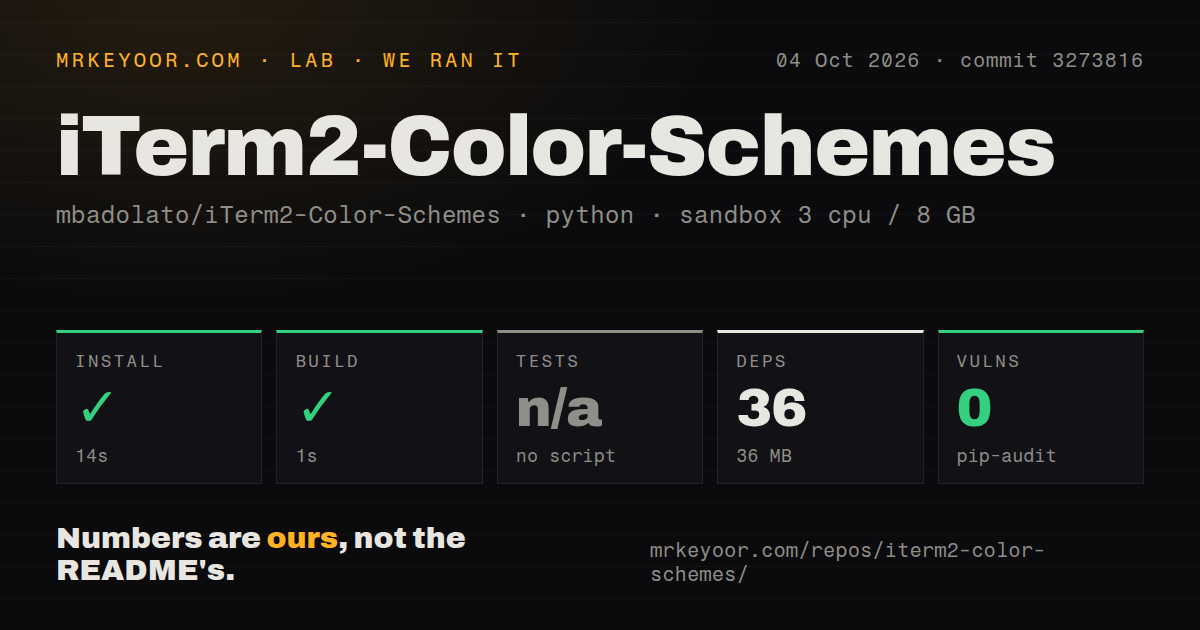
Our sandbox installed commit 3273816 in 14 seconds, pulling 36 packages and using 36 MB on disk. The build completed in 1 second. The run used an unprivileged Debian container with 3 CPUs, 8 GB of RAM, Python 3.12, and no secrets. Pip-audit reported 0 known vulnerabilities. The repository had a Dockerfile and 2 CI workflow files.
There was no tests script or target, so our pipeline skipped tests. We also found no tests directory. That result does not mean a test failed, and it does not prove the generated files are wrong. It means commit 3273816 offered no automated suite for our sandbox to run after the successful build. For a catalog producing thousands of terminal-specific files, that is a meaningful gap for contributors.
The consumer risk is smaller because a palette is configuration, not a resident process. You can preview one scheme, import it, and switch back if it looks poor. Generator changes have a wider blast radius: a new template or converter value can affect every theme emitted for that target. Without a test target, review should include generated diffs and opening representative outputs in the programs they claim to support.
Contributors generate formats from iTerm2 or YAML sources
A new theme begins as an iTerm2 file or a YAML definition. The guide requires human-readable filenames and tells contributors to quote names containing spaces. tools/gen.py then emits the other formats, while the screenshot module fills missing previews. Docker can run the generation work without installing Python dependencies on the host, although contributors still update the README and credits manually.
Contrast checking is optional. The documented command checks an iTerm2 file, and YAML inputs must be generated first. The guide says failed checks are acceptable because the generator may adjust colors toward a minimum 1.75:1 threshold. That is honest documentation, but it is not a promise that every included palette passes an accessibility policy. Teams with contrast requirements need to apply their own threshold to the exact foreground and background pairs they will ship.
Whole-catalog redistribution still needs a license decision
GitHub's repository metadata did not identify a standard SPDX license. More importantly, open issue 638 concerns the licenses of individual themes, not merely the generator code. The reporter's review classified 225 of 443 examined themes as having unknown, unclear, or nonfree terms. Maintainer comments thanked the reporter, and the latest update left the issue open pending an explicit product or legal decision.
That issue changes the recommendation for package maintainers. A person importing one palette for personal use faces a different decision from a Linux distribution or terminal vendor bundling the entire catalog. We cannot settle those rights from an issue thread. Package only themes whose provenance and terms you have checked, or wait for the project to publish a resolved policy.
October pushes show active catalog maintenance
The repository was pushed on October 4, 2026, with two theme pull requests updated that day. GitHub listed 27,244 stars and 3 combined open issues and pull requests. The latest release arrived on September 28 with new palettes, fixes for four unparseable iTerm2 schemes, and per-terminal archives. Those dates describe a collection being maintained, despite the absence of an automated test target.
For an individual developer, the collection is easy to recommend: preview a palette, download the narrow archive, and import the one file you want. The 52.9 MB checkout and 36-package contributor environment are unnecessary for that job. Forking, packaging, or generating the catalog deserves more care because tests are absent and theme licensing remains unresolved.