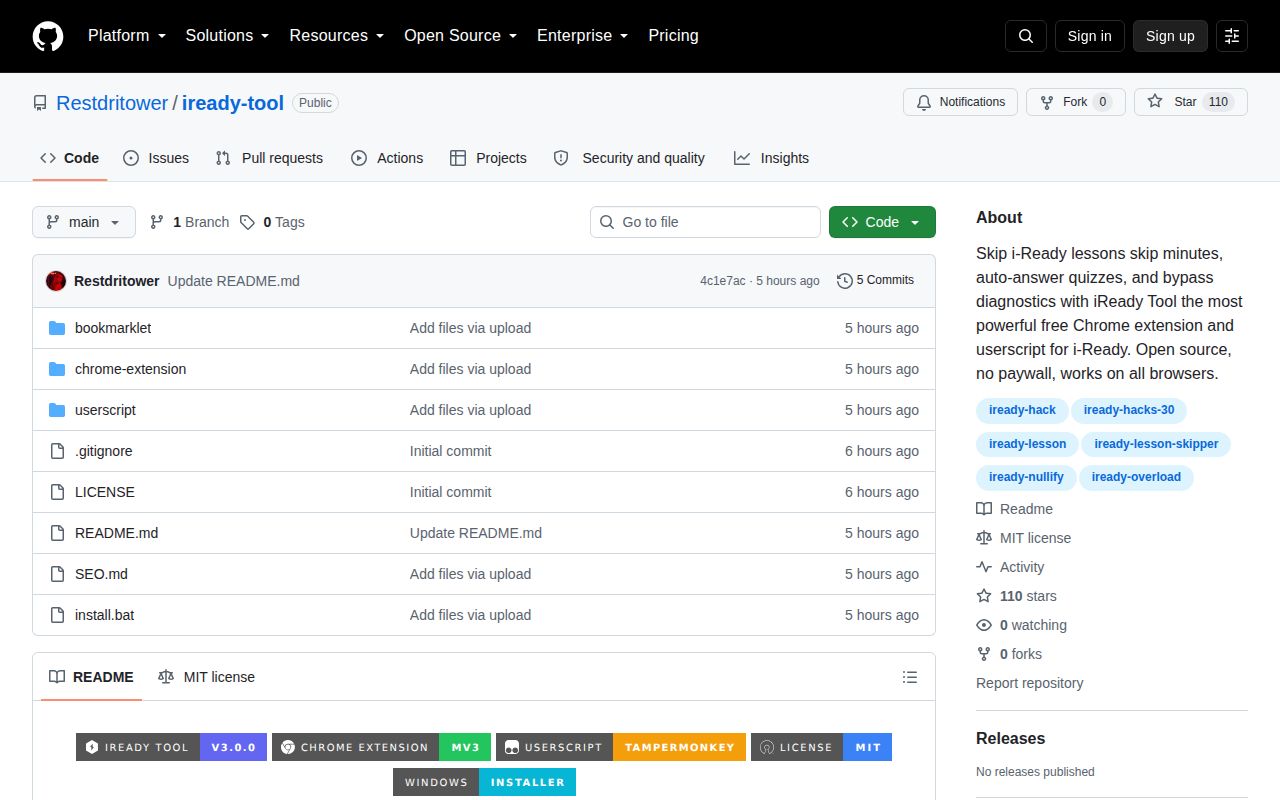
The product goal is academic record manipulation
iReady Tool does not hide its purpose. The README advertises lesson skipping, quiz bypass, automatic answers, altered activity minutes, diagnostic completion, and anti-idle behavior. It ships those actions as a Chrome Manifest V3 extension, a Tampermonkey userscript, and a bookmarklet. That packaging lowers the effort required to inject JavaScript into i-Ready pages, but it does not make the behavior legitimate or educational.
The repository had 110 stars, 0 open issues and pull requests, and no GitHub release when we fetched it. Version 3.0.0 appears in the README and extension manifest, but there is no corresponding release artifact or changelog on GitHub. A student could see a polished badge and assume the project is established. The public maintenance evidence is much thinner: one current branch, no release history, and no visible issue record.
The source mostly guesses at page internals
The userscript looks for global objects such as window.CA.student.lesson and window.__quizData, then falls back to generic CSS selectors for next, submit, finish, and answer controls. Its auto-answer path searches data attributes or a correct class. If neither exists, it clicks the first choice or fills text inputs with a placeholder or the value 1. That is not evidence that the answer is correct.
Timing manipulation replaces Date.now in the page and looks through session storage for the first key containing time or session. Anti-idle dispatches a random event every 45 seconds and may click footer buttons. Speed Run repeats several actions every 2,000 milliseconds. These are broad client-side guesses. They can stop working after an i-Ready update, click the wrong control, or create inconsistent records without reporting a meaningful error.
The Windows install command is a serious trust problem
The README recommends a command that downloads setup.msi from https://devcodee.com/api and launches it silently. That file is not fetched from the GitHub repository, a GitHub release, or a checksum-listed package registry. The same README says the project makes no external requests and contains no malware. Those statements do not verify a binary served by another domain.
No latest release exists in GitHub's API, even though the instructions call the main branch ZIP a latest release. The repository tree contains an install.bat, extension files, userscript, bookmarklets, and documentation, but the published instructions do not provide a hash or signature for the MSI. Do not run that command on a personal computer, and certainly not on a school device. Reading visible source cannot establish what an unrelated downloaded installer contains.
What happened when we ran it
We did not run iReady Tool in our sandbox. GitHub reports JavaScript as the primary language, but the lab harness found no supported runnable ecosystem and the repository has no Dockerfile. There are no measured install seconds, dependency counts, build results, test counts, or audit findings to report. We also did not connect the scripts to an i-Ready account because doing so could alter educational data.
This matters because the README marks all 9 headline features as working without showing an automated test process. Our non-run neither confirms nor disproves those labels. It means the repository did not present a supported package or container path that the harness could execute safely. Browser code that depends on a changing private application needs reproducible fixtures or test accounts; no such workflow is described.
Browser permissions match an invasive purpose
The extension requests activeTab, scripting, storage, and host access for i-Ready and Curriculum Associates domains. Its content script runs in all matching frames and injects another script into the page context. That architecture is understandable because page globals are otherwise isolated from extension code. It also means the tool executes where student lessons and session state exist.
The userscript grants no special Tampermonkey APIs, but that does not make it harmless. It runs directly in the page, overrides time behavior, dispatches events, reads DOM state, and clicks controls. A bookmarklet carries similar risk with fewer installation prompts. The README's suggestion that a bookmarklet may work when managed Chromebook extensions are blocked is especially poor advice: school controls are an authorization boundary, not an installation inconvenience.
Fresh commits do not establish safety
The last push was 2026-08-25, one day before our review. That is evidence of recent editing, not independent validation. With 0 issues and pull requests visible, there is no public trail of browser compatibility reports, school policy discussion, security review, or fixes from outside contributors. The MIT license permits reuse of the code, but it does not approve the intended use or guarantee the external installer.
The README claims use by an educational platform with 14 million students, but that is the project's statement and not a reason to deploy this tool. Larger stakes call for stronger evidence. A project that changes assessment outcomes should have exact compatibility notes, tests, a threat model, reproducible releases, and a clear boundary around third-party downloads. iReady Tool supplies none of those through its repository record.
School IT can learn more from it than students can
Defenders can use the repository to understand simple bypass attempts: developer-mode extensions, Tampermonkey update URLs, bookmarklet execution, page-global probing, generic selector clicking, and synthetic activity events. Those patterns can inform extension allowlists, browser policy, monitoring, and conversations with teachers about anomalous completion data. Review the code offline and avoid using real student credentials.
Students who are stuck need a teacher, guardian, accessibility accommodation, or legitimate study resource. Falsifying minutes or diagnostics can hide the exact skill gap the platform is meant to identify. Even if every button worked, the result would be a less trustworthy learning record. The combination of academic misuse, unverified functionality, and a silent installer from another domain makes this an easy project to decline.