Short answer
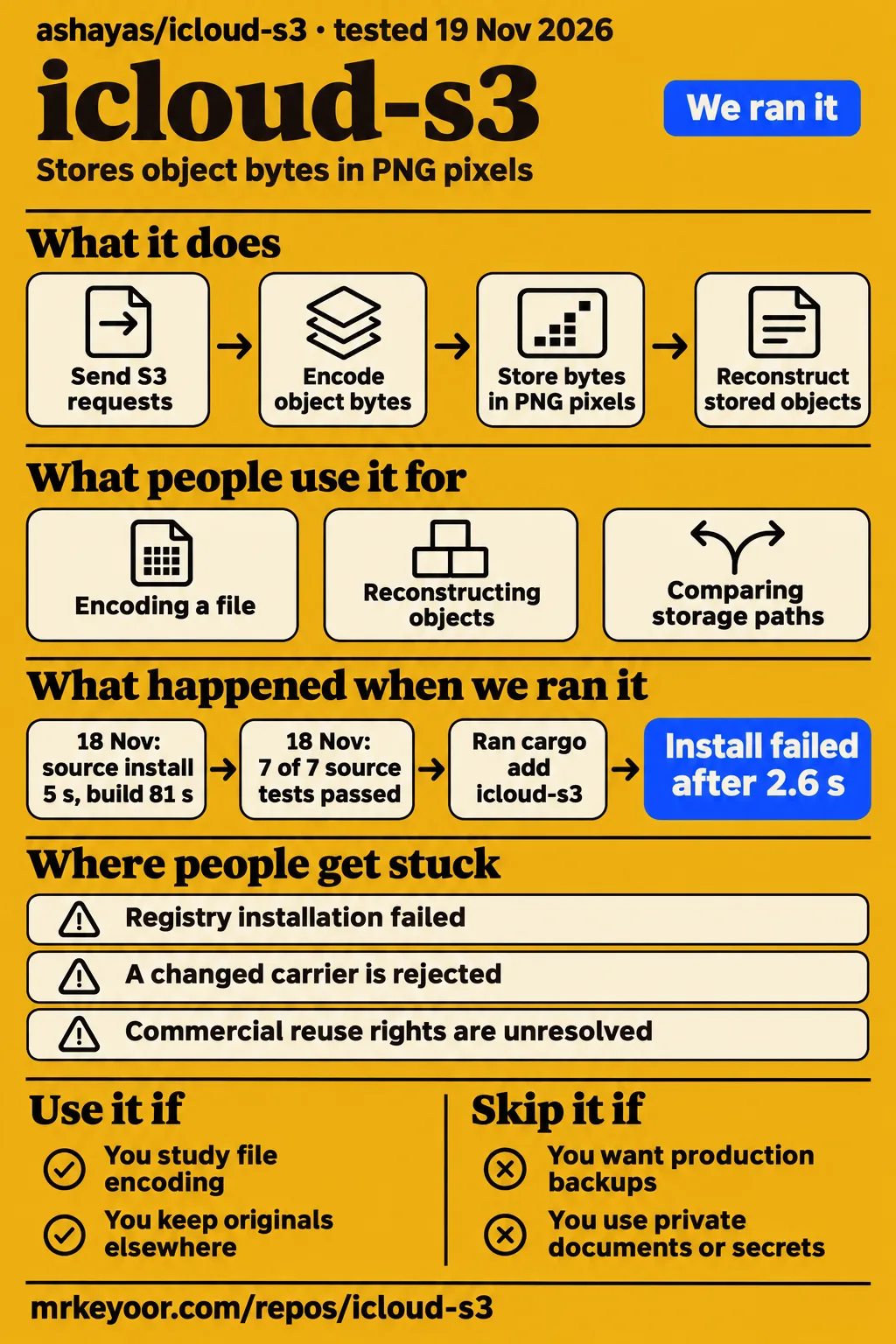
icloud-s3 stores object bytes in PNG pixels behind an S3-compatible interface, and our source-build run passed 7 of 7 tests. Its README calls it satire and excludes production and sensitive data. That makes it a useful code-reading experiment for developers interested in file encoding, carrier integrity and object reconstruction. Use disposable files and keep the originals elsewhere. Project README
The repository creates carrier images from ordinary objects. A photo-export script does the reverse kind of job: it starts with an existing photo collection and moves those files into storage. The distinction matters before installation because the similar names can lead to different expectations. This review follows the Rust repository's documented modes, our two setup records and the author's demonstrations to help a developer choose a starting point.
What people use icloud-s3 for
The author's examples cover encoding a file, sending S3 requests, reconstructing objects after a restart and comparing storage paths. The sample Cargo.toml carrier gives readers a small, recognizable file to decode. The AWS CLI example exercises the HTTP interface, while the restart exercises explain how the program finds objects again from carrier files. These are author demonstrations rather than customer case studies. Author's examples and evaluations
| Who used it | What they did | Reported outcome |
|---|---|---|
| Project author | Encoded Cargo.toml into a sample carrier PNG | The README provides the carrier and a decode command to recover the original file. Sample carrier instructions |
| Project author's evaluation suite | Pointed an unmodified AWS CLI at the endpoint | The author reports bucket creation, copying and listing, including a 24 KiB binary round trip. AWS CLI evaluation |
| Project author | Restarted storage backed by local PNG files | The author reports reconstructing stored objects by scanning carriers and decoding their headers. Cold-restart report |
| Project author | Compared ten JPEGs and one ZIP with Cloudflare R2 | The README compares local PNG operations with requests to a live R2 bucket. Comparison methodology |
The author reports reconstructing 8 keys across 4 album shards in the correctness evaluation. A separate restart benchmark reports 50 objects and a 31.45 ms album scan and header decode. The first result belongs to the correctness suite; the second belongs to the restart benchmark. Both concern recovering object state from the information stored inside PNG carriers. Restart evaluations
The command source describes its SQL dump, Terraform state, tracing data and SQLite snapshot as synthetic objects. Those names illustrate possible byte contents rather than identify organizations using the program. For a developer exploring the design, the practical exercise is to follow a harmless input through encoding, object-key assignment and reconstruction. Synthetic demo definition
What happened when we ran it
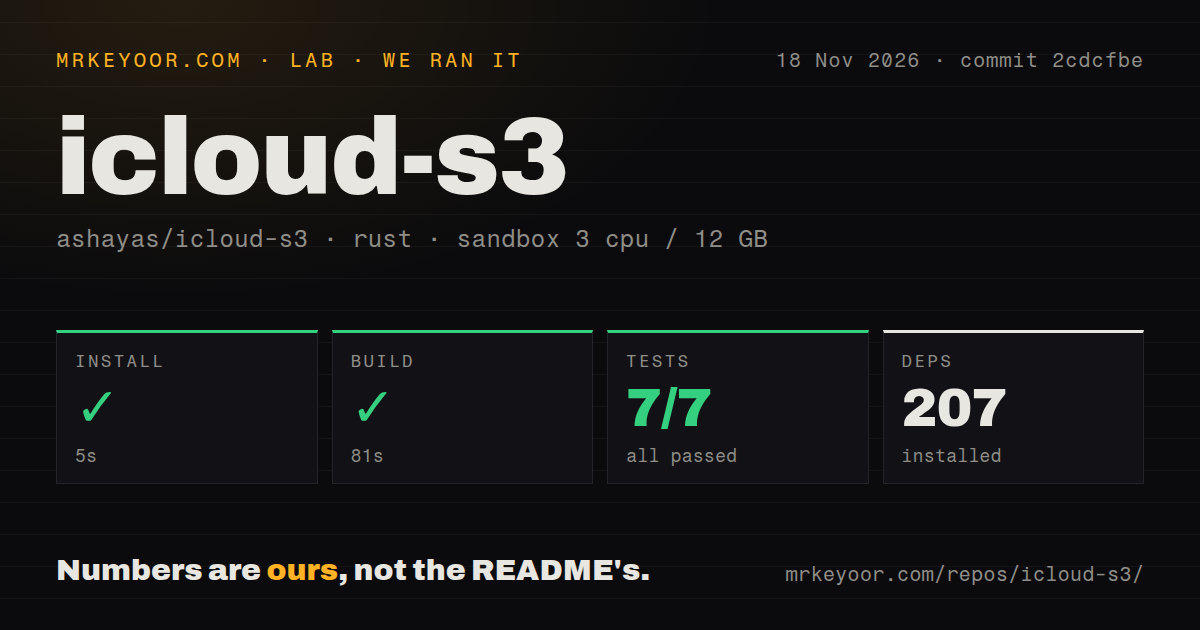
Our November 18, 2026 source-build run at commit 2cdcfbe passed installation, compilation and all 7 cargo tests. Installation took 5 seconds, building took 81 seconds, and testing took 10 seconds. The sandbox recorded 3 CPUs, 12 GB RAM and image label lab-rust:1. These are our measurements, separate from the author's published evaluations and the following day's registry installation attempt.
| Source-build sandbox observation | Recorded result |
|---|---|
| Installation | Succeeded in 5 seconds |
| Dependency inventory | 207 dependencies recorded |
| Build | Succeeded in 81 seconds |
| cargo test | 7 passed, 0 failed of 7, in 10 seconds |
| Checkout | 17 files, approximately 3,432 source lines, 2.3 MB |
| Repository scan | 0 CI workflow files, no Dockerfile, no tests directory |
The November 19 recipe used commit 2cdcfbec7f1b in an unprivileged container with 2 CPUs, 4 GB RAM, no published ports and no secrets. Cloning completed in 1 second. Installation failed in 2.6 seconds: cargo add icloud-s3, run inside a new binary crate, returned exit 101 because the crate could not be found in the registry index. Run configuration Clone step Installation error
The run summary says the package was installed from crates.io, but the installation step records failure and the finding is install-failed. Teardown finished with ok. The step log therefore describes a failed registry lookup, alongside the separate successful source-build record. The README's installation command uses the source checkout rather than adding a registry dependency. Recorded failure finding Teardown result README installation instructions
The checkout scan recorded no tests directory, while cargo test reported seven passing tests. A directory scan and a test command describe different things, so these results coexist. Likewise, the absence of CI workflow files and a Dockerfile describes the checked-out repository structure. The successful build is the direct result for whether this source compiled in the recorded sandbox.
Where people get stuck: installation and carrier integrity
The recorded registry installation failed before the program reached an album or photo. The README documents cargo install --path . from a source checkout instead. Start by matching the installation route to the instructions: the error names a registry lookup, while the documented command installs the local package. Apple account settings belong to a later part of the workflow. Installation failure README installation instructions
| Symptom or decision | Evidence | Useful response |
|---|---|---|
| Cargo says the crate could not be found | Our registry-based attempt exited 101 | Follow the README's local-source installation route. |
| You want persistence between runs | The README distinguishes dry-run memory from an album directory | Select directory-backed mode and retain the carrier files. |
| You want images imported into Photos | The README exposes a separate Photos.app option | Select the AppleScript import option on macOS. |
| A changed carrier is rejected | The author's corruption evaluation reports checksum rejection | Keep an intact carrier and the original object separately. |
The author's corruption evaluation reports that a one-bit green-channel mutation was rejected with ChecksumMismatch. The README describes per-frame CRC32 checks and whole-object SHA-256 and MD5 digests. This gives a concrete behavior to look for when reading the decoder: deliberately altered carrier data triggers an integrity error. An intact original file provides a reference when exploring how encoding and decoding relate. Integrity evaluation and carrier format
The 12 TB headline describes raw pixel capacity
The README derives approximately 12 TB of raw capacity from 200 albums, 5,000 photos per album and images up to 2048×2048 pixels. It describes a lossless 24-bit RGB image at that size as holding 12.18 MB of raw pixel data. These are the author's capacity inputs, and the headline refers to raw pixels. README capacity calculation
The carrier format also contains a 64-pixel visual banner, a JSON preamble and numbered frames for larger objects. The command source exposes a maximum payload per frame and a shard count. Those details make the format more useful to study than the headline alone: object bytes share the carrier with the information needed to identify, check and reassemble them. Carrier structure Command configuration
Security: use disposable files
The README explicitly excludes production and sensitive data. Choose harmless contents and filenames, and retain the original file elsewhere. The visible carrier banner includes bucket and object information, which makes the carrier itself part of the example's exposed contents. A sample manifest fits the stated purpose better than credentials, private documents or a real database backup. Author's warning and carrier design
The source defaults the server's bind address to 127.0.0.1:9000, and the README points its AWS CLI examples to that endpoint. The Rust server receives the S3 requests and produces or reads the carrier images. That connection between client, endpoint and carrier is the useful setup model for a first experiment: follow the request into the local server, then inspect the representation it writes. Server command definition Client examples
icloud-s3 vs Cloudflare R2, Amazon S3 and migration tools
The author's comparison labels icloud-s3 as local Shared Album PNG storage, R2 as measured live and S3 as published WAN baselines. Rclone and javierarce/icloud-to-s3 address transferring existing files or photos. Choose among these by the job: studying a carrier format, reading a storage benchmark or moving an existing collection. README benchmark labels Rclone README Photo-export script README
| Choice | What the supplied evidence describes | Decision |
|---|---|---|
| icloud-s3 | PNG carriers behind an experimental S3 interface | Choose it to study encoding and reconstruction with disposable data. |
| Cloudflare R2 | A live network bucket in the author's comparison | Read the reported timings alongside the network request path. |
| Amazon S3 | Published WAN baselines in the README | Read these as the author's baseline figures. |
| Rclone | File and directory synchronization across storage providers | Consider it for moving existing files between services. |
| javierarce/icloud-to-s3 | A script for shared-album photos going into an S3 bucket | Consider it for that photo-export direction. |
Rclone is a command-line program for syncing files and directories to and from different cloud storage providers. Its provider list includes Amazon S3, Google Drive and iCloud Drive. The photo-export script has a narrower setup: its README asks for a Shared Album ID, S3 credentials and an output folder, then dependency installation and execution. Neither description is a PNG carrier workflow. Rclone purpose and providers Shared-album export setup
Outdated claims, corrected
The author's 284-times-faster R2 headline refers to local PNG operations compared with a live network bucket. The README's benchmark labels supply that distinction: the icloud-s3 column is local Shared Album PNG storage, and the R2 column is measured live. The reported comparison therefore belongs to those two request paths. Author's launch claim README comparison methodology
Blober's transfer page describes a desktop workflow in which users sign in on their own machine and credentials stay local. Its promise of no download-and-re-upload step appears alongside that desktop setup. For readers seeking a migration tool, the concrete distinction is between copying a photo collection through a transfer application and encoding arbitrary object bytes into carrier images. Blober desktop transfer description icloud-s3 design
FAQ
icloud-s3 is an experiment for studying PNG-backed objects; Rclone and the shared-album export script address existing-file transfers. The questions below concern choosing the repository, understanding its representation and finding the appropriate transfer direction. The README's satire notice remains the starting point for that choice. Project purpose Rclone purpose Photo-export purpose
Is ashayas/icloud-s3 still actively maintained?
The latest recorded push was October 31, 2026, and the November 19 metadata snapshot records zero open issues and pull requests. GitRank describes the repository as recently maintained. Those dated observations describe repository activity at the time of collection; the README describes its purpose as a satire experiment. Repository metadata source GitRank project profile README purpose
Can I use icloud-s3 commercially?
OpenToolsHub reports no licence file or README licence statement, and GitRank labels the licence unverified. Request explicit permission from the author before treating it as a commercial dependency. Separately, the README excludes production and sensitive data. A commercial-use decision therefore needs both a permission decision and attention to the project's stated purpose. OpenToolsHub licence account GitRank licence account README warning
What are the best open-source alternatives to icloud-s3?
Rclone fits transfers across storage providers, while javierarce/icloud-to-s3 describes moving shared-album photos into S3. For the carrier experiment itself, this repository's examples show how object bytes become images and how the server reads them back. Pick a transfer tool when the starting material is an existing file collection; pick this experiment when the representation is the subject you want to study. Rclone README Photo-export script README Carrier examples
Why encode object data in pixels instead of image metadata?
The README says media pipelines strip ancillary metadata chunks on upload, so the design places bytes in RGB pixels. It pairs that representation with per-frame checksums and whole-object digests. The author's damaged-pixel evaluation reports ChecksumMismatch, connecting the design rationale to a specific decoder outcome rather than a general promise about image integrity. README codec explanation and integrity evaluation
How can I transfer iCloud photos to S3 without downloading them locally?
javierarce/icloud-to-s3 describes moving existing shared-album photos into an S3 bucket. Blober describes a desktop transfer application with local sign-in and credentials, alongside its no-download-and-re-upload wording. Those are migration workflows. icloud-s3 instead takes object bytes and stores them in carrier PNGs, so its examples answer a different task from exporting an existing photo collection. Shared-album export script Blober transfer description Carrier design
What we have not tested yet
An Apple Shared Album upload, remote download and byte-for-byte recovery on a fresh machine remain untested in our supplied runs. Our source-build measurements cover installation, compilation and cargo tests; the separate registry attempt stopped at installation. A follow-up experiment would compare a harmless original file's digest with a restored copy retrieved from Apple's service. The instructions and examples above are source descriptions, not newly executed commands.
Full-scale usable capacity, sustained remote upload rates, Apple-side image transformations and deletion recovery are outside the measured results. The supplied evidence also lacks a matched remote-storage performance run against R2 or S3, a security audit, an access-control evaluation and demonstrated repair or redundancy for damaged or missing carriers. Framing overhead and configured chunk sizes also separate raw pixel capacity from usable object capacity.
SethSchilbe's million-user and SlackCache reply belongs to the supplied satirical exchange and supplies no adoption evidence. Independent production deployments and a support history are absent from these records. The image label supplies neither the actual Rust version nor the operating-system version; those require toolchain logs. The supplied licence accounts leave commercial permission unresolved. Satirical discussion Licence account
Rendered layout, resolved links, related links and recommendation modules fall outside these text and source checks. The evidence also supplies no direct Apple paid-plan extract or result for migration without local bandwidth or disk use. Start with the documented source installation and disposable input when studying the format, while retaining the original file elsewhere.