Ghost puts browser captures and torrents in one desktop queue
A video found in your browser and a torrent shouldn't require separate download routines. Ghost Downloader combines web-file downloading, BitTorrent, and streaming-media support in a graphical application. The project has a Chinese-speaking community, an English README, and English user documentation. Its browser extension can list media on a page and hand downloads to the desktop app, with authentication state carried over according to the README. That's the practical reason to try it.
The scope is visible in our checkout: 514 files, roughly 114,426 source lines, and 18.3 MB before installation. The README lists HTTP, FTP, HLS, MPEG-DASH, and eD2k alongside torrents, plus site-specific handling for YouTube and Bilibili. You can see the appeal if your downloads span those sources. Someone who only retrieves server-side files should weigh the desktop and browser machinery against a command-line downloader with fewer interfaces to manage.
What happened when we ran it
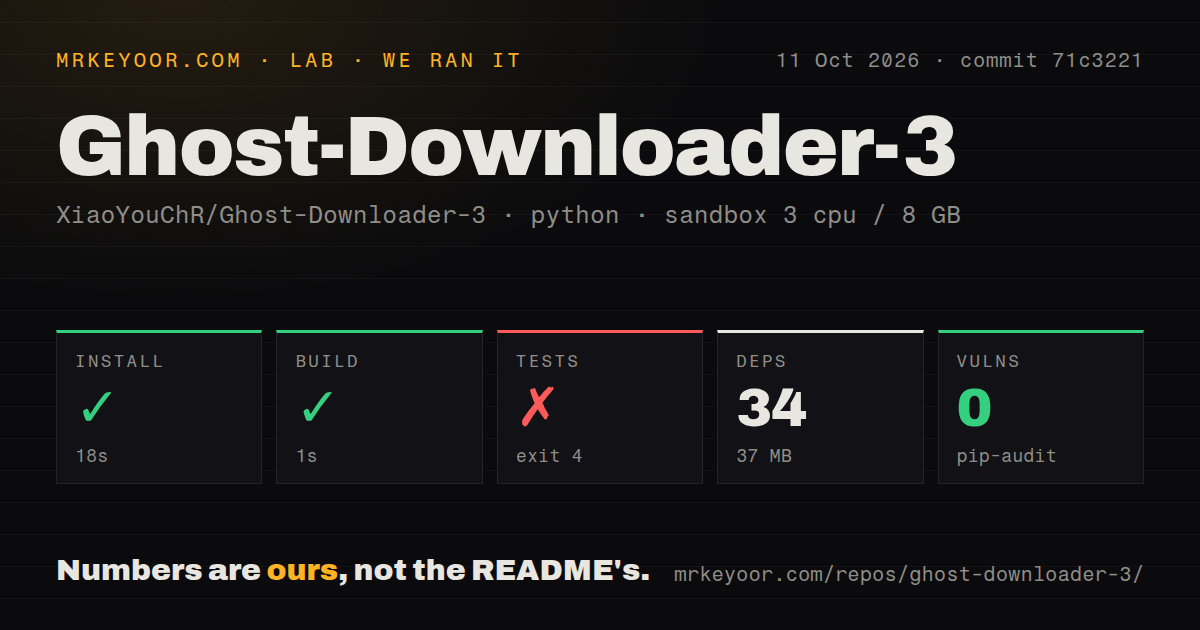
Our Ghost Downloader sandbox installed 34 packages in 18 seconds, using 37 MB on disk, and built successfully in 1 second. We measured commit 71c3221 on October 11, 2026, in an unprivileged Debian container with 3 CPUs, 8 GB of RAM, the uv Python 3.12 Bookworm base image, and no secrets. These results describe the repository steps we ran, not the speed of a download or the behavior of an installed desktop release.
The test command failed with exit 4 after 1 second. While loading /work/repo/tests/conftest.py, line 7 tried from aiohttp import web and raised ModuleNotFoundError: No module named 'aiohttp'. The log establishes that the module was unavailable to that test invocation. It doesn't establish why. Our scan found 6 CI workflows, a tests directory, and no Dockerfile. Pip-audit reported 0 known vulnerabilities, which does not turn the failed test step into a pass.
Platform installers are a different route from source development
The v4.3.7 release includes Windows installers and portable archives, macOS disk images, Linux packages, and an Android APK. The installation guide sends users to those artifacts. On Windows, installed mode stores data in the user directory, while portable mode keeps it alongside the application. That distinction matters if you want a removable setup or need predictable locations for download settings and history.
Our 37 MB dependency footprint doesn't measure the size or completeness of those distributed apps. Source contributors should read the project configuration: it requires Python 3.13 or newer and places aiohttp in the development group. The sandbox base image's Python 3.12 label does not identify the interpreter selected during installation. That configuration helps explain what contributors need to inspect, but it doesn't prove the cause of our missing-module failure.
Modern platform requirements exclude older machines
The README requires Windows 10 or newer, macOS 13 or newer, and Linux with glibc 2.35 or newer. It also warns that the Qt version excludes CPUs without AVX support. Those are concrete reasons to walk away if you're keeping an old download workstation alive. Check the system requirement before choosing an installer, especially on a Linux machine whose base distribution predates the required glibc version.
Our 18-second install says nothing about compatibility with those older machines. Android also has a documentation discrepancy: the README lists Android 11 or newer, while the installation guide says Android 10 or newer. Neither page resolves the difference. If you use an Android 10 device, verify the specific APK's requirement before depending on it. A supported-platform table is useful only when it matches the artifact you're about to install.
Browser integration needs a trial on your actual sites
The README describes a browser extension that finds media and transfers authentication state to the desktop app. It also advertises browser-style TLS fingerprints and bandwidth-aware chunking. Treat those as project claims until you've tried the sources you use. Our sandbox contains no transfer-throughput measurement, site-compatibility check, or evidence that anti-bot systems cannot detect this downloader. A good interface cannot make a remote service accept every request.
With 514 files in the measured checkout, this is a larger adoption surface than a single download script. Test an authenticated source and an ordinary file separately, then inspect the resulting files. If you only need scripted HTTP or torrent downloads, aria2 is the narrower choice. Xtreme Download Manager is another desktop option when browser integration matters. Neither comparison implies a speed advantage we measured.
The public plugin API remains unfinished
Ghost's README says Feature Packs are operational but still lists making the plugin API public as unfinished work. Don't build a long-lived integration on the assumption that a stable public extension contract already exists. The advertised aria2-compatible RPC interface provides another integration route, but compatibility is a claim to check against your client's actual methods. Editing URLs, headers, and proxies during a download may be useful without settling those API boundaries.
Our 1-second build is a reason to inspect the source, not a substitute for integration checks. GitHub showed 9,700 stars and 85 open issues and PRs, with a last push on October 8, 2026, and October issue activity. Open issue 916 reports unusual tray memory use on startup in v4.3.7 on Windows 11. We didn't reproduce it. Try the desktop release if its combined queue solves your problem, and check startup behavior before leaving it running unattended.