Keep your current agent and give it an API command
Gemini API CLI leaves planning with the agent you already use. Put gemini-api on its shell path, configure API access and the host can request media, analyze files or start a managed agent. If you already have a coding assistant whose workflow you like, that division of responsibility is the reason to consider this project.
The README describes each invocation as independent. Your script or host agent supplies context and controls subsequent actions. That means the CLI can fit into an existing workflow, but it also means your workflow owns the returned paths and interaction IDs. Installing the binary does not create a persistent local conversation manager.
What happened when we ran it
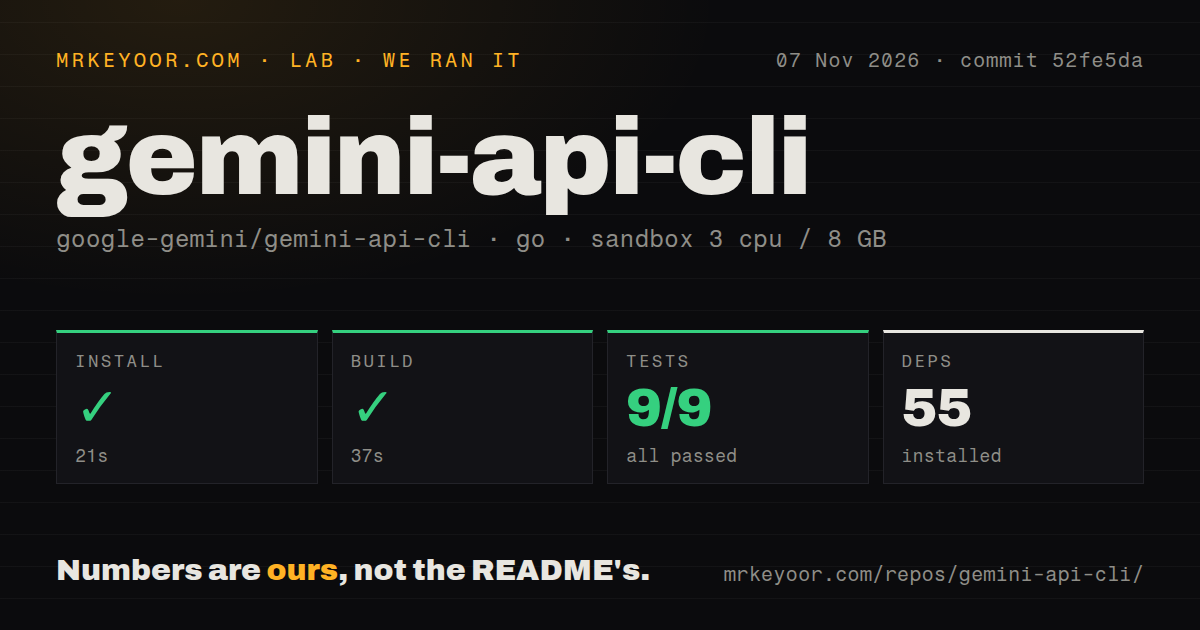
Our November 7, 2026 run at commit 52fe5da completed installation in 21 seconds, recorded 55 dependencies and built successfully in 37 seconds. The test step succeeded in 90 seconds. Its supplied Go summary reports 9 passed and 0 failed of 9. That is the recorded summary, rather than evidence that every documented API operation was exercised against a live account.
The checkout contained 473 files, approximately 111,253 source lines and 4 MB. The scan found two CI workflow files and a tests directory, with no Dockerfile detected. We have no installed disk-footprint measurement, security audit or authenticated media-generation result in this record.
The configured sandbox had 3 CPUs, 8 GB RAM and image golang:1.24-bookworm. That name does not establish the Go executable or operating-system version. Current main documents Go 1.26.10 or later and says automatic toolchain selection can download the required version. We cannot use the label to claim that current main compiled with an older Go toolchain, nor identify which toolchain the measured revision actually used.
These successful steps justify proceeding to an integration trial. They do not establish API access, output quality or managed-agent completion. A developer deciding whether to automate document analysis still needs a representative document and an authenticated response, neither of which appears in our measurements.
Preview the request before giving it credentials
The README documents --dry-run as offline validation that prints a resolved request with credentials redacted, without a network call or OS-keychain read. That is a useful first checkpoint for an automated caller. It can inspect a request before sending data, although a valid preview cannot establish that the API will authorize or fulfill it.
For actual calls, the documented credential options include an environment variable and persistent workstation storage. The binary also has a command for inspecting the active configuration and credential source. Select the storage method deliberately, then make sure the host agent's subprocess receives the intended configuration. Our repository checks did not verify any of those authentication paths.
Request discovery is built into the interface. --usage exposes machine-readable command information, while --schema describes request bodies. That gives an agent something more precise than guessing flags from a natural-language instruction. We read the documented behavior, but did not test whether a particular host assistant discovers and uses those schemas correctly.
Scripts must handle streaming and background IDs explicitly
The README tells callers wanting a complete structured response to disable streaming and request JSON output. Media commands instead write local artifacts and, by default, print the written file path. Those are different output contracts. Decide which one your script expects before feeding stdout into another command.
Background managed-agent work adds another obligation: retain the returned interaction ID, then retrieve progress or the result. Local statelessness does not mean the remote service retains nothing. The README separately describes server-side interactions and uploaded-file retention. Review the service settings for the data involved rather than treating a stateless binary as an offline-processing guarantee.
For a first integration, choose one bounded operation, such as analyzing an approved sample document. Capture the documented output, check the error path and decide how the host records the result. This is a proposed trial, not a workflow we completed in the sandbox.
Beta releases and a closed contribution path limit adoption
The project labels the CLI beta and warns of breaking changes between releases. It recommends pinning a release in automation. It also says external pull requests are not currently accepted. A team expecting to maintain an upstream patch needs to account for that policy before depending on it.
The last push was November 6, 2026, with issue and pull-request activity on the same date. The latest-release endpoint identifies v0.4.5, published October 30. These are signs of ongoing work, not evidence of a stable API contract or support guarantee. We did not assess response times or infer production reliability from the passing source steps.
Gemini CLI supplies an agent; LLM spans providers
Gemini CLI is a terminal coding agent whose current README limits its intended scope to enterprise Code Assist workflows. Evaluate that project if you need the agent itself and your account fits. Its similar name should not lead you to substitute it for the API command discussed here.
LLM documents multiple model providers and local-model plugins, with prompt and response storage in SQLite. Choose that direction when provider flexibility and a queryable history drive the decision. We have no comparative setup or inference measurements for either alternative.
Documentation ratings run from 1 for no usable entry path, through 2 for partial instructions and 3 for a documented main path, to 4 for distinct workflows and limits, and 5 for independently verified coverage. This README earns 4. Setup ease, support capacity and production maturity remain unassessed beyond the recorded steps. Pin a release, preview one request, then verify its authenticated result before making it part of unattended work.