The package starts quickly, while the source tree spans 703,120 lines
Gemini CLI puts a coding agent in the terminal. It can inspect and change files, execute shell commands, fetch pages, and ground a request with Google Search. Interactive sessions suit repository work, while headless runs can return plain text, JSON, or streamed JSON events. MCP support adds tools from outside services. Those abilities make it useful, but they also determine the size of the trust boundary.
The README offers an npx command, a global npm install, Homebrew, MacPorts, and Anaconda. Working on the source is a different proposition. Our checkout contained 3,016 files, about 703,120 lines of source, and 87.4 MB before installation. It is an npm workspace monorepo with 47 CI workflow files and a Dockerfile. A developer trying the package and a contributor changing the agent are signing up for very different amounts of machinery.
Three authentication routes still end at Google
You can sign in with a Google account, supply a Gemini API key, or configure Vertex AI. OAuth is the simplest route for an individual. An API key gives explicit model selection, while Vertex AI fits organizations already operating in Google Cloud. Node 20 or newer is required by the root package. None of these routes turns Gemini CLI into a local-model runner.
That distinction matters in restricted networks and provider-diverse stacks. The client is Apache-2.0 licensed, yet the documented model path still needs a Google service and its account, quota, and data-handling rules. The README currently advertises 60 requests per minute and 1,000 requests per day for personal sign-in. Treat those figures as service terms to recheck, since they are not properties of the source code.
What happened when we ran it
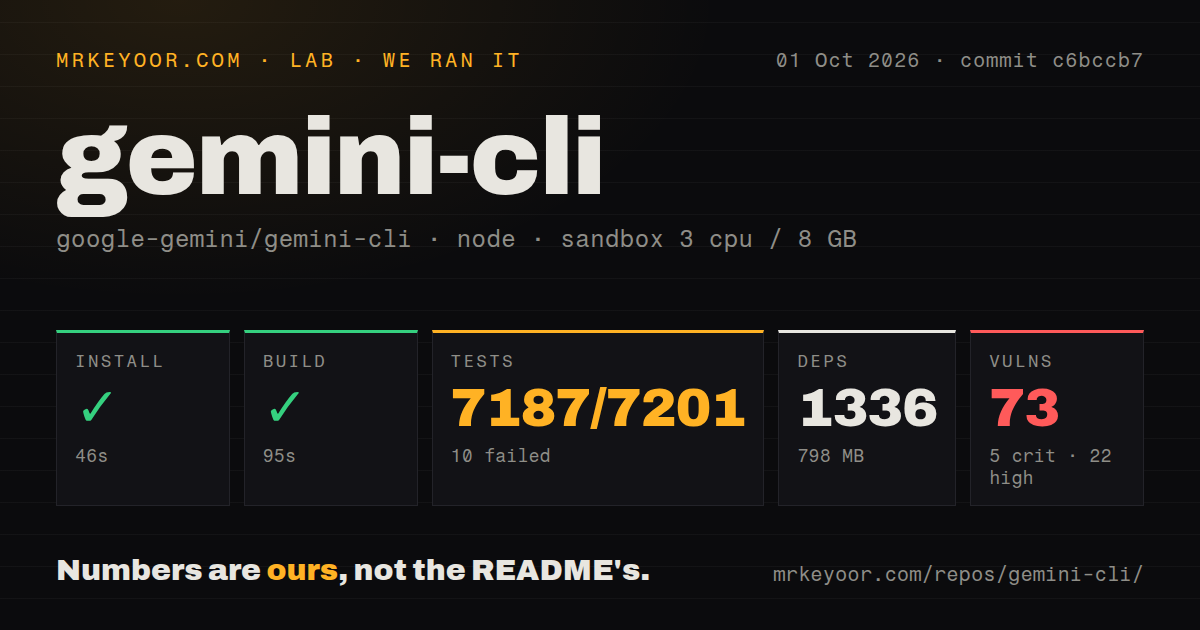
Our sandbox installed commit c6bccb7 in 46 seconds, adding 1,336 npm packages and consuming 798 MB on disk. The build succeeded in 95 seconds. We used Node 22 in a fresh unprivileged Debian container with 3 CPUs, 8 GB of RAM, and no secrets. Npm audit reported 73 known vulnerabilities: 5 critical, 22 high, 42 moderate, and 4 low.
The test command did not finish within 900 seconds. Vitest reported 7,187 passed, 10 failed, and 4 skipped out of 7,201. The supplied log tail showed several slower BrowserManager cases passing, including invalid-domain and connection-failure handling. It also showed passing session-summary, IDE connection, retry, code-assist, and hook-runner files. The tail did not name the 10 failures, so it does not support a diagnosis.
Those results say two useful things at once. Most tests passed, and this commit still missed a clean release gate in our environment. The same restraint applies to the 73 audit findings: their severity counts deserve inspection, but the audit summary alone does not prove that every advisory is reachable through normal CLI use. A team adopting the source should map the affected dependency paths before deciding on exposure.
MCP breadth needs curation before it becomes useful
MCP servers are configured through Gemini settings and can expose systems such as source control, chat, or databases. This is more than a convenience feature. Each server gives the model another set of actions and may introduce a token or credential. Open issue 24246 reports a 400 response when more than 400 tools are available, so a very large MCP catalog can fail before the model chooses anything.
Keep the tool list tied to the current job. A database reader, Slack sender, and GitHub writer do not all need to sit in every session. Headless mode makes this discipline more important because JSON output can look machine-ready even when a tool call timed out or stopped halfway through. Scripts should check process status, parse structured errors, and verify the intended file or remote change before continuing.
Sandboxing narrows damage, but its boundary changes by platform
Gemini CLI supports macOS Seatbelt, Docker or Podman, gVisor, Windows Native Sandbox, and experimental LXC. Docker and Podman mount the current workspace at the same absolute path inside the container. gVisor needs a configured runsc runtime. LXC expects an existing container and does not create one for you. The default macOS profile permits broad reads and network access while limiting writes.
Those are meaningful controls, not a universal safety switch. Open issue 22672 says the agent can sometimes choose destructive Git commands such as reset or force when a safer route exists. For important repositories, use a disposable branch, restrict credentials, inspect mounted paths, and require confirmation for irreversible commands. A sandbox can limit the blast radius, while review still decides whether a change belongs.
The October 2 push is active maintenance, not a clean-room result
GitHub showed 107,222 stars, 787 combined issues and pull requests, and a push on October 2, 2026. Stable v0.62.0 shipped on September 29. Its release notes include OAuth refresh-token handling, PTY lifecycle work, MCP tool-title formatting, IDE fixes, and test stabilization. The README describes weekly stable and preview releases plus daily nightlies.
The project is plainly active. Activity does not erase our 10 failed tests or classify 73 dependency findings. Try the stable package in a disposable repository if Gemini is already part of your stack. For managed use, pin the release, select one sandbox path, keep MCP access narrow, and make a green run on your own operating system the entry ticket.