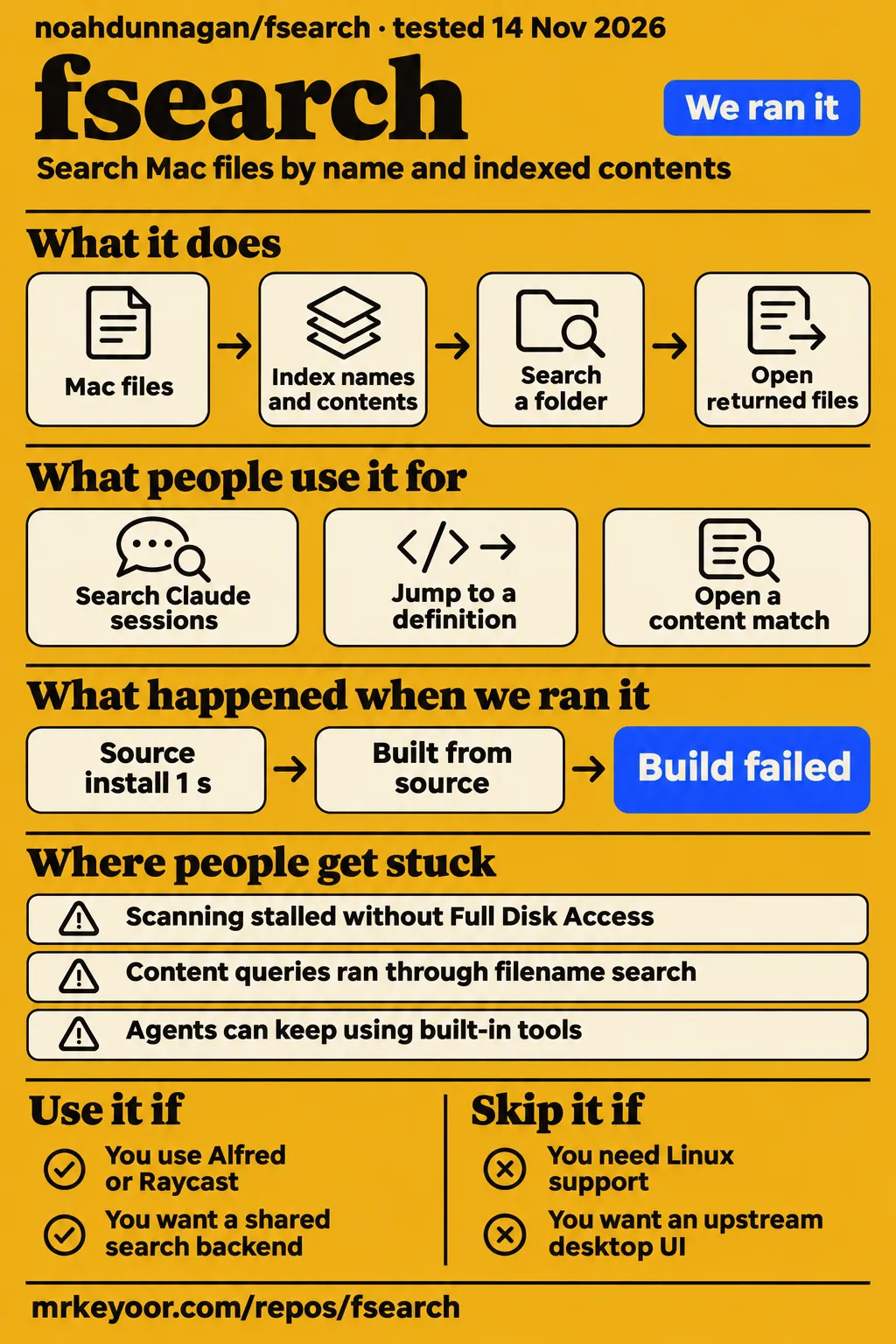
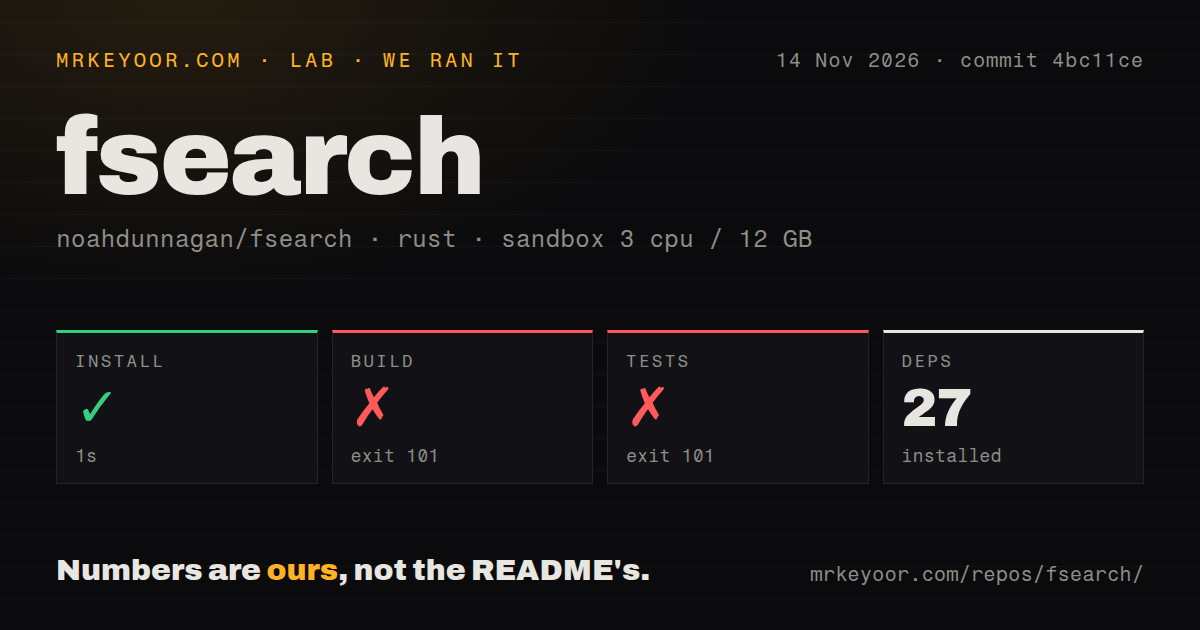
Noah Dunnagan's fsearch is a macOS CLI and daemon; the GTK3 Linux FSearch belongs to a separate project. Choose Noah's tool if you want one search engine behind a terminal, launcher or coding agent. Choose a desktop application if you want the interface supplied for you. Our sandbox installed its dependencies, then failed to compile commit 4bc11ce, so our recommendation rests on documented capabilities and attributed user reports, rather than a working Mac session.
What people use fsearch for
Alfred, Raycast and an independent Mac launcher put fsearch's filename and content searches into interfaces people already use. These reports are more useful than a fast-looking search demo because they explain what happens after a match appears: opening the file, revealing its location, or jumping to a definition. Keep the ownership straight: these integrations sit around Noah's engine. The maintainer explicitly declined an upstream desktop UI in issue #15.
| Who used it | Workflow | Reported outcome |
|---|---|---|
| X user alber70g | Connected fsearch to Alfred as a Script Filter | File results supported opening, revealing and Quick Look; the user also searched Claude and Codex sessions. Alfred report |
| GitHub user domfahey | Built a SwiftUI/AppKit menu-bar launcher | The frontend searched filenames, contents and definitions through the daemon socket, adding no index of its own. Native frontend report, issue #18 |
| X user 0xdhrv | Announced a Raycast extension | The announcement describes filename, text, regex and definition searches, plus Raycast AI access. Extension announcement |
The Raycast listing fills in the everyday details: Quick Look, previews, opening a content match at its line, and pasting paths into another app. Its shell-quoted path action is particularly useful when a filename contains spaces. Those are small features that make a search result usable without another copy-and-paste chore. The listing describes installation through Terminal, including a Rust setup offer, rather than a completely self-contained extension.
For developers, the upstream README documents in: for a folder, ext: for an extension, grep: for indexed text and sym: for definitions. Start with a folder you know. A query such as ext:rs grep:apply_dir expresses a different job from finding a filename containing those words, and that distinction matters when judging both the results and the benchmark command.
What happened when we ran it
Our sandbox installed dependencies in 1 second, but the build failed after 22 seconds and the test command failed after 5 seconds. This was commit 4bc11ce on November 14, 2026, with a recorded configuration of 3 CPUs, 12 GB RAM and image label lab-rust:1. The image label supplies neither the actual Rust version nor the operating-system version. Our measurement setup covered dependency installation, source compilation and the test command; it stopped before a search workload.
| Recorded step | Result | What it tells you |
|---|---|---|
| Dependency installation | Succeeded in 1 second; 27 dependencies recorded | Dependencies were obtained; this was not a working search session. |
| Build | Failed, exit 101, after 22 seconds | The compiler reported 48 errors and 2 warnings. |
| Tests | Failed, exit 101, after 5 seconds | Library and library-test compilation failed; the record supplies no passing-test count. |
| Repository scan | 33 files, approximately 19,615 source lines, 0.9 MB checked out | A small checkout does not guarantee a successful build. |
| Supporting files | 1 CI workflow, no Dockerfile, no tests directory | This describes detected files, not CI success or the absence of inline Rust tests. |
The build tail names error codes E0422, E0425 and E0433, then says the library could not compile because of 48 previous errors. It also shows an unnecessary-mutation warning and an unused pair argument in src/content.rs. The test tail repeats the compilation errors for the library and library-test targets. Those warnings are separate from the errors that stopped compilation. The supplied tail is too short to identify all failing symbols or prescribe a package fix.
The separate hands-on record says the safety step failed because no Compose file existed. Its safety record calls the repository unsafe under a harness rule requiring Compose. That is a harness requirement for this attempt, not a finding that a local Mac search daemon needs Docker. A run-summary record nevertheless says it deployed with its own Docker Compose and loopback-bound ports. These records conflict. The teardown record says teardown was OK; none of those statements supplies a completed search task.
Where people get stuck: permissions, interfaces and benchmark versions
A first scan can stall at privacy-protected libraries, according to the reporter in issue #29. That is a more actionable setup warning than calling the program difficult to install. The README says a terminal with Full Disk Access can index protected locations, and that a login installation needs access granted to ~/.local/bin/fsearch, again after each rebuild. Permissions belong on your setup checklist before you interpret missing files as poor search quality.
| Report | What happened | Recorded response or resolution |
|---|---|---|
| Issue #29, first index | Reporter says Music and TV libraries stalled scanning without Full Disk Access | Adding Music/Music and Movies/TV to the protected-folder exclusion list made their scan finish. Closed without a maintainer comment. |
| Issue #10, benchmark command | Content queries ran through filename search; the value labelled first was the maximum | Maintainer reports both defects fixed on main in 8a452d1. |
| Issue #35, installed version | User wanted a command to identify the installed build | Maintainer says version 0.2.2 includes fsearch version and fsearch --version. |
| Issue #15, desktop UI | User requested an interface for ordinary desktop use | Maintainer closed the request and said fsearch stays a CLI and daemon; independent frontends were suggested. |
Issue #29 describes a scan count that stopped changing, followed by a terminal request for access to the Music library. The reporter traced that to two library paths missing from the exclusion list and supplied a patch. Read that as a specific workaround report. Closing an issue and shipping its patch are different events, and the record documents only the former plus the reporter's successful change.
The benchmark bug is consequential for anyone comparing tools. A content query could produce plausible-looking filename results while timing the wrong operation. The reporter also disclosed that their reproduction used a Linux build of the same benchmark function. The maintainer's response identifies the fixing commit. Keep that commit alongside any historical content-search timing you use, instead of treating every output labelled bench as equivalent evidence.
Content limits and directory churn affect what you find
The README limits automatic content indexing to text files up to 1 MB, or 10 MB inside git repositories. It excludes lockfiles, larger JSON files, ignored files and other listed categories. Names remain indexed, and an explicitly named file can still be read for a content search. That distinction matters if you expect a whole-disk filename index to mean that every byte of every file has already entered the content index. The content coverage documentation gives you the boundaries to check against your own files.
The README also says cache and build-folder changes wait until activity settles before updating search results. That policy affects a developer differently from an occasional document searcher: node_modules, build output and logs can change continually while you work. Names in those folders are indexed, but their updates follow a quieter schedule. If your task depends on a file created during a build, consider freshness as well as how quickly a query returns.
Issue #16 raises two specific potential memory-growth paths: ownership of an FSEvents callback context and deleted directory prefixes retained in Live::priors. The reporter proposes repeatedly creating and deleting unique directories and repeatedly replacing event streams while watching allocations. The issue is closed with no comments in this extract. It is a code-review concern, not a measured memory leak reproduced by our lab. A short idle-memory figure would answer a different question from that proposed churn test.
A shared daemon needs clear ownership and access decisions
Domfahey's frontend reports reusing an existing daemon without stopping or taking it over. That makes the native app interesting if you already use the CLI: the app developer says the frontend adds no separate index. Issue #18 also requests a daemon version field and a way for another LaunchAgent to declare ownership. Those are integration requests in the supplied discussion, rather than documented additions to the daemon protocol.
The same developer reported an undisclosed daemon security issue and asked for a private reporting channel. The maintainer enabled private vulnerability reporting through the repository's Security tab. That is the recorded response. An access grant such as Full Disk Access deserves a deliberate choice about which binary and frontend you run, especially when the frontend bundles a pinned engine build of its own. The app developer explicitly describes that pin in the issue.
For coding agents, use folder restrictions and bounded output as your starting configuration. The README exposes folder and result-limit filters, while the Raycast listing says its content tools return up to five lines per file and report early stopping. X user PythonDvz raises context flooding as a concern with broad searches. That post poses a configuration question; it supplies no measured incident. Requiring confirmation for searches outside a workspace is our recommendation, not a reported fsearch default.
Reported speed and agent adoption answer different questions
X user gregkop reports that installing fsearch alone left coding agents using their built-in Glob/find tools in 12 of 16 runs. The user packaged instructions as a skill for Claude Code, Codex, Cursor and OpenCode. That workflow report supplies a useful adoption lesson: making a tool available and getting an agent to choose it are separate jobs. Someone has to describe when the agent should use indexed search and how to scope it.
The author advertises microsecond filename searching, and the current README labels its comparison hardware and source-tree datasets. Read those as author measurements. Our decision gives greater weight to the concrete Alfred and frontend reports because they describe actions people completed. A large speed multiplier against Finder says little about your own mix of names, content, freshly edited files and protected folders unless the comparison identifies those conditions.
fsearch vs Linux FSearch, the cross-platform fork and Mac frontends
Pick the project by operating system and interface before comparing search speed. The same name covers unrelated software, while a fork and a frontend have different relationships to Noah's engine. For the query fsearch linux, cboxdoerfer/FSearch is the separate GTK3 application; threehymns offers a Linux-supporting fork of Noah's project. Neither changes the upstream maintainer's explicit macOS-only position in issue #9.
| Choice | Relationship and documented role | Pick it when |
|---|---|---|
| Noah Dunnagan's fsearch | macOS CLI and daemon, with indexed content search and an MCP interface | You want a programmable search backend for Mac tools. Upstream README |
| cboxdoerfer/FSearch | Separate application written in C with GTK3 | You want the Linux graphical search application described in Linux reviews. Linux repository |
| threehymns/fsearch-crossplatform | Contributor's Linux-supporting fork of Noah's engine | You need that engine's approach on Linux and can assess a separately maintained fork. Fork discussion |
| domfahey/fsearch-app | Independent native Mac launcher using fsearch's daemon | You want a Mac interface around this engine instead of operating the CLI directly. Frontend report |
| Finder | The built-in Mac alternative named in speed comparisons | You prefer the existing Mac file interface over adopting a daemon and integration. Comparison search record |
The fork author says keeping up is the intention and also acknowledges a backlog. That is a maintenance commitment expressed by a contributor, not a promise of release parity. The native frontend makes a different trade: it stays on Mac and handles the interface while relying on fsearch for retrieval. Choose between them on those grounds. A frontend does not turn an unsupported operating system into a supported one.
What the other reviews get wrong
Linux installation advice belongs to cboxdoerfer/FSearch, not Noah Dunnagan's macOS daemon. This is the most damaging confusion in the supplied search results because it can send you to the wrong repository before you have chosen a tool. XDA's Linux experience, including its large home-directory index, concerns that separate application. Its success is not performance evidence for the Mac engine reviewed here.
Make Tech Easier says Fedora users need to compile Linux FSearch from source. The supplied official Linux README lists stable and nightly COPR packages. Source compilation is therefore a choice, not the only documented route. MakeUseOf's AUR installation advice also needs a date attached: the official Linux README lists the official Arch repository for stable packages and AUR for development builds. These corrections concern the Linux application exclusively.
A Hacker News discussion contains claims that Linux FSearch was abandoned and lacked index caching. Its author directly disputes both, explaining that stable releases already load a cached index. Calling it a locate frontend also misses its own filesystem index. A Linux Mint Reddit comment assumes a find wrapper and Qt, whereas the official project identifies C and GTK3. Forum descriptions are useful leads, but they should not replace the project's documented design.
Questions people ask
Version 0.2.2 supplies the version commands, while the maintainer explicitly keeps upstream macOS-only. Those facts resolve two common setup questions. The answers below separate maintainer statements from user reports, particularly where an issue's closed label could otherwise imply more than the discussion says.
Which fsearch project do I need, and does Noah Dunnagan's version run on Linux?
Noah Dunnagan's upstream remains macOS-only, according to the maintainer in issue #9. Choose cboxdoerfer/FSearch for the separate Linux GTK3 application, or assess threehymns/fsearch-crossplatform if you specifically want a fork of Noah's engine with Linux support.
Is anyone working on a Windows version of Noah Dunnagan's fsearch?
Issue #38 asks about Windows and remains open without a reply in the record. X user al3rez separately describes building wsearch after seeing Noah's project. That announcement concerns a different implementation, not upstream Windows support.
Is there an easier graphical interface for the macOS CLI and daemon?
Domfahey describes an independent native Mac launcher in issue #18, and the Raycast extension provides graphical file and content searches. The maintainer says an upstream desktop UI is not planned in issue #15.
How do I display the installed fsearch version?
Use fsearch version or fsearch --version in version 0.2.2, according to the maintainer's response in issue #35. Record that output when comparing results or reporting a bug, rather than relying on the date you downloaded the project.
Why does the first index hang without Full Disk Access?
The issue #29 reporter says Music and TV library paths were missing from the privacy exclusion list. Adding those paths made their scan finish. Follow the README's Full Disk Access instructions for your chosen terminal or login binary, rather than treating every permission-related omission as an indexing defect.
Does bench actually measure content queries, and does first mean the first run?
The maintainer reports fixing both behaviours on main in 8a452d1 in issue #10. The earlier implementation timed content queries as filename searches and labelled the maximum duration as first. Associate benchmark output with its code revision before interpreting either value.
Can repeated filesystem changes or FSEvents stream replacement cause unbounded memory growth?
Issue #16 identifies potential allocation and retained-path problems and proposes tests. It records a review concern, not a completed churn experiment. Its closed status supplies no validation result or confirmed repair in this extract.
How can a security issue in the daemon be reported privately?
Use the repository's Security tab and Report a vulnerability, the channel the maintainer enabled in issue #18. The discussion records enabling private reports after a frontend developer requested a way to send an undisclosed daemon finding.
Can native frontends identify the daemon version and declare which LaunchAgent owns it?
Domfahey requests both capabilities in issue #18. The app developer describes reusing an answering daemon and avoiding takeover of one it did not start. The requested protocol additions should be distinguished from that app's reported ownership behaviour.
Should coding-agent integrations restrict whole-disk searches with ignore lists or require confirmation?
Our recommendation is to begin with a workspace folder and explicit result limits. The README documents in:, limit: and a content-skip file. PythonDvz's X post asks about ignore lists and confirmation because broad results could fill agent context. Treat confirmation as an integration policy you choose.
How much faster is the Mac fsearch than Finder in practice?
The Bilibili search record contains a Finder comparison title, while the README provides author benchmarks. Our sandbox produced a failed compilation rather than comparative search timings. There is no independent Finder speed result to quote from this review.
How does fsearch compare with fff?
The Bilibili search record lists a video comparing fsearch and fff. A video title supplies no test method or result. Choose neither on the strength of that listing alone.
What we have not tested yet
Our sandbox failed to compile fsearch, and a supported macOS run is the missing piece. The exact runtime versions require the raw toolchain logs, and the build tail cannot resolve whether platform, source or another cause produced its errors. We have not tested search correctness, first-index completion, protected-folder coverage, daemon restarts or launcher actions on a Mac. The contradictory Compose metadata supplies no substitute for those results.
We have not measured Finder or fff comparisons, memory under repeated directory churn, FSEvents replacement, or agent task performance. The benchmark fix is identified on main, but its first containing release is not established in the supplied issue. The Music/TV workaround lacks a confirmed shipping release in that record. Private vulnerability reporting is enabled, but the disclosed thread supplies neither severity, affected versions nor remediation evidence. Linux-fork parity and the frontend protocol requests also remain open assessment questions.
The score cards reflect that boundary. Setup, community support and operating maturity are unassessed: a failed sandbox build and a handful of discussions cannot grade everyday Mac use or support reliability. Documentation receives 4/5 on a five-point editorial scale where 1 means missing practical instructions, 3 means basic setup and usage, 4 means detailed usage with explicit scope boundaries, and 5 additionally requires us to reproduce the documented workflows. The README earns 4 through its query examples, content exclusions, permissions and API description.
If you already use Alfred or Raycast, start with searches inside one familiar development folder and open the returned files. Record the installed version and check a newly edited file as well as an old one. That exercise answers the useful question: whether this engine finds the right file in your workflow, with the access you intended to grant.