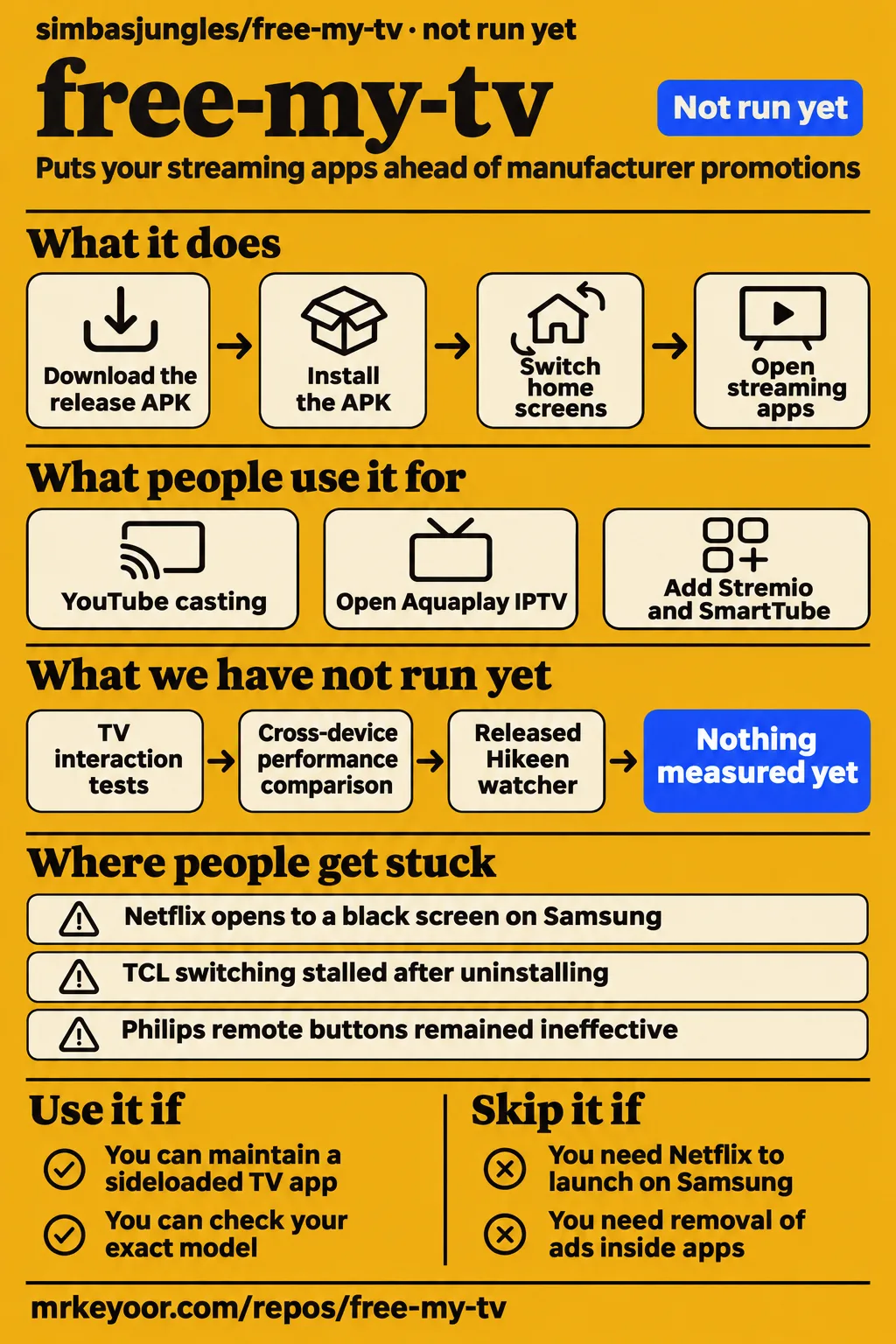
Free My TV replaces the Android TV home screen; on LG and Samsung it runs beside the manufacturer's home screen. Use it if you can maintain a sideloaded TV app and check your exact model. Skip it if every streaming shortcut and the factory remote must work without troubleshooting. Our sandbox stopped before running the application. Platform documentation explains why the platform distinction matters more than the screenshots.
What people use free-my-tv for
Users report working TCL and Wanbo installations, but a Samsung S95F owner still needed Samsung's home screen for SVT Play. These are individual owners' results, useful for choosing what to try on your television rather than a promise about an entire brand.
| Who used it | What they did | Reported outcome |
|---|---|---|
| GitHub user europacafe | Manually installed on a TCL T6G running Android TV 11 using Windows WSL/Ubuntu | Reported a working installation in issue #157. |
| GitHub user europacafe | Used a Wanbo T2 Ultra projector running Android TV 11 | Reported working keystone correction, focus, remote streaming shortcuts and YouTube casting; later updated in place from v1.3 to v1.4 in the same thread. |
| GitHub user gilgameshinter | Installed on a Samsung S95F and used Vetro for the Home button | Aquaplay IPTV and TizenTube opened; SVT Play required Samsung's home screen in issue #469. |
| GitHub user eduardoterence | Retried installation on a Samsung UN49KU6400 | A Tizen-signed build installed and ran after cleanup; Samsung-signed packages had failed in issue #349. |
The Wanbo account is especially useful. Replacing a projector's home screen raises a practical question: will focus and keystone still work? The maintainer asked for the system-package list and follow-up checks. Europacafe then reported that both automatic and remote-controlled adjustment still worked. That exchange gives a projector owner a concrete checklist, including casting and the remote's app buttons, rather than a claim that Android compatibility settles everything.
Customization has a different evidence boundary. Zellerhaus published a Bible Edition with a Verse of the Day, while halgurdh published a fork adding Stremio and SmartTube to the home page. Those fork descriptions and installation prerequisites establish what their authors offer. The reported TV installations above are stronger evidence for everyday operation.
What happened when we ran it
We did not run Free My TV: our sandbox had no supported ecosystem for this Java project, and the supplied measurement records no Dockerfile. The recorded configuration was 3 CPUs and 8 GB RAM, with commit 0e33f16 cloned on 2026-11-16. This is a coverage limit of our runner, not a failed TV installation.
| Lab stage | Recorded outcome | What a reader can conclude |
|---|---|---|
| Clone | Repository cloned | We obtained the source; this says nothing about TV behavior. |
| Execution eligibility | NOT RUN: Java ecosystem unsupported; no Dockerfile | The sandbox supplied no application result. |
| Quickstart planning | FAILED: no install method the runner could use | The runner's allowed CLI recipes did not cover this project's setup. |
| Teardown | Reported OK | Cleanup completed, without demonstrating a working TV app. |
The planning record says the runner found no eligible package-manager command or manifest-named binary and excluded source builds, brew and pipe-to-shell scripts. Free My TV's documented TV setup therefore fell outside that recipe. The clone record and teardown record describe preparation and cleanup. Neither turns this into hands-on launcher testing.
Where people get stuck: installation, app launch and remote buttons
The issue records separate recoverable setup problems from app-launch failures that still have no confirmed resolution. Start with the symptom and model, because the same error code can end in different outcomes.
| Report | What happened | Outcome in the supplied thread |
|---|---|---|
| Europacafe, TCL #375 | After replacing a personal build with the release APK, switching stalled at Starting | Reapplying TCL background permission restored switching. Repeat that permission step after uninstalling and reinstalling. |
| Lekiq, Samsung #349 | UE49K5670 rejected installations with failed[118] | Cleanup, signing changes and Samsung's own installer failed. Maintainer closed it as a TV limitation. |
| Tgrosz and other owners, Samsung #257 | Netflix opened black from Free My TV while Smart Hub worked | A new launch path reached main, but tgrosz still reported a black screen on v1.5.0. Use Smart Hub for Netflix on that affected set. |
| Samsung owners, Settings #257 | TV Settings froze reported Tizen 3 and 4 sets | Version 1.3 removed that shortcut on affected model years; use Samsung's remote Settings control. |
| Jeysonmartins, Philips #437 | 32PHG6918 remote buttons remained ineffective after accessibility was enabled | Mappings for another Philips remote did not match this receiver. The reporter could not read its protected key-layout file; investigation remained open. |
| Europacafe, crypto #375 | Prices disappeared on TCL and Xiaomi devices | Logs showed certificate validation failure. Main gained an alternate Binance endpoint, but the reporter's prices also returned on v1.3 before that fallback release. |
The TCL story is an easy trap. Europacafe had already run a personal build successfully, then installed the ready APK and saw Starting go nowhere. Uninstalling had removed the background-running permission. The reporter confirmed that granting it again restored switching. Rebuilding repeatedly would have missed the relevant change.
Philips illustrates the opposite problem: a visible configuration screen can suggest support that the hardware does not yet have. In #437, one remote supplied Android key codes; the other went through an MStar receiver with different raw codes. Free My TV consumes Android's translated codes. The protected layout file blocked the next diagnostic step, so enabling accessibility alone was insufficient.
Samsung compatibility needs a model and an app list
A working Samsung installation can still leave particular streaming apps inaccessible from Free My TV. Treat the following as a map of reported outcomes, including the firmware where the reporter supplied it.
| Samsung model | Platform or firmware reported | Result and practical consequence |
|---|---|---|
| UN49KU6300 | Tizen 2.4, firmware 1260 | Owner jwcastillo reported a fresh installation in #349. |
| UE49K5670 | Tizen 2.4, firmware 1260 | Lekiq reported repeated developer-install rejection in #349. Same firmware number did not produce the KU6300 outcome. |
| UN49KU6400 | Tizen 2.4; reporter described firmware as latest | Eduardoterence reported success after uninstall cleanup and Tizen signing in #349. No exact firmware number was supplied for this set. |
| S95F | Tizen 9 | Gilgameshinter reported Aquaplay IPTV and TizenTube working, SVT Play failing in #469. |
| QE50LS03FAUXXU, The Frame | Tizen 9 | Kbullett reported BBC iPlayer returning to Smart Hub instead of launching in #469. |
The iPlayer follow-up matters because a suggested workaround was actually tried. Kbullett could open iPlayer through its DIAL endpoint from a computer, but equivalent requests from Free My TV received 401 responses. Success from a laptop therefore did not establish an app-side fix. For a household that relies on iPlayer or SVT Play, retaining easy access to Samsung's home screen is part of the decision, not a minor convenience.
Signing changes and reboots can undo a working setup
Changing from a personal Android build to the release APK requires uninstalling first, and that also removes TCL's background permission. The release instructions tell existing personal-build users to return to Original before uninstalling because the signing keys differ. Keep that sequence together with the permission fix from #375 when planning a migration.
Recovery also depends on the debugging connection. The Chromecast instructions say Chromecast with Google TV on Android 14 closes port 5555 after every restart. Wireless-debugging pairing persists, but Original, the watchdog and the boot check cannot reach ADB until adb tcpip 5555 is run again. A restore button is only useful while the connection behind it works.
A separate standby failure appears in Hikeen issue #367. Reporter malanchukmaksim2007-arch traced the black FallbackHome screen to firmware force-stopping the launcher. Their shell watcher survived repeated wake checks, including with Cleanmaster enabled. The maintainer added a guarded watcher to main; the thread ends with the reporter waiting to test the release implementation. Keep the successful experimental watcher distinct from the shipped change's pending owner feedback.
Optional features bring separate permissions and credentials
USB debugging is only part of the permission picture: the documentation also describes accessibility for remote buttons, a notification listener for Now Playing and installer approval for updates. The release instructions connect the accessibility and listener services to Play Protect's sideloading checks. For readers, those capabilities are reasons to inspect each optional feature before granting access.
| Feature | Documented requirement or boundary |
|---|---|
| Trending picks | A personal TMDB key, entered in Home Settings on the ready build. |
| Plex picks | A server address and Plex token; the expanded README labels it Google TV only. |
| Trakt | A personal API client ID and TV sign-in; the expanded README labels it Google TV only. |
| Home Assistant buttons | A custom build configured for the server; the token is sent separately from the computer. |
| Now Playing | Optional notification-listener access, described in the current README. |
| In-app Android updates | Android installer approval, with permission to install apps requested the first time. |
The integration settings distinguish platforms, while issue #393 explains why personal-server integrations stay in a user's own build. Do not buy into a universal feature list: an Android capability can have a narrower Samsung equivalent or no LG equivalent.
For Home Assistant, the current primary README says the token is prompted for without display and sent into private app files over ADB. It explicitly keeps that token out of the APK and config.properties because installed APKs can be read by other apps. Use the documented separate transfer, and use a dedicated non-administrator Home Assistant account as the author recommends.
The performance headline belongs to one TCL
The author's memory and frame-rate claims come from a single TCL television, not our sandbox. The README record reports 60 fps and 96 MB for Free My TV versus 242 MB for the stock home screen on a 98-inch TCL running Android 14. Those figures explain the project's appeal, but they cannot tell a Samsung owner how an older Tizen set will feel.
The useful adoption evidence here is the named owner follow-up: functioning projector controls, successful in-place updates, failed regional apps and permission fixes. A fork demonstrates customization interest; a successful screenshot demonstrates a screen. Neither substitutes for turning your TV off, turning it back on and opening the service your household actually watches. Our recommendation rests on that distinction rather than a popularity score.
Free-my-tv vs Projectivy Launcher, CleanYourTV and DumbTV
The supplied comparisons position Free My TV around its home interface, while CleanYourTV and DumbTV emphasize cleanup controls. These are publishers' descriptions, not results from a shared test.
| Alternative | What the comparison source says | When to consider it |
|---|---|---|
| Projectivy Launcher | RepoPicks presents Free My TV as a free MIT-licensed alternative in its project review. | Compare the launcher experience if that is your main need; the record supplies no head-to-head winner. |
| CleanYourTV | Its own comparison page emphasizes packaged cleanup scripts, while describing Free My TV's weather and market widgets. | Investigate it for package cleanup rather than choosing solely by the home-screen appearance. |
| DumbTV | The same publisher comparison describes Fire OS-specific package and DNS controls. | Investigate it for a Fire TV cleanup task; Free My TV's current README says Amazon retains the Home button. |
| Samsung Smart Hub | Owners in #257 and #469 opened affected services from Samsung's own home screen. | Keep using it when Netflix, SVT Play or iPlayer is more important than a uniform interface. |
CleanYourTV's page sells its own approach and makes broad safety and speed claims. We use its feature positioning to explain the choice, without adopting those guarantees. The meaningful comparison for many Samsung readers is already on the television: does the new shelf save enough effort to justify returning to Smart Hub for an essential app?
What the other reviews get wrong
Open Source Drop's claim that Google TV has no prebuilt download is outdated: the later documentation offers a release APK, and a user in #367 explicitly reports installing it. The directory's build-only advice should be read against the release instructions, not repeated as a requirement.
The Medium installation guide also describes rebuilding with a TMDB key where the later documentation allows entering that key in Home Settings. Repowise's opening blurs the Android replacement and LG/Samsung companion-app distinction. The expanded platform documentation is more precise: the manufacturer's home screen stays on LG and Samsung.
Alta Media's tutorial opens with a claim about killing every ad on a smart TV. That is too broad for a home-screen replacement. The supplied transcript establishes the creator's promise, while ExplainX's review correctly separates home-screen advertising from ads inside streaming apps. The transcript is not evidence of an all-app ad-blocking test.
The official website's 2017 Samsung cutoff misses the expanded README's reported working 2015 Tizen set. Its USB-debugging-only permission description also omits optional services and installer approval. Most consequentially, unconditional recovery wording leaves out the Chromecast restart condition above. Read the site alongside the model-specific documentation before depending on its short assurances.
Questions people ask
Install Free My TV on Google TV by enabling developer debugging, downloading the release APK and sideloading it with ADB, then approving Free My TV's own debugging request on the television. The documented release route avoids a source build for readers who just want the home screen.
How do I install Free My TV on Google TV?
Use the release's FreeMyTV.apk, connect ADB to the TV and install the APK. Open Free My TV, select its Home Screen option and accept the TV's debugging prompt for the app itself. TCL background permission and Chromecast wireless-debugging setup are device-specific extra steps in the installation documentation.
Where do I download the APK, and do I need to build it from the ZIP?
Download FreeMyTV.apk from the project's GitHub releases. The release instructions provide a ready APK and let you add the TMDB key on the TV. A ZIP is source code for a custom build, not a prerequisite for using the ready APK.
How do I install Free My TV on Samsung Tizen?
Enable Developer Mode in Samsung Apps, enter the computer's IP address and restart, then use TizenBrew Installer to install simbasjungles/free-my-tv where supported. The Samsung instructions require a different build route on older sets that cannot run TizenBrew. The compatibility table above shows why a model-year claim alone is insufficient.
Is Free My TV a launcher replacement or an ordinary app on my TV platform?
On Google TV and Android TV it changes the home screen through the TV's ADB service. On LG webOS and Samsung Tizen it installs as an app alongside the original home screen, according to the platform documentation. A Samsung Home-button interception tool is an additional arrangement, as gilgameshinter reported in #469.
Does Free My TV block ads inside streaming apps?
No. Replacing the home screen removes that surface's promotional rows; advertising inside YouTube, Netflix or another streaming service is separate. ExplainX's review states this boundary explicitly. Choose it for a cleaner way into your apps, without expecting it to change what a streaming app serves after opening.
Can I use Free My TV on Fire TV or Roku?
The current README says Free My TV runs as an app on Fire TV while Amazon's home screen retains the Home button. Roku is outside the native platforms documented in the supplied records; the project's HDMI-streamer route offers a separate device rather than a native Roku installation. See the current Any TV section.
Is Free My TV available through an app store?
The documented Google TV route is sideloading, not installing Free My TV from Google Play. Samsung uses developer installation; LG uses Developer Mode or the webOS Homebrew Channel route in the platform instructions. These platform routes should not be confused with the streaming apps that Free My TV opens.
Should I choose CleanYourTV or Free My TV?
Choose the task first: investigate CleanYourTV for its publisher's packaged cleanup workflow, and Free My TV for its app shelf and home-screen widgets. That distinction comes from CleanYourTV's comparison. It provides no measured reason to declare either universally faster or safer on your TV.
Will Free My TV work on a Wanbo T2 Ultra projector running Android TV 11?
Europacafe reported it working, including keystone correction, focus, remote streaming shortcuts and YouTube casting. The Wanbo thread also records an in-place update. That is a useful positive report for this named projector, with the concrete checks an owner should repeat after installation.
Can I reuse the APK built for my TCL TV on another Android TV device?
The maintainer told europacafe the same APK could be used on the Wanbo because it was not tied to the TCL. It carried the city and TMDB key built into it, while the TCL appops permission step was unnecessary on that projector. The exchange in #157 supports that specific reuse case.
Why does my TCL TV stay on Starting instead of switching to Free My TV?
In europacafe's report, uninstalling had removed TCL's background permission. Reapplying AUTO_START or APP_AUTO_START restored switching, as confirmed in #375. That is a documented explanation for this migration symptom, not a diagnosis of every possible Starting failure on every TCL firmware.
Why are Bitcoin and crypto prices missing?
Europacafe's logs showed certificate validation failure, and the maintainer added a fallback endpoint on main. Prices also returned on the reporter's existing v1.3 installation before that fallback release. Issue #375 therefore supports a connection-related finding, without proving that the new code caused the recovery.
What we have not tested yet
Our evidence contains no running Free My TV instance in the sandbox, no TV interaction tests and no independent cross-device performance comparison. The recorded sandbox allocation is not the launcher's RAM usage, and its image label is n/a. Actual runtime and operating-system versions require raw toolchain logs.
One supplied hands-on metadata record says the project was deployed with its own Docker Compose. That conflicts with the explicit NOT RUN measurement and the failed planning step. We follow the explicit measurement and make no deployment claim. The conflicting run metadata needs correction before it can support a deployment account.
The next useful evaluation is a physical-TV recovery test: standby and wake, a full restart, HDMI wake, returning to Original and reopening every essential streaming app. We have not checked the released Hikeen watcher, verified a resolution of the later Netflix report, audited token storage or captured network traffic. Owner reports and documented safeguards cannot fill those gaps.
For an experimental household device, the named model reports offer a sensible place to start. For the television everyone expects to work tonight, keep the original home screen within reach and make your must-watch app the first acceptance check.