mrkeyoor.com_
Tue 01 Sept 17:45 UTC
Webevaluationupdated 30 Aug 2026

Font-Awesome review

Font Awesome is a collection of icons distributed as SVG files, web fonts, CSS, and JavaScript packages for websites and applications. The repository is the generated public distribution for Font Awesome Free 7, while paid icons and services sit outside this checkout.

+3 / 1dstars / 7d
Verdict

Our measured Font Awesome common-types package installed in 6 seconds with 0 dependencies and 1 MB on disk, but it exposed no build or test target, so the result proves packaging simplicity rather than icon quality. Font Awesome 7 remains a sensible default for teams that value format choice and an established naming system. Pin the exact release, test accessible names and representative SVG geometry, and do not treat a minor update as automatically compatible.

We ran it

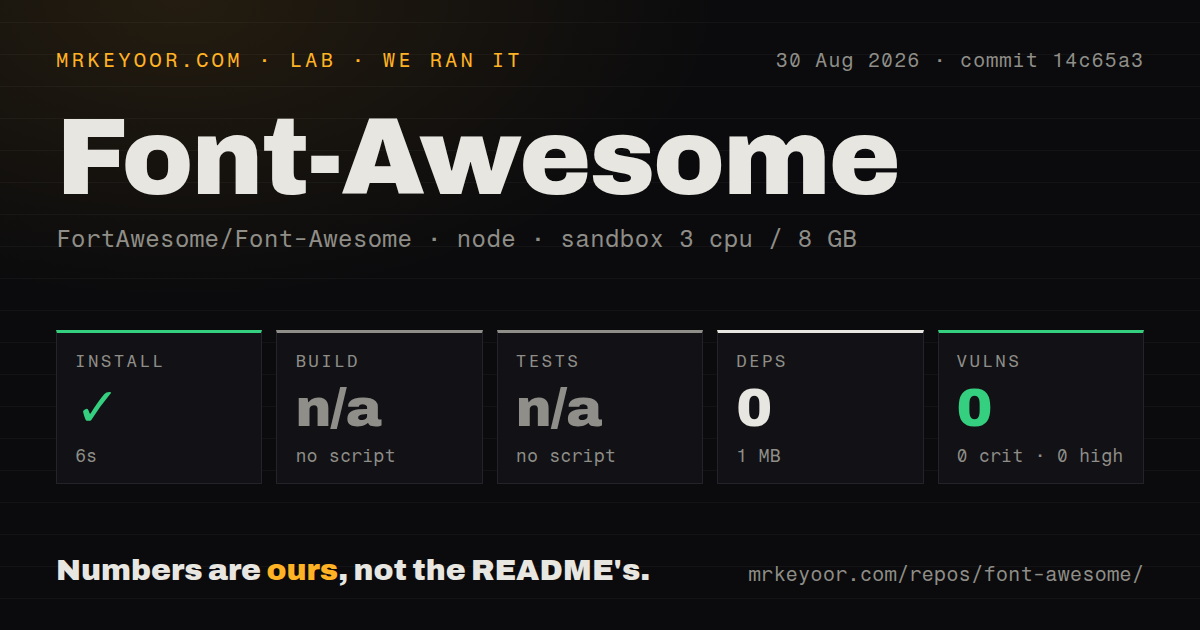
Lab card: what happened when we ran Font-AwesomeScreenshot of Font-Awesome (fontawesome.com)
Install✓ · 6s0 packages · 1 MB
Buildn/ano build script
Testsn/ano test script
Known vulns00 critical · 0 high · 0 moderate · 0 low (npm audit)
Repo23250 files~230,643 lines of source · 70.4 MB · 0 CI workflows

Answers from our run

Does Font-Awesome build from source?

Dependencies installed in 6 seconds (0 packages), and the project has no separate build step. We cloned commit 14c65a3 into a clean Debian container with 3 CPUs and no project-specific setup.

Does Font-Awesome have tests you can run?

Not through a standard command: the project exposes no test script or target that our harness could run.

Does Font-Awesome have known vulnerabilities in its dependencies?

npm audit found none in the dependency tree at the time of our run.

Who should not use Font-Awesome?

Contributors expecting normal source pull requests: the contribution guide says these files are generated elsewhere and changes are not merged directly into the main release branch.

What are the alternatives to Font-Awesome?

Lucide, Tabler Icons, Phosphor Icons. Our measured Font Awesome common-types package installed in 6 seconds with 0 dependencies and 1 MB on disk, but it exposed no build or test target, so the result proves packaging simplicity rather than icon quality.

Setup4/5Measured type package is 1 MB, but icon setup depends on delivery path
Docs4/5Clear version, upgrade, format, and licensing routes on the docs site
Community5/576,892 stars with current issue activity around version 7
Maturity4/5Release 7.3.1 is current; compatibility and icon regressions need tests

Discussed on

  1. hnFont Awesome, the pictographic font designed for use with Twitter Bootstrap711 points
  2. hnHow Font Awesome 5 Became Kickstarter’s Most Funded Software Project315 points
  3. hnFont Awesome 2.0 - 70 new icons, desktop font, vectors, IE7 support168 points
  4. hnFont Awesome 4.1 released105 points
  5. hnFont Awesome 3.0 Released - sub-setting, pixel perfect at 14px, better license100 points

Who it’s for

Product teams that want one familiar icon system across web, desktop, and design handoffs.
JavaScript and TypeScript applications using the official SVG core and framework packages.
Sites that prefer self-hosted SVG, CSS, or font assets under documented licenses.
Existing Font Awesome users planning a controlled move to version 7.

Who it’s NOT for

Contributors expecting normal source pull requests: the contribution guide says these files are generated elsewhere and changes are not merged directly into the main release branch.
Teams requiring strict SemVer compatibility: the README says a minor release may contain backward-incompatible changes and existing icon designs may change in any release.
Products staying on Font Awesome 3, 4, or 5: those lines are end-of-life; version 6 receives critical fixes only.
Developers planning to import @fortawesome/fontawesome-common-types directly: that package's README tells users to import its re-exported types from fontawesome-svg-core.
Accessibility teams relying on generated SVG <title> output without regression tests: open issue 20729 reports that version 7 stopped rendering it in the documented case.

Setup reality

Our measured target was js-packages/@fortawesome/fontawesome-common-types/, not the full icon toolkit. Its npm install succeeded in 6 seconds, installed 0 packages, and used 1 MB. It had no build or test script, so both steps were skipped rather than passed. Npm audit reported 0 known vulnerabilities.

The measured package contains shared TypeScript declarations with no dependencies. Its own README says applications should import those types through @fortawesome/fontawesome-svg-core. Using actual icons requires choosing separate SVG, JavaScript, CSS, font, framework, self-hosted, or hosted-kit paths documented by Font Awesome.

Version 7 is current, version 6 is limited to critical fixes, and versions 3 through 5 are end-of-life. Licensing also depends on the artifact: icons use CC BY 4.0, fonts use SIL OFL 1.1, and code uses MIT.

The repository is a generated distribution, not the source workshop

Font Awesome Free 7 packages the same icon system in several forms: SVG assets, JavaScript packages, CSS, and web or desktop fonts. That breadth is the practical reason to choose it. A designer can name an icon and a web team can consume the matching asset through its preferred delivery path. The repository is less useful for understanding how icons are drawn or generated because the contribution guide says its files come from another system.

That distribution is huge. Our checkout had 23,250 files, about 230,643 lines of source, and occupied 70.4 MB before installation. Those figures cover the repository, while the executable lab target was only js-packages/@fortawesome/fontawesome-common-types/. Keeping those scopes separate matters: the tiny npm result does not describe installing every icon family or framework adapter in Font Awesome 7.

The measured package is shared TypeScript declarations only

@fortawesome/fontawesome-common-types abstracts type definitions used across the JavaScript packages. It has no dependencies and points types to an index.d.ts file. Its README carries an unusually direct warning: application code should import types such as IconName from @fortawesome/fontawesome-svg-core, which re-exports them. Direct use of the common-types package ties an app to an internal package boundary without a stated benefit.

Our sandbox install finished in 6 seconds, added 0 packages, and used 1 MB. The package declared neither a build script nor a test script, so the lab skipped both steps. That is different from two green checks. It tells us the published declaration package is mechanically simple, while giving no runtime, rendering, browser, or type-regression evidence for the larger 23,250-file repository.

What happened when we ran it

We ran the package at commit 14c65a3 in an unprivileged Debian container with 3 CPUs and 8 GB of RAM. Npm completed installation in 6 seconds. With 0 dependencies added and only 1 MB used, there was almost nothing for the package manager to resolve. Npm audit reported 0 known vulnerabilities at every severity level in that measured environment.

There was no build target and no tests target, so our run could not verify generated declarations against the rest of Font Awesome 7. The supplied scan also found 0 CI workflow files, no Dockerfile, and no tests directory. Consumers should read this as a package-scope finding. Compile the actual application against the types, render the icons it uses, and keep those checks in the consumer repository.

Version 7 permits visual and minor-release compatibility changes

Font Awesome uses SemVer as a guideline with explicit exceptions. The README says an existing icon's design, appearance, or branding can change in any release. A minor release may also contain backward-incompatible changes, with upgrade instructions promised. Patch releases are intended to preserve compatibility, and neither minor nor patch releases removes icons. A loose version range may therefore change visual output even when an import name survives.

Release 7.3.1 was published on July 15, 2026, the same date as the repository's last push. Version 6 is now the long-term-support line and receives critical bug fixes only. Versions 3, 4, and 5 are end-of-life. Teams maintaining an old site should choose deliberately between a frozen legacy dependency, version 6 maintenance, and a tested version 7 migration rather than assuming every historical class behaves identically.

Accessibility and icon geometry need consumer tests

Open issue 20729 reports that the SVG and JavaScript path in version 7 no longer emits a <title> element supplied through the title option, unlike version 6.7.2 in the reporter's example. That is a concrete migration risk for apps that used the generated title for an accessible name. Verify the current package behavior and follow an explicit accessibility pattern in your framework instead of assuming an icon library makes unlabeled controls understandable.

Geometry reports are current too. Issue 21645 says the person-pregnant SVG extends outside its viewBox and clips the head. Issue 20870 lists several other icons whose paths may be cut off, and issue 21623 argues that version 7 changed the mosque symbol enough to lose its intended meaning. Our 6-second declaration-package install could not catch any of these visual defects. Screenshot tests should cover the small set of icons central to a product.

Three licenses apply to three kinds of artifact

The repository metadata cannot reduce Font Awesome Free to one SPDX license because the distribution mixes them. SVG and JavaScript icon files use CC BY 4.0, fonts use SIL OFL 1.1, and non-font, non-icon code uses MIT. The README says downloaded files already include attribution comments sufficient for normal use and asks users not to remove them. Asset pipelines that strip comments should get a license review before release.

GitHub showed 76,892 stars and 315 open issues and pull requests when fetched. Recent August activity includes icon geometry, accessibility, and brand-update discussion, while the latest release remains 7.3.1 from July. The 1 MB common-types package is easy to consume, and the wider project is mature enough to be familiar across teams. Its unusual release rules make pinning and visual regression tests part of responsible adoption.

Alternatives

ProjectWhat it isPick it when
Lucide gh↗A community-maintained SVG icon set with packages for several frameworks.pick this instead when a lighter outline style and direct SVG components fit the product better than Font Awesome's multi-format catalog.
Tabler IconsAn SVG icon set with framework packages and a consistent stroked style.pick this instead when you want a broad outline set with straightforward per-icon imports.
Phosphor IconsA flexible icon family with multiple weights built from a shared source package.pick this instead when weight variation is central to the visual system and you do not need Font Awesome compatibility.

What people are saying

  1. [github-trending] FortAwesome/Font-Awesome

Sources

  1. Font Awesome README
  2. Font Awesome repository metadata
  3. Font Awesome 7.3.1 release
  4. Font Awesome contribution guide
  5. fontawesome-common-types README
  6. Version 7 SVG title issue
  7. person-pregnant viewBox issue

More web reviews

axios · super-productivity · Graphite · fastify · tabler · go-zero · the whole board →