AIHawk is a browser agent with a real browser under the hood. You say what you want in plain language, and it browses, clicks, types, and reads the actual web. The problem it solves is not "no API exists", it's that many real workflows live inside calendar widgets, multi-step forms, and login walls where a human's eyes and mouse still matter. The project has two faces: an MCP server that slots into Claude Code, Codex, or Gemini CLI, and a standalone web UI at http://127.0.0.1:8765 where you chat on the left and watch the live browser on the right. Both faces use the same underlying engine, invisible_playwright, which is a Playwright-compatible Python library, plus invisible_core for seed-to-fingerprint consistency.
What happened when we ran it
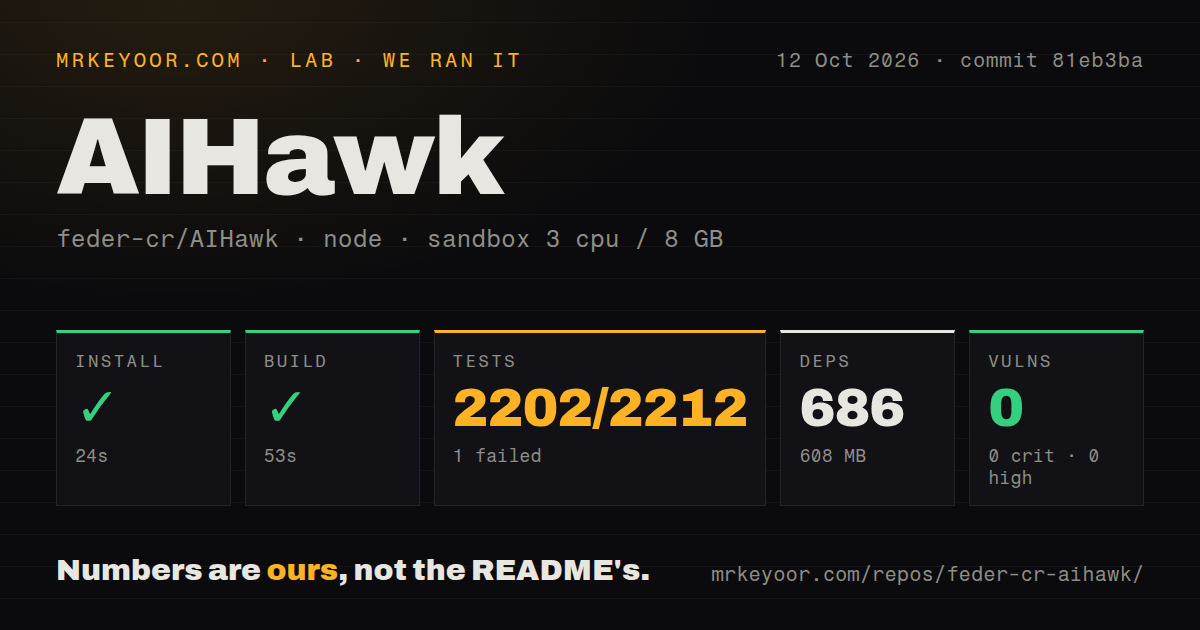
Our run was on a fresh Debian 12 container with 3 CPUs and 8 GB RAM, cloned at commit 90b5eb5 on 2026-09-06. Install succeeded in 39 seconds, pulling 79 packages and 105 MB on disk. Build succeeded in 7 seconds. The pytest suite completed in 22 seconds with 138 passed, 0 failed, and 6 skipped out of 138 tests. pip-audit reported 0 known vulnerabilities. The repository has 116 files and about 6,773 lines of Python source. Those are all our measured numbers; we did not test live browsing or model output because the sandbox had no secrets and no network access to target sites. The clean run matters, because a browser agent that cannot install and pass its own tests is not worth driving.
Concrete strengths
The MCP story is unusually direct. The README gives one-line commands to add the server to Claude Code, Codex, and Gemini CLI, and the package serves MCP by default with no subcommand. The UI is opt-in, so you are not forced into a local web app if you just want your assistant to browse. Version 0.11.1 landed yesterday and licenses changed: code before 2 September 2026 remains AGPL-3.0, but the current release is MIT, which removes the copyleft objection for commercial use.
Configuration precedence is also thoughtful: --flag beats environment, environment beats .env, and .env beats the default. The startup only reads .env in the current directory, so running from a subfolder cannot silently pick up a different key, and the log names variables without printing values. Passing --openrouter-key puts the key in shell history, but the README tells you to use OPENROUTER_API_KEY or a .env instead. The --profile-dir option keeps logins and cookies across restarts, and --binary refuses to start if the engine binary does not match the pinned seal, so you cannot accidentally run a mismatched Playwright build.
The documentation is extensive without being padded. The wiki has an AI browser-agent landscape comparison, a guide on why agents get blocked, and a piece on what happened to OpenAI Operator. Worked examples and transcripts live in articles/. The invisible_playwright and invisible_core repos are linked separately, so you can use the engine directly if you want code instead of prompts.
Rough edges and honest cautions
The web UI has no authentication out of the box, and the README says as much: changing --host exposes an interface with no auth. Keep it on localhost unless you put an authenticated reverse proxy in front of it. You also need an OpenRouter key, and the default model is z-ai/glm-4.6, a model we could not evaluate from our sandbox; the agent's judgment is only as good as that model, and the tool does not include model evaluation tools.
There is no Dockerfile in the repo. Our install succeeded with uv, but teams that want an image will need to write their own Dockerfile or use uv in a base image. Browser automation on third-party sites carries real ToS and accuracy risk; the README's responsible-use note says to respect rate limits and not submit anything a human has not read, but it cannot enforce that. The repo reports 0 open issues, which is either a well-maintained tracker or a place where community feedback doesn't land. We cannot tell which from a snapshot, but the number itself is zero.
Community health and cadence
AIHawk was created on 2024-08-04 and has 30,319 GitHub stars at review time. The latest release, v0.11.1, was pushed on 2026-09-06T23:48:47Z and the last push was 2026-09-06T23:45:27Z, about a day before this review. There are 5 CI workflow files and a tests directory. Press mentions include Business Insider, TechCrunch, Wired, The Verge, and 404 Media. That active push cadence, combined with a fresh release, suggests the project is not stale, but the 0 open issues leave no public evidence of maintainer response time.
Where it fits in a real stack
AIHawk fits behind your existing assistant or as a local UI, not in front of an API gateway. If you already run Claude Code or Codex, adding the MCP server is a two-command operation and gives your assistant browsing ability without writing a Playwright script. It is best for exploratory, one-off tasks where the page structure is messy and a person's judgment about what to click matters. It is not a replacement for Playwright when you need deterministic, repeatable regression tests, and it is not a replacement for a human approving high-stakes form submissions. Treat it as a trusted pair of hands for low-consequence browser work, and keep the browser headed or the logs visible until you know how it behaves on your sites.