ESLint 10.9.1 turns JavaScript policy into executable rules
ESLint 10.9.1 parses JavaScript with Espree, walks the resulting syntax tree, and runs configured rules against it. Each rule can be off, a warning, or an error that changes the process exit code. The value is control: a team can start with the recommended set, narrow rules to certain file patterns, consume plugin rules, or write a rule for a project-specific invariant that a compiler does not enforce.
The measured checkout contained 2,298 files, roughly 539,564 source lines, and 23.6 MB before dependencies. That scale includes the core engine, built-in rules, test fixtures, documentation support, and monorepo workspaces. ESLint is mature infrastructure rather than a tiny command wrapper. The codebase is large, but most users interact with one configuration file and a CLI command in package scripts.
Flat config makes file scope and rule severity explicit
The current README uses eslint.config.js with an exported array of configuration objects. A block can target **/*.js, **/*.cjs, and **/*.mjs, then set its language options and rules. This arrangement is readable when a repository has browser code, Node scripts, tests, and generated files with different globals. It also makes order significant, so teams should keep blocks focused and test which files each block matches.
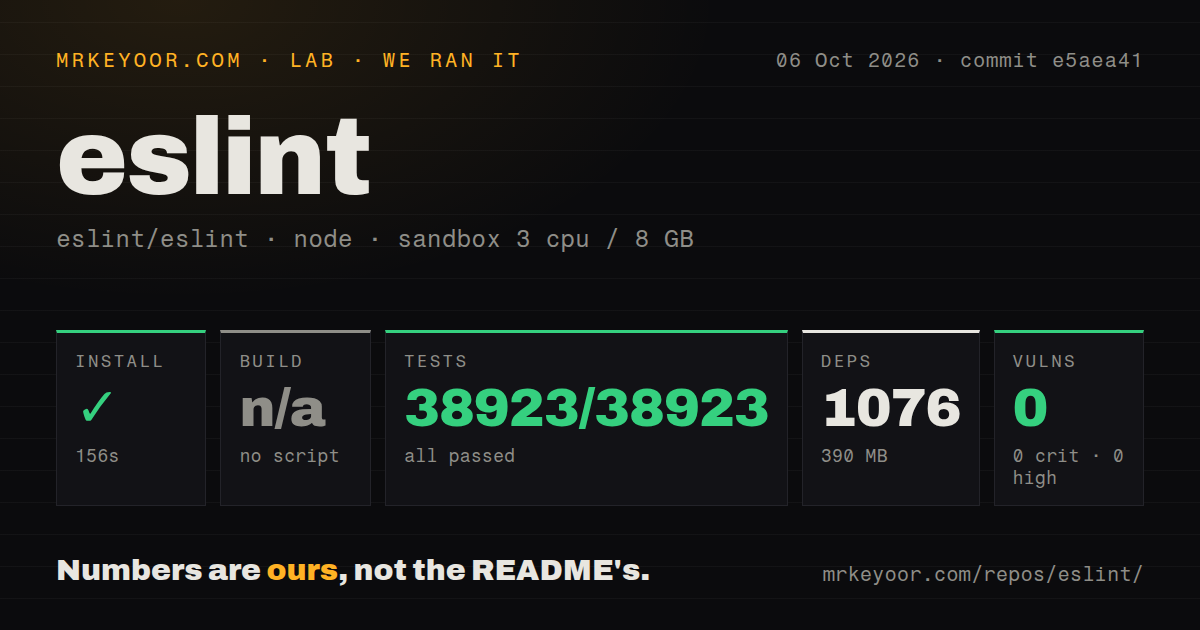
Our npm installation added 1,067 packages and occupied 386 MB. That is a bigger dependency tree than the single npx eslint command suggests, though npm audit reported no known vulnerabilities in the measured environment. Plugins and framework presets increase the tree further. A central shared config can reduce drift across repositories, but its peer ranges and ESLint compatibility should be tested before a fleet-wide update.
What happened when we ran it
Our sandbox installed ESLint in 133 seconds inside an unprivileged Node 22 Debian container with 3 CPUs and 8 GB of RAM. The test command finished in 85 seconds. Mocha reported 38,615 passed and 0 failed out of 38,615. Npm audit returned 0 critical, 0 high, 0 moderate, and 0 low known vulnerabilities for the installed tree.
There was no build script or target, so our harness skipped that step rather than treating it as a pass or failure. The repository had 10 CI workflow files, a tests directory, and monorepo workspaces, but no Dockerfile. Those observations describe commit c6cc6c5. ESLint is a Node package that needs no resident service, database, or container for ordinary use.
The 38,615-test pass supports adoption, not every rule decision
Passing all 38,615 measured tests is strong evidence that the checked-out core behaved as its maintainers expected on our Node 22 image. It cannot prove that a chosen third-party parser, plugin set, and shareable config work together in another repository. Add a small fixture project to dependency update jobs, lint representative JavaScript and TypeScript files, and make a changed finding count visible before merging version bumps.
The 85-second suite and 133-second install are reasonable for core maintenance, while ordinary project lint time depends on file count, enabled rules, cache state, and plugins. We did not measure lint throughput on an application, so this review makes no speed comparison with Biome or Oxlint. Teams with a very large monorepo should benchmark their own files and rule set rather than borrow headline performance claims from another workload.
TypeScript 5.3, React, and stage 3 syntax need extra pieces
ESLint's own TypeScript definitions require TypeScript 5.3 or later, but type-aware linting still comes from the TypeScript ESLint parser and plugin stack. JSX parsing can be enabled in core; React semantics require a React plugin. Experimental ECMAScript syntax may need Babel's parser and plugin. These boundaries are documented, and they explain why an ESLint upgrade cannot be evaluated separately from parser and plugin peer ranges.
The measured 1,067-package install covered ESLint's repository, not every framework combination. A mixed project should pin a known set, run rule tests, and upgrade one layer at a time. Pnpm users have another decision: the README recommends automatic peer installation and a hoisted node linker for compatibility. Teams that deliberately enforce an isolated pnpm layout should test whether their plugin stack resolves cleanly before adopting those settings globally.
Autofix and cache output still need human review
Accepted issue 21279 reports that the prefer-object-has-own autofix in v10.9.0 can change behavior when a local variable shadows the global Object. Issue 21155 reports prefer-arrow-callback offering a fix that becomes invalid TypeScript when a function declares a typed this parameter. Both reports have reproductions. They support a conservative policy: inspect fix diffs and reserve automatic CI fixes for rules the team has tested on its syntax.
Those open reports do not conflict with our 38,615 passing core tests; they describe cases that were missing or not handled as expected. Issue 21188 adds a different risk for long runs: a file edited after linting but before cache reconciliation may pair current content metadata with old results. Repositories with editors or generators writing during lint should avoid overlapping writes or clear suspicious cache entries until that report is resolved.
August 2026 releases and 104 open issues show active triage
GitHub recorded ESLint's last push on August 31, 2026, and 27,494 stars when fetched. Search found 104 open issues, while repository metadata listed 138 issues and pull requests combined. Releases v10.5.0 through v10.9.1 arrived from June 12 through August 24, matching the README's stated two-week release schedule closely enough to show current maintenance rather than an old package living on reputation.
ESLint's 10 CI workflows and complete 85-second test pass reinforce that maintenance signal. The tradeoff is policy ownership: minor releases may produce more findings, built-in rules cannot cover every framework semantic, and plugin compatibility belongs to the adopting team. For a JavaScript codebase that wants tailored static checks, that cost is justified. For a team wanting a fast preset plus formatting, Biome is the cleaner starting point.