Should you add Emdash to your agent workflow?
Emdash is worth a small local trial if coordinating several coding-agent tasks has become cumbersome. Emdash runs each task in its own Git worktree. Its documented workflow brings agent sessions, diffs, pull requests and CI checks into one desktop application. That gives it a clear purpose for developers who already know which agent CLIs they want to use.
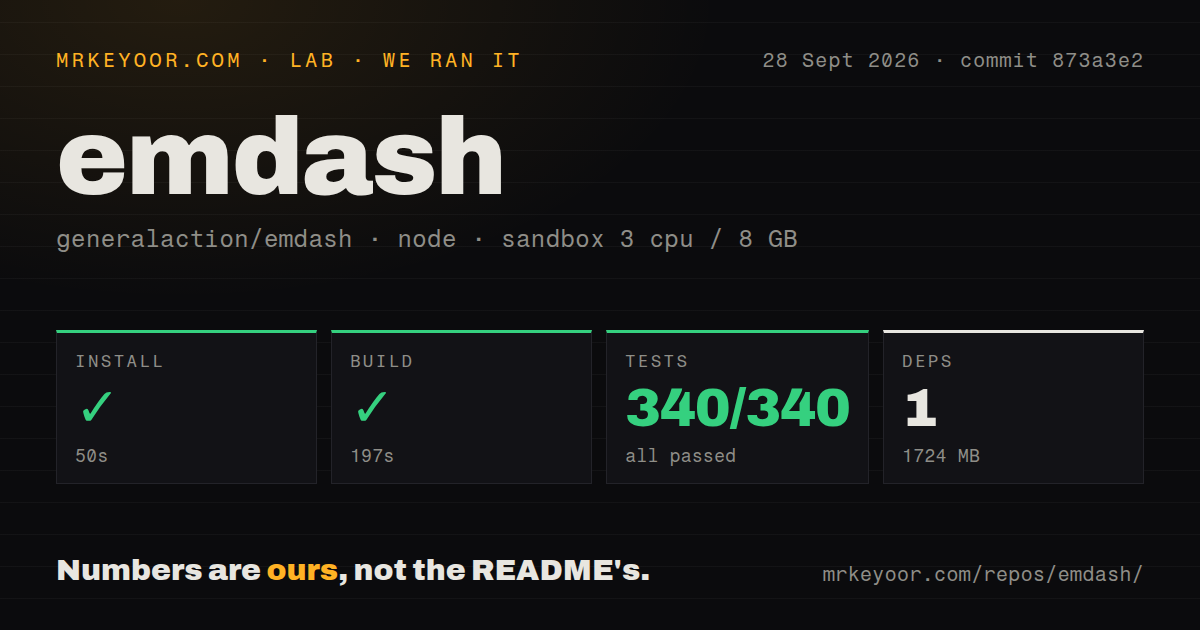
Our run on September 28, 2026, checked source installation, building and repository tests at commit 873a3e2 (full SHA 873a3e2067f4abc136272ed2b61abea3a2c07bcf). It did not establish that the desktop workflow works on your platform or with your agent account.
Our sandbox built it, but tests exited unsuccessfully
Our sandbox recorded a successful build in 197 seconds and a test-command exit code of 1 after 684 seconds. Installation succeeded in 50 seconds, and dependencies occupied 1,724 MB. These are observations from one stored run, not a new execution or a runtime benchmark.
Our harness records command success, exit codes, elapsed time, timeout status and parsed test counts separately. The attached stored parser summaries report 340 passed, 0 failed and 0 skipped. They do not establish exhaustive unique coverage, and we have not reconciled the complete logs or added together the separate suite footers.
The raw output supplies evidence the summary misses: src/primitives/sqlite-store/testing/conformance.test.ts contains a test that timed out at 5000ms, and Nx names @emdash/core:test as failed. A separate message says that something prevented the main process from exiting. The visible raw suite footer also includes skipped tests; skipped tests are not failures. These observations explain why the stored zero-failure parser field must not be read as an all-clear. They do not establish whether the timeout arose from the project, the container or their interaction.
The record labels the sandbox image lab-node:22 with 3 CPUs and 8 GB of memory. Its raw detection and native-build output identify Node 24, so the image label alone should not be used to infer the actual Node runtime. No audit result is attached, and scan coverage is unknown.
The MrKeyoor testing methodology explains how command outcomes and parsed counts reach reviews. That page provides provenance context; its current procedure does not prove which methodology version governed this older run.
We did not launch and evaluate the desktop interface, authenticate a provider, run a real coding task, connect to SSH, test Windows hooks or reproduce a large-worktree workload. Successful installation and building cannot substitute for those checks.
Worktree scaling: a closed report, not an unresolved verdict
The reporter of issue 2987 described bursts of concurrent Git worktree queries on a local repository with 190 worktrees while using Emdash 1.1.40. Those are the reporter's observations, not our measurements.
Issue 2987 was closed as completed on September 1, 2026, after a maintainer reported merging a fix. The comment says the fix would be in the next release. It does not identify that release or demonstrate that the problem is resolved in every workload. Our September checkout was not tested against the report's reproduction, so neither a continuing defect nor a verified performance fix follows from our build result.
For a trial, start with a small local repository and a few independent tasks. Check worktree creation, cleanup, diff review and process activity before expanding the workload. These are proposed acceptance checks, not results from our run.
Local storage and provider traffic have separate boundaries
The README at our tested commit says application state lives in local SQLite and that Emdash does not send code or chats to Emdash servers. It also says agent CLIs may send code, prompts and context to their providers. Treat those as the project's documented policies, not findings from a traffic inspection.
The same README documents optional telemetry, SSH/SFTP connections and credentials stored in the OS keychain. It also describes lifecycle hooks installed in supported agents' user-level configuration. Review the provider configuration and data policy before connecting a sensitive repository. Git worktrees separate working directories; the supplied evidence does not establish a security boundary around agent execution.
Which alternative matches your actual need?
GitButler supports stacked and parallel branches through its GUI and CLI. Consider GitButler when managing branches and commits is the main job. Its documented role makes it a candidate for the Git-management part of a workflow; this evidence does not establish it as a replacement for every Emdash agent-session feature.
Aider provides terminal pair programming with LLMs and automatically commits changes. Consider Aider when you want to work directly with an agent in a terminal and do not need Emdash's desktop coordination layer. That makes it an alternative workflow at the coding-agent layer, rather than an equivalent desktop task manager.
OpenHands Agent Canvas supports local, remote and cloud agent backends, plus scheduled or webhook-triggered automations. Consider OpenHands Agent Canvas when persistent services and automation are central requirements. Its README distinguishes direct host execution from Docker sandbox options, so isolation depends on the chosen deployment. We did not install or compare these alternatives in our sandbox.
How to read the ratings
For assessed dimensions, the scale is 1 for substantial documented barriers, 2 for material limitations, 3 for mixed evidence, 4 for strong evidence across the relevant documented workflow, and 5 for broad verification with no material gaps in the reviewed scope. These are editorial judgments, not comparative benchmarks. Unassessed means the supplied evidence cannot support a rating.
Setup ease is 3/5: desktop downloads are documented and source installation succeeded, but the dependency footprint and ignored build scripts add setup considerations. Documentation is 4/5 within the supplied README's scope: it explains installation, provider detection, remote access, hooks and privacy boundaries, though we did not verify the linked documentation end to end. Maturity is 3/5: the checkout built and the scaling report received a maintainer response, but our test command failed and operational workflows remain untested. Community is unassessed because the supplied extracts do not establish adoption, sustained participation or typical support response.