The installer replaces 6 manual component steps
The README describes 6 separate component steps that DLSS5oneclick handles for you. It finds installed games, inspects their folders, chooses an installation route, downloads the required files from their upstream projects, and records what it placed so the Remove action can clean up its own work. That is a useful job. ReShade, shader headers, a motion-vector provider, NVIDIA runtime files, and the neural-rendering add-on leave plenty of room for a missed file or stale setting when assembled by hand.
The tool is still an installer for experimental graphics mods, not a compatibility guarantee. commit 1588564 contained 46 files and about 17,915 lines of source, yet the runtime behavior depends on several projects fetched later. A successful click means those files reached the chosen game folder. It does not establish that the game exposes usable motion vectors, that its DLSS calls match the selected engine, or that the picture will be correct.
The README splits games across 2 main setup routes
The README uses 2 main routes according to whether a game already has DLSS files. The native path installs ReShade and the RenoDX DLSS 5 add-on, while DirectX 11 titles also receive a bridge that replays their calls through a private DirectX 12 device. Games without DLSS receive the Feeder path, which adds ReShade, shader headers, DLSS5-Feeder, LumeniteFX, the neural add-on, and configuration. You can override the automatic scan when a stray DLL makes its conclusion wrong.
There are 3 engine choices in the current README. The OptiScaler route is available for native-DLSS games, while an experimental all-in-one route handles 64-bit games that ReShade can reach through dxgi.dll. Each carries different controls and compatibility limits. Switching engines removes files that belong only to the previous choice, but settings such as OptiScaler.ini may be preserved. That is convenient for experimentation and another reason to use the built-in report when behavior changes.
What happened when we ran it
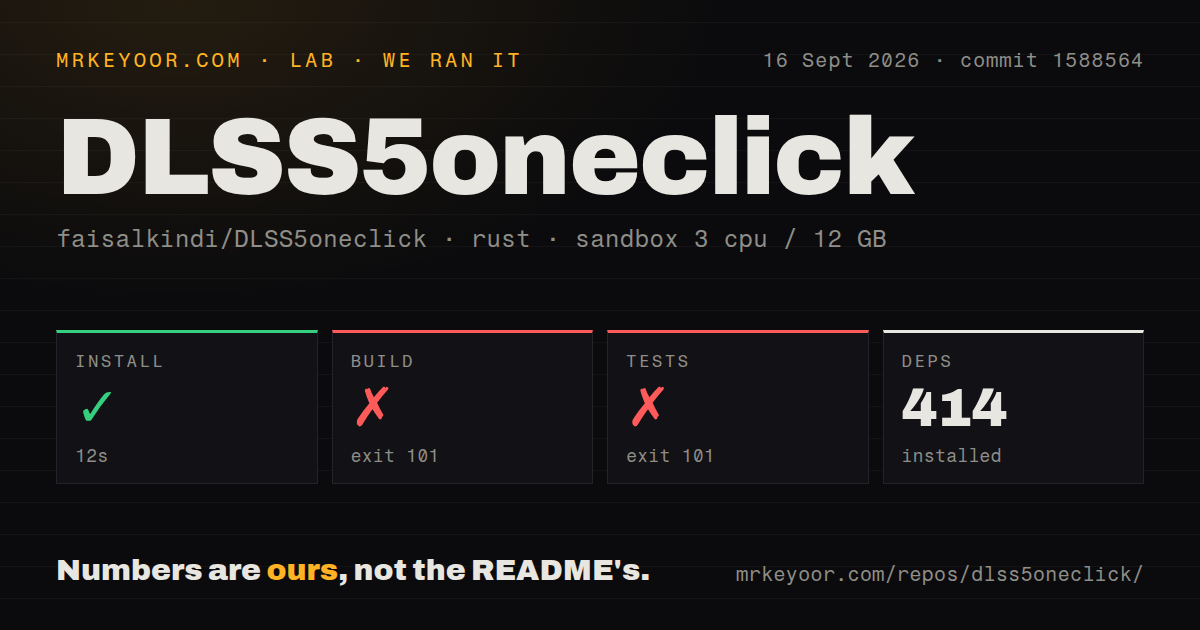
Our test method used a fresh unprivileged Debian sandbox with 3 CPUs and 12 GB RAM. It installed 414 packages in 12 seconds at commit 1588564. The checkout held 46 files, roughly 17,915 lines of source, and occupied 2 MB before dependencies. It had 1 CI workflow file, no Dockerfile, and no tests directory. Installation was the only successful command in the supplied lab run.
The release build ended with exit 101 after 208 seconds. Rust reported error E0433 at src/library.rs:588: the code tried to import windows_sys::Win32::System::Registry, but windows_sys was not available in that scope. Tests reached the same compiler error and exited with 101 after 6 seconds. The logs do not show whether a Windows target or code change would resolve it, so we are not assigning a cause beyond the unresolved crate reference.
One closed-source add-on sits inside the downloaded stack
The download chain includes 1 leaked, closed-source DLSS 5 add-on that the project says it cannot vouch for. The release executable also has no publisher certificate. Its job is to download DLLs and place them beside game executables, behavior that the README says can trigger SmartScreen or Defender. Users are told to verify the release SHA-256, use only the project releases page or its linked Nexus page, and expect to restore quarantined files in some cases.
DLSS5oneclick itself is MIT licensed, while downloaded components keep separate licenses and the add-on has no published license. A 2 MB source checkout therefore does not provide source-level accountability for everything the installed game will load. The project's source and removal manifest are useful, but they do not make an opaque binary inspectable. Treat the upstream download chain and every release hash as part of the trust decision.
Anti-cheat and hardware limits rule out ordinary use cases
DLSS5oneclick refuses 3 detected anti-cheat families: Easy Anti-Cheat, BattlEye, and GameGuard. It names several other online games separately. Injected ReShade add-ons may be flagged, with a kick as the mild outcome and a ban as the serious one. An override exists for offline modes where anti-cheat is genuinely disabled. That switch transfers the judgment to the player, so it should never become a routine way around the warning.
Hardware narrows the audience further. The README rejects non-NVIDIA adapters and NVIDIA GTX, GT, and MX cards. RTX 50 uses the model's intended FP8 path; RTX 40 and RTX 20/30 follow patched paths with different expected costs. Hybrid laptops add another failure mode because a game launched on the integrated GPU has no NGX access. The app writes a Windows GPU preference for the selected executable and removes it when the recorded value still matches.
Active releases coexist with unresolved game regressions
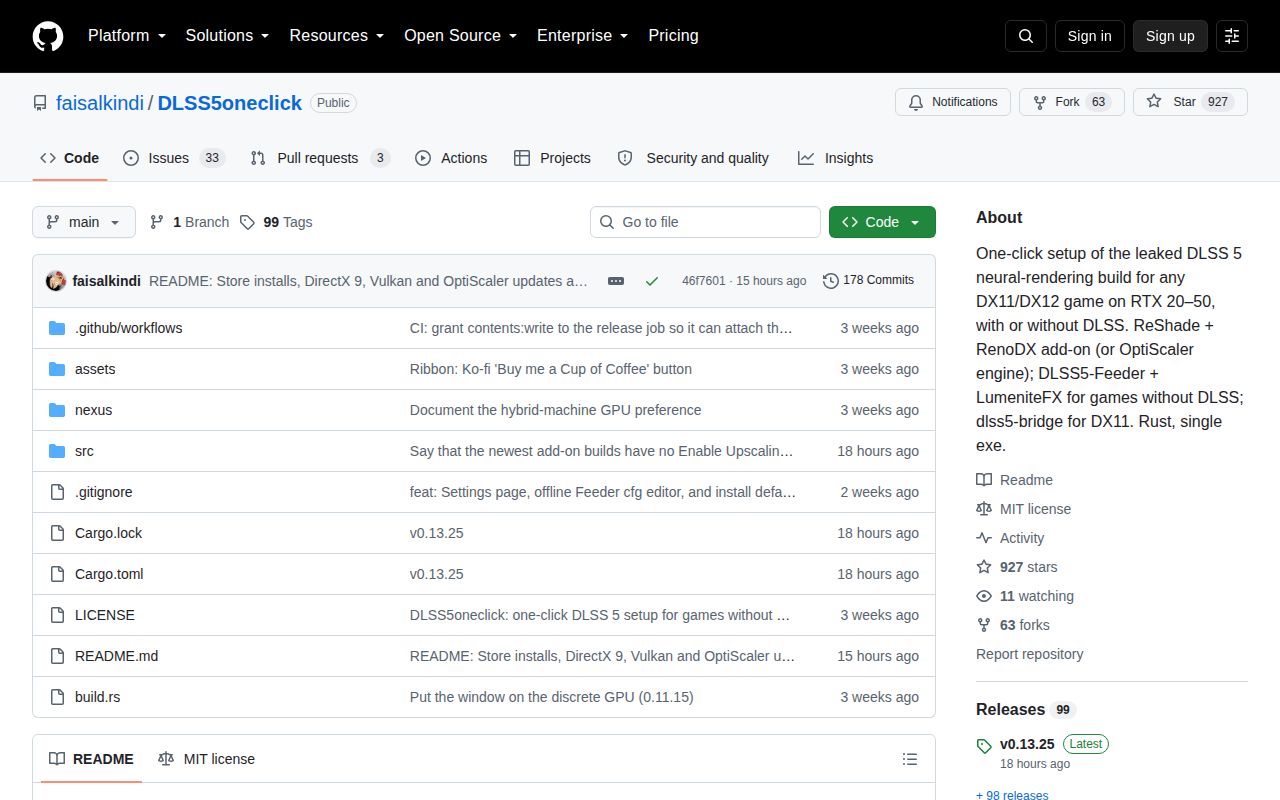
GitHub showed 927 stars, 36 open issues and pull requests, and a last push on September 23, 2026. Release v0.13.25 arrived the same day, after four other numbered releases since September 20. That pace shows active maintenance. It also means behavior can move quickly as the installer reacts to upstream add-ons, drivers, and user reports. Pinning an OptiScaler fork or add-on build is available when the newest combination regresses.
Open issue 111 reports an OptiScaler-route regression in Dragon's Dogma 2 involving Alt-Tab, freezing, and a color shift. Issue 112 compares visible horizontal lines across several installer versions on an RTX 3060, while carefully noting that the test was not a controlled bisect. These reports do not prove a universal fault. They do show why the tool's report ZIP, preserved settings, version pins, and removal path matter as much as the Install button. Use it as a reversible experiment, and keep online games outside that experiment.