
Workspaces and Split View reshape the Firefox desktop
Zen starts with Firefox and changes how the browser window handles crowded work. Workspaces separate groups of tabs by project. Split View places two pages beside each other, Glance opens a frequently used page without losing the current context, and Compact Mode hides browser chrome to return more room to the site. Zen Mods provide downloadable interface changes. These are daily workflow choices, which makes Zen easier to judge than browsers built around a vague privacy pitch.
The customization lives in a sizeable source project. Our checkout held 2,373 files and about 256,611 lines of source, although the downloaded repository was only 39.8 MB. Zen carries its own interface code, preferences, localization, build tools, and tests while relying on a separate Firefox engine tree. Firefox add-ons and Mozilla Sync give it a familiar base, yet every changed menu, sidebar, storage path, and window behavior can create a difference from upstream Firefox.
Packaged downloads avoid the source engine workflow
The official download page provides macOS, Windows, and Linux builds, including a Linux Flatpak. It labels Zen as beta and offers a Twilight channel for prerelease work. The repository README currently says its release line uses Firefox 155.0. That README follows the development branch, while the latest GitHub release says Zen 1.21.16b was based on Firefox 154.0.1. Buyers should compare the installed About screen with the release notes instead of assuming every page updates together.
Source contributors face a much bigger setup than the 117 MB npm dependency folder suggests. Package scripts use Surfer to download a Firefox engine, import Zen's changes, and bootstrap it through npm run init. Starting the browser enters the engine directory and calls Mozilla's mach; linting and several tests do the same. The top-level repository is therefore an overlay and build controller, not a standalone browser codebase that npm can fully exercise by itself.
What happened when we ran it
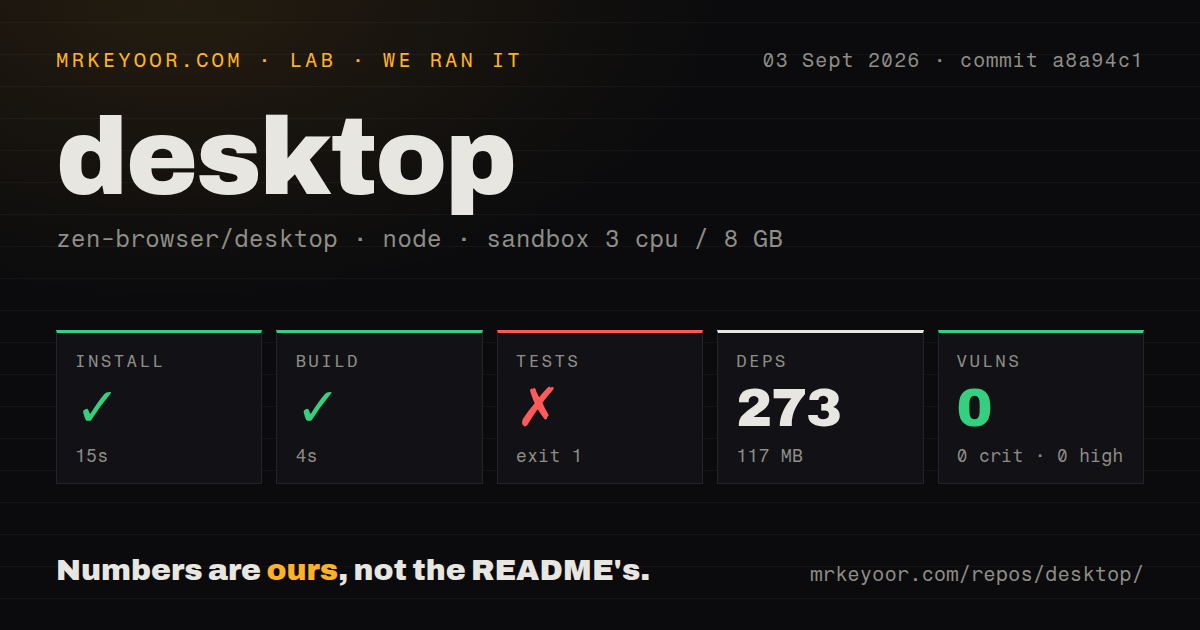
Our sandbox installed commit a8a94c1 in 15 seconds, adding 273 npm packages and using 117 MB on disk. The build then completed in 4 seconds. We used a fresh unprivileged container with 3 CPUs, 8 GB of RAM, Node 22, and no secrets. Npm audit reported 0 known vulnerabilities across critical, high, moderate, and low severity levels.
The test command failed after 7 seconds. scripts/run_tests.py first tried to copy ignorePrefs.json from src/zen/tests into the Firefox mochitest directory. It opened engine/testing/mochitest/ignorePrefs.json for reading and Python raised FileNotFoundError because that path did not exist. The log names the missing file and no test cases ran. It does not say whether the engine was never initialized, partly initialized, or laid out differently.
Our scan found 15 CI workflow files and no Dockerfile or top-level tests directory. The npm test entry still points at Zen's Python runner, and the failure log shows tests under src/zen/tests, so the lack of a root tests folder is a layout fact rather than evidence that tests do not exist. The result remains a failed local check: install and wrapper build succeeded, while the suite never reached execution in our checkout state.
Zen removes telemetry but still makes startup connections
Zen's privacy policy says the browser removes Firefox telemetry and crash reporting and does not collect browsing history, IP addresses, search terms, or form data. It keeps cookies, cache, and preferences locally. Mozilla Sync is available for bookmarks, history, and passwords, with encrypted data stored on Mozilla's servers. Mods come from Zen's service and add-ons come from Mozilla's catalog, so users still choose code and services outside the browser repository.
The policy includes a useful admission. Zen makes startup connections for updates, add-ons, connectivity, geolocation, and push services; third parties may log them. It also says the team tries to disable Firefox telemetry but may have missed some. Those statements are more credible than an absolute privacy promise. A user with strict network controls should inspect traffic, disable unwanted connections in about:config, and decide whether Mozilla Sync and hosted Mods belong in the profile.
Beta regressions reach extensions, media, and workspaces
Release 1.21.16b was published on August 29, 2026. It updated the Firefox base to 154.0.1, reduced session-store CPU and disk spikes, and fixed password access, address autofill, a tab-menu separator, and Picture-in-Picture sidebar behavior. That is a meaningful maintenance release. It also follows quickly after 1.21.15b, the version named in an open macOS native-messaging regression report.
Issue 15220 reports that uBlock Origin's Preferences entry is missing from about:addons on a Linux tarball even though Firefox shows it. Issue 15123 reports that version 1.21.15b stopped launching native messaging hosts on two Macs, while the previous Zen version worked for the reporter. Issue 15209 describes external links choosing the wrong Zen window when Space Routing spans several displays. Each one affects the workflow or Firefox compatibility that motivates switching.
A September push shows speed, while 605 issues show the cost
The repository was pushed on September 3, 2026, the same day new Linux and Windows reports were being filed. GitHub showed 44,234 stars, 605 open issues excluding pull requests, and 667 combined issues and pull requests. The latest tagged release was five days old. That combination points to fast maintenance and heavy incoming demand; the issue count should not be read as 605 confirmed defects.
Zen is easy to recommend as a parallel install and harder to recommend as an immediate replacement for a managed Firefox deployment. The 4-second wrapper build and current Firefox base show an active engineering pipeline, while our 7-second test failure exposes how dependent contributor checks are on engine state. Try Workspaces, Split View, video playback, password access, and essential extensions with a disposable or synced profile before moving the browser into the center of a workday.