rc.19 puts DeepSeek Harness behind a desktop workspace
DeepSeek Harness Studio is an Electron shell around the DeepSeek Harness web service. It opens local project directories, groups and searches conversations, resumes history, and exposes Plan, Goal, Todo, background jobs, workflows, and subagents in a graphical workspace. Permissions are visible per session, with read-only, workspace-write, and full-access choices plus prompts for dangerous actions. The primary documentation is Chinese; the separate English README covers the same product and development routes.
The application reaches beyond a chat window. Its plugin center searches published packages, checks versions and permissions, installs them, and manages enable, disable, update, and uninstall actions. A preset catalog bundles roles, skills, tools, and operating rules for repeated work. An application center currently includes a local knowledge-base product. That breadth is attractive if you already use Harness, but it also explains why the repository contains 8,216 files and about 690,142 source lines.
Local models still need a separate running server
Studio can connect to DeepSeek and other compatible providers. For local inference, the README documents Ollama at port 11434, vLLM at port 8000, SGLang at port 30000, and a custom OpenAI-compatible base URL. Studio does not download model weights or manage GPU settings. You start and size the inference service, then add its actual model identifier in the application. A local API key may be omitted where the server allows it.
Image handling has its own provider routes. The product can use a DeepSeek vision model or a compatible cloud or self-hosted endpoint, and it saves a local vision configuration only after a real image succeeds. Hosted model use requires your provider credentials in Settings. The README says stored secrets use a write-only flow and are not read back into the page, which is the right interface behavior, though teams should still review the desktop host and local storage before deploying managed credentials.
What happened when we ran it
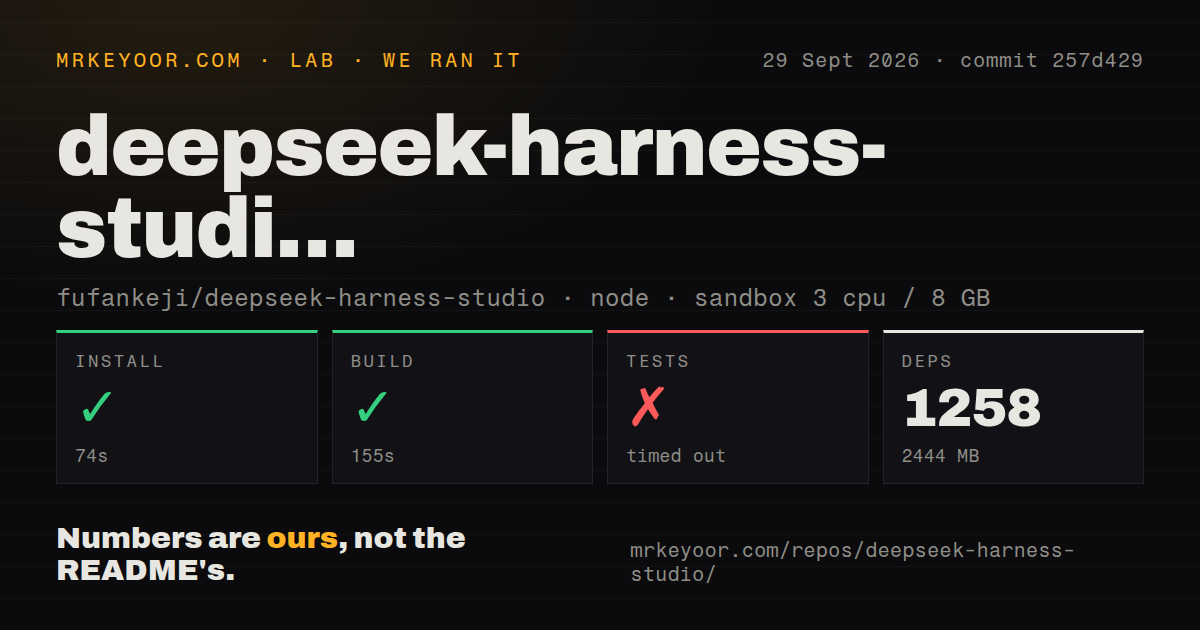
Our sandbox installed 1,258 pnpm packages in 86 seconds and used 2,444 MB on disk. The build succeeded in 124 seconds. This was a 63.5 MB checkout at commit d1268b4, run with 3 CPUs and 8 GB of memory in an unprivileged Node 22 container without secrets. The monorepo had 18 CI workflow files, no Dockerfile, and no top-level tests directory.
The test command did not complete within our 900-second limit. Its final output showed failures in restoration cases for disabling and uninstalling plugins. Named phases included stopping-host, installing, validating-profile, starting-host, reloading, health-checking, and verifying-runtime, with several displayed cases taking about 5 seconds. One reloading after-side-effect case passed. The log tail proves repeated recovery-test failures before timeout; it does not prove their underlying cause.
A successful 124-second build means the source assembled in the stated environment. It does not cancel the timed-out suite. Plugin installation and rollback are central product promises, so failures in those tests deserve more weight than a cosmetic test would. A team evaluating the desktop app should reproduce install, disable, failed update, restart, and uninstall flows on its target Windows or macOS machines before trusting plugins with important local work.
Plugin recovery has already caused a blocked desktop
Closed issue 22 describes a Windows 11 user whose failed plugin install led to a recovery screen that prevented entry to the desktop, even after reinstalling the application. The issue closed within hours on August 24, and the README now describes rollback plus a safe mode that allows disable or uninstall actions when the runtime manifest remains inconsistent. That response is encouraging, but our 900-second suite still ended around the same recovery behavior at an earlier measured commit.
Closed issue 23 reports another desktop-specific problem: a graphical launch could not find npm or Corepack because it did not inherit the terminal PATH. The issue text recommends launching from a terminal or installing pnpm separately. Preview installers are supposed to avoid a separate Node or pnpm requirement for ordinary use, so plugin operations that reach external package tooling need explicit acceptance testing on a clean user account.
The preview covers two platforms and no Linux package
The download links point to a macOS arm64 ZIP and Windows x64 installer for Studio 0.1.0-rc.19. Both are labeled development previews. The README says formal release workflows will publish platform-signed installers and checksums only after verification, which distinguishes the current files from finished distribution. Linux appears in source-development commands and local model examples, but no Linux desktop preview is offered.
Building from source requires Node.js ^22.19.0 || >=24.0.0 and pnpm 11.7.0. Commands cover desktop development, forced rebuilds, a full build, current-platform packaging, type checks, and Vitest. The repository has no Dockerfile, which is unsurprising for a native desktop product. It does mean reproducible contributor environments depend on the pinned package manager, platform tools, and the monorepo scripts rather than an included container recipe.
August releases moved quickly while the suite stayed costly
GitHub showed 524 stars, zero combined open issues and pull requests, and a last push on August 25, 2026. Issue activity was also current: plugin installation, desktop PATH, vision-provider, and development-build reports were closed during the preceding week. The normal latest-release endpoint returned no stable release, while the releases list showed rc.19 as a prerelease published on August 25. That is active preview development, not evidence of settled production behavior.
Existing DeepSeek Harness users can justify testing Studio because it unifies sessions, permissions, plugins, presets, and local providers in one desktop. New teams should be more cautious. A 2,444 MB dependency install and a suite still running at 900 seconds make source ownership expensive, while the current downloads remain previews. The practical buying line is simple: try it for personal Harness work now, but require clean recovery tests and signed formal packages before centralized rollout.