Short answer
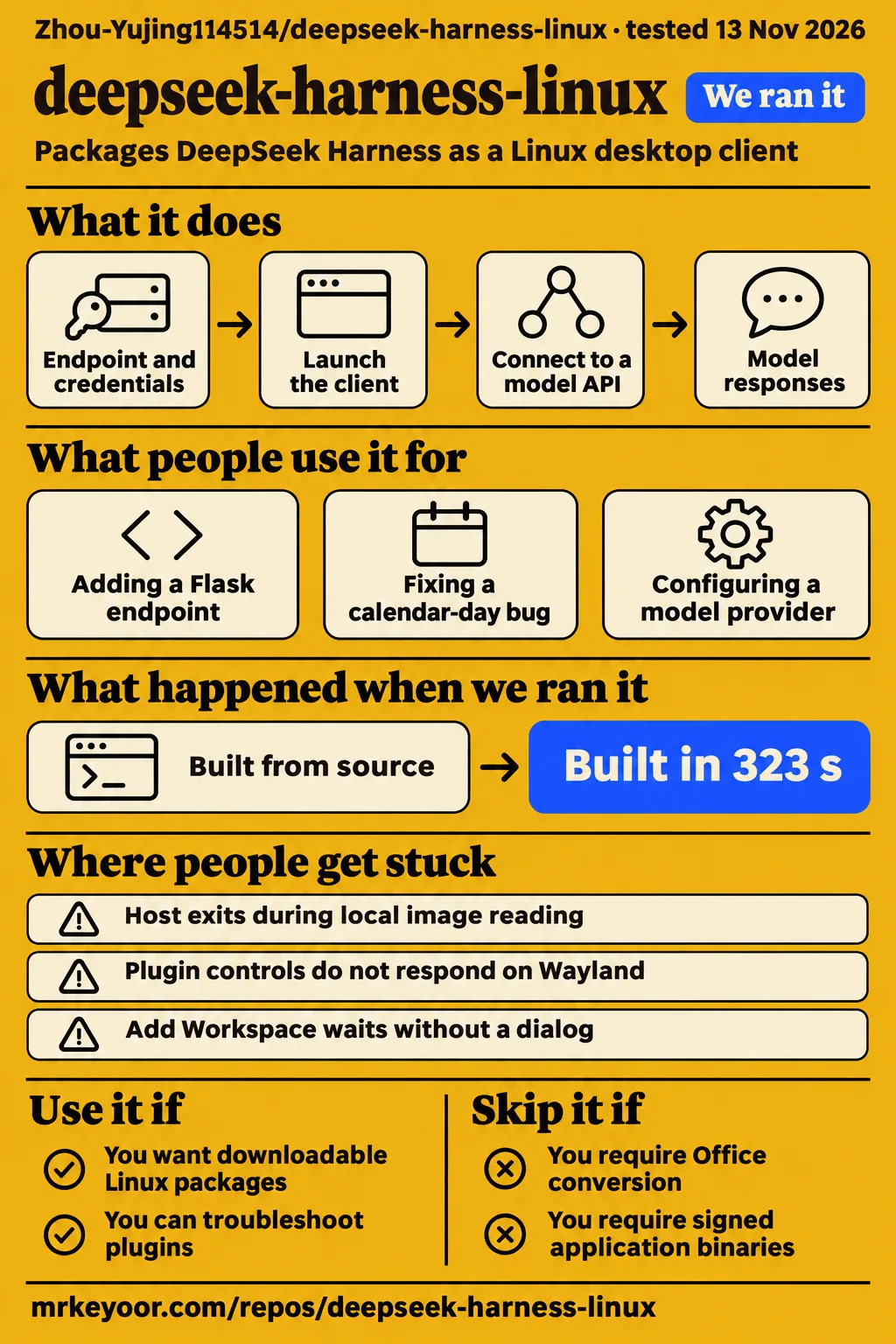
Our sandbox built deepseek-harness-linux in 323 seconds, but its tests timed out at 900 seconds. Use this community desktop fork if you want downloadable Linux packages and can troubleshoot packaging and plugins. Skip it if your work requires Office document conversion, signed application binaries or dependable local image reading. The README documents the first two restrictions and labels the image-reading host exit unresolved. Fork packaging README.
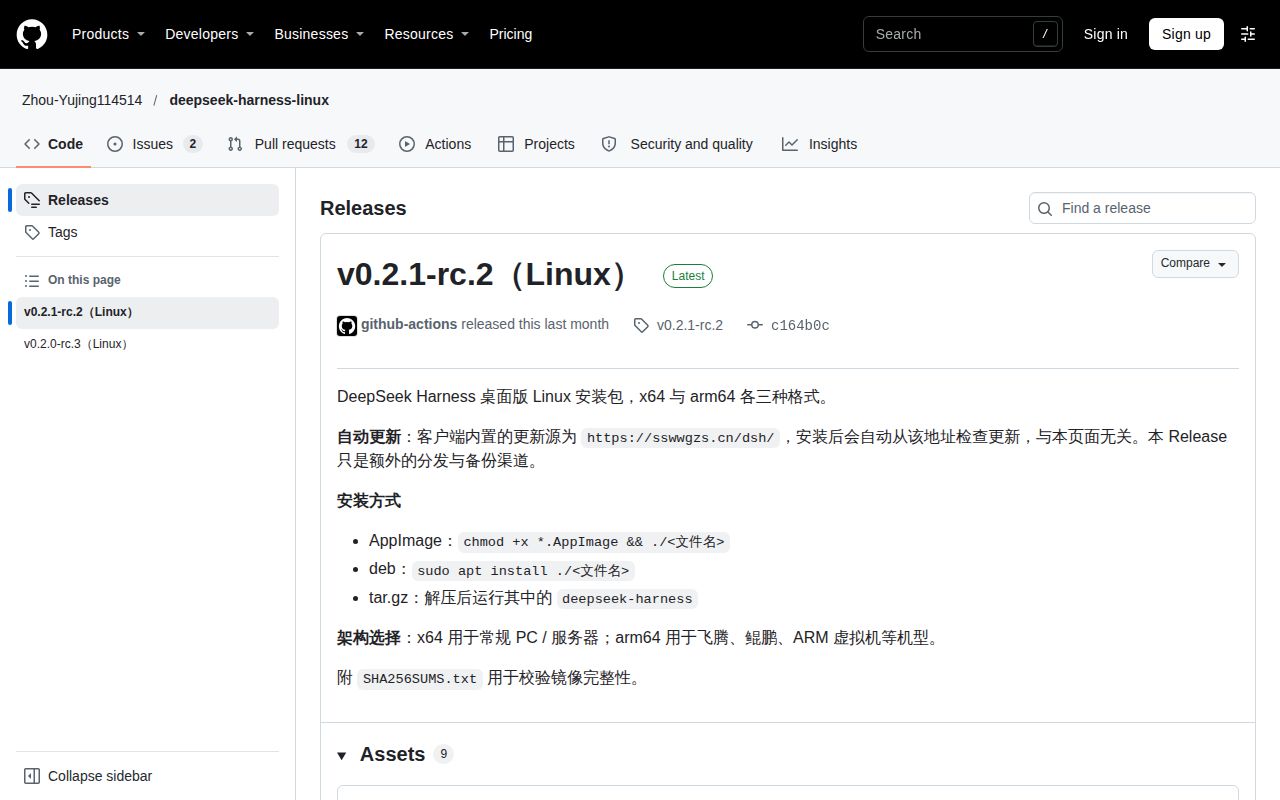
Zhou-Yujing114514's project packages DeepSeek Harness as AppImage, Debian and portable archive downloads for x64 and arm64. The selected release is v0.2.1-rc.2, while our source run used commit ea7f64a. The release notes identify https://sswwgzs.cn/dsh/ as the configured automatic-update destination and describe GitHub Releases as an additional distribution and backup channel. Downloading a package from GitHub and accepting subsequent updates therefore involve separate distribution paths. v0.2.1-rc.2 release metadata.
The useful decision is whether this particular Linux package fits your work. Desktop downloads, source builds and upstream interfaces offer different starting points. For a developer who already knows Harness and wants an application window, the fork supplies package choices and compatibility instructions. For someone choosing an agent primarily for routine coding, the comparisons below offer another route. Start with the task you need to complete, then choose the interface and package that support it.
What people use deepseek-harness-linux for
A KDE Wayland user installed and displayed the 大肥鱼 plugin in this fork's AppImage, then reported that clicking and interaction failed. Other examples concern upstream Harness: adding a Flask endpoint, fixing a calendar calculation and configuring a model provider. The table names the application and reporter for each example so that a useful starter task stays attached to the product on which it was reported. Fork interaction report.
| Who used what | Task and outcome | What it helps you decide |
|---|---|---|
| KDE Plasma Wayland user, target-fork AppImage | Installed and displayed 大肥鱼; clicking and interaction failed. Issue #25 | Exercise interaction with your actual plugin. |
| XDA reviewer, upstream Windows application | Added a Flask health endpoint and test; Harness and Claude Code produced byte-identical code. XDA comparison | A small application change makes a concrete starter task. |
| DataCamp comparison author, upstream Windows application | Used the same Claude model for a calendar-day bug; both runtimes produced the same patch and passed the original suite. DataCamp comparison | Include approval behavior in a workflow comparison. |
| DeepInfra review author, upstream 0.1.1-rc.2 | V4-Pro returned a capacity error while Flash answered using the same key and route. DeepInfra provider review | Distinguish provider capacity from credentials and request format. |
In upstream discussion #7261, the requester asks for a downloadable desktop application without the manual npm launch procedure. This fork's AppImage, Debian and archive packages address that preference through community distribution. The plugin report adds a practical acceptance task: install the plugin, open its window and use its controls. Completing those actions answers a more useful question than merely confirming that a package launches. Desktop-client request, plugin interaction report.
What happened when we ran it
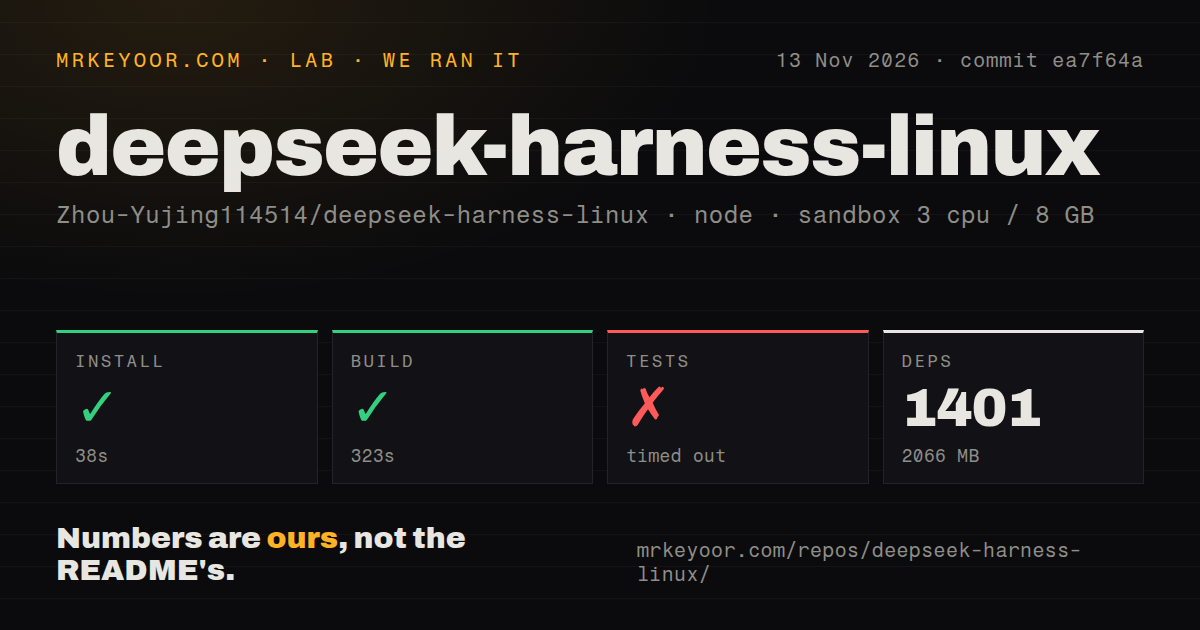
Our November 13, 2026 run installed dependencies in 38 seconds and built commit ea7f64a in 323 seconds; tests timed out at 900 seconds. We measured the source procedure in a sandbox configured with 3 CPUs, 8 GB RAM and image label lab-node:22. A separate deployment procedure stopped at a Compose-file safety requirement. These source-command results and deployment records describe different procedures with different outcomes.
| Source-check step | Our recorded result | Practical meaning |
|---|---|---|
| pnpm dependency install | Succeeded in 38 seconds; 1,401 dependencies recorded; 2,066 MB on disk | The checkout has a substantial dependency footprint. |
| Build | Succeeded in 323 seconds | The recorded build command completed. |
| Tests | Timed out at 900 seconds | The command reached its time limit without a completed suite result. |
| Sandbox | 3 CPUs, 8 GB RAM; configured image lab-node:22 | These are the recorded sandbox settings. |
The log tail includes successful unused-suppression reporting, Session history read restrictions, ignored-only staged selection and project-free staged validation. It also records successful fix-output preservation, final-diagnostic handling after a failed fix retry, and convergence of overlapping Oxlint fixes under --fix, --fix-suggestions and --fix-dangerously. These named checks show work completed before the timeout; the overall test-command outcome remains the recorded 900-second timeout.
Three visible package entries contain 70, 38 and 17 tests respectively: the DeepSeek files API, workflow guest behavior and a client menu-group component. Those entries are individual package results. The repository scan separately recorded 16,226 files, approximately 1,294,947 source lines, a 133.1 MB checkout and 28 CI workflow files. It detected monorepo workspaces and no Dockerfile or top-level tests directory; package-local test paths appear directly in the execution log.
| Separate hands-on record | What the record says | Outcome |
|---|---|---|
| Safety step | FAILED: none of compose.yaml, compose.yml, docker-compose.yaml or docker-compose.yml exists | The runner required a Compose file and stopped. |
| Run label | Says deployment used the repository's own Docker Compose on November 13, 2026, with every port bound to 127.0.0.1 | The label conflicts with the failed safety step. |
| Teardown | teardown: ok | Cleanup was recorded as successful. |
The deployment runner used the phrase "unsafe repo" for its Compose eligibility failure. Its concrete reason was the absence of an accepted Compose filename. That explains the stopped procedure without assigning a cause to desktop behavior. The source installation and build succeeded in their separate procedure, the test command timed out, and the deployment records conflict. Each result belongs to its own command or recorded step.
Where people get stuck: image reads and desktop interaction
Issue #24 reports a host exit when read_image loads a local PNG, followed by the same failure after reopening the affected conversation. The reporter describes roughly an hour of normal conversation before the first trigger and a TOOL_OUTCOME_UNKNOWN result when the host exits. The reported application was @deepseek-ai/dsh-desktop 0.2.0-rc.3. A commenter implicates in-process sharp decoding, while the current README labels the image-reading host exit unresolved. Image-crash issue #24.
Issue #25 describes a different failure: the 大肥鱼 plugin installs and appears in an AppImage on KDE Plasma Wayland, but its controls do not respond. The README documents --ozone-platform=x11 as an XWayland launch option for that symptom. Its compatibility document explains that the launch helper prints suggestions by default, starts the application with --exec, and takes application arguments after --. Wayland interaction issue #25, compatibility instructions.
| Symptom | Source and available action | Status in that source |
|---|---|---|
| Host exits during local image reading | Fork #24 records the crash and a comment implicating in-process sharp decoding | Open; current README says unresolved |
| Plugin appears but cannot be clicked | Fork README documents the XWayland launch argument | Maintainer-documented workaround |
| Add Workspace waits without a dialog | Upstream guide recommends the browser picker or starting web mode without display variables | Workaround for the versions discussed |
| Handlers and icons disappear with empty XDG data variables | Upstream guide recommends unsetting the variables | Reporter-supplied patch described as unmerged |
| Names contain escapes and icons disappear | Upstream guide proposes decoding name and icon fields, leaving executable fields alone | Described as unresolved in the discussed versions |
The upstream Linux desktop troubleshooting guide associates the last three symptoms with issues #8835, #8926 and #8980. It distinguishes directory-dialog selection, data-directory defaults and desktop-entry parsing. Match the visible symptom before changing settings: a missing workspace dialog, vanished application handlers and an unclickable plugin window point to different components. The guide's recommendations belong to the upstream versions it discusses, while the fork's README supplies its own launch instructions.
Unsigned updates and API routing need separate checks
The v0.2.1-rc.2 release notes name https://sswwgzs.cn/dsh/ as the configured automatic-update source. They say the installed client checks that address independently of the GitHub release page, which serves as an additional distribution and backup channel. The update destination therefore belongs in the decision about accepting this package, alongside the repository owner, selected release and initial download location. Release metadata and update instructions.
The README says only AppImage supports in-application automatic updates; Debian packages and archives require manual replacement. It describes HTTPS transport and sha512 checks from update metadata, with SHA256SUMS.txt supplied for manual downloads. Linux builds are unsigned, and the update process lacks code-signature validation. A checksum comparison and code-signature validation answer different questions about an artifact, so the documented checksum procedure should be understood on its own terms. README update instructions.
The client needs a model endpoint and credentials. Its README says it contains no offline model and allows self-hosted or third-party endpoints through client configuration. Choose that endpoint as part of setup: the model service and the package-update host perform different jobs. Local installation describes where the client runs, while endpoint configuration determines which service receives model requests. The README explicitly distinguishes this desktop client from running a model locally. Client and endpoint explanation.
Chinese packaging instructions sit beside upstream SDK docs
The fork's main README and README.zh.md provide Chinese packaging guidance, and README.zh.md labels its main-README link "English." The main document covers package formats, source packaging, updates and plugin compatibility. An English-speaking reader can use those specific sections as a setup checklist. Upstream's Python SDK documentation describes a separate installation route with a matching bundled runtime. Main packaging README, compatibility README.
The selected release lists deepseek-harness-0.2.1-rc.2-linux-amd64.deb and deepseek-harness-0.2.1-rc.2-linux-x86_64.AppImage. The main README's quick-start commands instead use x64 filename patterns for those formats. Use the actual downloaded filename when following installation or launch instructions. The release asset names resolve this discrepancy directly: the Debian package uses amd64, and the AppImage uses x86_64. Selected release assets.
Documentation earns 3/5 under this page's rubric: 1 means no usable starting path, 2 means fragments, 3 means usable steps with consequential inconsistencies, 4 means consistent coverage of documented paths, and 5 adds corroboration through reproduced workflows. The packaging instructions support 3, while the quick-start filename discrepancies prevent 4. This is a documentation judgment based on the instructions and assets, with the underlying mismatch visible above.
A source build is a maintenance commitment
Our dependency installation recorded 1,401 dependencies and 2,066 MB on disk. The README's source-packaging route specifies Node.js 24+, pnpm and libfuse2, followed by separate packaging commands for x64 and arm64. Its web-mode instructions require built workspace lib artifacts: a fresh checkout can otherwise produce ERR_MODULE_NOT_FOUND for lib/typert.host.js. The main README recommends pnpm run build:official for that preparation. Source-build instructions.
The README describes deliberate fork changes as Linux packaging work, including CI, electron-builder configuration, launch compatibility and documentation. It also says version lag can leave files behind upstream and directs readers to release notes for the baseline. Repository metadata records a push on November 14, 2026, while the selected release is v0.2.1-rc.2. Use those identifiers to distinguish a source checkout from a downloadable release. Repository metadata.
deepseek-harness-linux vs upstream Harness, Claude Code and another Linux port
Upstream's Python SDK bundles a matching runtime and needs no system Node.js for normal execution. Interface choice therefore offers a concrete starting point: this fork provides community desktop packages, while upstream documents web and SDK routes. DataCamp recommends Claude Code for routine application work and Harness when changing or inspecting runtime components is part of the task. Upstream SDK guide, DataCamp comparison.
| Option | Why choose it | Evidence that matters |
|---|---|---|
| Zhou-Yujing114514/deepseek-harness-linux | You want this community fork's downloadable Linux desktop | README documents three package formats and unsigned updates. Packaging README |
| Upstream DeepSeek Harness Web UI or Python SDK | You want an upstream interface or programmatic integration | SDK installation includes a matching runtime and dsh command. SDK guide |
| Claude Code | You want the application-coding workflow recommended by the comparison author | DataCamp distinguishes routine application work from runtime inspection. Comparison |
| allannuwamanya/deepseek-harness-linux-desktop | You want to investigate another port's reported document conversion | Its author reports conversion smoke tests and Linux chat/tool sessions. Author's discussion |
The separate port's author reports that DOCX, XLSX and PPTX conversions pass packaged smoke tests. The discussion describes normalizing null filesystem returns to undefined so LibreOfficeKit can use its WebAssembly fallback. Zhou-Yujing114514's README says desktop Office conversion is unavailable. Document-heavy users therefore have a specific feature difference to investigate, with the conversion result attributed to the author of the other repository. Separate port implementation report.
What the other reviews get wrong
Node.js advice varies by version and installation route: xCloud recommends 20+, DataCamp's tutorial recommends 22.19+, and SSD Nodes documents 24.9.0+ for published package 0.2.2-rc.1 on November 6, 2026. The fork's source-build README specifies Node.js 24+, while the SDK guide describes a bundled runtime. Apply each requirement to the package and procedure its source names. xCloud overview, DataCamp tutorial, package-version analysis.
An unversioned upstream npx command can select changing prerelease code, and a local project installation can take precedence. The SSD Nodes guide recommends pinning the complete package version and checking which version runs. Its account also describes installation appearing successful on an unsupported Node.js release before failure at runtime. Those are package-resolution and runtime-selection problems, so a successful installation command alone answers only the installation step. Install and version troubleshooting.
Endpoint compatibility also depends on request format. The synthesis contrasts xCloud's broad compatibility claim with DeepInfra's route-level supportsDeveloperRole: false and maxTokensField: max_tokens settings, plus model overrides. It also contrasts an older troubleshooting statement that the developer role cannot be disabled with that configuration example. DeepInfra reports that a reachable gateway with valid credentials can still reject requests, giving readers a specific configuration question to investigate. DeepInfra provider review, troubleshooting index.
Interface descriptions need the same attention to scope. The synthesis flags a Substack description of Harness as having only a web UI and an older SDK composition's Windows exclusion. The later SDK documentation includes a bundled dsh command and Windows instructions, while a separate community port author reports Linux desktop sessions. Read the older composition as documentation of that composition, and distinguish the SDK, browser interface and community desktop packages. Older SDK guide, later SDK guide, Linux port report.
FAQ
DeepSeek Harness runs on Linux through this fork's documented desktop packages and upstream's web or Python SDK routes. AppImage, Debian and archive downloads serve the desktop installation preference; the SDK serves programmatic integration. The questions below also cover two reported desktop symptoms: local image reading that exits the host, and a plugin window that displays but ignores clicks. Fork installation README, upstream SDK guide.
How do I use DeepSeek Harness on Linux?
This fork documents AppImage, Debian and archive downloads for x64 and arm64; upstream documents web and Python SDK interfaces. AppImage needs FUSE 2 according to the fork README. The SDK installation includes a matching native runtime, so normal SDK execution needs no system Node.js. Choose the route that matches an application window, browser interface or programmatic integration. Packaging instructions, SDK installation.
Is there a downloadable Linux desktop client that avoids manually launching npm and keeping a terminal running?
Yes: Zhou-Yujing114514's community project publishes AppImage, Debian and portable archive packages. Its README directs users to download and launch a package, and the selected release is v0.2.1-rc.2. Upstream discussion #7261 asks for a downloadable application with this kind of installation experience. Check the repository owner and actual asset filename when choosing a community package. Release assets, desktop-client request.
Why does reading a local PNG crash the host, including after restarting or resuming a conversation?
A commenter in issue #24 implicates in-process sharp decoding. The original reporter describes the host exiting during read_image, returning TOOL_OUTCOME_UNKNOWN, and crashing again when the affected conversation resumes. That report names application version 0.2.0-rc.3. The current README also lists the image-reading host exit as unresolved. Issue #24 observations, README status.
Can the 大肥鱼 plugin's click and interaction failure on Wayland be fixed?
The current README documents --ozone-platform=x11 as an XWayland workaround for a plugin window that appears but cannot be clicked. The compatibility document explains its launch helper: it prints suggestions by default, starts the application with --exec, and requires application arguments after --. Issue #25 records the KDE Wayland user's original interaction failure. Compatibility instructions, issue #25.
What we have not tested yet
Our source run covers commit ea7f64a, not a desktop interaction trial of release v0.2.1-rc.2. We have not tested https://sswwgzs.cn/dsh/, its delivered artifacts, artifact reproducibility, the update feed in operation or desktop behavior on either architecture. Actual sandbox runtime versions require raw toolchain logs; lab-node:22 identifies the configured image. The conflicting Compose records supply no completed deployment result, and the pack contains no completed known-answer questions or lab screenshot records.
The image crash, proposed repair and XWayland workaround sit outside our execution results. The supplied repair implementation is truncated, issue #25 records no resolution, and the workaround requires XWayland while losing native Wayland fractional scaling. The upstream troubleshooting guide's applicability to this checkout is also untested. Issue #24's application version is 0.2.0-rc.3; its reported symptoms are not an executed test of the selected v0.2.1-rc.2 release.
The upstream SDK synthesis describes default session-log contribution with DeepSeek requests. The supplied extract does not identify the exact sdk-minimal permissions or a supported setting for disabling that behavior. Inspect the installed fork profile before applying upstream logging defaults to it. Task speed, model quality, cost, memory under load, long-session reliability, English interface completeness and the selected release's complete upstream differences also fall outside our measurements.
The Windows comparisons supply no Linux-fork speed ranking, and the other Linux port's conversion results belong to that repository. Empty YouTube records and Bilibili search titles supply no executed demonstration. Rendered layout, related links, recommendation modules and template behavior remain untested in this text review. As a next step, use a disposable project to exercise your required plugin, image reading and conversation reopening before relying on this desktop for important work.