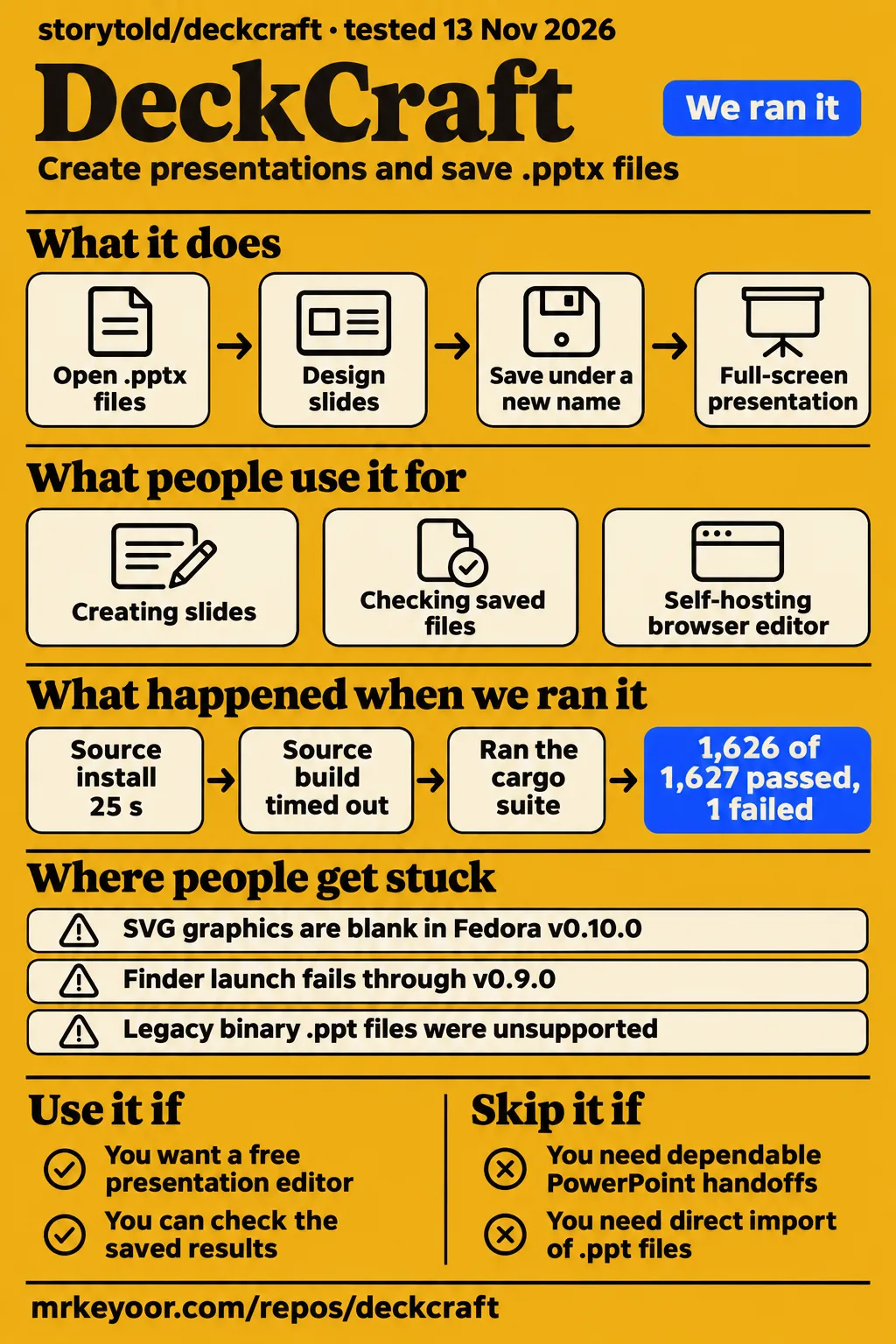
DeckCraft is worth evaluating with copies of existing presentations if you want a free editor and have time to inspect the saved results. Keep your established workflow for urgent PowerPoint handoffs and imminent talks. The useful evidence is specific: community contributors report successful saved-file checks, while our source build timed out at 900 seconds and cargo test ended with one failure. This review follows the file from editing through saving, reopening and presentation delivery.
What people use DeckCraft for
Users report creating presentations, delivering slides full screen, comparing animation workflows and checking saved office files in PowerPoint. Each task answers a different practical question. Creating a new deck demonstrates an authoring experience; reopening an existing office file tests a handoff. The reports below retain the person, task and outcome so a favorable individual experience stays attached to the work that produced it.
| Who used it | What they did | Reported outcome |
|---|---|---|
| Alex_Strgzr on r/linux | Created a presentation and delivered it full screen | Preferred DeckCraft to Impress and Euro-office for that experience |
| Jack Wallen at ZDNET | Built presentations using animations and Design Ideas | Preferred its animation workflow to LibreOffice Impress |
| KNUFFIXX in issue #781 | Repeated opening, text, save and PowerPoint reopening checks on office presentations | The v0.17.0 report records all 13 saved decks opening in PowerPoint |
| kacuak99 in issue #959 | Self-hosted browser builds and compared startup | Version 0.12.0 reached the interface in Chromium where 0.8.0 had crashed |
The corpus methodology says it was tested and written by Claude and posted for Udo Funk, KNUFFIXX. Its original files came from a German property-management office, chiefly notices and posters. That provenance matters when interpreting its repeated checks. Wallen's account serves another purpose: he describes completing the same presentation in half the time taken in LibreOffice and preferring the animation results. His description helps identify a workflow to try rather than assigning DeckCraft a universal speed advantage.
What happened when we ran it
Our November 14 quickstart-cli attempt at commit 69379cf689f9 cloned the repository in 2 seconds and failed at planning. The quickstart run record identifies the commit and recipe. The individual steps provide the operational sequence: source retrieval, a rejected installation plan and cleanup. The recipe excluded source builds, Homebrew and pipe-to-shell scripts, which directly explains why its available installation choices differed from the README's source instructions.
| Question | Answer | Verdict | Why |
|---|---|---|---|
| Did source retrieval work? | Clone completed in 2 seconds | Passed step | The clone record records that duration |
| Did the recipe reach installation? | Planning failed | Blocked | The plan record found no permitted installation method |
| Did cleanup complete? | Teardown: ok | Passed step | The teardown record records cleanup completion |
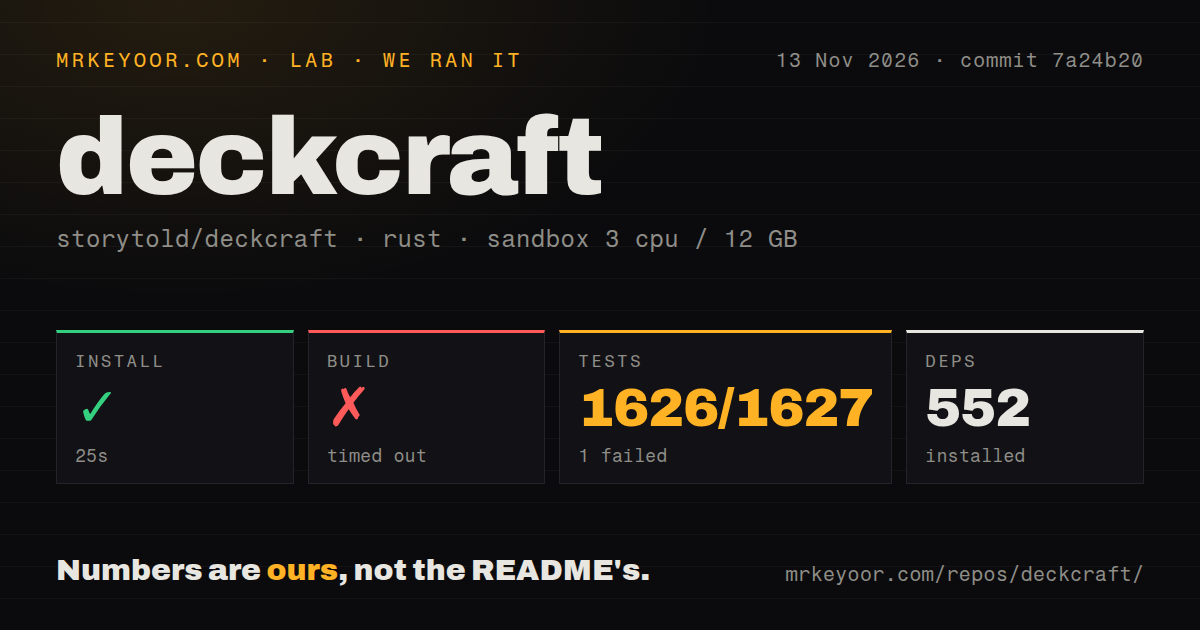
Our November 13 source run at commit 7a24b20 installed dependencies in 25 seconds, but the build timed out at 900 seconds. Cargo test failed with exit 101 after 755 seconds: 1,626 passed and one failed out of 1,627. These are our measurements from the source harness. They belong beside the failed quickstart plan because the two runs attempted different routes and reached different stopping points.
| Source-harness step | Our recorded result |
|---|---|
| Install | Succeeded in 25 seconds; 552 dependencies recorded |
| Build | Timed out in 900 seconds |
| Tests | Failed with exit 101 in 755 seconds; 1,626 passed, 1 failed of 1,627 |
The sandbox recorded 3 CPUs, 12 GB RAM and image label lab-rust:1. Its checkout contained 648 files, approximately 180,958 source lines and 10.7 MB. The scan found eight CI workflow files, no Dockerfile and no tests directory. Library test results appear in the log, including a final failing summary of 217 passes and one failure. The tail names deckcraft-render with the rerun target -p deckcraft-render --lib, giving contributors a concrete package to investigate.
Where people get stuck: imports, startup and Save As
Issue reports describe blank imported graphics, browser startup panics, a Fedora crash, Finder opening failures and filename-selection differences. Their follow-ups distinguish shipped changes from actions taken on a user's machine. Reading those sequences is more useful than relying on an issue title: an old title can describe a repaired case, while a closed thread can still contain only a reported workaround for a particular setup.
| Attributed report | Recorded action or resolution | Practical reading |
|---|---|---|
| Impairon reported blank SVG graphics and grouped AutoShapes on Fedora with v0.10.0 in #1231 | DevSidd2006 posted progress images; Impairon pointed out missing text | Compare diagram slides with their original appearance |
| Browser users reported a startup panic in #959 | The process-ID guard shipped in v0.10.0; users confirmed startup in v0.11.1 and v0.12.0 | Follow the versioned startup confirmations |
| sf-987 reported an immediate Fedora 44 Cinnamon/X11 crash in v0.18.1 in #2086 | The reporter stopped seeing it after kernel and NVIDIA driver updates and a reboot | Preserve the update sequence in a troubleshooting report |
| macOS users reported Finder opening failures through v0.9.0 in #138 | Dragging into the running app or opening from inside it worked | Use the reported alternative opening route |
| enwo02 reported pictures overlapping imported list text in #788 | The sample exposed bare normAutofit handling; commit a82f691 shipped in v0.10.0 | The thread reports restored spacing for that sample |
| HyakoV3 compared filename editing in #1077 | Desktop v0.15.0 allowed renaming in the system picker; web v0.15.1 downloaded a generated name | Follow the platform-specific saving flow |
The Fedora reporter updated both the kernel and NVIDIA packages before rebooting. Save those details and the application log when describing a similar sequence. The README says desktop logs rotate across launches, so a crash log survives the next start; browser messages go to the console. For Save As, the desktop system picker and the app's format-selection page are separate interfaces. The cited browser build downloaded directly under a generated filename.
PPTX reopening and visual fidelity answer different questions
KNUFFIXX's v0.17.0 corpus report records 13 saved files opening in PowerPoint. The corpus thread tracks opening, slide counts, text, saving and rendering separately. Its original v0.7.0 result also illustrates why those distinctions matter: an embedded worksheet became a picture even though the saved deck opened. The later OLE check changed that specific preservation result, giving readers a versioned account rather than one compatibility label.
| Versioned evidence | What the record supports |
|---|---|
| v0.7.0, original office corpus | Opening, slide counts, text and saves succeeded; its embedded worksheet became a picture |
| v0.8.0, corpus expanded from 12 to 13 files | The embedded-object preservation check changed from failing to passing |
| v0.17.0, later corpus rerun | All 13 saved files passed the PowerPoint opening check |
| v0.12.0, separate synthetic SmartArt checks in #203 | Follow-ups report saved files opening without repair in PowerPoint |
Issue #203 reports both tested OLE forms surviving saves in v0.8.0. The subsequent synthetic SmartArt checks used v0.12.0, including repeated saves and PowerPoint reopening. Contributors attribute the reported save repair to c462859f. Preservation carries the underlying object through the package; rendering draws it; editing changes it through controls. Those are separate acceptance questions, even when a slide's preview looks convincing.
For a handoff, save under a new filename and open the result in the recipient's PowerPoint installation. Compare text and slide counts, then inspect the slide containing the most complicated diagram or embedded worksheet. Finally, try the operation that gives the object its value, such as opening its data. This proposed procedure follows the distinctions in the reports and produces a more useful result than simply recording that the file opened.
Presenter View needs a rehearsal on your actual displays
Rehearse the chosen build on your actual displays; issue #1135 records Linux users seeing only the presentation slide. In that Presenter View discussion, gNovp reports finding the notes window through the desktop window switcher on a single-screen setup, using Alt+Tab as the example. The thread also contains requests about thumbnails, notes layout, clock placement and selecting the presentation monitor.
IsEverythingArt's November 3 comment in the two-display discussion says an update had been submitted and was awaiting inclusion. A useful rehearsal starts with the actual laptop and audience display: launch the show, locate the notes, jump to a middle slide, stop and restart. Check which screen the audience sees at each step. That is a suggested acceptance procedure for the delivery task described by these users.
Downloads and privacy depend on which DeckCraft you found
ArtCraft's Rust app and deckcraft.in's AI studio are independent projects, according to deckcraft.in's identity notice. The repository reviewed here is storytold/deckcraft. Begin with that identity and its linked downloads. The supplied release metadata lists v0.18.1, published November 12, 2026, while our runs used the source commits identified above. Similar product names lead to different software and service terms.
| Name or destination | Identity in the records |
|---|---|
| storytold/deckcraft | ArtCraft's Rust presentation editor, with desktop, browser, CLI and MCP interfaces |
| deckcraft.in | An independent AI presentation studio |
| rioryugen/DeckCraft | A separate AI presentation-generator repository |
| deckcraft.com/powerpoint | A PowerPoint presentation copilot |
| EasyRunCraft, reached from deckcraft.run | Hosted editors based on ArtCraft projects, with optional AI and MCP processing |
The Snap listing names Ken VanDine as publisher and describes repackaging the upstream Linux release. Its ownership notice distinguishes domain ownership from official upstream publication. EasyRunCraft separately says manual editing runs in the browser, while AI features send required context or file copies to servers or AI providers. Its AI and MCP processing use account credits. Apply those terms to the named hosted service when deciding where to upload a presentation.
The local README documents an MCP server over standard input/output and automation read-root and write-root arguments for restricting a headless agent to folders. That gives developers a documented way to scope file access. Copies in designated input and output folders are a practical starting arrangement for evaluating automated changes. The command interface is relevant to repetitive editing, while the saved-file checks above remain relevant to the resulting presentation.
DeckCraft is active, and its README still calls it alpha
The supplied GitHub metadata records a last push on November 18, 2026, and release v0.18.1 on November 12. The README calls DeckCraft alpha and supplies English instructions for packages, source builds, fonts, logs and automation. Those concrete instructions are more useful to an evaluator than interpreting repository activity as a maturity score. Recent commits and an alpha label describe different aspects of the project.
Linux source builds require ALSA headers, with package names documented for Fedora, Debian, Ubuntu and Arch. A sibling craft-fonts checkout supplies fonts automatically; otherwise DeckCraft uses system fonts. Release downloads provide another route, including Linux packages and archives. These details help a contributor choose an installation path and prepare a report with the relevant environment information. The source harness and restricted quickstart recipe should be read alongside those documented choices.
DeckCraft vs PowerPoint, LibreOffice Impress and Google Slides
Wallen and Alex_Strgzr preferred DeckCraft in their presentation workflows, while KNUFFIXX used PowerPoint to inspect saved output. Those accounts support different decisions. An existing workflow can be worth retaining because it already completes the required task; an individual comparison can identify an editing task worth trying. The table ties each alternative to its role in the supplied evidence rather than assigning unsupported feature or performance rankings.
| Alternative | What the supplied comparison supports | When to choose it instead |
|---|---|---|
| Microsoft PowerPoint | KNUFFIXX used it to open and inspect DeckCraft's saved output | Retain an established workflow for an urgent editable handoff |
| LibreOffice Impress | Wallen and Alex_Strgzr preferred DeckCraft after making presentations | Keep an existing Impress workflow that delivers the required result |
| Google Slides | Wallen preferred DeckCraft's feature set and simplicity | Keep an existing Slides workflow that meets the brief |
| python-pptx | The original #203 reporter used it during early DeckCraft save-loss problems | Consider scripted changes whose operations and output you can inspect |
The ZDNET account describes animation controls and previews alongside Wallen's preference. Alex_Strgzr's Reddit report adds a completed full-screen presentation. The python-pptx workaround belongs to the original save-loss report; subsequent comments record repaired OLE and SmartArt cases. Its historical context matters when deciding whether a scripting library addresses the operation you need today.
What the other reviews get wrong
ZDNET's claim of a drop-in PowerPoint replacement is broader than the supplied versioned reports support. Wallen's completed presentation explains his favorable editing assessment. Issue #239 describes legacy binary .ppt handling, and issue #1231 describes blank imported graphics. Those reports are enough to make unrestricted replacement language misleading. They also give a reader concrete files and operations to include in an evaluation rather than a general promise of equivalence.
The independent deckcraft.in page's blanket standard-PPTX compatibility claim likewise exceeds the imported-graphics evidence. For relationship handling, #203 records a November 9 limitation report followed by November 16 links to commits 3559316 and a5a302a concerning related-part graphs and package-absolute targets. That chronology replaces the draft's treatment of the November 9 report as an unchanged current defect. The final section states the remaining assessment boundary once.
Layer3Labs frames its account around DeckCraft v0.5.0 and Launcher v0.2.1. The supplied records include DeckCraft v0.18.1 and the product page's Launcher v0.13.0 listing, making those references an older snapshot. Its assertion that an internal checklist is the only compatibility record also overlooks issue #781's public corpus. A team's checklist can draw on that public method while selecting files that represent its own work.
Questions people ask
DeckCraft's reported v0.17.0 corpus passed PowerPoint reopening for 13 saved files. That answers a specific part of the most prominent comparison question: whether PowerPoint accepts the saved output. The questions below cover the remaining distinct actions readers asked about, including repository identity, opening files, filename editing and finding notes. Each answer stays attached to the version or user report that supplies it.
How does DeckCraft compare with PowerPoint for real presentation work?
The v0.17.0 corpus report records 13 saved decks opening in PowerPoint. Its separate checks distinguish text, saving and rendering.
Where is the GitHub repository for ArtCraft's DeckCraft app?
ArtCraft's repository is storytold/deckcraft, with the source, releases and issue tracker for this review's presentation editor.
How are DeckCraft, ArtCraft and WordCraft related?
The README lists DeckCraft and WordCraft among ArtCraft's Crafting Apps. DeckCraft handles presentations; WordCraft handles word processing and documents.
Can DeckCraft show slides on one display and presenter notes on another?
The supplied two-display thread contains a November 3 report of a submitted update awaiting inclusion. Use the display rehearsal above as the acceptance task.
How do I select the monitor used for the presentation?
ProtocolLive asks that question in issue #1135. The display-rehearsal procedure above checks the audience screen directly.
Why is the presenter console missing on Linux?
gNovp reports finding the Presenter View window with the desktop window switcher, such as Alt+Tab, on a single-screen Linux setup in #1135.
Why does opening a PPTX from Finder fail when dragging it into DeckCraft works?
The #138 reports describe this difference through v0.9.0. Dragging into the running app or opening from inside it worked for the cited reporter.
Can DeckCraft open old .ppt files, or must I convert them?
Issue #239 reports unsupported legacy binary .ppt files and a user who converted theirs. Convert the contents with an application that reads that format.
Will saving a PPTX preserve SmartArt and embedded Excel objects?
Issue #203 reports OLE preservation in v0.8.0 and successful PowerPoint checks for synthetic SmartArt in v0.12.0.
How can I change the filename when using Save As?
HyakoV3 reports editing it in the desktop system picker on v0.15.0 in #1077. The checked web v0.15.1 downloaded a generated name.
Why are imported SVG diagrams and grouped shapes blank?
Issue #1231 reports blank graphics on Fedora with v0.10.0. Its progress discussion includes the reporter pointing out missing text.
Would you switch to a free alternative or keep paying for Office compatibility?
Our source build timed out at 900 seconds. For the supplied Office-compatibility question, use the saved-file acceptance procedure above and retain an established workflow for urgent handoffs.
What we have not tested yet
Our lab evidence covers source-harness checks and a quickstart recipe blocked at planning. We did not create or deliver a presentation, inspect the interactive editor, reproduce the community corpus or exercise packaged v0.18.1. The quickstart record's generic Docker Compose and loopback-port description conflicts with steps that stop at planning, so it supplies no completed deployment. No documented command, proposed acceptance procedure or reported workaround is presented as an executed repair by us.
The source log omits the failed assertion and test name, and it supplies no diagnosed timeout cause. Image lab-rust:1 supplies no actual Rust or operating-system version. ALSA requirements and font fallback are documented setup facts rather than explanations of our failures. Application memory, large-deck performance, accessibility, English-interface completeness, CI outcomes, security and controlled comparisons of alternative editors are outside these results. Rendered layout, resolved links and site recommendation modules were also outside this revision.
The original private office corpus excluded charts, SmartArt, notes and media. Its Claude-authored reports are attributed evidence rather than independent reproduction or an adoption measurement. The supplied records contain no confirmed released fix for the imported-graphics report, later browser filename behavior or Finder integration. The Fedora update sequence isolates no single cause. Successful two-display delivery and a working monitor-selection procedure are absent from the supplied results; the single-screen Alt+Tab report answers a different task.
The November 9 #203 report dates the relationship-graph and external-link limitation to that report and points to #1993. The fresh extract then lists November 16 commits 3559316 and a5a302a concerning object-part graphs, related parts and package-absolute targets. Their complete effect and release inclusion are unverified in the supplied evidence. Neither a confirmed current failure nor a confirmed repair follows from those links. Complex object preservation, rendering and editing therefore need results tied to the chosen build and files.
The supplied YouTube records contain no transcripts, and the Bilibili results concern unrelated projects. The intent deckcrafter has no corresponding product record here. Search volumes, rankings, market share and broad office adoption are unknown. For the next acceptance check, keep the original beside a newly saved copy, open the result in the recipient's PowerPoint and inspect the most complicated object first. Record the application version and output file with that result.