Choose DBeaver for mixed databases on your desktop
Open a PostgreSQL database beside a MySQL database and DBeaver gives you the same place to write SQL, inspect tables, and edit rows. That is its strongest reason to exist. The Community README lists both databases alongside SQLite, Oracle, and many others. If your work crosses database engines, keeping the editor and navigation habits consistent is more useful than another tool dedicated to one server.
The scope comes with substantial source code: our checkout contained 10,319 files and roughly 977,394 source lines in 52.1 MB. Those figures describe the repository, not desktop memory use. DBeaver includes schema editing, execution plans, ER diagrams, and import/export tools. I'd choose it for someone who regularly moves between these jobs, while a person opening an occasional SQLite file should compare a narrower client before adopting the whole application.
What happened when we ran it
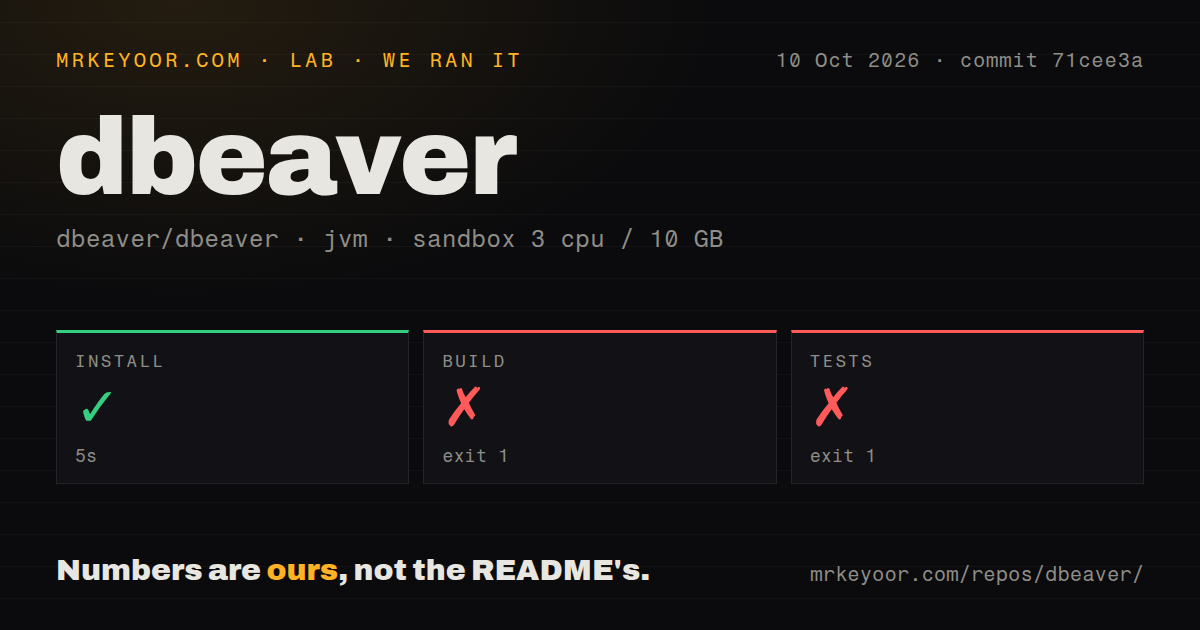
Our sandbox installed DBeaver commit 71cee3a in 5 seconds, but the build failed with exit code 1 after 2 seconds. We ran it on October 10, 2026, in a fresh Debian container with 3 CPUs, 10 GB of RAM, image lab-jvm:21, no secrets, and no elevated privileges. Maven could not resolve the parent project com.dbeaver.common:com.dbeaver.common.main:pom:2.9.0-SNAPSHOT required by the root pom.xml.
The test command also failed with exit code 1 after 2 seconds and printed the same unresolved-parent error. That is a project-loading failure before the logs demonstrate any test results. We cannot turn it into a count of failing tests or a claim that database features are broken. The log shows an absent Maven artifact, without establishing why it was unavailable or which change would fix resolution.
Our scan found 2 CI workflow files and a tests directory, with no Dockerfile. Those signals suggest places to investigate the contributor workflow, but they do not make the failed commands pass. For someone intending to patch DBeaver, the missing parent is the first obstacle to clear. Downloading the desktop release follows a separate path, and this run supplies no timing or success claim for that path.
Desktop packages and source development need different preparation
The DBeaver README directs ordinary users to prebuilt installers or archives and says distributions include Java. It also explains that the application uses native components for the desktop interface and networking. You need a supported desktop environment, a database connection, and the credentials that database requires. Remote connections can also involve SSH tunnels or proxy configuration, both listed among the application's features.
The 5-second install in our source run doesn't price those connection decisions. Nor does the 52.1 MB checkout describe the size of a packaged download. DBeaver's architecture uses Eclipse RCP and OSGi, a plugin system, with dependencies supplied through P2 repositories as well as Maven. A contributor should follow the linked source-development guide and inspect the parent artifact configuration before expecting a generic Maven invocation to cover the project.
For everyday SQL work, leave optional AI integration out of the initial connection exercise. The README says its chat context can include database structure and the SQL dialect. That makes the selected provider and permitted context relevant to a company database. Settle whether schema information may leave your environment before enabling that feature. The lab container had no secrets and did not establish an authenticated database or AI-provider session.
Community users should check the driver list before choosing
The Community and Pro driver lists draw a concrete boundary: MongoDB and Redis appear in the commercial section. A developer seeking a free interface specifically for those systems should walk away from Community rather than assume the general database-support claim covers them. PostgreSQL and MySQL are explicitly in the Community list. Match the actual engine you need, including its edition-specific connector, before migrating your workflow.
A large source tree doesn't settle platform compatibility either. Our 10,319-file checkout stopped before producing an app, so it gives no evidence about desktop rendering. Separately, issue 41561 reports a startup crash with DBeaver on NVIDIA and X11 under MX Linux. That report concerns a specified desktop configuration, not every Linux machine. Teams standardizing that setup should check the issue's status and reproduce their own launch before selecting a release.
An October push accompanies active fixes and open reports
GitHub recorded the last push on October 9, 2026, and 3,344 open issues and PRs when checked. Recent activity includes an ER-diagram error report and connector work. The 26.2.2 release, published October 4, lists SQL autocomplete controls, database-specific fixes, and a Linux startup correction. These are signs of current maintenance. The combined queue is neither a verified bug count nor a promise that your report gets quick attention.
CloudBeaver is the better comparison when users need a browser-accessible database manager. PostgreSQL-only administrators should consider pgAdmin, while Beekeeper Studio offers another desktop SQL workflow. I'd start DBeaver adoption with a packaged release and the exact databases you use. If your decision depends on maintaining a fork, first resolve the 2.9.0-SNAPSHOT parent that blocked our build and test commands. Until then, the contributor path remains unverified on our sandbox setup.