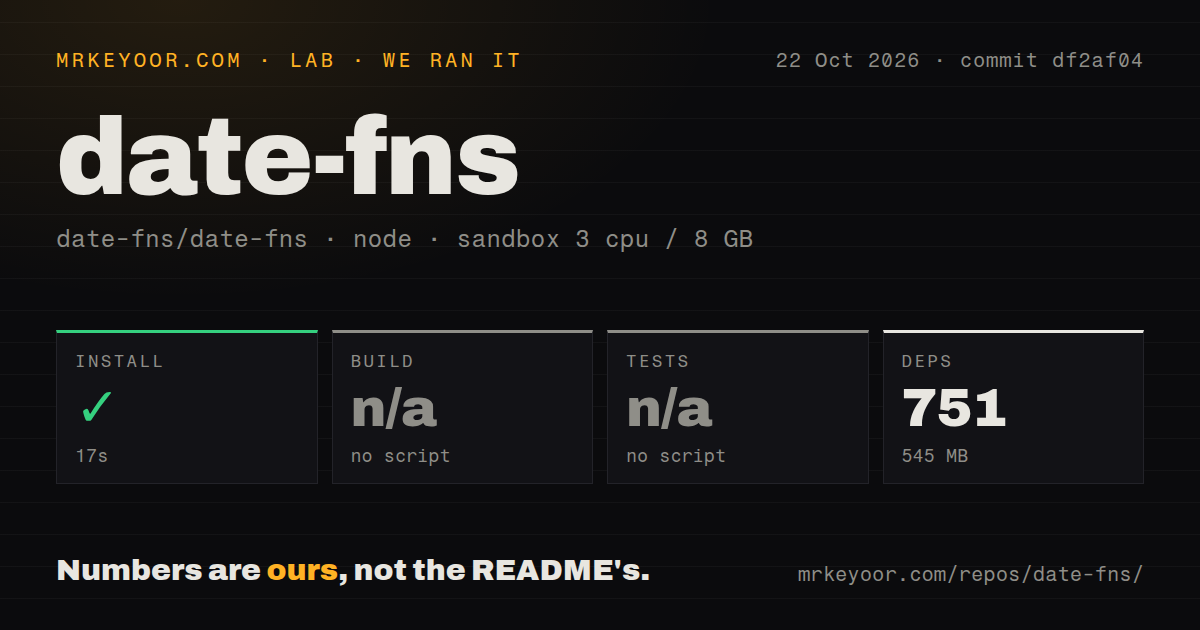
The 545 MB recorded in our date-fns run belongs to a developer checkout. It is not a measurement of what an application adds by installing the published package. That distinction determines how much this repository review can tell you.
What happened when we ran it
Our sandbox installed date-fns commit df2af04 in 17 seconds, recording 751 dependencies and 545 MB on disk. The run took place on October 22, 2026, with a recorded configuration of 3 CPUs, 8 GB of RAM, and image label lab-node:22. Actual runtime and operating-system versions are not established by that label.
The selected project exposed no build script or target, so build was skipped. It also exposed no test script or target, so tests were skipped. These are limits of the selected harness path; they do not establish that the repository has no build process or tests.
The scan identified pnpm and monorepo workspaces. The checkout contained 2,070 files, approximately 114,404 source lines, and occupied 11.3 MB. It found 6 CI workflow files, no Dockerfile, and no tests directory. Tests may live elsewhere in a repository, so that directory observation cannot establish their absence.
Installation succeeded in the recorded environment. Whether that environment matched upstream's supported contributor setup was not established. We measured neither a published-package installation nor a browser bundle, and we exercised no application-level date behavior.
Choose the package or contributor path first
The supplied date-fns README documents npm installation for application use. Its example imports format and compareAsc, formats a native Date value, and sorts an array of dates. This is a documentation example, not code executed in our sandbox.
The README says date-fns uses native dates and does not extend core objects. That API style is worth evaluating when an application already exchanges Date values and needs individual date operations. The supplied README is from main, however, so it is not proof of every API detail in v4.4.0 or in the measured checkout.
For source contribution, the next step is to locate the workspace responsible for your change and verify its documented checks. The dependency installation does not supply that missing build and test evidence.
The existing date-fns library guide addresses package use. This review focuses on what the source-preparation result establishes and what remains to check.
Compare the data model before comparing setup numbers
Day.js documents a largely Moment.js-compatible API. Its README also describes it as immutable and chainable. It is a candidate when a team wants chained date operations and familiar Moment.js patterns.
Luxon provides DateTime, Duration, and Interval types. Its README documents native time-zone and Intl support. It is a candidate when an application should carry explicit date-time or interval objects.
Those are documented API distinctions, not results from comparative testing. We did not install either alternative, and the date-fns repository timing provides no basis for ranking their setup cost, performance, or correctness.
v4.4.0 changes the CDN distribution path
The v4.4.0 release notes deprecate the main package's CDN scripts and direct users to @date-fns/cdn. They also say CDN source maps were removed from the main package and remain available in the separate package. The release was published on May 29, 2026.
If your application loads browser scripts directly, inspect the script URLs and package you deploy before upgrading. The release notes establish this distribution change; our sandbox did not test CDN loading.
Check your compiler settings separately
Issue #4411 reports a problem forwarding possibly undefined values into date-fns options with TypeScript's exactOptionalPropertyTypes enabled. The report identifies date-fns 4.4.0 and includes a wrapper that forwards an optional locale to format. It was opened on October 27, 2026. We did not reproduce it.
Treat it as a specific evaluation case if your application uses that compiler flag. It does not establish that all TypeScript integrations fail, and an issue report alone does not verify the proposed fix or workaround.
For application adoption, exercise the operations you need with your compiler settings and representative date inputs, including relevant daylight-saving transitions. For contribution, verify the workspace build and tests. Those checks answer the questions that a successful repository dependency installation leaves open.