One Compose file starts the web app and its supporting services
The README's example puts a web service and Redis in the same file, then starts them with docker compose up. That is Compose's useful promise: the next developer can inspect the application's containers, ports, and mounts without reconstructing a sequence of shell commands. If your app needs a database or cache beside it, a checked-in service definition is easier to share than instructions scattered across chat messages.
Compose itself is a substantial Go project. Our checkout contained 886 files and about 76,396 source lines, occupying 3.1 MB before installation. Users normally consume a packaged plugin rather than compile this repository. The README points Windows and macOS users to Docker Desktop and Linux users to release binaries installed in a Docker CLI plugin directory. Contributors have a different question: can the source build and its available checks run in a fresh container?
What happened when we ran it
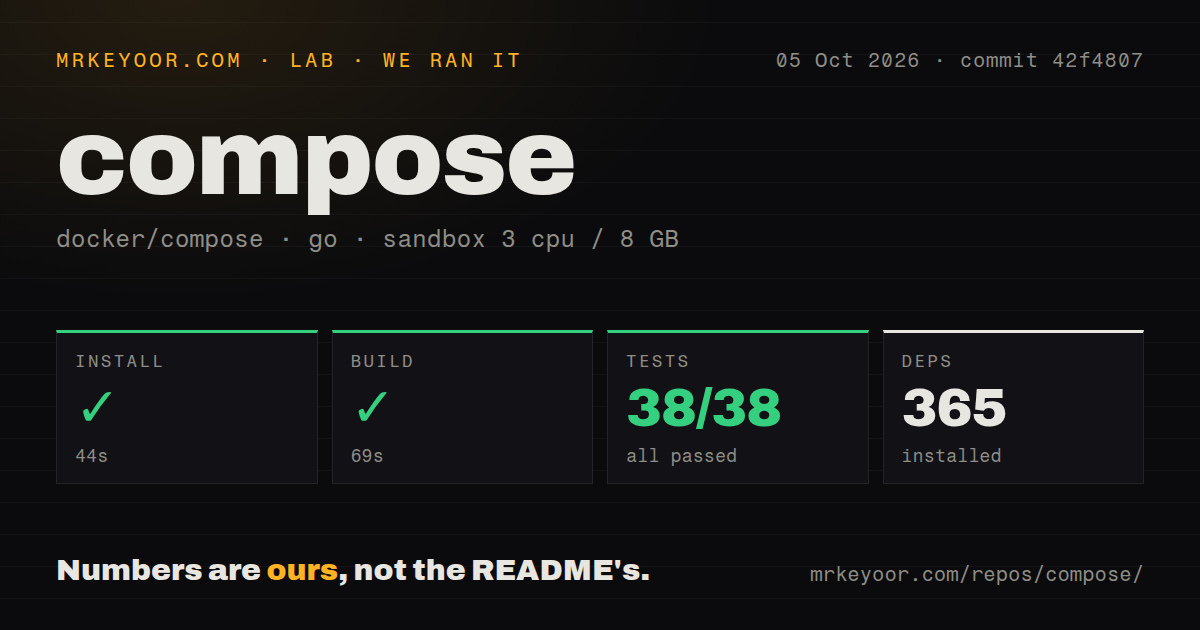
Our run installed Docker Compose in 44 seconds, built it in 69 seconds, and passed the tests in 33 seconds. The supplied Go test summary reported 38 passed and 0 failed out of 38. We cloned commit 42f4807 on October 5, 2026, into an unprivileged Debian container using golang:1.24-bookworm, with 3 CPUs, 8 GB of RAM, and no secrets. All measured steps finished successfully under those conditions.
Installation pulled 365 packages. The repository scan found 10 CI workflow files and a Dockerfile, but no tests directory. That last result describes a directory-name check, not an absence of test code: the reported test command completed successfully. We should read the passing result at its actual scope. It validates the checks executed by this run, without establishing coverage of every Docker Engine interaction or every Compose configuration.
The 69-second build measures compiling Compose itself. It says nothing about how long your application images take to build, download, or start. Likewise, the 33-second test result is not a measurement of container launch speed. These distinctions matter when deciding whether to adopt the tool: our run supports a workable contributor setup, while application startup and recovery still need checks on the host and images you intend to operate.
The plugin requires a working container engine
Compose sends work to Docker Engine, so a binary in the plugin directory is only part of the setup. You need an accessible engine and a compose.yaml defining the services. Public images need no private registry credential, while private images and your application's external services may require authentication. Ports and host-mounted paths also need to match the machine running the engine. A copied development configuration can carry assumptions about directories that another developer does not have.
The 365 packages in our source installation are a contributor cost, not a requirement to compile Compose on every production host. For normal use, take the supported packaged route and verify the plugin can reach the intended engine. Docker's production guide documents remote-host configuration as well as deployment on a single server. Keep the engine target explicit in automation, especially when the same workstation can address local and remote environments.
A running database can still reject connections
Docker's startup-order guide says Compose waits for containers to run, without automatically waiting for application readiness. A database can therefore exist before it accepts SQL connections. The documented remedy is a healthcheck and a depends_on condition of service_healthy. That condition gives the application a meaningful startup dependency. Simply listing services together does not tell Compose which database query proves that your application can proceed.
Our 38 passing tests do not settle your readiness checks. Choose a probe that matches the service's actual job, then check a cold start and a restart with your application images. There is also a narrower restart concern in issue 14311: a reporter using a development build describes an optional dependency becoming required when start reconstructs the project without reading its file. The issue remains open. Check that path if your runbook relies on it.
Scheduled jobs are absent from the latest release
Release v5.6.0, published October 2, 2026, explicitly limits jobs to manual triggers. Scheduled jobs depend on corresponding Engine support that has not yet landed, according to the release notes. A team choosing Compose specifically to replace a scheduled-job system should stop there. The same notes list fixes around Watch rebuilds and container monitoring, useful reminders that development convenience and lifecycle behavior continue to receive changes. Pin versions rather than assuming every installation behaves identically.
The 10 CI workflow files found in our checkout and its passing 33-second test step are encouraging maintenance signals. They do not turn missing scheduled jobs into an available feature, or make Swarm accept every current Compose attribute. The README explicitly warns that Swarm uses the legacy file format and misses newer specification features. Teams targeting Swarm should check the attributes they depend on instead of assuming a Compose file transfers unchanged.
A single server is a reasonable destination with explicit recovery rules
Docker's production guide recommends changes such as removing application-code bind mounts, setting restart policies, and supplying production configuration through an additional file. That fits a small service whose owner accepts responsibility for the host. It leaves backups and host recovery in your operating plan. If workloads must be scheduled across multiple machines, Kubernetes or Nomad addresses that requirement more directly. Podman Compose is worth considering when Podman's rootless, daemonless process model is the priority.
The last push was October 9, 2026, with recent issue and pull-request activity. GitHub listed 38,362 stars and 116 open issues and PRs, and the code uses Apache-2.0 licensing. Compose is my default choice for a Docker application that needs a repeatable local stack or an explicitly managed single-server deployment. Our 44-second install and clean reported test result support that choice. Before depending on it for production, write down how you restore the database when the host disappears.