
Cloud Mail is a web mailbox built from Cloudflare services
Cloud Mail turns a domain in Cloudflare into a browser-based email service with multiple users and addresses. The Vue interface includes inbox views, attachments, user and message administration, role-based access, charts, theming, and an API for tasks such as bulk account creation. Hono and Drizzle run in the Worker backend. Incoming messages arrive through Cloudflare Email Routing, while D1 and KV hold application data. Attachments can move to R2 or another S3-compatible store.
That architecture avoids a traditional always-on mail server, but it is still a system with several moving parts. Our checkout contained 320 files, about 30,334 source lines, and 6.8 MB. The repository uses workspaces, with the frontend under mail-vue and the Worker under mail-worker. The main README is Chinese. An English README and full English documentation site cover deployment, sending, storage, forwarding, environment variables, and the API, so English-speaking operators are not left with screenshots alone.
Incoming mail is Cloudflare-native, while sending needs another provider
The receive path depends on a catch-all Email Routing rule that forwards mail to the Worker. This is convenient for creating many addresses under one domain, and it avoids maintaining SMTP receiving infrastructure. Cloud Mail can forward received messages to Telegram or another verified email address. Workers AI can identify verification codes, and Turnstile can be configured to slow automated registrations. These are application features around a routed inbox, rather than a replacement for every mail protocol.
Outbound mail crosses a separate boundary. The English guide says Cloudflare blocks port 25 and instructs users to register with Resend, verify the sending domain in DNS, create an API key, and configure a status webhook. Our 293 MB install did not exercise that delivery chain. Before using Cloud Mail for important messages, an operator still needs to test SPF, DKIM, DMARC, bounces, webhook authentication, provider quotas, and how failures appear to users. The repository supplies the application, while the sending provider determines actual delivery.
What happened when we ran it
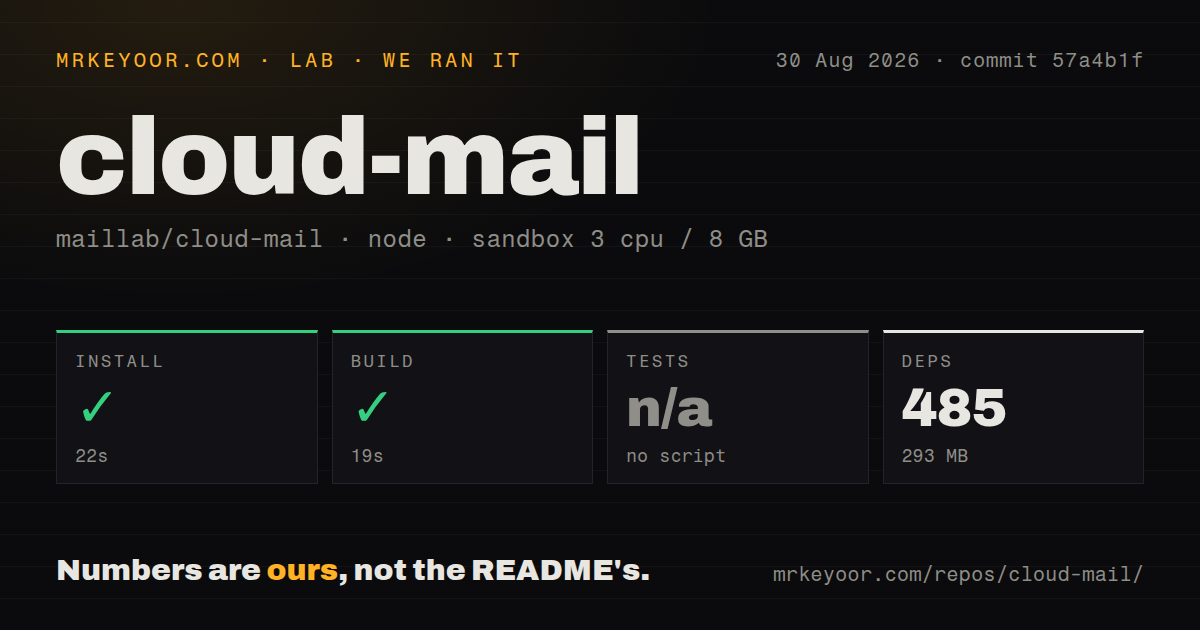
Our sandbox installed 485 pnpm packages in 22 seconds, using 293 MB on disk. The build completed successfully in 19 seconds on 3 CPUs with 8 GB of RAM. Those numbers cover commit 57a4b1f in a fresh unprivileged Debian container with no secrets. The build worked from the mail-vue project as directed by the lab configuration, so the basic frontend toolchain is in usable shape.
Tests were skipped because our lab found no runnable test script or target. The Worker package does contain a script named test, but it invokes wrangler deploy --config wrangler-test.toml; it does not run an assertion suite. The repository had 1 CI workflow and no tests directory. A 19-second successful build proves that Vite can produce assets. It says nothing about authentication, mailbox isolation, migrations, incoming MIME parsing, attachment permissions, or email delivery. Those paths need a separate pre-production checklist.
Deployment needs D1, KV, routing, and a guarded secret
The dashboard route begins with a Cloudflare account and a domain already added to it. Operators import the GitHub repository, select mail-worker, define the mail domains, administrator address, and JWT secret, then bind databases using the exact names db and kv. Email Routing must send the catch-all address to the Worker. GitHub Actions is another path and needs a Cloudflare API token, account ID, custom domain, domain list, admin, and JWT secret.
Initialization deserves special care. The guide tells an administrator to open /api/init/<jwt_secret> on the Worker domain. Putting a secret in a URL can expose it through browser history, logs, monitoring, screenshots, or copied links. The 485 installed packages do not change that operational risk. Use a unique value, restrict access during setup, check what Cloudflare and any proxy log, rotate it after exposure, and verify that the initialization route cannot be abused once the database exists.
Missing standard mail protocols change the target user
Cloud Mail is aimed at its own responsive interface and open API. It does not document IMAP or POP3 access for desktop and mobile clients. Issue 526 requested POP3, IMAP, and SMTP support for collecting other mail; it was closed without those protocols appearing in the current README. Anyone who wants Thunderbird, Apple Mail, standard migration tools, or server-to-server SMTP should start with a mail server such as Stalwart or mailcow.
Account controls also need an adoption check. Open issue 528 asks for two-factor or QR-code login, which means buyers should not assume either is present. Other recent issues ask how to reach the administrator interface after deployment or why a configured administrator remains a normal user. These reports do not establish a universal defect. They show where setup validation should focus after the 22-second dependency install: administrator role, registration policy, password recovery, API authorization, and tenant separation.
v3.2.0 is active, but the open queue mixes support and defects
Release v3.2.0 was published on August 25, 2026, adding GitHub and Google OAuth, sub-addressing, automatic cleanup, database indexes, and mail-list loading work. GitHub recorded a push on August 29, 13,801 stars, and 71 open issues and pull requests. That combined count includes support questions and proposed features, so it should not be read as 71 confirmed bugs. The same queue shows active users exercising real Cloudflare deployments.
Cloud Mail is appealing when the goal is a branded web inbox on infrastructure a team already runs in Cloudflare. Our 19-second build makes the code cheap to inspect, while the absent test target makes production validation the operator's job. Treat inbound routing, outbound delivery, storage, login, and initialization as separate failure domains. If that sounds like more responsibility than expected, a hosted mailbox or established full mail server is the safer choice.