Short answer
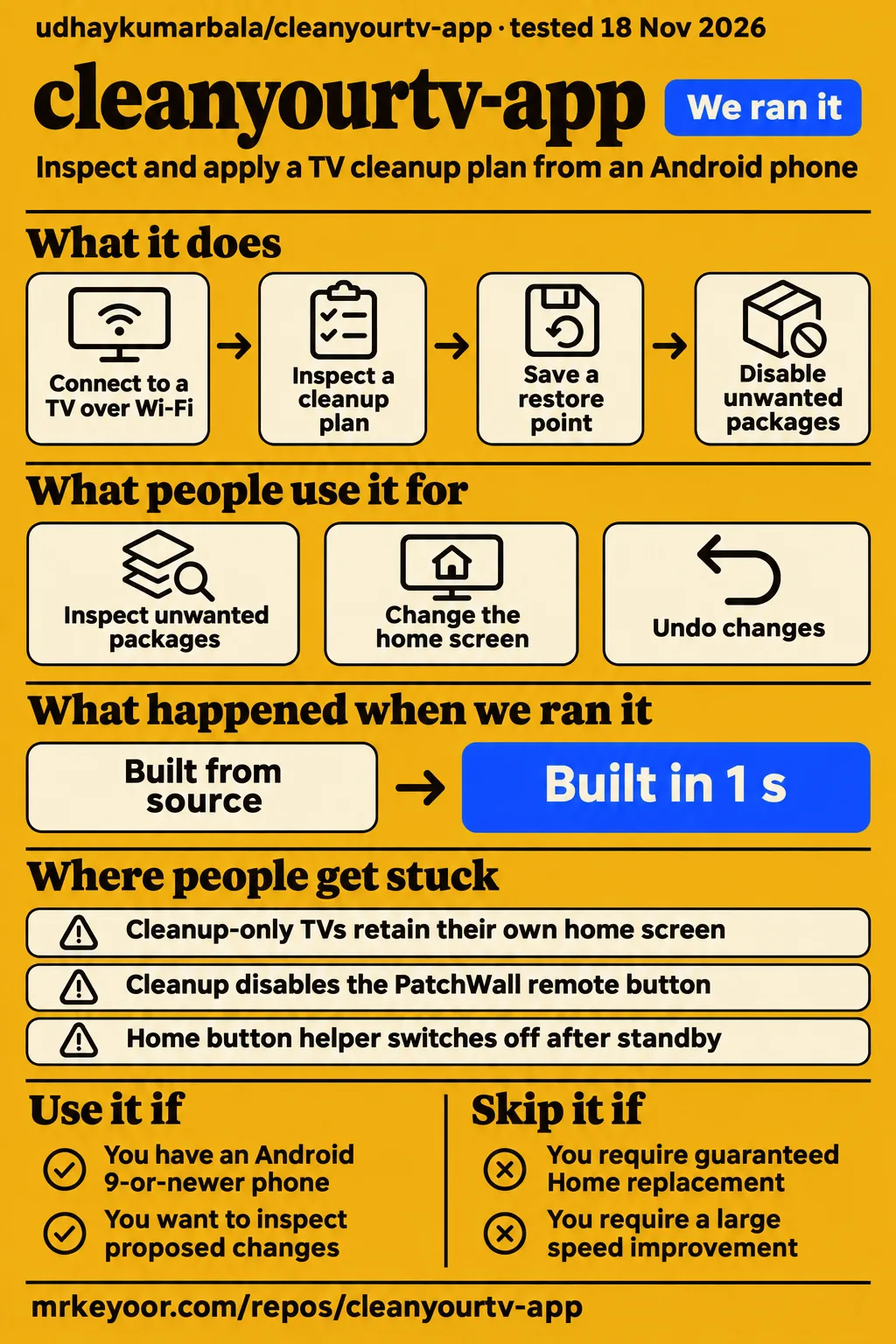
cleanyourtv-app can complete cleanup while leaving the original home screen in place. Use it if you have an Android phone and want to inspect the proposed changes for your exact TV. Skip it if a replacement Home interface is an absolute requirement regardless of model. The README separates cleanup from launcher replacement and says the app explains the outcome before changing anything, on the What we found screen. App outcome categories
The practical decision has three parts: which packages change, which launcher opens and whether that choice survives everyday use. The Homatics report shows why these deserve separate answers: the owner confirmed the look and wallpaper fix, then returned with a cleanup complaint. The SWTV-22AE exchange adds another distinction, because a successful restart preceded a later standby failure. Read those outcomes together before treating a finished setup screen as the whole result. Homatics outcomes Standby sequence
What people use cleanyourtv-app for
Owners use cleanyourtv-app to inspect unwanted packages, apply cleanup and change the home screen where their TV's outcome allows it. The README describes a phone workflow that reads the TV, displays a plan and creates a restore point before applying changes. It also describes returning later to put an app back, change the dock or look, check leftovers after a TV update or undo changes. Documented app workflow
| Who and device | What they tried | What they reported |
|---|---|---|
| nanip42-ui, Xiaomi MiTV4I | Cleanup and later launcher fixes | Earlier builds disabled 19 services, freed a reported 60 MB and left the old launcher visible; after 0.4.6, the user reported success with a Wi-Fi indicator exception. MiTV4I report |
| tvfaker, Homatics Box R 4K Plus, Android 14 | Launcher, reboot and customization | The new launcher survived reboot and customization was fixed; the later cleanup complaint remained in the thread. Homatics report |
| RentreX, EKO Android TV | Setup after repeated connection failures | After a 0.4.7-beta3 recommendation, the user reported the new home screen remained after restart. EKO report |
| napfkuchen1, PHILIPS QM163E, Android 8 | Replacement home screen | The user reported that 0.4.6-beta3 retained the new home screen after a cold boot. Philips report |
| Skirttles, Cecotec QLED VQU10055 | Beta setup and restart | The user reported successful changes and the new home screen after restart. Cecotec report |
GEEKrar's Hisense demonstration describes less visual noise after the change. On X, lohith1409 says the Android app works well and asks for more modifications. These reports answer different questions: the video describes the visible result, while the named-device issues record setup problems and follow-up outcomes. For an owner choosing a route, the model, firmware and final response in a support thread provide more specific grounds for comparison than a general endorsement. Hisense demonstration Android-app feedback on X
What happened when we ran it
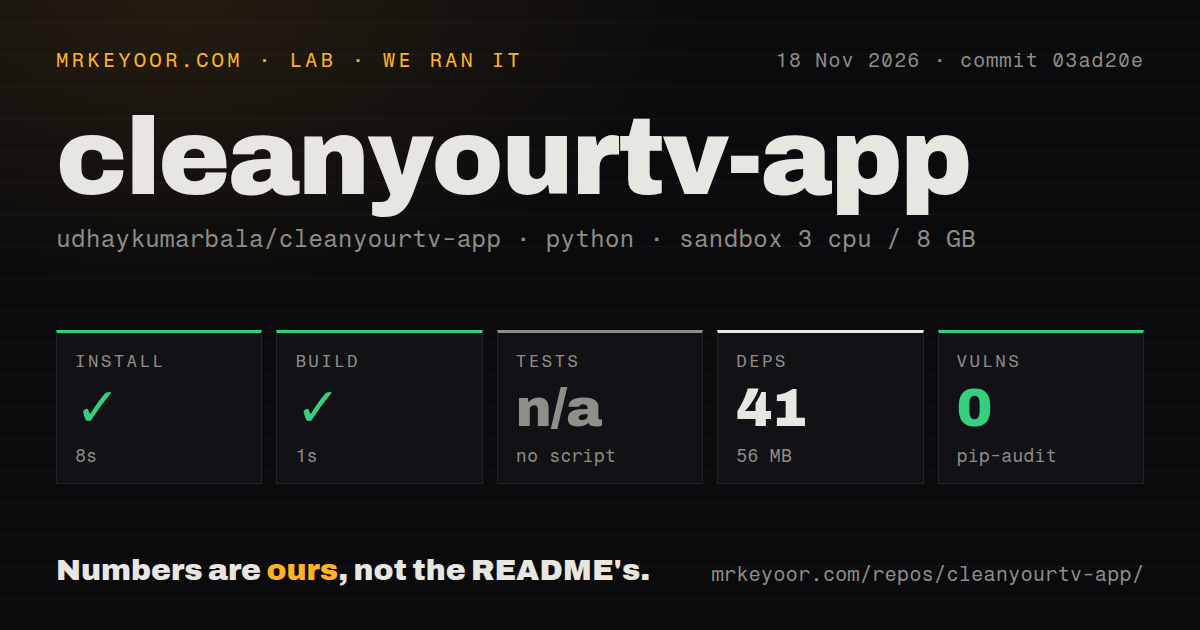
Our November 18, 2026 run at commit 03ad20e installed the bundled Python tooling in 8 seconds and built it in 1 second. The detected project was third_party/cleanyourtv/tools/. The recorded configuration was 3 CPUs, 8 GB RAM and image ghcr.io/astral-sh/uv:python3.12-bookworm. We measured the tooling environment at 56 MB, with 41 dependencies recorded; the complete checkout occupied 231.9 MB and contained 5,502 files and approximately 176,539 source lines.
| Recorded check | Answer | Verdict | Why |
|---|---|---|---|
| Which project did the detector select? | Python in third_party/cleanyourtv/tools/ |
Tooling selected | This was the subdirectory recorded by the harness. |
| Did installation complete? | Yes, in 8 seconds; 41 dependencies and 56 MB recorded | Succeeded | The install exited successfully. |
| Did the build complete? | Yes, in 1 second | Succeeded | The recorded tooling build completed. |
| Did tests pass? | No tests script or target; tests skipped | Skipped | The harness recorded no executed suite. |
| What did the dependency audit report? | pip-audit: 0 known vulnerabilities | Audit completed | This was the recorded Python dependency result. |
| What checkout signals appeared? | 5 CI workflow files; no Dockerfile; no tests directory found | Scan recorded | These were the harness's checkout observations. |
A separate hands-on attempt failed its safety step because the harness required a Compose file and found none. The log lists compose.yaml, compose.yml, docker-compose.yaml and docker-compose.yml as the missing candidates. Teardown succeeded. Its generic summary nevertheless says the project was deployed with its own Docker Compose, with every port bound to 127.0.0.1. The specific failure and generic summary conflict; the missing-file error is the concrete outcome of that attempted setup. Failed safety step Successful teardown Conflicting deployment summary
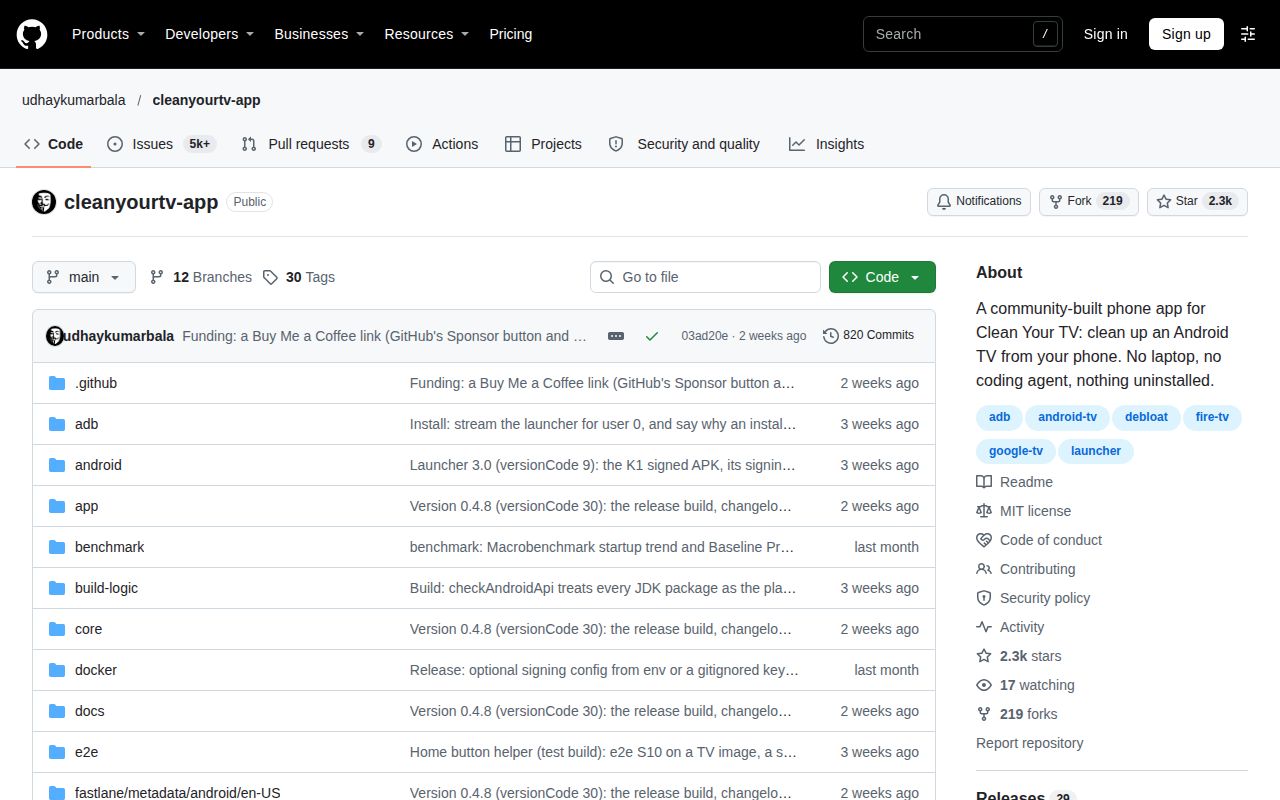
The owner's documented route starts with an Android 9-or-newer phone with a screen lock, the TV on the same Wi-Fi and debugging approval using the remote. The README also identifies a computer-pairing exception for TVs that offer only pairing-code Wireless debugging. Those requirements describe the phone-to-TV route; the Compose-file requirement came from the separate harness attempt. GitHub metadata identifies Kotlin as the repository's language. Phone requirements and pairing exception
Where people get stuck
An unchanged Home screen can follow intentional cleanup-only behavior or an older launcher-selection bug. The README says cleanup-only TVs retain their own home screen, including the adverts drawn by it. The Xiaomi exchanges describe additional causes: Manage could retain an earlier setup decision, and another installed launcher could trigger an overly restrictive refusal. Match the symptom to the app build and device report before repeating setup. README outcomes Xiaomi launcher-selection fixes
| Symptom and source | Recorded action | Recorded outcome |
|---|---|---|
| MiTV-AESP0 retains an old Manage decision or another launcher blocks selection | Maintainer identified fixes in 0.4.6-beta3 and offered Run Setup again | quest99812 reported complete success; the maintainer closed the issue. Issue #43 |
| Homatics look and wallpaper stay unchanged | Settings delivery changed from copying files to handing settings to the launcher | tvfaker confirmed the look and wallpaper fix. Issue #1094 |
| Xiaomi PatchWall remote button stops working | Manage, Switched off, PatchWall, Put back | Maintainer supplied the workaround and promised a corrected list. Issue #111 |
| EKO setup loses its connection while YouTube remains usable | Thread later recommends 0.4.7-beta3 | RentreX subsequently reported restart persistence. EKO exchange |
| Fire TV Stick is absent from discovery | Maintainer recommends manual IP entry | The user reported that the address-entry option was absent in the cited builds. Fire TV exchange |
| GitHub opens an empty support report | Copy and paste the generated report manually | The user reported completing that step. Report workaround |
The MiTV-AESP0 thread contains a correction worth following through to its end. The maintainer acknowledged announcing a fix before it worked for that TV, then explained the two remaining beta2 problems. After the beta3 recommendation, quest99812 returned with a success report. That sequence makes the final user response more useful than the earlier fix announcement: it connects a named build and specific changes to the affected owner's result. Complete Xiaomi correction
A successful reboot can precede a standby failure
NotCrissss reported that the SWTV-22AE's Home button helper survived a full restart but switched off after overnight standby. The maintainer recommended Run Setup again to turn the helper back on. The owner then tried disabling battery optimization and initially reported improvement, before returning to say the helper had switched off again after several days of standby. The final supplied device report names app version 0.5.0-beta1. SWTV-22AE follow-ups
Stable 0.4.8 excludes the Home button helper; its release notes keep that feature in test builds. This distinction matters when comparing a stable release with the SWTV-22AE exchange. A report about the experimental helper describes a different route from a stable app outcome that leaves the original Home interface in place. Owners who depend on predictable Home-button behavior should make that requirement part of their choice before installing a test build. Stable 0.4.8 release notes
Restore controls and debugging shutdown
The README describes disabling packages for the main user, saving a restore point and exporting plain restore scripts for a computer with ADB. It also describes a watchdog that restores the original home screen if the phone fails to confirm the switch within 150 seconds. These documented controls give owners several recovery options, including putting back a single package instead of undoing the entire plan. Documented recovery controls
The README states that the app has no accounts, analytics or ads, and switches network debugging off at the end unless the owner keeps it on. In the TCL 55C6K exchange, mrfearless reported that finishing setup disabled ADB debugging. The PatchWall workaround illustrates another practical use of the controls: restore the package associated with a remote button, then check that button's behavior. Save the restore export before making further changes. Privacy and debugging defaults TCL observation PatchWall workaround
Device identifiers explain more than brand names
The TCL 55C6K report matched the tcl-c755-google-tv profile, while the Cecotec discussion used the generic identity My Android TV. Keep the retail model, device identifier, Android version and firmware build together when comparing reports or asking for help. A familiar brand name alone can hide the technical identity that determines which list and launcher decision the app uses. TCL profile report Cecotec discussion
The supplied README reports 173 TV lists from 47 brands and separates coverage from the outcome a TV receives. Its searchable TV page explains whether a model gets the new home screen and, where it does not, why. Start there before downloading a build for a particular launcher result. If the entry is missing or wrong, the page directs owners to Manage, then Help add this TV, to send the model and home-screen information. README coverage Searchable TV outcomes
cleanyourtv-app vs alternatives
The Android app provides a guided phone route, while upstream Clean Your TV provides computer scripts and shared launcher resources. The separate Apple app and manual launcher routes address other device or setup preferences. Choose according to the phone you own and the change you want to make. The app README explicitly describes upstream as the route for tinkerers, themes and new TV lists. App and upstream comparison
| Option | Choose it for | Evidence |
|---|---|---|
| udhaykumarbala/cleanyourtv-app | Inspecting and applying a TV cleanup plan from an Android phone | README describes connection, plan preview and model-specific outcomes. Android workflow |
| Gathin23/cleanyourtv | Computer scripts, themes and TV-list development | App README describes the upstream computer route. Upstream workflow |
| FLauncher or a separate launcher manager | A manual route to choosing another Home interface | Xiaomi and Sharp users described separate launcher steps. Xiaomi discussion Sharp discussion |
| Clean Your TV (EN) | A separate Apple-device workflow | App Store evidence describes an unofficial app and optional OpenRouter assistance. Apple app listing |
The Sharp exchange includes a step that matters when assigning credit: harashoo1 used a separate launcher manager to disable the stock launcher. The user reported that this worked and later confirmed the new home screen after restart. That is a combined workflow. Someone whose only goal is a different Home layout can use the report to investigate the launcher step separately from a broader package-cleanup plan. Sharp owner's workflow
What the other reviews get wrong
The Android landing page promises that ads and bloat disappear in about five minutes, while the README says cleanup-only TVs keep their original Home interface and its adverts. The landing page also lists 131 models from 46 brands, compared with 173 lists from 47 brands in the supplied README. Read the outcome for the model rather than interpreting either coverage count as a promise of launcher replacement. Landing-page wording README outcomes and coverage
The no-laptop slogan also needs the README's pairing exception: TVs offering only pairing-code Wireless debugging require pairing once from a computer. Earlier support advice received corrections too. The update-check fix belongs to stable 0.4.8, rather than 0.4.7, and the TCL exchange withdrew advice to forget and rejoin Wi-Fi as a way to change Home. The corrected advice pointed to the optional helper in a test build. Pairing requirement Update correction TCL correction
The supplied video makes a warranty assurance, while the RepoPicks upstream review quotes a warning that changing TV software may affect warranty or support. These are different statements from different sources. The Android app's restore controls describe how software changes can be reversed; they do not determine a manufacturer's warranty terms. Treat the quoted upstream warning as a reason to read the terms that apply to the TV you own. Video record RepoPicks warranty warning
FAQ
Cleanup-only TVs retain their original home screen and the adverts drawn by it, according to the README. That directly answers the recurring question about a finished setup leaving the TV looking unchanged. The questions below follow the supplied owner discussions, including launcher persistence, update behavior and discovery problems. Their answers distinguish the app's documented behavior from the outcome reported by a particular owner. Cleanup-only explanation
Why does my TV look unchanged after setup finishes?
Cleanup-only mode keeps the original Home interface. The app says which outcome it proposes before making changes. Older Xiaomi reports also describe launcher-selection problems followed by fixes, so the app build matters alongside the model. Read the displayed outcome first, then compare the relevant support thread instead of assuming that an unchanged picture means no packages changed. README outcome screen Xiaomi fix sequence
Will the new home screen remain after a restart?
Homatics and Philips owners reported that their new home screens survived restart or cold boot. The Homatics exchange also records a successful customization fix, while the Philips owner names 0.4.6-beta3. Preserve those device and build details when comparing the reports with your own TV. The SWTV-22AE standby sequence appears separately above because waking from standby produced a different outcome from restarting. Homatics result Philips cold-boot result
How do I return to the new home screen when Home opens Google TV again?
Run Setup again is the maintainer's recorded workaround for the SWTV-22AE helper switching off. It turns the helper back on. The exchange concerns the optional helper route, and stable 0.4.8 leaves that feature in test builds. Match your setup to that route before applying advice intended for the helper. Helper workaround Stable release scope
Why does the Home button helper turn off after overnight standby?
The SWTV-22AE exchange records the helper switching off when the TV wakes after overnight standby. It also records the owner's later reversal of an initially positive battery-optimization result: the failure returned after several days. The useful troubleshooting sequence is the whole exchange, including that final report, rather than the earlier comment saying the setting appeared to help. Standby and battery-setting follow-ups
Can the app automatically disable battery optimization for the launcher?
A user requested automatic battery-optimization changes in the SWTV-22AE thread. The same owner later reported that manually changing the setting had failed to keep the helper working after several days. The thread therefore supplies a feature request and a subsequent device outcome, rather than an instruction to use that setting as a lasting repair. Battery-optimization request and outcome
Why does unnecessary-app cleanup not work even though the new launcher works?
The Homatics owner's later report shows the new home screen already active and no matching profile. The owner explicitly says unnecessary-app cleanup does not work, after confirming the look and wallpaper fix earlier in the thread. This is the clearest example in the supplied reports of why launcher selection, customization and cleanup need separate result fields. Homatics cleanup complaint and device report
Why does Check for updates fail?
Stable 0.4.8 fixes the update check, according to its release notes and the corrected support reply. On 0.4.7 or older, download the release manually because the affected checker cannot find it. jflambert subsequently confirmed that 0.4.8-beta1 offered stable 0.4.8. That confirmation follows the earlier mistaken statement that the fix would be in 0.4.7. Release installation instructions Owner confirmation
Does Check for updates offer beta builds or only stable releases?
The maintainer says Check for updates offers releases, never test builds. A test build receives an offer for the same stable version or a newer stable release. The thread also records the button opening the general Releases page, where a newer beta confused the user. Direct links to the offered release and beta-to-beta offers were recorded as requests. Update-selection discussion
Does cleanup actually speed up the TV or free much RAM?
nanip42-ui reported 60 MB freed on a MiTV4I after the app said it disabled 19 services. The maintainer described the aim as less tracking and fewer ads rather than a RAM boost. That report gives an owner a concrete result to weigh against general speed promises. Keep the reported memory figure attached to the MiTV4I and the user's account. MiTV4I memory result
Does the app stop the TV from using Google DNS?
The maintainer says the app does not change network or DNS settings and that individual TV apps may still use their own DNS. The Philips owner said they intended to monitor traffic after changing the launcher. The actionable distinction is between a launcher or package change and a network-setting change; the maintainer explicitly describes the app as leaving the latter alone. Philips DNS discussion
Why can't the app find my Fire TV Stick with ADB enabled?
The maintainer says Fire TV does not announce debugging like Android TV and recommends manual IP entry. The owner then reported that the address-entry option was absent from the builds they tried. Stable 0.4.8's notes say Enter the TV's address works. Keep the builds separate when following this advice rather than assuming the older interface matches the stable release. Fire TV discovery exchange Address-entry release note
Can I clean up my TV using only an Android phone without a paid coding-assistant subscription?
The README's normal route uses an Android 9-or-newer phone with a screen lock on the TV's Wi-Fi network. The app displays the plan and applies the selected changes; the owner does not need to run a coding assistant for that workflow. TVs offering only pairing-code Wireless debugging have the documented exception: pair once from a computer, following the commands the app shows. Phone route and computer-pairing exception
What we have not tested yet
Our completed checks covered Python tooling at commit 03ad20e, not the Android APK on a physical TV. We have not tested the Android build, reproduced the community's launcher changes or established that this checkout is the v0.4.8 release tag. The sandbox image label does not establish actual runtime or operating-system versions; those require raw toolchain logs. The tooling footprint and checkout size are not installed APK sizes.
The supplied hands-on records contain no app screenshots or known-answer task results. The Compose attempt stopped at its missing-file requirement, so its generic deployment summary supplies no completed phone-to-TV result. The checkout scan's missing tests directory is not an inventory of every possible Android test source. Likewise, pip-audit's 0 known vulnerabilities applies to the recorded Python dependency audit, rather than an assessment of the Android app's security.
The records supply no independent performance benchmark or comparison test. Our run did not measure app-opening speed, before-and-after RAM or DNS traffic. Complete restoration, watchdog recovery, APK reproducibility and debugging-port closure across models also need device checks. The EKO sequence supplies no general connection-loss diagnosis; the Fire TV thread contains no successful stable-0.4.8 retry; and the Homatics cleanup complaint ends without a resolving response.
The helper's underlying standby failure and a durable repair remain unresolved in the supplied exchange, and automatic battery-optimization changes appear as a request. The PatchWall thread promises a corrected list without demonstrating its later result. For a future device run, record cleanup, launcher selection and customization separately, then exercise reboot, several nights of standby, casting, inputs, voice, Live TV and remote buttons while retaining the exact firmware identifiers.