The open client leaves the backend outside your checkout
Choosing Cindy means deciding how much of your assistant you need to own. The Apache-2.0 repository contains an Electron desktop app, an Expo mobile app, and shared client packages. The backend lives elsewhere. Cindy can work with local files and logged-in applications, while its default endpoints and desktop update service belong to the official cloud. That boundary matters more than the promise of an agent that works out of the box.
Our checkout occupied 254.5 MB across 12,967 files before installation. You're adopting a substantial client platform, with orchestration, device linking, and model-provider code, rather than a small chat window. The README describes switching between Claude Code and Codex while keeping workspace context, memory, skills, and tools. That's a useful reason to try Cindy if moving between agents currently means rebuilding your working context. We haven't measured how reliably that continuity survives real tasks.
What happened when we ran it
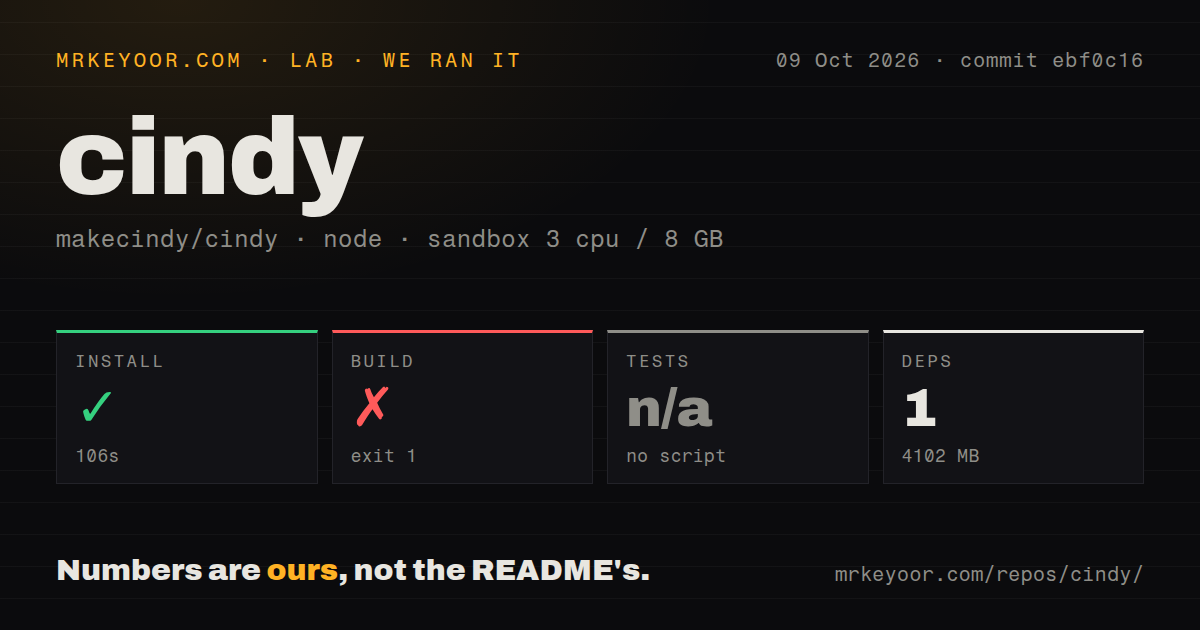
Our run installed Cindy commit ebf0c16 in 106 seconds, then failed its build after 8 seconds with exit code 1. We cloned it on October 9, 2026, into a fresh Debian sandbox using lab-node:22, with 3 CPUs and 8 GB of RAM. The container had no secrets or elevated privileges. Installation succeeded, and the harness reported 1 package installed with 4,102 MB on disk. That count is the harness result, not a census of this monorepo's dependencies.
Electron Forge stopped while resolving make targets because the Debian package maker couldn't find dpkg and fakeroot. The failing desktop command was node scripts/forge-cli.mjs make. This identifies missing packaging tools in our environment, not an application crash. Our scan found 4 CI workflow files, monorepo workspaces, no Dockerfile, and no tests directory. The harness found no test script or target and skipped testing. We therefore have no passing suite or working desktop session to report from this run.
Skipping sign-in removes server-backed capabilities
The README's account-mode table says you can choose Skip Sign-In and run local agents without a Cindy account. Server-backed capabilities become unavailable. Hosted use needs a Cindy cloud account, and remote development distinguishes Mainland China accounts from global accounts. Other model routes include authorizing an existing coding plan, supplying API credentials, or using local models. Your choice of provider still determines what credentials and external services the assistant needs.
The 4,102 MB installed footprint is only the source environment we measured. It doesn't establish the storage or memory cost of a local model, or make the cloud backend part of the checkout. If your requirement is a complete assistant service you can deploy behind your own network boundary, this repository doesn't supply that entire stack. Local agent use is a narrower, documented option. I would settle that distinction before spending time on provider settings or mobile pairing.
A Linux desktop needs more than Node and pnpm
The README specifies Node.js 22.x, pnpm 10.x, and Git LFS, explicitly excluding pnpm 11. Its short prerequisite list doesn't mention the dpkg and fakeroot binaries that stopped our Debian packaging step. Contributor instructions link onward to environment and platform guides. Following those links is part of the work, especially when you want to change the client rather than download a published desktop package. The failed make step gives contributors a concrete prerequisite to check.
Our 8-second packaging failure left these desktop requirements unverified. The Linux guide requires a normal desktop session, working session D-Bus, and an unlocked Secret Service keyring for the Arch route. Installing a keyring package alone doesn't unlock it. Wayland screen sharing needs the compositor's portal backend and PipeWire. Alpine/musl and root desktop sessions aren't supported user-install routes. These constraints are good reasons to walk away if your intended home for Cindy is a headless container or a stripped-down Linux appliance.
Official builds send analytics even though work runs locally
The installed source environment reached 4,102 MB, but disk ownership says nothing about data leaving the app. Cindy's privacy section says official distributions include TapDB analytics covering device, operating-system, and app-version metadata, associated with your account ID after sign-in. Signed-in cloud clients also send an online heartbeat. The project says analytics exclude chat content, file content, and working-directory data, and crash dumps remain local. Those are documented boundaries, not findings from our sandbox.
Our 3-CPU sandbox had no secrets and supplied no evidence about hosted analytics traffic. Source builders have explicit ways to change that behavior. Mobile analytics do nothing without injected TapDB credentials, and desktop analytics can be removed by deleting the documented initialization call. That is useful control for a fork. It also means someone requiring an official binary with no usage analytics has a concrete objection. MCP connections and scheduled actions expand what Cindy can reach, so start with a workspace and application accounts whose actions you can review.
October activity earns a trial, with Windows behavior still unsettled
Cindy's last push was October 10, 2026, and GitHub returned 2,987 stars with 1,572 open issues and PRs. Desktop release v0.1.101 was published October 9. Release notes and the recent issue sample are predominantly Chinese, although English README and contributor documentation exist. Recent reports and pull requests show ongoing work. The combined queue isn't a bug count, and rapid activity doesn't establish that the version you choose handles your particular platform correctly.
Open issue 5764 reports Windows Codex thread creation timing out at a project root while a client subdirectory worked. The report explicitly says the comparison wasn't controlled and the cause remains unconfirmed. The 106-second install establishes no claim about agent reliability. Try Cindy when keeping several agents in one desktop workflow solves an existing nuisance. Choose Cline for an editor-centered coding agent or Aider for terminal pair programming. Before entrusting Cindy with recurring work, verify the chosen release against the same project directory and desktop session you will actually use.