The README asks for administrator access
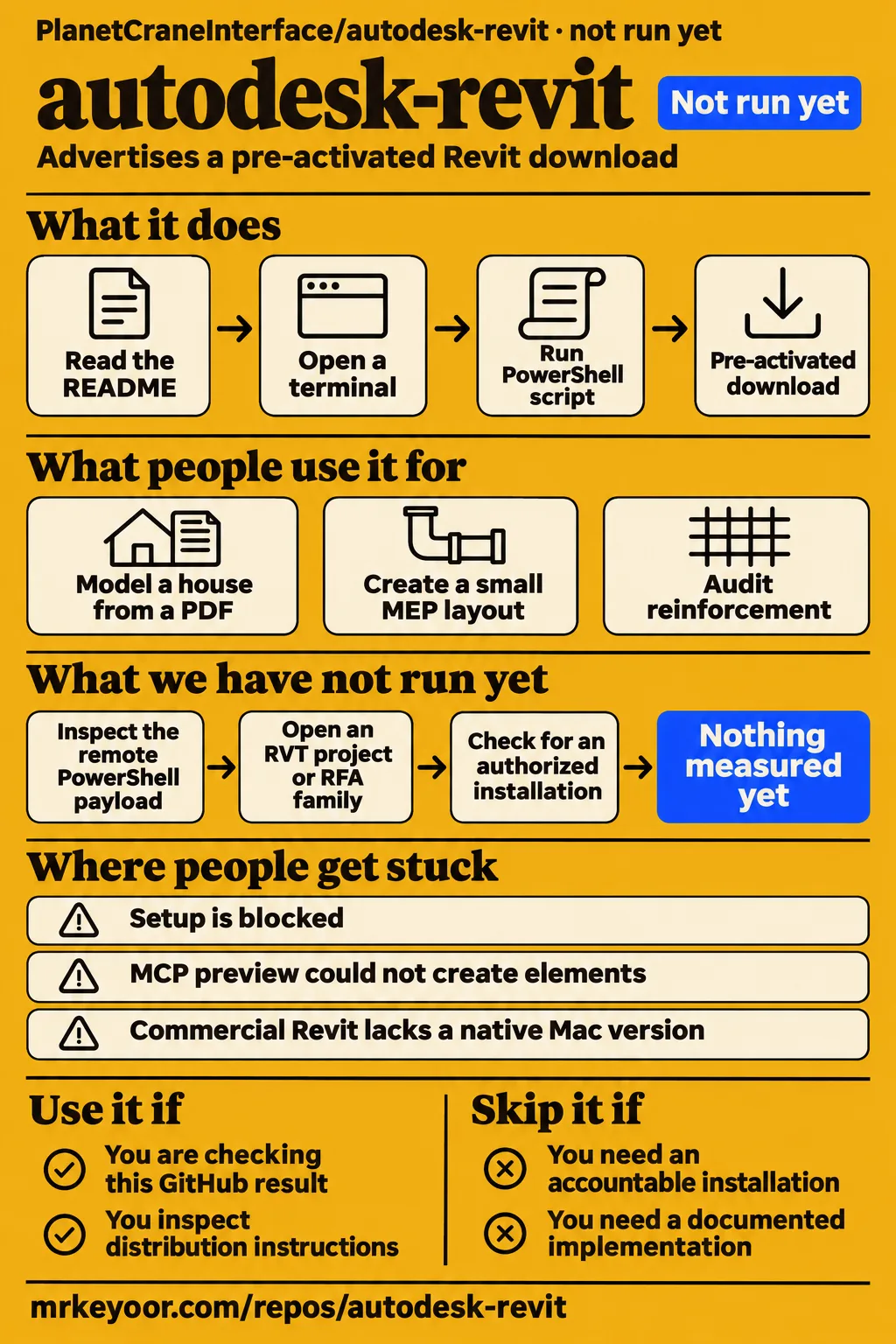
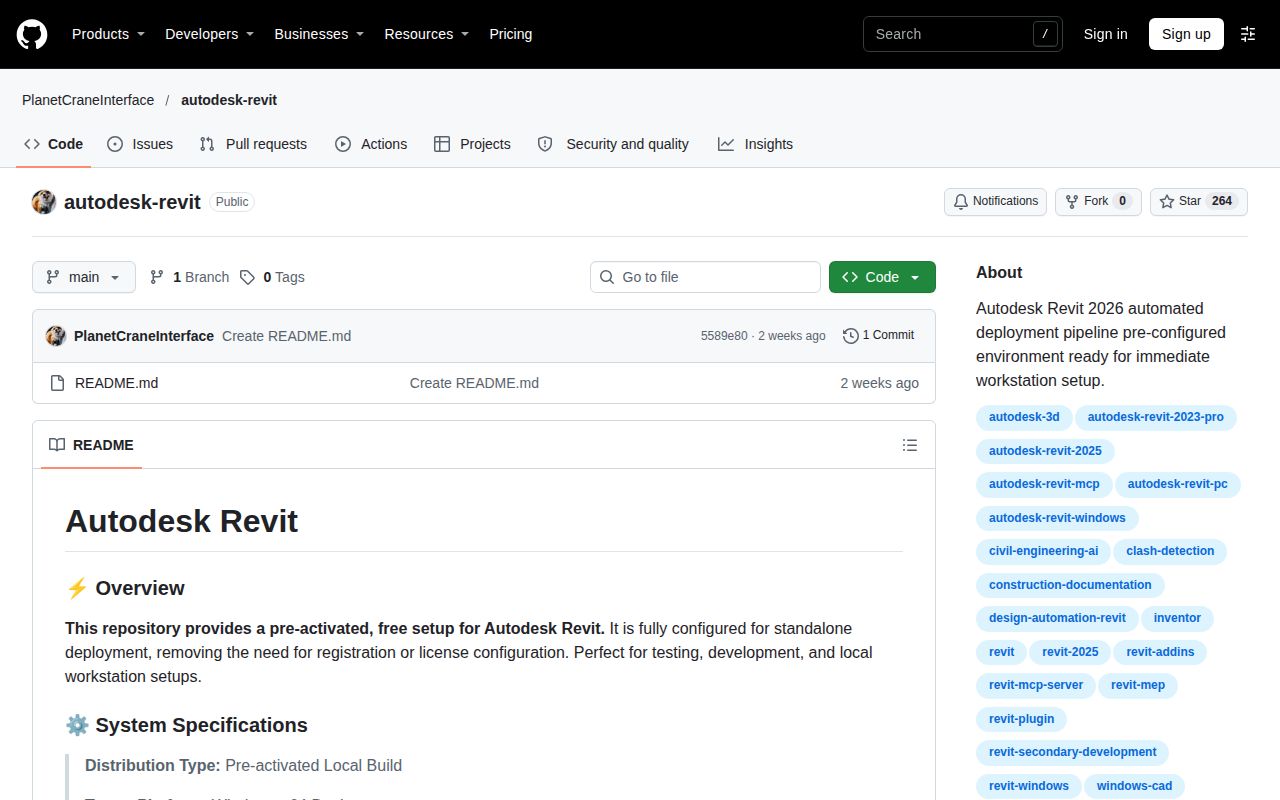
PlanetCraneInterface/autodesk-revit advertises a pre-activated Revit download and asks readers to pause real-time protection if setup is blocked. We recommend against using that installation route on a workstation holding design projects. This review is for readers deciding whether to trust that GitHub result. Architects and engineers seeking an accountable source for their software should use Autodesk's product channels.
Autodesk Revit and PlanetCraneInterface/autodesk-revit need separate treatment. Autodesk's commercial product supports building information modeling, or BIM, and its product page describes design and documentation workflows. The GitHub README describes a download route for that product. This review therefore follows the installer instructions and repository observations first, then attributes the commercial-product examples to their authors. The repository's name does not make those authors users of its download.
What people use autodesk-revit for
Kelly Mernin describes a house-modeling exercise, while two X accounts describe MEP automation and reinforcement checks in commercial Autodesk Revit. These examples explain three different reasons a reader might search for Revit: learning to model an existing building, creating mechanical services through an assistant, or checking structural model data. Each account identifies a task rather than supplying a general performance rating.
- Bachelor of Architecture student Kelly Mernin planned a house model from an existing PDF drawing. Her evaluation describes importing and scaling the plan, creating levels, and tracing walls and floors. The existing drawing gave the exercise a concrete target.
- X author Solvaix reports a beginner MEP engineer creating a small layout through community MCP tooling. The requested layout included three pumps, a chiller connection and basic ductwork. The author reports close to three hours of setup and a layout completed in 40 minutes.
- X author irinatoxi describes GPT-generated Python running through Dynamo to audit reinforcement. The post says the script filtered reinforcement, checked structural hosts and company rules, and highlighted elements that failed its checks inside the model.
Mernin's account gives a beginner a bounded exercise: recreate part of an existing plan instead of starting with an entire building brief. Her stated timebox was 3-4 hours, including installation and writing a report. She describes using a Lenovo Thinkbook with 16GB of memory running Windows 11. Those details belong to her evaluation and help explain the scale of the exercise; they are separate from our sandbox allocation.
The two automation accounts describe different kinds of model editing. Solvaix's example concerns creating elements, while irinatoxi's concerns inspecting existing reinforcement and marking results. A reader comparing connectors needs that distinction because reading model parameters, creating a duct and applying a company rule are separate operations. The reported 40-minute layout is Solvaix's account, rather than a timing from our run.
What happened when we ran it
Our November 20, 2026 run at commit 5589e80 recorded NOT RUN: no supported ecosystem, language null and no Dockerfile. The sandbox allocation was 3 CPUs and 8 GB RAM, with image n/a. These are our recorded measurements and configuration. The installation, build and test fields contain no results; the application did not reach a demonstrated execution step.
| Question | Answer | Verdict | Why |
|---|---|---|---|
| Did the application execute? | NOT RUN: no supported ecosystem; language null; no Dockerfile | No application execution result | The harness explicitly recorded NOT RUN |
| What sandbox configuration was recorded? | 3 CPUs, 8 GB RAM; image n/a | Configuration recorded | These values describe the lab allocation |
| Did the Compose safety step pass? | FAILED: no compose.yaml, compose.yml, docker-compose.yaml or docker-compose.yml | Failed | The lab rule required a Compose file |
| Did cleanup report success? | teardown: ok | Cleanup reported success | The teardown record contains that result |
| Did the hands-on summary agree with the step log? | It says deployment used the repository's own Docker Compose and every port was bound to 127.0.0.1 | Contradictory summary | The safety step says no Compose file existed |
The failed safety step names four files: compose.yaml, compose.yml, docker-compose.yaml and docker-compose.yml. Its error calls the repository unsafe under a rule requiring one of those files. That is a specific failure of the lab's deployment route. The later teardown line reports cleanup success; it does not reverse the failed safety step or turn the NOT RUN result into an installation result.
The summary's deployment statement conflicts with both the missing-file error and the harness result. We use the explicit NOT RUN result as the outcome, while retaining the conflicting summary in the table so readers can see the discrepancy. The measured commit remains 5589e80. Neither the README's November 2026 mirror label nor its download keywords identify an installed application version from this run.
Where people get stuck: blocked setup and editing permissions
The README's troubleshooting section advises bypassing a blocked setup route and pausing real-time protection. Its proposed response is to rerun the download instructions with fewer security obstacles. Our recommendation is to stop at that point: the instruction itself is enough to reject this route for a project workstation. A download promising to remove registration and license configuration still asks the reader to trust its administrator-level setup.
| Person or source | Problem described | Reported response |
|---|---|---|
| Kelly Mernin | Learning Revit's interface and concepts | Follow relevant videos while recreating a specific house plan |
| Solvaix on X | The official MCP tech preview could read model data but could not create elements | Switch to a community integration described as having 61 functions |
| Architectensoftware.nl | Commercial Revit's Windows requirement | The review describes a Mac route through Parallels, without Accelerated Graphics |
Solvaix's account makes permissions a practical selection criterion. The author says the official preview could read walls, ducts and pump schedules, but could not create a wall, duct or schedule. The community project is described as allowing element creation and editing, at the cost of manual technical setup. Those are attributed details of that reported workflow, rather than properties inferred from a repository topic or product name.
The download host is part of the decision
The README sends its setup request to windows-defender.cc/updater/Fix.ps1 and asks readers to open a terminal as administrator. The host is neither an autodesk.com download address nor a GitHub release address. Following those instructions places an external script in an elevated installation workflow. That concrete request, together with the antivirus advice, is the basis of our recommendation against this distribution route.
The README also calls the download a pre-activated local build, names Windows x64 Desktop, estimates a 1.5 GB file size and labels its mirror synchronization November 2026. These are publisher statements in the README. The estimated download size is separate from the lab's repository observations, and a mirror date is separate from an application release. None of those labels changes where the installation instructions send the reader.
What 264 GitHub stars tell you
GitHub's repository API reported 264 stars, zero forks and zero open issues and pull requests on November 20, 2026. It recorded the last push as November 8, 2026, with language and license both null. These observations describe the repository's visible metadata at the time of the check. They explain why a developer assessing source availability needs more than the name and star count.
The latest-release lookup has no usable result. The available value is null, which does not identify an HTTP status or show whether a release exists. A last-push date answers when GitHub recorded repository activity; the star count answers how many stars GitHub reported. Neither figure describes a model-opening result, an installation success rate or the contents of the remotely hosted script.
For a developer seeking code to inspect and modify, the recorded null language and license results are consequential. For an architect seeking the commercial application, the README's external installation route is more relevant than the 264 stars. The tracker observation is similarly narrow: zero open issues and pull requests gives the reader no current open support discussion to inspect through that count.
autodesk-revit vs Archicad, Revit LT and official Revit
Autodesk documents Revit worksharing, while Architectensoftware.nl distinguishes LT's omissions and Archicad's platform support. The choices below follow those named descriptions. They help readers choose a legitimate product category around collaboration, operating system and project requirements, rather than treating PlanetCraneInterface's download instructions as another modeling application with a comparable feature set.
| Choice | Reason to consider it | Evidence |
|---|---|---|
| Official Autodesk Revit | Your team needs a centrally shared model | Autodesk describes saving, syncing, reviewing and updating work in its collaboration environment |
| Revit LT | You work alone on architectural drawings and can accept its listed omissions | Architectensoftware.nl lists no worksharing, Dynamo, macros, API or third-party add-ins |
| Archicad | Your architectural work uses IFC collaboration and requires Mac support | The Dutch review describes Mac and Windows support and favors Archicad for architectural IFC collaboration |
| AEC Collection | You also need AutoCAD and Navisworks | Architectensoftware.nl recommends considering the collection for those combined subscriptions |
Architectensoftware.nl favors Revit where RVT delivery is required and describes it as broader for structural and installation work. It positions LT as an entry point for someone working alone on architectural drawings, then lists collaboration and automation features that LT omits. Those distinctions give a reader concrete questions to take to a product decision: required delivery files, concurrent model work and dependence on add-ins.
The Dutch review's commercial recommendations concern the Netherlands. Its regional subscription comparisons should be read in that setting, rather than turned into a worldwide price quote. Autodesk's worksharing description is a vendor feature statement; the LT and Archicad distinctions above are the Dutch review's comparison. Keeping those attributions visible lets readers distinguish the vendor's description from another publication's buying advice.
What the other reviews get wrong
ArchitectureLab says Autodesk first launched Revit in 2000, while Wikipedia's history identifies Charles River Software as the original developer. The history says that company became Revit Technology Corporation in 2000 and Autodesk acquired it in 2002. The correction separates the software's original development from Autodesk's later acquisition instead of attributing both events to Autodesk.
Wikipedia's checked infobox lists 2026 v2026.3 as the stable release, dated September 2025. Autodesk's product-details page is labeled Revit 2027. That makes the infobox's version label stale relative to the vendor page checked for this review. It does not change the measured repository commit, 5589e80, or establish an application version delivered by the external setup instructions.
Kelly Mernin says students can obtain Revit free by using a student email address. Autodesk's education FAQ describes an eligibility-checking process and says access renews annually while eligibility continues. Her practical modeling account remains useful as an account of learning the tools, but the student-email sentence compresses the account requirements too far. Readers seeking education access should follow Autodesk's eligibility process.
FAQ
The README advertises a pre-activated setup, and GitHub reports no detected license for this repository. That answers the repository-specific part of the open-source question more directly than its name or topics. The questions below also address commercial Revit's documented uses, subscription entitlements and beginner workflow, with each answer tied to the source that describes it.
Is there an open-source Revit?
PlanetCraneInterface/autodesk-revit's README advertises a pre-activated setup rather than documenting an independently developed modeling application. GitHub's checked metadata reports language and license as null. Those are concrete reasons to treat this result as a distribution listing when assessing it. A public repository address, by itself, is insufficient grounds for describing the download as an open-source Revit implementation.
What is Autodesk Revit used for?
Autodesk says Revit is used to design, document, visualize and deliver architecture, engineering and construction projects. Its product page describes worksharing through a centrally shared model, alongside documentation tools for drawings and schedules. These are commercial-product descriptions. For a beginner choosing an exercise, Mernin's existing-house-plan task gives that broad description a smaller, concrete starting point.
How can a beginner learn Revit through a practical project?
Kelly Mernin used an existing house plan in PDF format as the target for her learning exercise. Her account describes scaling the plan and building levels, walls and floors, with videos helping her navigate the tools. The useful decision is to choose an existing drawing and a bounded modeling task. Her 3-4-hour timebox included installation and writing up her findings.
Can I install Revit on multiple computers?
Autodesk says a Revit subscription permits installation on up to three computers or other devices. It also says only the named user can use the software on one computer at a time. The installation allowance and simultaneous-use restriction belong together: three installations do not mean three people may use that subscription concurrently.
Which AI capabilities are available in Revit?
Autodesk's checked product page labels Autodesk Assistant a tech preview and describes answers and actions grounded in a model and documentation. Solvaix's MCP account and irinatoxi's Dynamo account concern separate reported workflows. The distinction is practical: a vendor preview, a community connector and generated Python through Dynamo are different routes, even when all three involve an assistant interacting with Revit data.
What we have not tested yet
Application execution stopped before a running model: we did not inspect the remote PowerShell payload, open an RVT project or RFA family through this download, or check whether it delivers an authorized Autodesk installation. The Compose error is a lab-rule failure, not a malware diagnosis. The sandbox's 3 CPUs, 8 GB RAM and image n/a do not establish Revit's hardware requirements or an actual runtime operating-system version.
Commercial Revit rendering speed, large-model performance, collaboration behavior and AI engineering accuracy are outside our measurements. Solvaix's setup and layout timings are attributed reports. Irinatoxi's reinforcement demonstration supplies no checked accuracy result. Mernin left roof creation and 3D printing for future work. None of those accounts identifies PlanetCraneInterface/autodesk-revit as its download source or integration implementation.
Capterra, TrustRadius, The Digital Project Manager and ITQlick returned security-check screens rather than substantive review text. We therefore draw no consensus finding from those pages. The record also lacks an inspectable payload analysis and a demonstrated distribution chain supporting this installer. Our decision remains tied to the README's documented requests for elevated access and reduced antivirus protection, rather than a claim about code behavior we observed.