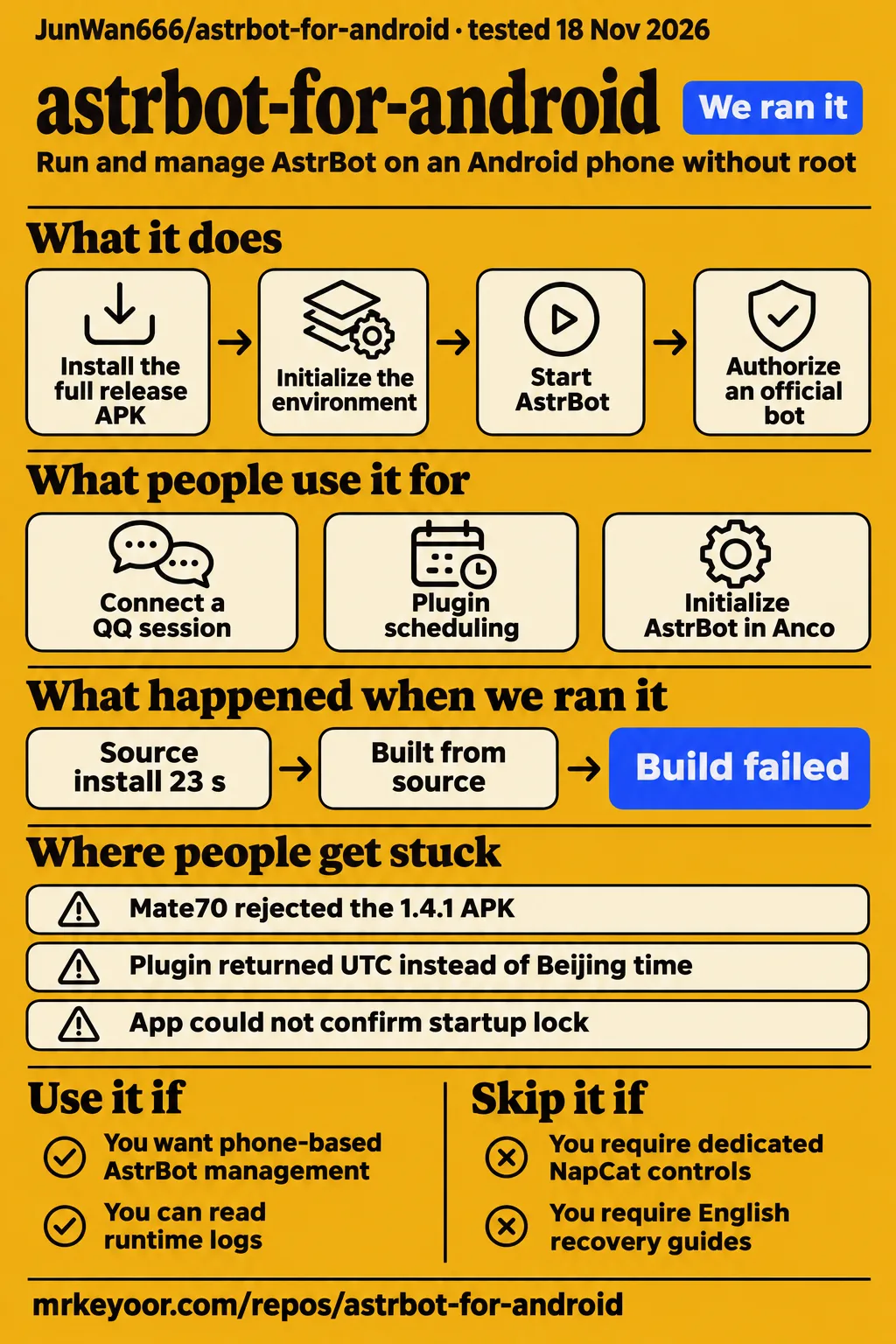
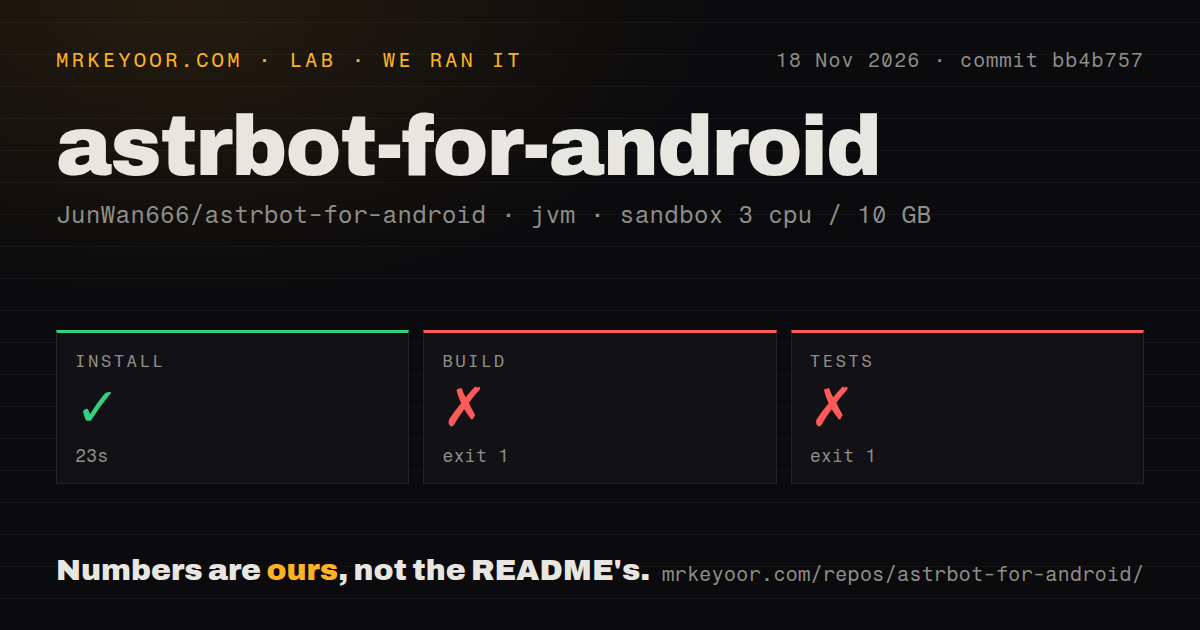
Our sandbox install step succeeded in 23 seconds, but build and tests both exited 1 after 12 seconds with Gradle wrapper download frames in their log tails. Use astrbot-for-android if you want to manage AstrBot on an ARM64 phone and can troubleshoot its Linux environment. Skip version 1.5.0 if dedicated NapCat or SnowLuma integration is your reason for choosing it. The release removes those installation and runtime paths. Current English README.
This review concerns JunWan666/astrbot-for-android, the Android manager. Upstream AstrBot supplies the bot platform, while HZP-BT maintains a separate SnowLuma-oriented Android fork. The manager's release page identifies v1.5.0 with commit bb4b757, the commit used by our source harness. Older issue threads cover earlier releases, including connection paths removed in 1.5.0. The decision is whether the current manager's official bot connections and phone controls fit the host you intend to use.
Version 1.5.0 changes the bot connections
Version 1.5.0 removes dedicated NapCat and SnowLuma integration and adds Home configuration for QQ official bots and official WeChat ClawBot. The app runs AstrBot inside PRoot Ubuntu without root and provides native service controls, logs and backups. Its embedded AstrBot dashboard handles models, plugins and personas. Android supplies the host, the manager controls local processes, and AstrBot connects messaging adapters to the configured model provider. Version 1.5.0 README.
The documented installation route starts with the complete release APK on ARM64 Android 8.0 or later. Initialize the environment, start AstrBot and wait for the dashboard, then choose an official bot connection from Home and complete authorization. Model API keys belong in AstrBot's dashboard. The full APK supplies the runtime environment; official bot authorization, model requests and online updates use the network. These are the developer's setup instructions.
Version 1.5.0 also adds Tasks for Ubuntu programs users deploy themselves. A task has a working directory, command, runtime status, exit code and logs. Standalone Linux QQ remains a desktop extension for login and chat, independently of bot integration. According to the README, upgrading disables old bundled integrations while retaining AstrBot data, account files and user-installed software. Existing users should read the migration instructions before applying the update: retained account files do not preserve the removed integration controls.
What people use astrbot-for-android for
The supplied issue records describe SnowLuma use, plugin scheduling and a Huawei tablet initialization attempt. Connecting a QQ session, obtaining the expected plugin time and starting the runtime inside a compatibility container are three documented reasons people used the application. The accounts below identify the reporter and release where supplied, with links to the corresponding discussion.
| Who used it | What they attempted | What happened |
|---|---|---|
| GitHub user zedpy256 in issue #6 | Run SnowLuma and load it into QQ inside the app | Reported successful SnowLuma operation and asked how the app handled Android injection restrictions. |
| The reporter of issue #5 | Run astrbot_plugin_miss_you in bundled Ubuntu | Reported that datetime.now() returned UTC instead of Beijing time and supplied a timezone workaround. |
| The reporter of issue #9, whose report includes a Deepseek attribution | Initialize version 1.4.1 on a Huawei MatePad Pro through Anco | Reported repeated initialization failure; the supplied synthesis records a claimed preload-filter workaround that let AstrBot listen on port 6185 and allowed QQ to start. |
Issue #5 describes a plugin receiving UTC even though AstrBot's own configured time was unaffected. For scheduled messages, inspect the plugin's local-time output as well as the dashboard configuration. The 1.5.0 changelog says guest services and terminals follow the phone's timezone after existing sessions restart. Its release behavior gives current users a more direct starting point than applying the older report's Asia/Shanghai adjustment regardless of their location. Timezone report, current changelog.
The Bilibili search record lists a phone-deployment tutorial by 泠小兮 and an APK overview by 愈解忧. Their titles include SnowLuma deployment and a "720MB APK," respectively. Version 1.5.0's README directs users to the full release attachment and official bot configuration from Home. Readers arriving through those videos should use the release's installation instructions and package attachment when choosing a connection path. Bilibili search listing.
What happened when we ran it
In our November 18, 2026 sandbox run at commit bb4b757, the install step succeeded in 23 seconds; build and tests each failed with exit 1 in 12 seconds. The sandbox configuration recorded 3 CPUs, 10 GB RAM and image label lab-jvm:21. The checkout contained 343 files, approximately 23,173 source lines and 12.4 MB. Its scan found three CI workflow files, no Dockerfile and no tests directory.
| Recorded step | Outcome | Duration | What the supplied tail shows |
|---|---|---|---|
| Install | Succeeded | 23 seconds | The harness records exit 0. |
| Build | Failed, exit 1 | 12 seconds | HTTPS connection and redirect frames followed by Gradle wrapper Install.forceFetch. |
| Tests | Failed, exit 1 | 12 seconds | The same Gradle wrapper download path. |
Both failure tails pass through HTTPS connection code and reach Gradle's wrapper installer. Completing the install step therefore produced neither a successful build nor a successful test result. The repository scan and test command also record different facts: the scan found no tests directory, while the invoked test command failed with exit 1. The supplied measurement block preserves those outcomes and the final connection frames from each failed command.
The separate deployment attempt failed its safety prerequisite because none of compose.yaml, compose.yml, docker-compose.yaml or docker-compose.yml existed. Its run summary nevertheless claims deployment with the project's own Docker Compose, with every port bound to 127.0.0.1. The harness requires a Compose file, so the prerequisite failed before the claimed deployment. The teardown record says cleanup completed.
Where people get stuck: Huawei installation and runtime checks
The sampled Huawei reports cover APK installation on a Mate70 and P30 Pro, plus runtime initialization inside Anco on a MatePad Pro. An installer rejecting a package and a Linux process failing to create threads occur at different setup stages. Start with the thread matching the device, release and error, then collect the package details or service logs requested there.
| Report | Failure and response in the sampled thread | Useful next step |
|---|---|---|
| Issue #7 | A Mate70 on HarmonyOS 4.3.0.208 rejected the 1.4.1 APK for a missing certificate. The maintainer said they lacked a HarmonyOS test device. | Include the APK version, phone model, system version and installer message in device feedback. |
| Issue #10 | An installation-failure screenshot prompted a request for device details. The reporter supplied Huawei P30 Pro. | Supply device and package details alongside the screenshot. |
| Issue #3 | Versions 1.1 and 1.2 reportedly failed with a signature error; the sampled issue is closed with zero comments. | Collect the exact installer message and package version for a new device report. |
| Issue #9 | The 1.4.1 Anco reporter attributes thread-creation failure to clone3 returning EPERM and describes a filter returning ENOSYS. | Read the 1.5.0 release's clone3 fallback and thread/process precheck changes. |
| Issue #8 | Startup paused because the app could not confirm an existing AstrBot instance or startup lock. The maintainer requested service logs. | Follow the message: stop AstrBot in its original session, retry and collect service logs. |
The 1.5.0 changelog reports stronger release-signature checks, an ARM64 guest clone3 compatibility fallback and recovery for known stranded AstrBot instances. It also adds thread and child-process prechecks and more specific failure diagnostics. These release notes give users relevant changes to consult for package installation, initialization and service recovery, respectively. Version 1.5.0 changelog.
Background permissions come before unattended operation
The README requires appropriate background permissions for continuous operation and makes reboot recovery optional and disabled by default. Its setup guidance covers notifications, battery optimization, unrestricted background usage, auto-start and locking the app in recent tasks. For a spare phone used as a host, these settings belong in the initial setup sequence alongside bot authorization and provider configuration. Background setup documentation.
Issue #1 asked for an information-reading feature so the owner could leave the phone out of reach. The maintainer requested a clearer description, and the sampled thread closed after that exchange. Current documentation separately describes optional Android screen reading and input permissions. Proposed acceptance checks for an unattended host include screen-off operation, a network change and a service restart with the intended plugins. Original feature request.
English exists, but detailed support is mainly Chinese
The app provides Simplified Chinese and English interfaces, while its English README identifies the detailed guides and project policies as Chinese. It also says QQ community discussions are primarily Chinese. An English-speaking owner can use the translated management interface, but detailed recovery, migration and building instructions lead to Chinese documentation. That affects how much translation or source reading the owner needs for maintenance. English README and documentation list.
The build section specifies JDK 17, Android SDK 35, the Android NDK and Python 3.11+. Compiling application sources and producing a full APK have different inputs: the full package additionally requires prepared runtime images, native resources, license inputs and signing configuration. Large assets and machine settings are excluded from Git. The release script prints Chinese progress messages, so developers preparing their own package need those inputs as well as the source checkout.
Security depends on the access you turn on
Android screen reading and input are disabled by default, and the README describes separate controls for LAN access and remote extensions. The dashboard retains authentication when LAN access is enabled. Local bot management, screen access and remote administration expose different capabilities, so enable the permissions required for the intended task. The service credentials page includes reset controls for a forgotten dashboard password or access token. Permission and credential documentation.
The upstream FAQ says the initial dashboard password is randomly generated and should be read from startup logs. Use the password in your own logs and change it after login. For web search, upstream requires a model and API with tool calling, a search provider and network access from the environment running AstrBot. Search keys and model keys are separate credentials. Upstream password instructions, web-search requirements.
astrbot-for-android vs SnowLuma, NapCat and desktop AstrBot
AstrBot Launcher supports Windows, macOS and Linux. JunWan666's Android manager supplies phone-specific controls around PRoot Ubuntu, while HZP-BT's SnowLuma fork describes a separate Android distribution with SnowLuma included. Choose the intended host first, then the messaging connection. The historical SnowLuma and rooted-runtime requests explain why readers consider alternatives to the current manager's documented setup.
| Choice | Why a reader considers it | Evidence that changes the decision |
|---|---|---|
| SnowLuma instead of NapCat in an older manager | The issue #2 reporter described frequent disconnections and three QQ risk-control incidents in three days. | The maintainer allowed self-installation in 1.2.0 while citing EULA restrictions on bundling; 1.5.0 removes both dedicated integrations. |
| Chroot, LXC or Docker on a rooted phone | The issue #4 requester wanted another runtime for an already-rooted device. | The maintainer said the root-mode design was undecided. |
| AstrBot Launcher on a computer | The intended host is a desktop operating system. | Upstream documents Windows, macOS and Linux support. |
| HZP-BT/astrbot-for-android-snowluma | SnowLuma integration is the specific requirement. | Its README describes a separate Android application packaging AstrBot and SnowLuma. |
Sources: historical SnowLuma request, root-runtime request, Launcher documentation, SnowLuma fork README, current manager README.
Upstream AstrBot is the platform behind these deployment choices. Its documentation is the starting point for readers managing their own host and adapters. This Android manager adds native service controls, diagnostic sharing and backups around a phone runtime. Those conveniences address the work of operating AstrBot on Android, including its permissions and process lifecycle. They are the relevant features to compare with the management work on the intended computer or phone.
What the other reviews get wrong
ForkFree's commercial-use summary omits the distinction between the manager's MIT license and the bundled components' separate terms. Original manager code is MIT licensed, and its README preserves third-party component terms. Upstream AstrBot's documentation identifies AGPL-v3 and says modified commercial network services must publish their modifications. A redistribution decision therefore requires the component notices as well as the wrapper's license. ForkFree summary, AstrBot licensing notice, manager licensing terms.
ForkFree explicitly says it has not run the app, and its NapCat packaging description concerns the older integration. The supplied Homebox and LightPost comparison pages describe their verdicts as opinions and present public popularity figures. The upstream FAQ has a different problem: it calls its displayed example the default password after explicitly explaining that first-start passwords are randomly generated. Follow the random-generation instruction and read your own startup logs. ForkFree disclosure, Homebox comparison, LightPost comparison, upstream password FAQ.
Questions people ask
Version 1.5.0 uses official QQ and WeChat bot configuration from Home and removes dedicated NapCat and SnowLuma controls. Setup questions in the supplied records also cover Huawei installer errors, Anco initialization, plugin timezones and startup locks. The answers below start with the relevant release behavior or reported symptom, then point to the matching documentation or issue.
Why does astrbot-for-android fail to install with a signature or missing-certificate error?
Issue #3 reports signature errors for versions 1.1 and 1.2, while issue #7 identifies a missing-certificate error with 1.4.1 on a Huawei Mate70 running HarmonyOS 4.3.0.208. The current changelog reports release-signature checks. Include the package version, system version and exact installer message when reporting a failure, so the maintainer has the device and package details needed to investigate. Signature-error report, Mate70 report.
Why won't astrbot-for-android install on a Huawei P30 Pro?
The P30 Pro thread records an installation screenshot, a maintainer request for the phone model and the reporter's answer naming Huawei P30 Pro. A useful follow-up would add the APK version, system version and installer text to that exchange. Those details let the maintainer investigate the specific package rejection rather than infer its cause from a device name alone. P30 Pro discussion.
Can I replace NapCat with SnowLuma to address frequent disconnections and QQ risk controls?
Version 1.5.0 removes dedicated installation and runtime support for both NapCat and SnowLuma. In issue #2, the maintainer said version 1.2.0 allowed user-installed SnowLuma while its EULA prevented bundling. The requester described three QQ risk-control incidents in three days. For the current manager, the documented connection choices are QQ official bots and official WeChat ClawBot from Home. Historical replacement request, current connection instructions.
How does the app load SnowLuma into QQ without removing Android's nosuid restrictions?
The maintainer's explanation in issue #6 describes LD_PRELOAD loading a compatibility library when QQ starts in PRoot. It waits for wrapper.node, then loads the user-provided SnowLuma native library in QQ's main thread. The maintainer says this leaves nosuid restrictions intact and avoids later cross-process ptrace injection. Version 1.5.0 removes the dedicated SnowLuma integration described by that thread. Maintainer's mechanism explanation.
Is a SnowLuma software package still available?
The manager README says the original SnowLuma repository was no longer publicly accessible on November 18, 2026. The sampled issue ends with a user asking whether a package is still available. Version 1.5.0 directs users to official bot connections from Home, and its full APK supplies the manager's documented runtime environment. Current availability statement, package question.
Will there be a Chroot, LXC, or Docker option for rooted phones?
The maintainer said the root-mode design was undecided in issue #4. The requester proposed Chroot or a container for an already-rooted device, while the current README specifies PRoot Ubuntu without root. Readers choosing this application should plan around that documented runtime and its Android management controls. The feature request records the proposed alternatives and the maintainer's response. Root-runtime discussion.
How do I fix plugins using UTC instead of Beijing time?
Version 1.5.0's changelog says guest services and terminals follow the phone timezone after existing sessions restart. Issue #5's reporter described an older workaround that pointed /etc/localtime to Asia/Shanghai and wrote Asia/Shanghai to /etc/timezone inside Ubuntu. Start with the current release behavior, restart existing sessions and inspect the affected plugin's local-time output using the timezone appropriate to your location. Timezone report, timezone changelog.
Why does initialization get stuck at runtime verification on a Huawei HarmonyOS/Anco device?
The issue #9 reporter attributes the 1.4.1 failure to clone3 returning EPERM and preventing thread creation. The report records "read interrupted by close() on another thread," Python's "RuntimeError: can't start new thread" and C++/Electron permission errors. It describes an ENOSYS filter to trigger fallback behavior. Version 1.5.0's changelog reports an ARM64 guest compatibility fallback and thread/process prechecks. Anco initialization report, compatibility changelog.
How do I resolve the error saying the existing AstrBot instance or startup lock cannot be confirmed?
The logged message directs users to inspect service logs, stop AstrBot in its original session and retry. The maintainer requested AstrBot service logs to locate the error. Follow those steps before changing lock files. The current changelog describes identity-based recovery for known stranded instances after a PRoot session interruption and adds service exit-code reporting. Startup-lock report, recovery changelog.
Can the app add an information-reading feature so I can leave the phone running out of reach?
Issue #1 closed after the maintainer requested a clearer description of the proposed information-reading feature. The current README describes separately authorized screen reading and input, disabled by default. Identify the information and actions you need before enabling those permissions. For keeping services active, follow the separate background-running guidance covering notifications, battery optimization, unrestricted background usage and auto-start settings. Original request, device-access documentation.
How do I deploy the QQ bot stack on a phone using the 720 MB APK?
"720 MB APK" comes from a Bilibili video title in the supplied search listing. Current instructions say to download the full release APK, initialize it on a supported ARM64 Android device, start AstrBot and authorize an official bot from Home. Use the current release attachment for package size and follow its connection instructions when setting up version 1.5.0. Video listing, installation instructions.
What should I do when the AstrBot dashboard returns a 404 error?
The Android manager's current changelog describes restoring matching local or bundled dashboard resources through environment repair, then obtaining official resources when necessary. Start with that manager-specific repair flow and the matching core version. The upstream FAQ also recommends extracting the matching dashboard release archive into AstrBot/data for its documented deployment environment. Upstream dashboard FAQ, environment-repair changelog.
What we have not tested yet
Our source harness stopped at Gradle wrapper failures; it did not exercise a supported Android APK installation or complete a QQ or WeChat conversation. The exception headers and actual toolchain logs are needed to diagnose those command failures. The lab-jvm:21 label records configuration rather than an observed JVM or operating-system version. The contradictory Compose summary supplies no successful deployment result, and its safety label supplies no evidence of malicious code.
The supplied records contain no measurements of sustained uptime, battery drain, temperature, working RAM consumption, message latency or busy-group throughput. They also contain no lab screenshot records or known-answer conversations. The Bilibili evidence is search metadata rather than a setup transcript. Historical user reports and current maintainer-reported remedies do not supply a reproduced 1.5.0 result on the reported Huawei devices, a universal installation fix or a reliability comparison between NapCat and SnowLuma. Issue #3's closure and issue #10's device identification supply no documented installation remedy; the sampled SnowLuma package question has no answer establishing a current download.
Plugin isolation, remote-access security, redistributed-stack licensing compliance and the separate SnowLuma fork were not audited here. The closed information-reading request does not demonstrate delivery of its unspecified requirement, and the rooted-runtime request supplies no implemented alternative or performance comparison. Rendered layout, related links, recommendation modules and template behavior also remain outside this text review. The next useful result is a documented installation and conversation on the intended phone, followed by background and recovery checks with the actual plugins and connection path.