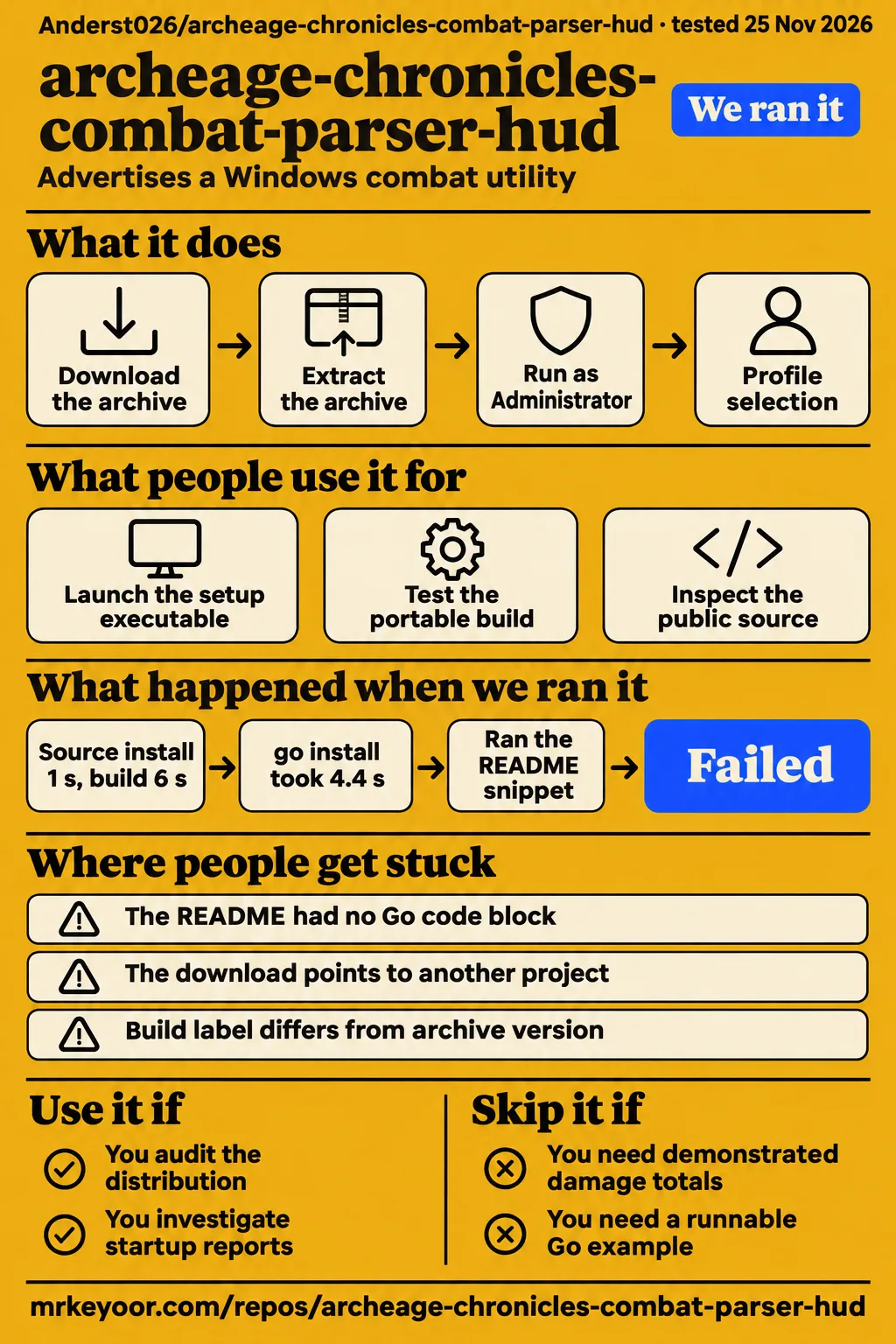
Our build finished in 6 seconds, and the test command ran zero tests. Archeage Chronicles Combat Parser Hud is a useful subject for a source-to-download audit: its README advertises one build number, its archive uses another version, and its installation guide links to another owner's project. Developers investigating that distribution have concrete files to inspect. Players choosing a damage meter need a different kind of result, described in the testing scope below.
What you can do with Archeage Chronicles Combat Parser Hud
The demonstrated operations are Go installation and build commands; the documented player workflow downloads and launches a Windows executable. The project README directs readers to extract a password-protected archive and run its executable as Administrator. Its title and package description advertise a combat parser and HUD, while the recorded operations give developers installation results and source files to examine.
For a player, the README's practical sequence is download, extraction, launch and profile selection. For a developer, the public files provide a different entry point: a Go package containing a version constant and a C++ entry point containing a hotkey loop. Keeping those routes distinct makes the instructions easier to interpret. The Windows setup procedure and a Go module operation are separate tasks, even though both use the repository's name.
The review therefore follows the executable's identity before discussing its advertised gameplay purpose. A release tag, a README build label and a filename each identify something specific. Here, those labels include v1.2.0, v1.2.2 and v3.0.6. Reading them as separate labels gives a newcomer a more useful starting point than treating every occurrence of the project name as the same release.
What people use archeage-chronicles-combat-parser-hud for
Two GitHub commenters report v1.2.2 startup or configuration work on Windows. Their accounts describe extracting an archive, starting the setup executable and trying the portable build. The issue #1 comments identify the Windows versions and configuration details behind those reports, allowing readers to distinguish the two accounts rather than combining them into a general compatibility claim.
| Person | Reported task | Reported outcome |
|---|---|---|
| Lanm9238 | Extracted the v1.2.2 archive and launched the setup executable with its default configuration | Reported clean initialization on Windows 11 24H2 x64 |
| marthason52665 | Tried the v1.2.2 portable build on Windows 10 22H2 x64 | Reported no additional dependencies and working hot reload |
Lanm9238 names Archeage_Chronicles_Combat_Parser_Hud_Setup_x64.exe and config/settings.json. Marthason52665 describes the portable build and says hot reload worked out of the box. These details answer two practical setup questions: which executable the first commenter started, and which configuration behavior the second commenter reported. Both accounts concern v1.2.2, whereas the README's direct-package filename contains v1.2.0.
What happened when we ran it
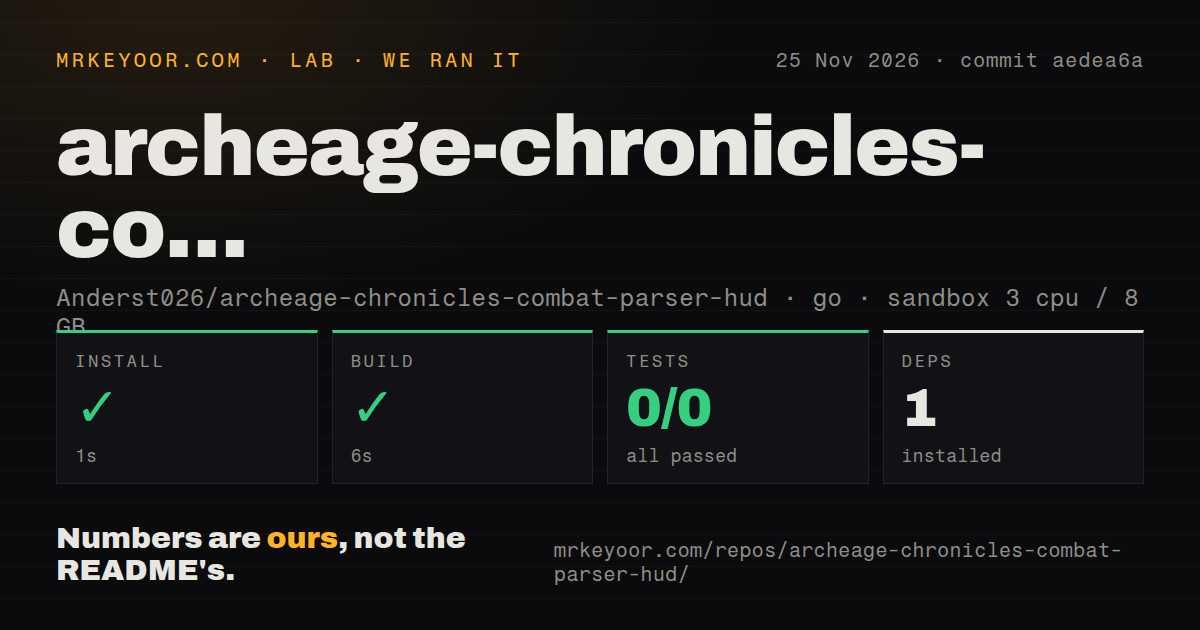
Our November 25, 2026 run at commit aedea6a completed installation in 1 second, the build in 6 seconds and the test step in 2 seconds. The recorded harness result reports 1 dependency and go test: 0 passed, 0 failed of 0. We measured command completion in that sandbox; the zero-case result is part of the outcome, alongside the successful exit status.
| Question | Answer | Verdict | Why |
|---|---|---|---|
| Did installation complete? | Yes, in 1 second; 1 dependency recorded | Completed | The installation step returned success |
| Did the build complete? | Yes, in 6 seconds | Completed | The build step returned success |
| Did the test command execute cases? | 0 passed, 0 failed of 0, in 2 seconds | Zero cases | The successful command reported no test cases |
| What did the checkout contain? | 25 files, approximately 42 source lines, 0.1 MB | Recorded size | These are checkout measurements |
| What repository signals were found? | 1 CI workflow file, no Dockerfile, no tests directory | Recorded scan | These are file-scan observations |
The harness configuration was 3 CPUs, 8 GB RAM and image label golang:1.24-bookworm. Its ecosystem field was Go. Those details identify the setting for the installation, build and test results. They also distinguish this run from the separate quick-start workflow, which used a different commit, a smaller configured container and a recipe that required a README example before proceeding to a task.
The quick-start workflow at b781a98e5164 recorded a 1-second clone step, installed v1.2.0 in 4.4 seconds, measured 420 KB in the module cache and counted 0 additional packages. The clone record, installation record, installed-size record and dependency-count record describe that sequence. The command was go get github.com/Anderst026/archeage-chronicles-combat-parser-hud@latest in a new module.
That workflow used a fresh unprivileged container configured with 2 CPUs, 4 GB RAM, no published ports and no secrets, according to the quick-start run record. Its recipe was quickstart-lib. The snippet step then failed, and teardown completed successfully. The 0 additional packages in this workflow and 1 dependency in the harness are separate recorded counts, attached to their respective procedures.
Where people get stuck: the README example step failed
Our separate quick-start attempt stopped because the README had no Go code block to run. The snippet step records FAILED, and the no-snippet finding records the same reason. The workflow had already fetched the module; its next requirement was an example from the README, so the failure occurred at the transition from installation to use.
The distinction matters to someone arriving through a Go package listing. The module name identifies something that can be fetched, while a runnable example would show the input, operation and output expected by an application developer. Here, the actionable request to the maintainer is specific: add a minimal example with sample input, the command or function call that processes it, and the expected result. That request follows directly from the failed snippet step.
The visible C++ entry point polls keys
The C++ entry point toggles a menu flag on Insert and stops its loop on End. The pinned C++ source file calls GetAsyncKeyState for those keys, starts with menu_open = true, and calls Sleep(6) inside the loop. This is a description of the source at b781a98e5164, rather than a report that the Windows program was executed.
The pinned Go package source sets Version to v1.2.0. Its package comment describes configuration and runtime utilities for Windows 10/11 x64 and names an official package URL. These two files give an auditor concrete starting points: the Go release identifier and the C++ key-handling function. The source inspection uses b781a98e5164; the earlier harness result belongs to aedea6a.
What the docs get wrong about the download
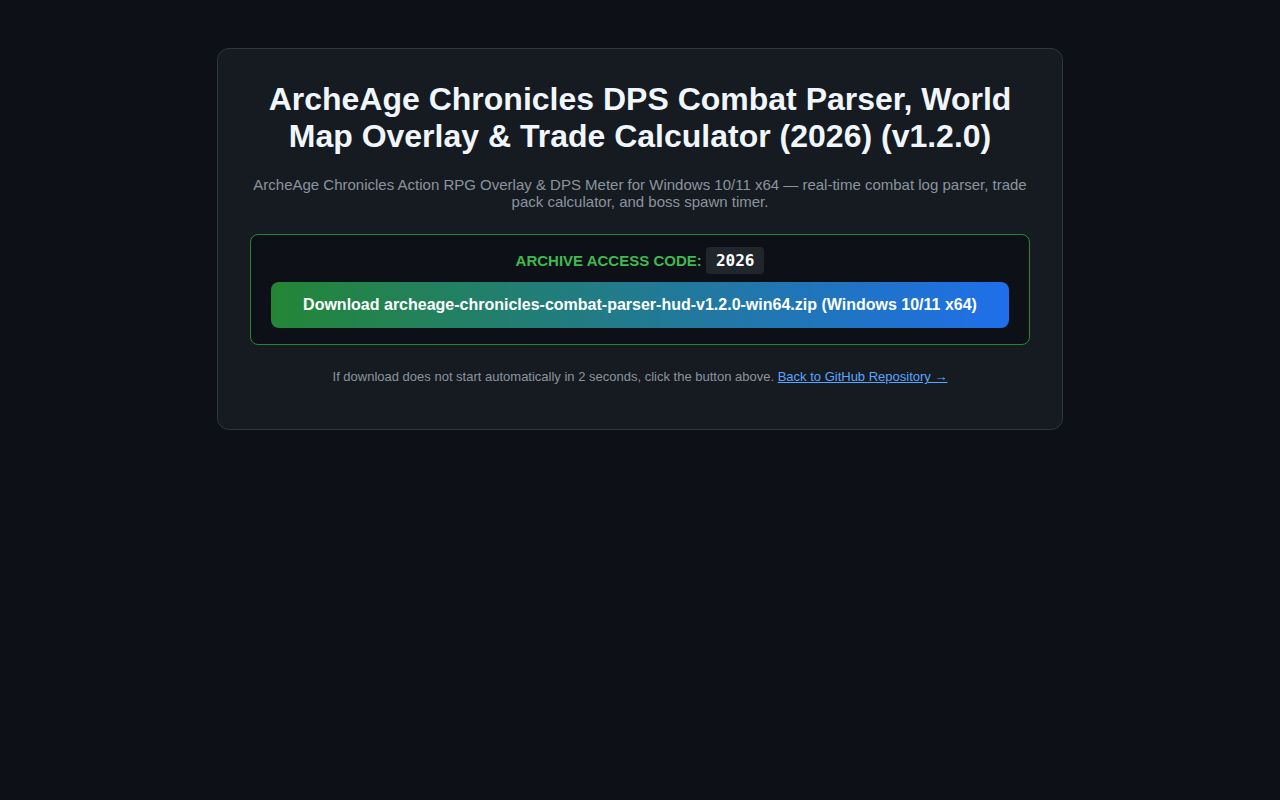
The installation guide labels its download archeage-chronicles-combat-parser-hud-v1.2.2-win64.zip, but the link points to Shuhua73716/robrun-trainer-esp-aimbot-2026. The pinned docs/INSTALL.md contains that label and destination. The destination archive is named robrun-trainer-esp-aimbot-2026-v1.2.2-win64.zip, under a download path containing v1.2.0. This is a disagreement between the displayed package identity and the linked artifact.
The README separately advertises build v3.0.6 and names a v1.2.0 archive, while issue #1 discusses v1.2.2. These are the labels readers encounter, rather than a reconstructed release history. A maintainer response should identify the intended Windows archive, correct the installation link and name the source revision corresponding to that artifact. Changing a filename locally would leave the underlying identity question unanswered.
| If you encounter this | Useful next action |
|---|---|
| An archive label that differs from its destination | Ask the maintainer to identify and correct the intended artifact |
| A README build label that differs from the archive version | Ask which source revision corresponds to that exact archive |
| A Go module without a runnable example | Request a minimal input, command and expected result |
| A thread title ending in Solved | Read the thread state and the actual resolution before assuming a defect was fixed |
Administrator access is part of the documented route
The README instructs readers to launch the executable as Administrator and recommends whitelisting its directory for Defender or SmartScreen alerts. Its troubleshooting answer attributes possible warnings to heuristic checks. The installation guide also includes an administrator launch step, although it names ArcheageChroniclesCombatParserHu_Setup_x64.exe, a different executable spelling from the issue comment.
For the distribution audit, these are concrete instructions to document alongside the artifact labels. The requested privilege level, the scanner exception and the executable's identity are separate items a maintainer can explain. The README's extraction password is 2026, and the issue thread gives the same password for v1.2.2. A shared password explains how the instructions say to open the archives; the version labels and download destination remain distinct facts.
Archeage Chronicles Combat Parser Hud vs OBS Studio and PresentMon
OBS Studio documents video recording, and PresentMon documents graphics-performance capture on Windows. Their primary descriptions support choosing between those two tasks. The comparison below separates recording visible play from collecting frame-duration data and from this project's advertised combat-parser purpose. Each row names the task first, so the shared presence of an overlay or a game context does not decide the choice.
| Your task | Candidate | Documented purpose |
|---|---|---|
| Record play for later viewing | OBS Studio | Capturing, compositing, encoding, recording and streaming video |
| Investigate frame durations and graphics latency on Windows | PresentMon | Capturing and analyzing graphics-application performance |
| Investigate the advertised combat utility and its distribution | Archeage Chronicles Combat Parser Hud | Windows download instructions, startup reports and public source files examined here |
OBS Studio's README describes capturing, compositing, encoding, recording and streaming video. The OBS Studio repository is therefore the relevant starting point when the intended output is a recording. A player can choose that task explicitly: preserve what appeared on screen and watch it later. That recommendation rests on the project's documented recording purpose, rather than a comparison of gameplay speed or combat totals.
PresentMon's README describes CPU, GPU and display frame durations and latencies. The PresentMon repository also describes a capture application with an overlay and per-frame CSV capture. Those outputs fit a frame-delivery investigation. Character damage and display timing are different quantities, so a reader asking about graphics performance has a documented category of tool to pursue without treating every game overlay as interchangeable.
Game reviews answer a different question
The Arche-Age Wiki review describes an assessment based on the October 2026 demo, official class reveals and XLGAMES' published systems. That game-review scope concerns ArcheAge Chronicles itself. The Bilibili search extract includes an ArcheAge Chronicles ranger-build video, alongside other titles containing Chronicles. Those records explain the game context and search ambiguity rather than adding a startup result for this executable.
Issue #1 is directly about the utility, and its captured title ends in Solved while its state is open. The recorded thread heading also reports 2 comments, the startup accounts discussed above. Reading the actual comments yields the executable name, Windows versions and configuration behavior. Reading only the title would discard the details that make those reports useful.
FAQ
Issue #1 lists 2026 as the archive password and includes a Windows 11 24H2 startup report. Those are the direct answers to the two questions recorded in the release discussion. A third first-time-user question concerns configuration: the installation guide names config/settings.json and live hot reload. The answers below retain the distinction between a documented setting and a commenter's reported result.
What is the password to extract archeage-chronicles-combat-parser-hud-v1.2.2-win64.zip?
Issue #1 lists the archive password as 2026. Lanm9238 also says they used that password to extract the v1.2.2 archive before starting Archeage_Chronicles_Combat_Parser_Hud_Setup_x64.exe with the default configuration. The release discussion is the source for that answer; the README separately lists the same password for its v1.2.0 archive. The filenames keep the two instructions identifiable.
Does Archeage Chronicles Combat Parser Hud support Windows 11 24H2?
Lanm9238 reports successful initialization of v1.2.2 on Windows 11 24H2 x64. Their issue #1 comment names the archive, executable and default config/settings.json used for that startup. Marthason52665's separate portable-build account concerns Windows 10 22H2 x64. These are the specific Windows configurations described by the two commenters, with each result attributed to its author.
Where are runtime settings stored?
The installation guide names config/settings.json for runtime profiles and describes live hot reload. That configuration instruction gives a first-time user the documented path. Lanm9238's startup comment names the same file, while marthason52665 reports working hot reload in the v1.2.2 portable build. The path and the reported behavior come from those respective statements.
What we have not tested yet
Combat-log ingestion, damage arithmetic, in-game HUD rendering, accuracy and gameplay overhead have no measured result in these runs. The Windows startup accounts are commenter reports. Our source description is static inspection, and neither Go workflow demonstrates execution of the advertised Windows application. The sandbox image labels describe configuration; the actual runtime and operating-system versions require toolchain logs. No comparative runtime test of OBS Studio or PresentMon was performed.
The Windows archive's contents, its reproducibility from public source and the licensing scope of the distributed package remain unresolved. Repository metadata reports NOASSERTION; that establishes neither the presence nor the absence of a LICENSE file. No malware-analysis or vulnerability-audit result is recorded for the executable. The README's explanation of heuristic warnings is the author's statement, rather than an independent security assessment.
Anti-cheat compatibility and account safety also have no test result here. The game's XIGNCODE3 listing does not answer whether this particular utility is permitted. A gameplay recommendation needs an identified artifact connected to inspectable source, followed by a known-answer combat example. Until those questions have evidence, this review serves developers auditing the distribution and players assessing the startup reports; it does not recommend the download as a demonstrated damage meter.