One framework for the whole browser application
Angular's main advantage is agreement. A generated project has a standard component model, template syntax, dependency injection system, router, HTTP client, forms, build pipeline, test hooks, and update mechanism. A new engineer can move between teams without discovering a different state library and routing stack in every repository.
Components combine a TypeScript class with an HTML template and selector. Styles may sit beside the component or in separate files, and components are standalone by default in current Angular. Templates support binding, control flow, events, and composition. Dependency injection gives shared services an explicit home rather than passing every concern down the component tree.
This structure matters most as the codebase and team grow. Angular asks developers to learn its vocabulary early, then rewards consistency later. A marketing page with two interactive widgets does not need that bargain. An operations console with permissions, nested routes, many forms, and several teams often does.
Signals make the reactive model easier to see
Angular Signals wrap values so the framework can track where state is read and update interested consumers. Writable signals expose direct setters and update functions. Computed signals are read-only, lazy, and memoized. Their dependencies are dynamic, based on the values actually read during a computation.
This gives local and shared state a straightforward path without making RxJS disappear. Existing applications can keep observable pipelines where streams fit, while newer component state can use signals. Teams should still understand reactive context: reads after an asynchronous boundary are not tracked automatically, and readonly signals do not prevent deep mutation of an object value.
The framework's wider tool set remains the bigger reason to choose it. The router includes guards, data resolution, and lazy loading. Forms supply standardized validation. The language service understands templates, DevTools can inspect component and injection trees, and ng update runs migrations for routine breaking changes. These are practical benefits for a long-lived application, not flashy demo features.
What happened when we ran it
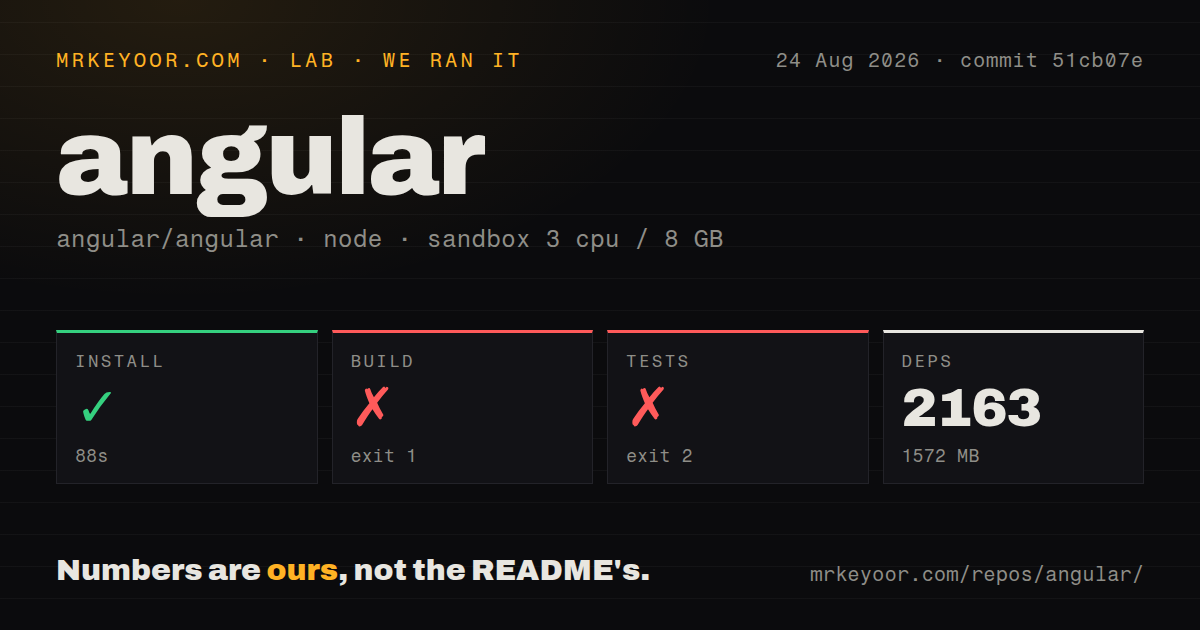
We cloned commit 51cb07e into an unprivileged container with three CPUs and 8 GB of RAM. pnpm installation succeeded in 88 seconds, installed 2,163 packages, and consumed 1,572 MB on disk. The repository contained 10,684 files, about 1,084,825 lines of source, 13 CI workflow files, monorepo workspaces, no root Dockerfile, and no tests directory.
The build ran for 183 seconds and failed with exit code 1. Its final stack pointed to scripts/build/build-packages-dist.mts; a child process returned status 7 with empty stdout and no stderr. Node.js v24.19.0 was shown. The tail does not say which underlying operation failed, so we cannot responsibly assign a cause.
The tests failed through a different path after 70 seconds with exit code 2. Bazel tried to download rules_ts-v3.10.0.tar.gz from GitHub, timed out, and then could not load the @aspect_rules_ts//ts:skipLibCheck option. This log does identify the immediate cause: an external archive fetch timed out before the selected tests could run. It does not show failed Angular assertions.
These results describe contribution work in the framework monorepo. They should not be projected onto ng new, which consumes published packages and generated application targets. They do show that Angular source development relies on a large pnpm and Bazel toolchain plus reliable access to pinned external dependencies.
Rendering can vary by route
Angular applications use client-side rendering by default. The official server package adds server rendering and prerendering, and route configuration can select client, server, or build-time output per page. A public product page can be static, a user-specific page can render on the server, and an application-only area can stay client rendered.
Each mode has ordinary tradeoffs. Server rendering improves initial HTML and search visibility but requires browser-independent code and server capacity. Prerendering serves cheap static files but needs all page data during the build and can lengthen large builds. Client rendering is operationally simple, though users wait for JavaScript and client data fetching. Angular documents these costs clearly instead of presenting SSR as a universal upgrade.
Angular is still only one application tier. Teams need APIs, authentication services, databases, queues, deployment, and monitoring from elsewhere. The framework can render on a server; it does not become a full business backend because Node returns the initial HTML.
Release discipline is part of the product
Version 22.1.3 was released on August 19, 2026, and the repository was pushed on August 26. GitHub showed 1,131 open issues and pull requests combined. Issue activity continued through August 24, including a report about incorrect npm latest tags for two packages. The large queue fits the size of the platform and needs to be read alongside patch cadence and triage, not as a defect total.
Angular now aims for one major release each year, with minor releases during the cycle and patches almost weekly. Major versions typically receive 12 months of active fixes followed by 12 months of long-term support. Deprecations remain for at least one major version, and core and CLI major versions are aligned. This is predictable, but it requires maintenance. Skipping several majors turns supplied migrations into a larger project.
Choose Angular when organizational consistency is worth more than freedom to swap every layer. Its documentation, migration tools, rendering options, and stable application model are excellent for serious TypeScript products. Choose React, Vue, or Svelte when a smaller core or different component style matters more than an integrated platform.