Short answer
Choose AI-For-Beginners for its documented AI foundations syllabus; choose Microsoft's Generative AI for Beginners when your next task is building LLM applications. The AI-For-Beginners README covers symbolic reasoning, neural networks, images, text and ethics. The Generative AI for Beginners README organizes 21 lessons around building applications, including chat, search, retrieval and agents. These are different learning goals, and the syllabus is the reason to choose between them.
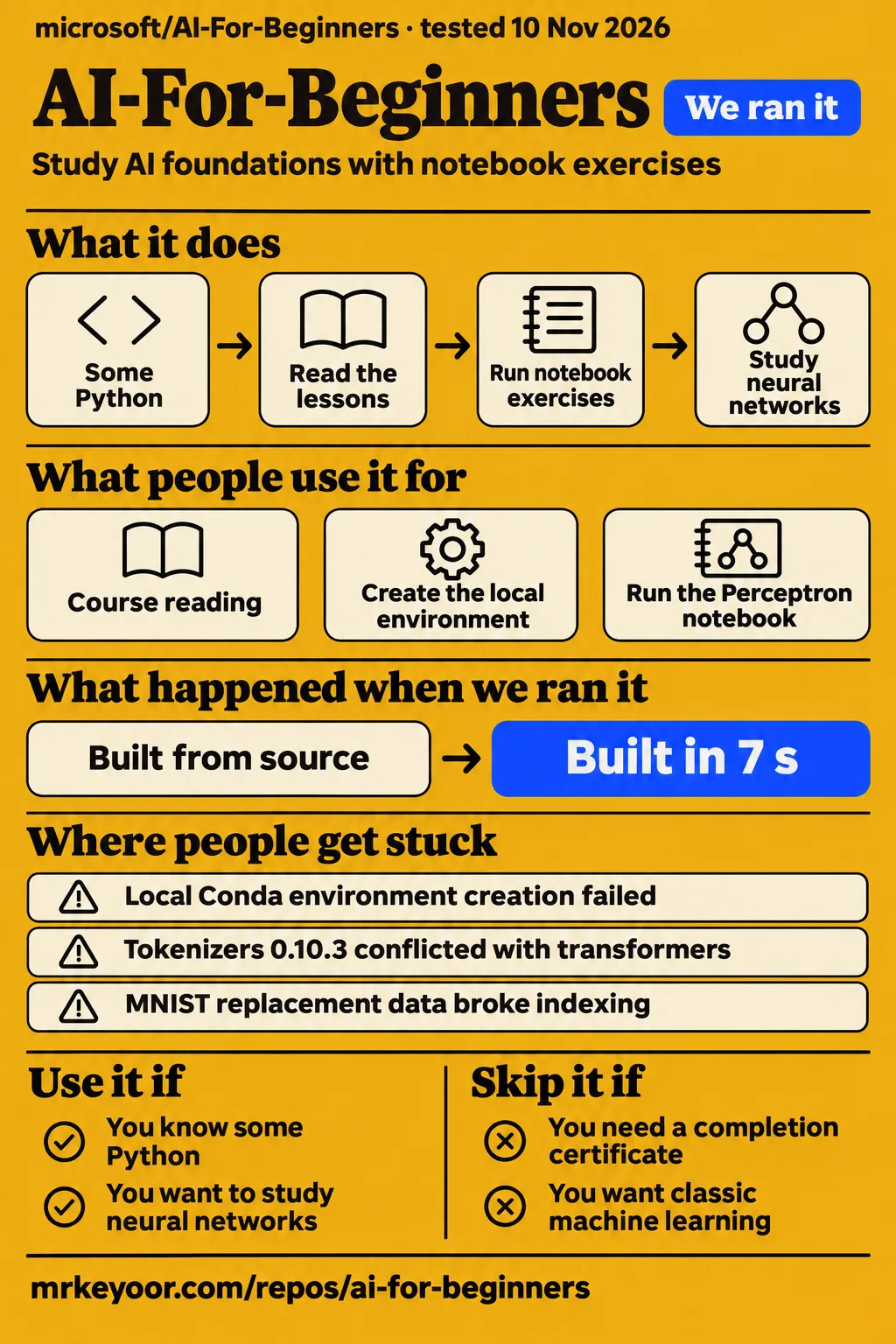
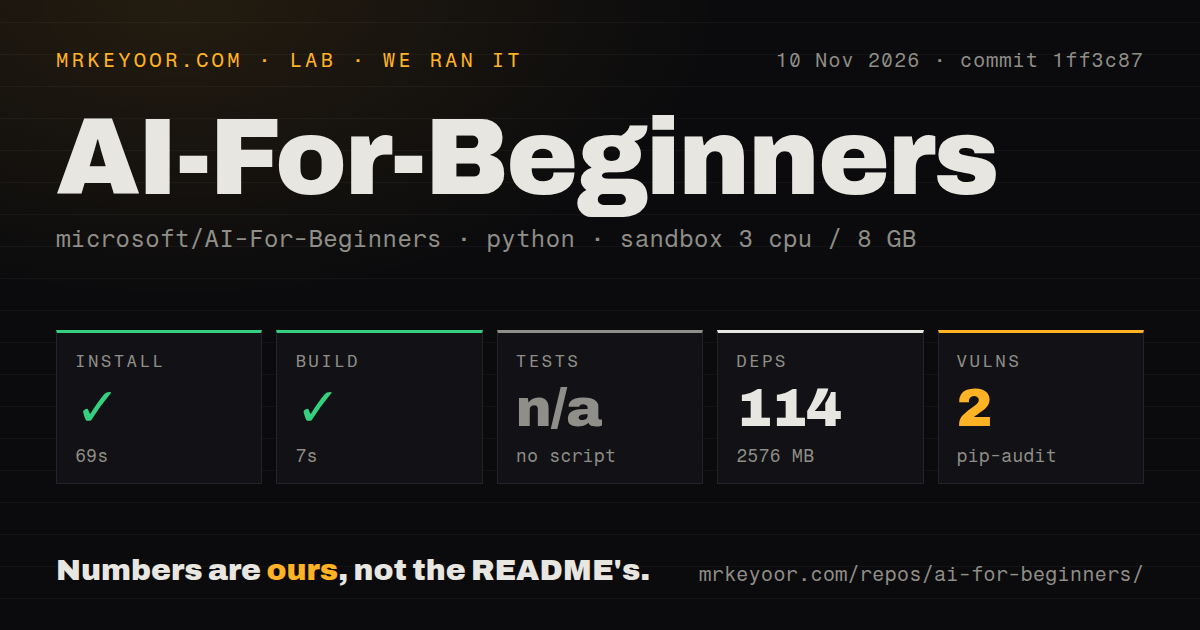
Our run at commit 1ff3c87 installed successfully in 69 seconds and built successfully in 7 seconds. Those are repository setup results. For a learner with some Python, the course's written explanations and executable notebooks provide a structured route into its listed subjects. Certificate seekers should choose another resource: Tested Intelligence reports no certificate. A large language model, or LLM, is the kind of model used in text assistants; studying its architecture and building an application around it involve different exercises.
What people use AI-For-Beginners for
Learners report using AI-For-Beginners for course reading, local environment creation and Perceptron exercises. The accounts below distinguish what each person attempted from the outcome they reported. A Jupyter notebook combines explanatory text with executable code cells. The official execution guide says running the examples requires the ability to execute Python in those notebooks, and describes several ways to do that.
| Who used it | What they tried | Reported outcome |
|---|---|---|
| DevTrends review author | Tried the curriculum and its learning activities | Appreciated homework, related Microsoft Learn courses and GPT/LLM material in the DevTrends personal account. |
| alessandroseni | Moved from Binder toward local execution | Installing PyTorch separately did not help, according to their comment in issue #201. |
| lufonzi | Edited requirements to create the local environment | Changing tokenizers to 0.13.3 worked, according to their confirmation in issue #201. |
| Harlucy and mouseart | Ran the Perceptron notebook after dependency changes | Harlucy reported success with NumPy 1.22.3; mouseart confirmed the suggestion solved their problem in issue #233. |
| atkerosbo | Sought course access after trying Docker, Binder and Codespaces | Accessed the material through the README, according to their reply in issue #289. |
Lufonzi described themselves as a non-developer and explained that they edited requirements.txt through the Windows 11 interface with Notepad. Their account in issue #201 gives a concrete example of environment repair becoming part of a learner's route into the course. The useful detail is the named package change and the reported successful environment creation, rather than a general claim that installation is easy for beginners.
What happened when we ran it
Our November 10 sandbox installed AI-For-Beginners in 69 seconds and built it in 7 seconds at commit 1ff3c87. The recorded measurements also show skipped tests and 2 known vulnerabilities reported by pip-audit. The sandbox had 3 CPUs and 8 GB RAM, with image label ghcr.io/astral-sh/uv:python3.12-bookworm. Its repository scan counted 13,697 files, approximately 2,119 source lines and 1,989.7 MB checked out.
| November 10 sandbox observation | Recorded result |
|---|---|
| Revision | commit 1ff3c87 |
| Configuration | 3 CPUs, 8 GB RAM; image label ghcr.io/astral-sh/uv:python3.12-bookworm |
| Repository scan | 13,697 files, approximately 2,119 source lines, 1,989.7 MB checked out |
| Installation | Succeeded in 69 seconds; 114 dependencies recorded; 2,576 MB on disk |
| Build | Succeeded in 7 seconds |
| Tests | Skipped: no tests script or target |
| Dependency audit | pip-audit reported 2 known vulnerabilities |
| Repository signals | 2 CI workflow files; no Dockerfile and no tests directory detected |
The separate November 19 attempt failed its safety step because no Compose file existed. The check looked for compose.yaml, compose.yml, docker-compose.yaml and docker-compose.yml, then returned unsafe repo under the harness rule requiring one of those files. That error describes the harness's entry requirement. Microsoft's execution guide instead documents several notebook execution routes, including a VS Code development container.
The November 19 run summary says it deployed with its own Docker Compose, but the failed safety step supports a stopped attempt. The teardown record says teardown: ok. Keeping the two runs separate preserves both outcomes: November 10 produced installation and build measurements, while November 19 produced a failed prerequisite check and a successful teardown record.
Where people get stuck: package conflicts and replacement data
GitHub issues identify separate failures involving PyTorch packages, tokenizers, TensorFlow and notebook data structures. The error's package names determine which historical discussion is relevant. For example, issue #349 records tensorflow-text 2.8.1 requiring TensorFlow below 2.9 while the requested TensorFlow version was 2.11.1. Changing an unrelated package would leave that specific conflict in place.
| Report | What failed | Reported response |
|---|---|---|
| #201, local environment | Unavailable PyTorch packages and dependency conflicts | Several learners reported failures; a later tokenizers change solved a separate conflict for lufonzi. |
| #237, tokenizers | tokenizers 0.10.3 conflicted with transformers 4.30.0 | The discussion proposes tokenizers 0.13.3 and describes a pull request awaiting approval. |
| #349, TensorFlow | TensorFlow 2.11.1 conflicted with tensorflow-text 2.8.1 | BethanyJep reported updated dependencies. |
| #233, Perceptron | Constructing the snapshots array raised ValueError | Learners reported a NumPy 1.22.3 workaround; leestott later reported a notebook update. |
| #241, MNIST | Pickle decoding failed, then replacement data broke string-key indexing | Commenters described latin1 decoding and integer indexing for the replacement structure. |
The MNIST report contains two errors in sequence. Loading the saved data raised UnicodeDecodeError; after a decoding workaround, MNIST['Train']['Features'] raised TypeError: tuple indices must be integers or slices, not str. GanGral explained in issue #241 that the original file location was unavailable and they downloaded a replacement. Their account connects the second error to a different data structure: successful decoding alone did not make that replacement match the notebook's named fields.
Keep the traceback, dataset filename and checkout revision together when diagnosing this sequence. They answer different questions: the decoder determines whether Python can read the stored object, while the indexing expression determines how the notebook addresses its contents. In issue #241, the proposed integer indexing followed the replacement file's structure. That is a more useful explanation than treating both failures as one generic MNIST installation problem.
Reading the course and executing notebooks are separate steps
The README is the course contents page, while Python notebook execution follows the environment instructions. In issue #289, atkerosbo initially reported failures with Docker, Binder and Codespaces, then said they could access the course through the README. For a reader new to GitHub, the practical starting point is a written lesson linked in that table, followed by its notebook or lab link.
Microsoft's execution guide recommends Miniconda for a local Python environment and documents conda env create --name ai4beg --file .devcontainer/environment.yml, followed by conda activate ai4beg. The browser route on a local computer starts with jupyter notebook or jupyterhub in the course directory. VS Code with its Python extension is another documented route. These commands describe Microsoft's instructions, separate from our installation and build measurements.
Translations increase the download; English readers can omit them
The README says its 50+ language translations significantly increase download size and documents sparse checkout to exclude them. Its Bash instructions select the course files while excluding translations and translated_images. This gives an English-reading learner a documented clone option rather than requiring them to discover the exclusions through an issue discussion. The commands below reproduce that option; they are documentation examples, not an additional execution result.
git clone --filter=blob:none --sparse https://github.com/microsoft/AI-For-Beginners.git
cd AI-For-Beginners
git sparse-checkout set --no-cone '/*' '!translations' '!translated_images'
Offline reading has a separate historical discussion. In issue #293, a learner reported a missing etc/docsify folder and a broken PDF link. Gilzy suggested serving the main repository folder with Docsify instead. The thread also contains conflicting statements about PDF URLs. The concrete suggestion concerns where to run the documentation server, whereas the PDF replies concern particular download links.
Recent pushes and issue replies describe different kinds of activity
GitHub metadata records a November 15, 2026 push to AI-For-Beginners. The repository API response gives the timestamp as 2026-11-15T19:46:34Z. That is a dated repository activity fact. Historical issue replies describe more specific actions: dependency changes, notebook changes and proposed work awaiting approval. A learner deciding which instructions to follow benefits from keeping those different records attached to their dates and subjects.
Issue status alone compresses several outcomes into the same closed badge. In issue #237, a contributor said their pull request was awaiting approval. In issue #185, the reporter could no longer find a disputed child-learning analogy and inferred that it had been removed. In issue #184, BethanyJep explicitly reported updated lessons after a complaint about GPT descriptions. The reply text identifies what each closure actually records.
AI-For-Beginners vs Generative AI for Beginners and ML for Beginners
Generative AI for Beginners teaches application building; ML for Beginners teaches classic machine learning, primarily with Scikit-learn. Their application curriculum README and machine-learning curriculum README state those aims directly. AI-For-Beginners places symbolic reasoning and neural architectures in its syllabus and directs classic machine-learning readers to the separate ML course. Choose by the exercise you want to undertake next.
| Your next task | Resource to choose | Documented reason |
|---|---|---|
| Study symbolic reasoning, neural networks, vision and text models | AI-For-Beginners | Its syllabus includes these topics and TensorFlow/PyTorch examples. |
| Build generative-AI applications | Generative AI for Beginners | Its 21 lessons include chat, search, RAG and agents. |
| Study classic machine learning | ML for Beginners | Its README describes classic machine learning using primarily Scikit-learn. |
| Study business uses or specific Azure frameworks | Microsoft Learn resources linked in the AI curriculum | The README directs these subjects to separate learning paths. |
The generative-AI curriculum labels lessons as Learn or Build and includes Python and TypeScript examples where possible. Its README lists Azure OpenAI Service, Microsoft Foundry Models, OpenAI API and Foundry Local as execution choices. The ML curriculum describes a 12-week, 26-lesson plan that avoids deep learning because AI-For-Beginners covers it. Those documented differences give readers a firmer basis for selection than the shared Microsoft branding or the word beginners in each title.
What the other reviews get wrong
Tested Intelligence's statement that every lesson has labs and assignments is broader than the README's statement that labs are available for some topics. The Tested Intelligence review describes a uniform structure, while the official contents table leaves the GAN lab cell empty and lists no notebook or lab for Multi-Agent Systems. Wang Ruofeng's review also calls out those two lesson gaps. The course map supports choosing exercises lesson by lesson.
Wang Ruofeng's Chinese review frames several findings as absent from the README, including translation-related download friction. The README documents both the translation download burden and sparse checkout. That corrects the documentation claim directly. The same review separately reports broken links, a Tamil option displaying Hindi and a Lesson 5 gensim installation problem; those remain attributed reports rather than results from our sandbox.
Questions people ask
The AI-For-Beginners repository is microsoft/AI-For-Beginners, and its README links the lessons and setup instructions. Access and environment questions appear together in issue #289, where learners asked how to reach the material and how to participate on an unfamiliar platform. The answers below separate navigation, historical repairs and the course's stated offering, without turning each issue into a universal setup recipe.
Where can I find the AI-For-Beginners GitHub repository?
Open microsoft/AI-For-Beginners on GitHub and use the README's contents table to select a lesson. The repository belongs to Microsoft and contains the curriculum discussed here. HP LIFE also has a separately named AI for Beginners course, developed with UNIDO, according to its course page. Including Microsoft in a search distinguishes the GitHub curriculum from that other provider's course.
How do I access the course and its data if Docker, Binder, and Codespaces fail?
The README provided course access for atkerosbo in issue #289. Open the written lesson there, then follow its notebook and data links. For execution, Microsoft's guide describes local Python, VS Code, Jupyter and hosted choices. The reporter's successful reading access and their earlier environment failures are separate outcomes, recorded in the same discussion.
How do I participate if I am new to GitHub and do not understand the platform?
Start with a written lesson in the README's contents table, which links the course subjects, notebooks and available labs. The README also links a development-environment lesson and a separate educator setup page. Learners in issue #289 explicitly asked how to participate and said they did not understand the platform, so repository navigation deserves its own explanation before environment repair.
How can I fix the failure to create the local Conda environment?
The named error determines the relevant instructions: issue #201 contains package availability and tokenizers problems, while issue #349 records incompatible TensorFlow requirements. Microsoft's current execution guide also gives a Windows UTF-8 procedure specifically for a gdk-pixbuf UnicodeDecodeError mentioning the gbk codec. These are different failure signatures, with different responses.
Which tokenizers version works with the course's transformers dependency?
Tokenizers 0.13.3 worked for lufonzi's reported environment conflict in issue #201. The related issue #237 discusses transformers 4.30.0 requiring tokenizers at least 0.11.1 and below 0.14, excluding 0.11.3, against the requested 0.10.3 pin. The reported 0.13.3 change belongs to that historical package combination, and the discussion separately records the proposed upstream change awaiting approval.
Why does the Perceptron notebook fail when running its training graph cell?
Issue #233 describes a snapshots-array ValueError involving inconsistent shapes. Harlucy reported that NumPy 1.22.3 worked, mouseart confirmed the suggestion, and leestott later reported a notebook update. The thread therefore contains two kinds of response: a learner-confirmed package workaround and a statement about changing the notebook itself. Preserve that distinction when comparing the report with a traceback from another checkout.
How do I fix the MNIST pickle decoding error without causing a dataset indexing error?
The discussion in issue #241 pairs latin1 decoding with integer indexing for a replacement dataset. GanGral said the original file location was unavailable and assumed the replacement had a different structure. The resulting tuple-indexing error identifies why changing the decoder alone was insufficient: subsequent notebook expressions still addressed the object through string keys intended for a different layout.
How can I run the documentation offline or obtain its PDF when the documented folder and links fail?
Gilzy suggested serving the main repository folder with Docsify in issue #293. That suggestion responds to the reported missing folder. The PDF replies are a different part of the discussion: commenters named links they considered working or broken, with conflicting results. The root-folder suggestion is the concrete documentation-server response recorded in the thread, rather than a resolution of every PDF report.
Is the GPT material outdated, and has it been updated?
BethanyJep reported updated lessons after the GPT complaint in issue #184. The README describes coverage of neural architectures for images and text and says it may lag the state of the art. That makes its stated foundations scope useful when choosing material: the separate generative-AI curriculum organizes application lessons around chat, search, retrieval and agents.
Is comparing neural-network training to how children learn a useful explanation?
A reader challenged that analogy in issue #185 and later inferred removal after failing to locate the passage. The discussion records the reader's objection and their search outcome. For the course's concrete account of training, the README points to executable neural-network notebooks using TensorFlow and PyTorch, where readers can inspect the data and code behind the explanation.
Is Microsoft's AI-For-Beginners really free?
Tested Intelligence describes the curriculum as free and open source, and GitHub's repository metadata identifies its license as MIT. Microsoft's execution guide describes both local and cloud routes. Those are separate choices from access to the written curriculum: a reader can select the local Python instructions or examine the requirements of a hosted environment before choosing where to execute notebooks.
Does Microsoft's AI-For-Beginners award a certificate?
Tested Intelligence reports that Microsoft's curriculum has no certificate. A learner whose employer or application requires a credential should choose a course that explicitly provides one. The HP LIFE course advertises a certificate on completion, but belongs to a different provider. Its completion policy does not describe the Microsoft GitHub curriculum reviewed here.
What we have not tested yet
Our measurements at 1ff3c87 cover installation and build, with tests skipped because no target was found. They do not establish lesson completion, educational outcomes or successful execution of every notebook, lab and dataset. The November 19 safety failure prevented deployment; that attempt contains no notebook answers or screenshots. Historical workarounds, maintainer statements and the DevTrends account do not add a completed course evaluation to our results.
The sandbox image label records configuration rather than actual Python or operating-system versions. Exact runtime reproduction needs the raw toolchain logs. GPU training performance, Windows and macOS execution, translation accuracy and the historical repairs against commit 1ff3c87 remain outside our evaluation. The 2 known vulnerabilities need package and advisory details before their impact or a specific upgrade can be described; the setup run includes no notebook or external-service security assessment.
The repository metadata has no latest-release value; that absence does not establish whether releases exist. There is no recorded endpoint response supporting a 404 claim. PDF-link availability, a complete offline workflow including datasets, and the Chinese review's broken-link, Tamil/Hindi and gensim reports also remain unresolved here. Search appearances on X and Bilibili do not measure curriculum adoption. A useful next evaluation is one complete lesson with its original dataset, recorded commit and exact environment captured from start to finish.