Short answer: try it on a scene you can afford to change
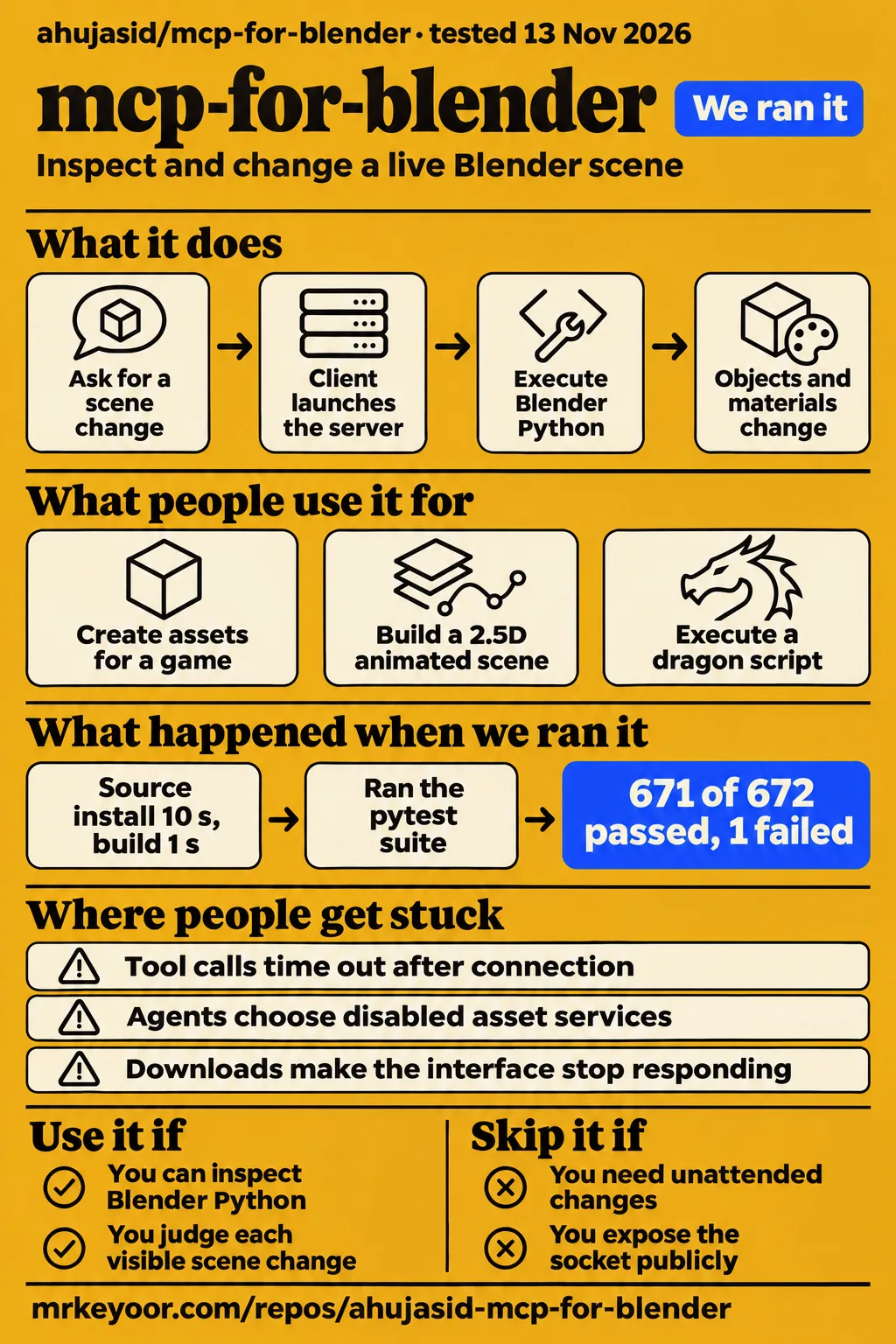
Our sandbox installed mcp-for-blender in 10 seconds and built it in 1 second, but pytest exited with one failed compatibility test. Use it for supervised exploration if you can read Blender Python and judge the scene yourself. Skip it for unattended work on valuable project files. The failed status check and the timeout reports below are reasons to keep the first session small, with a saved copy and a read-only scene query before any edits.
MCP for Blender is Siddharth Ahuja's independent integration, separate from Blender Lab's official server. Its project site identifies the creator and community status. The current README describes two parts: an add-on inside Blender and a Python MCP process connecting your AI client to it. That gives an assistant a way to inspect and change an open scene, rather than hand you a script to paste into Blender.
What people use mcp-for-blender for
Users report game-asset creation, animated scenes and scripting, with outcomes ranging from a working execution to an object its maker said looked nothing like a dragon. Those distinctions matter when choosing your first task. A small change to a scene you understand is easier to judge than a request for an entire game character.
| Person and source | What they did | Reported outcome |
|---|---|---|
| ForkedPush on X | Used Blender MCP while making a game | Said it created the majority of the game's assets. This is the developer's own account. |
| Y0urDumble on X | Made a 2.5D animated scene | Described one Claude-written Blender file containing chests, a wooden stage, lighting effects and animation. |
| cfyeung-dojjy in issue #111 | Asked for a dragon with external integrations disabled | Explicitly requesting scripting got code executed, but the commenter said the result did not resemble a dragon. |
| zhangbo2008 in issue #14 | Connected an API-backed model through RooCode | Reported success using the Doubao1.6 thinking API. |
The dragon report is the most useful counterweight to a polished demo. The agent initially asked for Hyper3D and PolyHaven to be enabled. A more explicit scripting request changed its behavior: it ran code inside Blender. That solved the tool-selection problem while leaving the modeling problem visible. If you're evaluating this for asset work, inspect the mesh after execution instead of treating a successful tool response as acceptance.
The README's documented operations include scene inspection, materials, animation and Python execution. Those are useful building blocks for layout experiments and small repeated edits. For example, changing a material on a named object gives you a clear before-and-after result. A whole environment adds geometry, lighting, composition and asset choices to the same request. My advice is to prove each part separately before asking the assistant to combine them.
What happened when we ran it
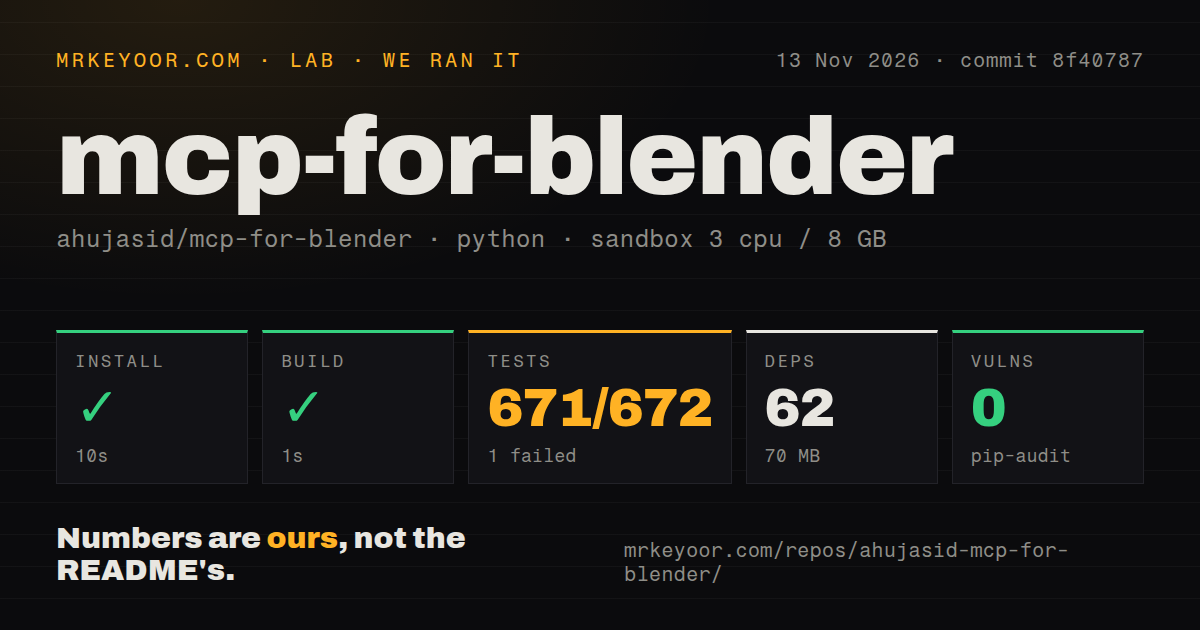
Our November 13, 2026 sandbox run at commit 8f40787 installed successfully in 10 seconds, built successfully in 1 second, and failed its test command after 43 seconds. The separate hands-on attempt stopped at a safety requirement: the runner required a Compose file and found none. These records cover different checks and should be read separately.
| Sandbox check | Recorded result | What to take from it |
|---|---|---|
| Install | Succeeded in 10 seconds | 62 dependencies recorded, 70 MB on disk |
| Build | Succeeded in 1 second | The recorded build step completed |
| Tests | Exit 1 in 43 seconds | Pytest reported 671 passed, 1 failed and 56 skipped |
| Dependency audit | pip-audit: 0 known vulnerabilities | A dependency advisory result, separate from Python execution permissions |
| Repository scan | 88 files, about 34,983 source lines, 2.7 MB checked out | Dockerfile and tests directory present, 0 CI workflow files detected |
The failing case was tests/test_compat_matrix.py::test_addon_status_always_answers[current]. It received the string Error checking addon status: No module named 'blender_mcp.config' and failed an assertion that the answer must not begin with “Error.” That is the finding: the current compatibility case returned an import-related error instead of the expected status answer. The log tail supplies no diagnosis of why that module was unavailable.
The summary says “1 failed, 671 passed, 56 skipped in 41.08s.” That pytest duration sits inside the 43-second outer test step. The supplied harness also labels the result “of 672,” which does not include the skipped entries in its denominator. We keep the separate counts visible rather than turn them into a success percentage or silently change the total.
Sandbox configuration recorded 3 CPUs, 8 GB RAM and image label ghcr.io/astral-sh/uv:python3.12-bookworm. That label identifies the selected image. Actual runtime and operating-system versions require the raw toolchain logs. The test error gives no basis for blaming either version.
The hands-on safety record says no compose.yaml, compose.yml, docker-compose.yaml or docker-compose.yml existed, so that step failed. The generic run summary nevertheless describes deployment with its own Docker Compose and ports bound to 127.0.0.1. Those statements conflict. The step-level evidence supports a blocked deployment attempt, and teardown reported ok. Missing Compose is a requirement of that lab runner, not proof that the project's documented desktop workflow is broken.
Where people get stuck: accepted connections still time out
Issue #339 reports an accepted connection followed by tool calls that time out, while individual commenters recovered after disabling competing add-ons. Start by identifying the client process, the loaded Blender add-on and the port each uses. A green connection indicator only answers part of that question.
| Symptom and source | What the record says to try | Resolution in the supplied record |
|---|---|---|
| Every call hangs, issue #339 | Check for competing add-ons and matching ports | Two commenters recovered after removing or disabling a conflicting connector. Other reports continued, and the issue is open. |
| Delayed results, issue #279 | Update both the add-on and server | The maintainer announced a fix, followed by comments reporting continued delays. The issue is closed. |
| Extra terminal server, issue #2 | Stop the manually launched instance and let the MCP client launch it | The maintainer repeatedly advised one instance and restarting both applications. The thread contains both recovery and continued trouble. |
| Cursor tools missing, issue #7 | Install uv, then fully restart Cursor | One commenter confirmed that reopening Cursor restored the tools. |
| Wrong tool chosen, issue #111 | Ask explicitly for scripting, and name execute_blender_code() | One commenter confirmed scripting execution. The later tool-specific prompt is a suggestion without a follow-up result. |
Issue #339 is particularly easy to misread. One commenter initially tied success and failure to different Blender versions. Later, that same person said both this connector and Blender Lab's connector were competing for a port, and uninstalling the official one fixed their case. That sequence makes a blanket “downgrade Blender” recommendation poor advice. Another reporter described persistent delays after a clean reinstall and on an empty scene.
For a first connection, follow the current README's client-launched workflow and ask for scene information. If the client cannot find uvx, the README recommends its absolute path and a full client restart. If tools appear but calls stall, collect the client and Blender logs before reinstalling everything. These are different symptoms, and issue #339 shows that pre-caching dependencies can leave the accepted-connection failure unchanged.
Larger scenes add downloads to an already fragile loop
The README says Poly Haven downloads run on Blender's main thread, so the interface stops responding until a transfer finishes. It recommends lower-resolution assets unless the camera needs a close view. That is a concrete reason to separate asset import from scene editing when trying the integration: a stalled download can otherwise look like a stalled command.
A repeatable baking job deserves a different starting point. In the Blender Artists discussion, pitibonom wanted shader parameters changed and a bake launched for a named object. Respondents suggested an established add-on or improving the existing script, and disclosed that they had not tried this MCP workflow. Their preference is useful advice about control, rather than a comparative result. For recurring work, I would keep the known script and use conversation to help inspect or revise it before allowing live execution.
Python execution needs permission, and localhost needs to stay local
The current README says arbitrary Python execution is allowed by default and the add-on socket has no authentication or encryption. Anyone able to reach that socket can run Python in Blender. Keep the default localhost binding and use an SSH tunnel for remote access as the documentation recommends. A dependency audit reporting no known vulnerabilities does not change these access rules.
Should Blender MCP require separate permission for arbitrary Python execution? Yes, that is my recommendation for valuable scenes. Enable BLENDER_MCP_SAFE_MODE=1, review the proposed operation, and save a recoverable copy first. The README describes safe mode as checking scripts and blocking direct file access, program launches, network access and persistent code while allowing normal Blender work such as saving and import/export. Those documented checks are useful controls, not a reason to hand over an irreplaceable file.
The telemetry wording also needs a careful read. The README calls content collection opt-in, then explicitly says a minimal anonymous usage record is collected by default. It lists an install ID, session ID, tool, result, timing, software versions, operating system and timestamp. Prompts, generated code, screenshots and scene data require opt-in. Set DISABLE_TELEMETRY=true in the MCP environment if you want the minimal record disabled too. Hosted models and optional asset services have their own data paths.
mcp-for-blender vs Blender Lab, direct Python and StraySpark
Blender Lab's official connector is a separate project whose installation page requires Blender 5.1 or newer. Choose between the projects by their documented architecture and your intended workflow, then compare them on a copy of the same scene. The shared “Blender MCP” wording makes it too easy to install one and troubleshoot instructions for another.
| Choice | Evidence-backed difference | When I would choose it |
|---|---|---|
| MCP for Blender | Independent add-on plus a separate Python MCP process, documented in its README | Conversational experiments in a live scene, with a person watching the changes |
| Blender Lab's official server | Its own installation page specifies Blender 5.1 or newer | You want the Blender developers' connector and can meet that project's requirements |
| Direct Blender Python or an established add-on | Forum respondents preferred improving a baking script for repeated work | You already know the operation and want reviewed, repeatable changes |
| StraySpark Blender MCP Server | Its vendor describes an MCP server inside Blender using HTTP instead of a separate stdio process and socket bridge | You specifically want that architecture and accept a paid product |
StraySpark's architecture comparison is vendor evidence, and its article discloses that it sells the alternative. It is useful for telling the designs apart. It supplies no reason to promise that buying it will eliminate every connection problem. Likewise, the preference for manual scripting in MindStudio's comparison is an editorial judgment, rather than a measured speed advantage.
Single-object mesh generators answer a narrower need than control of an existing Blender scene. The MindStudio page compares Shap-E, TripoSR and Meshy on that basis. If you need an object to import, consider the asset-generation route. If you need to inspect a scene and change its materials, camera or layout, the MCP bridge addresses that workflow. Decide which job you have before comparing screenshots.
What the other reviews get wrong
A local bridge does not make a hosted-model workflow fully local, and a paid Claude subscription is not a universal requirement. Two widely repeated shortcuts obscure the actual setup decision: where your data goes, and which client can launch the server.
MindStudio's review says there is no cloud dependency once the integration is running. The project README explicitly describes external asset downloads and API-backed generators. Its local socket is only one part of the workflow. A privacy decision must include the model client and every enabled provider, rather than stop at the word “localhost.”
blender-mcp.com says a Claude subscription is required. In issue #15, the maintainer says the free plan should work, and gitgoap reports success with the free version. The same thread includes connection trouble and advice to avoid duplicate server instances. A subscription purchase is a poor first remedy for a process or port problem.
Jay Austin Design's timeout guide recommends persistent operating-system service operation and dependency pre-caching as general remedies. That advice conflicts with this project's documented stdio workflow: the MCP client launches the server. Issue #2 warns against extra terminal instances, and issue #339 explicitly reports pre-caching without relief. Treat startup download problems separately from tool calls that stall after a connection is accepted.
Finally, closing issue #279 did not end the timeout reports: its own later comments describe continued delays. Nor should the official connector's requirements be borrowed from a community tutorial. Claude Academy's connector tutorial lists Blender 4.2 or later, while Blender Lab's supplied installation page requires 5.1 or newer. That conflict concerns the official alternative, not this community project's minimum version.
Questions people ask
The repository is ahujasid/mcp-for-blender, and the clearest first check is a scene-information request through one configured MCP client. The answers below separate documented capabilities from the outcomes people reported.
Where is the GitHub repository for mcp-for-blender?
The mcp-for-blender GitHub repository is github.com/ahujasid/mcp-for-blender. Its README says the former package name, blender-mcp, still works and new configurations should use mcp-for-blender. Start there for the matching add-on and client instructions. Blender Lab's server has its own documentation and should be treated as a separate installation.
What have people actually used mcp-for-blender for?
ForkedPush reports creating most of a game's assets, Y0urDumble describes a Claude-written animated Blender scene, and cfyeung-dojjy reports executing a dragon-generation script. The last person said the object looked nothing like a dragon. Those creator accounts and the scripting report show why successful execution and a usable asset need separate judgments.
Can mcp-for-blender set shader parameters and launch a bake for a specific object?
The README documents material control and Blender Python execution, which provide a route to such automation. The specific named-object baking question in the Blender Artists thread received advice to improve the existing script, rather than a demonstrated bake through this connector. Use that job as an acceptance test, with the object, shader values and expected bake output written down beforehand.
Can I use mcp-for-blender without Hyper3D or PolyHaven?
Yes, scripting is the intended fallback when those integrations are disabled, according to the maintainer in issue #111. Commenters still reported agents choosing disabled services or returning copy-and-paste instructions. Ask for execution through execute_blender_code() and inspect whether the client actually calls it. One commenter got scripting execution after making the request explicit, with poor modeling output.
Can I connect mcp-for-blender to an LLM API instead of Claude's interface?
Yes, issue #14 includes zhangbo2008's report of using Doubao1.6 thinking through RooCode. Another commenter describes a LangChain-based GPT-4o attempt and expresses dissatisfaction with quality. Pick an MCP-capable client for the API workflow you need. Those reports support client flexibility, without ranking the models for your modeling task.
Does mcp-for-blender work with Claude Desktop's free plan?
The maintainer says it should, and gitgoap confirms using the free version in issue #15. Payment is therefore not a universal prerequisite established by this project. The thread's connection advice focuses on one server instance and application restarts. Check current client access conditions separately from whether the local bridge is configured correctly.
How do I configure mcp-for-blender in Cursor?
The current README's Cursor configuration uses command uvx with args ["mcp-for-blender"] under the blender entry in mcpServers. Install and enable the matching add-on, then fully restart Cursor. In issue #7, a user confirmed that reopening Cursor restored missing tools. Use an absolute uvx path if the GUI cannot find it, as the README advises.
Why do tool calls time out even when Blender accepts the connection?
Issue #339 contains multiple causes and outcomes under that symptom. Conflicting add-ons explain the recoveries reported by two commenters, while other users reported delays after clean reinstalls and with no competing listener. Check loaded connectors and port ownership first, then compare logs with that issue. An accepted socket connection alone is insufficient evidence of working command execution.
What we have not tested yet
We have no completed interactive Blender task, measured mesh-quality assessment or production delivery result from our own run. The hands-on records conflict about deployment, and the detailed safety step stopped before a task. There are no screenshots or known-answer task results in this pack. The sandbox build and pytest output cannot answer whether a generated character rigs correctly, whether a bake matches a reference, or how much manual cleanup a game asset needs.
We have not tested safe mode as a security boundary, captured telemetry traffic, or compared clients and models on the same prompts. The supplied records do not isolate Blender-version compatibility from add-on conflicts. They also lack usable transcripts for the headless comparison videos, so we cannot choose MCP over headless scripting on that evidence. World Labs Marble is documented in the current README, but its cost, quality and reliability remain untested here.
Demonstration identity needs care too. The container-ship account in the pack uses Blender Lab's official connector, and the Eiffel Tower account describes the separate 3D-Agent system. Neither belongs in this repository's success column. Search demand and production adoption are unknown. For the next useful test, take a duplicate scene, specify one material or bake change with a known expected result, and retain both the client log and the resulting Blender file.